Choose one media asset that would help with your own work: an image, audio-only explanation, or short video. Define its purpose and audience, make a first version, and improve it once against an observed weakness. Keep the existing rights, consent, factual-copy, disclosure, and accessibility checks. The fictional process examples are optional starting points; making all three media types is not the task.
Learning objectives
- Choose an image, audio, video, or non-generative alternative because it serves a stated job, rather than because a generator happens to be available.
- Turn a small approved idea into a bounded media brief: permitted inputs, intended audience, factual boundary, visual or audio direction, and exclusions.
- Keep factual copy and editable text under human control while using generation for the part that can safely vary.
- Review a finished export for meaning, rights, consent, disclosure, technical quality, and an appropriate accessible alternative.
- Prepare one inspectable media asset and a compact record explaining how it was made.
Core concepts
Start with the job, not the generator
Media tools can make a draft quickly. That speed is useful when the thing that may vary is genuinely creative: atmosphere, an abstract setting, a non-identifying illustration, a neutral reading of approved copy, or a short illustrative transition. Speed is not a reason to let a tool decide facts, identity, permissions, or what an audience should believe.
Ask one practical question first: what must this asset help someone do? A presentation may need a calm visual pause. A training page may need an explanation of a process. A recording may need a spoken version of already approved text. A product update may need evidence of a real feature. These jobs sound similar because they all involve media, but they need different evidence and different production methods.
If the job is to show that something happened, show a real, authorized record of it. If the job is to communicate a concept, an illustrative asset can be appropriate if it is clearly treated as an illustration. If the job is to communicate exact words, numbers, or relationships, create those words and relationships in an editor from checked source material. A generated image with plausible-looking labels is not a reliable diagram; a fluent generated voice does not make an unreviewed script true.
This distinction is especially important when an asset is polished. A tidy illustration can imply a real laboratory, office, customer, product screen, event, or result. A warm voice can make a weak statement sound endorsed. A moving clip can be mistaken for footage. The more realistic the treatment, the more carefully a reader must ask what the audience could infer.
| The actual job | Sensible first method | What not to infer |
|---|---|---|
| Create mood, background, or a concept image | An original drawing or a bounded generated illustration | The scene proves a place, event, result, or product exists. |
| Explain a precise workflow | Build labels and arrows in an editor from verified copy | Decorative generated symbols accurately express the workflow. |
| Give access to approved written copy through sound | Authorized recording or a general synthetic voice | The voice has approved the message or is a real person. |
| Make a draft transcript of approved audio | Speech-to-text followed by human checking | The transcript is complete because software produced it. |
| Create brief illustrative motion | Assemble short, clearly illustrative scenes in an editor | The motion is documentary evidence. |
| Show a real person, place, demonstration, or result | Use an authorized real source or do not make the claim | Generation can replace evidence or consent. |
The table is not a ranking of media. A simple editable diagram can be better than an image. A written paragraph can be better than a voice-over. A real photograph may be necessary, but only when the photographer, subject, channel, and purpose are authorized. Choosing a non-generative method is not a failure to use a media tool; it is often the clearer and safer decision.
The boundary around an asset
Before a prompt or a recording, write a boundary in plain language. It has five parts:
- Purpose: what the asset explains or supports.
- Audience and channel: who will encounter it and where.
- Permitted inputs: material you made, public material you may use, synthetic exercise material, or material explicitly approved for this use.
- What must stay controlled: facts, exact language, names, numbers, logos, identity, and any claim of observation or endorsement.
- What may vary creatively: color, texture, abstract forms, a generic setting, pacing, or a non-identifying voice style.
Consider this before-and-after boundary for a fictional internal training slide.
Before: vague request
Make a professional video about our sample process with a scientist explaining it.
This request leaves unanswered questions. Is the scientist a real employee? Does the video show an actual procedure? Is the process complete? Are any measurements or instruments meaningful? Does “our” imply that the output is an approved description of a real organization? A tool may fill those gaps with confident-looking details, but that does not answer them.
After: bounded production brief
Purpose: explain a fictional four-stage sample journey in a practice presentation.
Audience: internal rehearsal audience only.
Permitted inputs: an invented four-stage brief and original editable labels.
Controlled facts: receipt, preparation, review, archive; fictional training only.
Creative range: abstract flat illustration, no people or realistic samples.
Do not imply: a laboratory procedure, results, a named organization, or evidence.
The second version is not merely safer wording. It gives the maker a way to judge candidates. A beautiful image of a person holding a sample tube is a poor candidate because it violates the boundary. A plain abstract flow with room for labels is useful because it supports the purpose without adding claims.
Rights, consent, and approval are separate questions
It is tempting to combine all permissions into one question: “Can I use this?” That hides important differences.
Rights concern whether you may use an input or output for the intended purpose. A photograph found on a website, an attractive logo, a stock illustration, a character, a recording, and a colleague's slide can all have different terms. A service's terms for its own generator do not automatically clear every file uploaded to it. If you cannot identify the source and permission for a needed input, replace it with an original, public-domain, synthetic, or explicitly approved alternative.
Consent concerns a person and their portrayal. Permission to photograph someone does not automatically permit voice cloning, fabricated speech, a new synthetic action, advertising use, or use in a different channel. Consent needs to cover the relevant input, portrayal, edit, audience, and duration. A disclosure label may help the audience understand origin; it never replaces a person's specific permission.
Approval is an organizational decision. A tool might technically offer a capability, yet your organization may not permit its use with a particular document, image, voice sample, account type, or audience. Approval can also limit publication even where rights and consent are clear. Confirm the applicable policy before uploading material. This book cannot establish what any employer, school, provider, or jurisdiction permits.
For a Level 1 asset, the easiest safe boundary is often deliberately narrow: use an invented topic, abstract visuals, your own approved words, and a general synthetic voice or no voice. That removes several difficult questions. It does not eliminate the need to review what the output implies.
Prompts are production briefs, not magic requests
An image or video prompt is most useful when it describes the creative part of a job. It should not outsource the facts. A compact structure keeps it readable:
- Subject: the concept or object to depict.
- Style: broad qualities such as paper cut-out, flat geometric shapes, or quiet ink texture. Do not request imitation of a named living creator.
- Composition: orientation, focal point, empty space, crop, and sequence direction.
- Exclusions: identities, logos, words, numbers, badges, watermarks, dangerous actions, or misleading realism.
Here is an unbounded prompt followed by a usable revision.
| Weak prompt | Why it causes trouble | Bounded revision |
|---|---|---|
| “Make a stunning image explaining our results.” | It requests an unspecified claim and may invent charts, labels, or a real-looking experiment. | “Four abstract connected stations representing a fictional training journey; flat geometric style; wide frame with an empty lower band; exclude people, writing, numbers, logos, instruments, results, badges, and watermarks.” |
| “Read this in the voice of our founder.” | It asks for a recognizable identity and does not establish consent. | “Read this approved fictional training script in a general, neutral synthetic voice at a clear pace; do not imitate a person.” |
| “Make a video of customers using the feature.” | It can create false testimonials and apparent product evidence. | “Create three short abstract transition scenes for a fictional process explainer; no people, interfaces, product names, testimonials, or claims.” |
The exclusions are not decoration. They tell you what to reject. If a candidate includes distorted writing, an invented brand, a recognizable-looking person, or a realistic scene that changes the meaning, do not repair the problem by pretending not to notice it. Reject it, revise one part of the brief, or switch methods.
Generated pixels are not verified editable text
Many generated images place letters that almost look correct. “Almost” is not correct when a viewer needs a stage name, price, date, measurement, safety instruction, citation, or call to action. Even when the letters appear readable, they may be baked into pixels and difficult to correct later. The same problem applies to fake interface elements, invented charts, and arrows whose relationships are unclear.
Put exact information in an editor where you can select, revise, proofread, and trace it to a checked source. This lets the generated visual do a limited job, such as creating an abstract background, while people retain control of the message. If the relationship itself is important, draw it rather than asking a generator to guess it.
This is also a practical recovery method. Suppose the selected image has an attractive composition but includes the misspelled word Reciept. Cropping it may remove useful context; asking for a new version may introduce other errors. If the word is not essential to the image, use a candidate without writing and add Receipt as editable text. If the image's purpose depends on precise labels, make the whole flow in an editor instead.
Audio needs a checked transcript; video needs synchronized captions
Audio can communicate approved material to a listener, but it should not be the only route to that material. Provide an appropriate written transcript for an audio-only file. A transcript is readable text of what is spoken, reviewed for names, numbers, technical terms, omissions, and meaning. It may also identify relevant sound where that matters to understanding.
Video captions are different. Captions are synchronized with the video so viewers can follow speech and meaningful sounds at the time they occur. If a door alarm, applause, machinery noise, a speaker change, or another non-speech sound contributes to the message, captions should convey it in a useful way, for example [alarm sounds] or [applause]. A transcript can be valuable alongside a video, but it is not a substitute for synchronized captions.
Text descriptions also have limits. A short description may help someone decide whether to play an asset, and a text alternative can be appropriate for some images. It does not automatically provide an equivalent to audio description for complex video, and it does not prove WCAG conformance. The required alternative depends on what information is carried only visually, who needs access, and the delivery context. The W3C image and captions tutorials listed in Source notes are the verified supplied references for these topics. Use relevant policy and specialist guidance when a public or high-stakes delivery requires a fuller accessibility decision.
Provenance is a small record, not a claim of truth
Keep a record next to the final asset. For a small exercise, this can be a short note containing:
- final filename and intended use;
- the exact prompt or approved script;
- date and tool or production process used;
- source and permission status of every input;
- selected candidate and any meaningful rejection reason;
- edits made in an editor;
- accessibility material prepared;
- disclosure wording; and
- the person or role that reviewed the final export.
If a tool provides provenance metadata or content credentials, retain them when practical. Metadata can be removed in export, upload, or reposting, so keep the human-readable note too. Neither metadata nor a label proves that a claim is true, that an input was authorized, or that consent exists. They help a later reviewer understand what was done.
An audience-facing disclosure should state only what happened. AI-generated illustration; text and facts reviewed by the presenter. is useful when the illustration was generated and the labels were added and reviewed by a presenter. It would be inaccurate for a fully hand-drawn image, or for a real photograph that was merely cropped. A label makes origin clearer; it does not convert fiction into evidence.
A five-step workflow for one honest asset
The rest of this book uses the same five steps:
- Define the honest job.
- Lock the factual copy.
- Generate or make a bounded visual or voice draft.
- Add controlled text, sound, motion, and accessible alternatives.
- Review and release the actual export with disclosure and provenance.
The sequence matters. Starting with a random image makes it easy to write a story around whatever appears. Starting with a boundary and checked copy gives you a standard for selection. The final review matters just as much: a generator preview is not the file that an audience receives.
A connected production map
The companion diagram /img/canvases/t09-l01-overview.svg maps this flow: intent leads to permitted inputs, bounded generation, controlled editing plus accessible alternatives, and a reviewed export. Human decisions appear at each boundary. The diagram is prepared as a companion and is not a published image or a screenshot.
Screenshot placeholder SC-01
Intended view: an approved media editor showing an abstract illustration with editable stage labels, a visible disclosure line, and a caption track for a fictional explainer.
Proposed caption: “Exact labels and accessibility material are checked in the editor rather than trusted as generated pixels.”
Reference URL: not applicable; no vendor interface is specified.
Status: not captured.
Runnable exercise
Make one chosen asset; the fictional process brief is optional
This exercise is optional preparation for practice. Reading this book should stand on its own. If you do the exercise, make exactly one finished asset: either a still illustration, a 20-60 second audio-only explanation, or a 10-30 second illustrative video. Do not make all three. The point is to practice decisions and review, not to assemble a portfolio.
Use only an approved tool and approved material. You can complete the exercise without a generator by drawing the visual in an editor, recording authorized audio, or writing a compact illustrated slide. Do not upload confidential documents, real customer material, credentials, unpublished work, colleague recordings, faces, logos, or protected assets merely to make the exercise more realistic.
Use your own bounded brief and permitted inputs, or use the fictional brief below as a complete starting point. When using your own project, replace the fictional stage words with checked copy for that project; keep the factual and permission boundaries just as explicit.
Project: Harborlight practice request journey.
Purpose: explain an invented four-stage process in a rehearsal.
Approved facts: intake, review, response, closure.
Required limitation: fictional training sequence only.
Not evidence of: a product, customer experience, service level, workplace, or event.
Permitted inputs: this invented text and material you create yourself.
Step 1: define the delivery decision
Choose one of these outcomes and write the decision in your provenance note before you make anything.
| Outcome | Best when | Required access material |
|---|---|---|
| Still illustration | The audience needs a visual process overview at its own pace. | Useful alt text that describes the purpose and important relationship. |
| Audio-only explanation | The approved sentence is the main content and an image would not add meaning. | A checked transcript. Do not add video-caption requirements to an audio-only file. |
| Illustrative video | Motion helps guide attention across stages without claiming a real demonstration. | Synchronized captions including meaningful non-speech sound, plus a description or additional alternative as the content requires. |
Write one sentence in this form: This [asset type] helps [audience] understand [limited purpose]; it must not imply [false or unsupported meaning].
For example: This still illustration helps a rehearsal audience understand the fictional Harborlight request journey; it must not imply a real product workflow or service promise.
That sentence is your first review test. If the selected medium cannot deliver the purpose without suggesting something stronger, choose another medium. An audio-only explanation may be clearer than a polished video. A manually drawn flow may be clearer than a generated scene.
Step 2: lock the factual copy before media production
Use the following approved script exactly as the factual foundation, or write a similarly limited fictional script. Do not ask a generator to invent the content.
A request moves through intake, review, response, and closure.
This fictional sequence is for training only.
Check each noun and implication. Request is generic. Intake, review, response, and closure are the four invented stages. The second sentence limits the context. The script does not say that a customer submitted a request, that a team responded within a certain time, or that a service exists. Those omissions are intentional.
Here is a tempting but unsuitable revision:
Our smart Harborlight platform receives every request instantly,
routes it to experts, and closes each case successfully.
It sounds useful, but it adds platform, automation, expert involvement, speed, universality, and success claims. Even if it were written for a fictional project, its polished form could be reused without the fictional context. Remove it rather than trying to hide the problem with a small disclaimer.
If you select a still image, use the approved sentence as the basis for editable labels. If you select audio, it is the script to compare against. If you select video, it is the narration and the basis for synchronized captions. Keeping one factual source reduces drift across formats.
Step 3: make a bounded creative draft
For a visual outcome, use this prompt only with an approved service, or treat it as an art direction for your own drawing:
Subject: four connected abstract stations representing a fictional request journey.
Style: simple flat geometric illustration, calm blue and amber palette.
Composition: wide 16:9 frame, left-to-right flow, clear empty band at the bottom.
Exclude: people, company logos, writing, letters, numbers, product screens,
currency, promises, badges, watermarks, realistic offices, and devices.
Read the prompt as a contract. The subject permits four connected abstract stations. It does not require the stations to resemble a real support desk, application, or office. The style creates a broad visual direction without imitating a named creator. The empty band gives the editor a predictable place for verified labels. The exclusions actively prevent common failures: invented interface screens, unreadable writing, implied commercial claims, and identity.
Generate a small batch, such as up to three candidates, not an endless stream. If you do not use a generator, make one or two rough sketches. Selection is a decision, not a popularity contest. Compare each candidate to the brief.
| Candidate observation | Decision | Reasoning |
|---|---|---|
| Four abstract shapes with visible left-to-right movement and no writing | Selectable | It supports the intended process without making a factual claim. |
A glossy dashboard with invented charts and a 99% badge | Reject | It implies a real product and adds an unverified number. |
| A realistic person at a headset in an office | Reject | It may imply an employee, customer interaction, or real workplace. |
| An abstract flow that includes illegible letters | Usually reject or regenerate once | The prompt excluded writing; distorted text is a signal that exact labels belong in the editor. |
Do not erase the rejection reason from your notes. A short note such as candidate 2 rejected: invented interface and performance badge records a meaningful judgment. It also helps you improve the next brief without making random changes.
For an audio-only outcome, make a neutral reading of the approved script using an authorized recording or a general synthetic voice. Do not upload somebody else's voice sample. Do not ask for a famous, recognizable, or colleague-like voice. Listen for changes to names, stage order, pronunciation, pace, and meaning. A smooth voice can still skip a word or make a limitation inaudible.
For a video outcome, keep the scenes illustrative. You might pan slowly across the selected abstract still, highlight one editable stage at a time, and end on the fictional-training limitation. This is enough motion to guide attention. A request for a full cinematic story invites invented locations, people, screens, and events that have no role in the factual brief.
Step 4: add what must be controlled
Open the selected candidate in an editor. This may be a slide editor, image editor, audio editor, or video editor approved for your setting. You are creating a new finished asset, not replacing the original candidate. Keep the original source file if your policy permits it, so a later reviewer can distinguish the generated draft from the final export.
Add the exact stage labels as editable text:
Intake -> Review -> Response -> Closure
Also add the limitation in a readable place:
Fictional training sequence only.
For a visual, write alt text based on the information the image carries. A weak description says A blue abstract image. It names color but not purpose. A more useful description says: Abstract left-to-right flow of four connected shapes labelled Intake, Review, Response, and Closure; the image illustrates a fictional training request journey. If the slide text already fully explains the same relationship, a shorter alternative may be appropriate in that delivery context. Decide from the surrounding content rather than applying one sentence to every image.
For audio-only, create a checked transcript. Compare the sound against the approved script word for word. If an important non-speech sound exists, identify it when relevant, for example [soft chime before final sentence]. The transcript need not include timing unless the intended delivery needs it. The requirement here is that a person can access the spoken content as text.
For video, create synchronized captions. Place each phrase at the time it is spoken, identify speakers when more than one matters, and include meaningful sounds. For the fictional video, captions might read:
[gentle transition sound]
A request moves through intake, review, response, and closure.
This fictional sequence is for training only.
The bracketed sound is useful only if the sound contributes to the viewing experience or meaning. Captions should not become a noisy transcript of every irrelevant breath. Check that captions remain readable over the visual and do not cover the disclosure or stage labels. A separate transcript can still be helpful, but it does not remove the need for timing in captions.
If visual information in the video is necessary to understand the message and is absent from narration, consider how that information will reach a listener who cannot see it. A single text description may not be enough. This short exercise avoids that problem by making the narration state the whole process and treating the motion as illustrative emphasis. That design choice is not a general solution for complex video or a claim of accessibility conformance.
Improve the same asset once
Keep the first version. Name one observed weakness against your brief: unclear emphasis, cramped labels, awkward pacing, inaudible wording, or another concrete problem. Make one purposeful revision in the editor or with one focused prompt change. Compare before and after and record what became more useful, or why it did not improve. This is one asset with a revision, not a request for another medium or a portfolio. Required rights, consent and accessibility corrections still apply before any sharing; one revision is not permission to release an unresolved defect.
Step 5: inspect the final export, then decide whether to share
Export the actual file in the format and location appropriate to your approved delivery channel. Do not inspect only the editor preview. Download, upload, player controls, crop rules, compression, and a muted player can change what the audience receives.
Use this review pass.
| Check | Ask | Recover when it fails |
|---|---|---|
| Purpose | Does the asset do the one job stated in the boundary? | Remove decorative elements or choose a simpler medium. |
| Facts | Does any image, voice, label, or motion imply a result, event, feature, endorsement, or observation not in the brief? | Remove the implication or use an authorized real source. |
| Rights | Can you identify every input and why it is permitted here? | Replace uncertain material; do not guess. |
| Consent | Does a person appear, sound identifiable, or appear to act or speak synthetically? | Stop and redesign unless specific documented permission covers the use. |
| Exact text | Are labels, numbers, names, and disclosure editable, accurate, and proofread? | Correct them in the editor and export again. |
| Access | Does the chosen format have its appropriate alternative: alt text, checked transcript, or synchronized captions? | Add and review the missing material. |
| Delivery | Do crop, sound, caption timing, last frame, and disclosure work in the actual export? | Correct the project, then make a new export. |
Review a video once with sound and once muted. With sound on, compare narration to the approved script and notice whether sound effects change interpretation. Muted review reveals whether captions, labels, and visual sequencing still communicate the intended limited message. For audio, listen through the final exported file while reading the transcript. For an image, inspect it at full size and at the size where the audience will see it. Tiny disclosure or unreadable labels do not become adequate because they exist somewhere in the source file.
Choose accurate disclosure. For the fictional visual-plus-narration video, use wording such as:
AI-generated illustration and synthetic narration; fictional training sequence.
Text and stage labels reviewed by the presenter.
Use only the parts that are true. If you drew the illustration yourself and generated only the narration, say so. If no generative system was used, do not apply an AI-generated label just because the topic is AI. Place the label where the intended audience can encounter it, and check what happens when the asset is embedded, cropped, downloaded, or reposted.
Finally, write the provenance note. A compact example follows.
Filename: harborlight-fictional-journey.mp4
Purpose: internal rehearsal explanation of an invented process.
Inputs: fictional brief written for this exercise; no real people, logos, or recordings.
Prompt/process: abstract four-station illustration using the approved prompt; slow pan in editor.
Selected/rejected: selected candidate 1; candidate 2 rejected for an invented dashboard.
Edits: added verified stage labels, limitation, disclosure, narration, and captions.
Access: synchronized captions include the transition sound; narration compared to approved script.
Review: final export checked with sound and muted; not evidence of a real product or service.
This record is intentionally plain. It is enough to explain the asset to a future reviewer. It does not certify legal clearance, provider policy, truth, or universal accessibility.
Worked example: Mira's fictional lab explainer
Mira is preparing an internal practice talk. She wants a 30-second clip that introduces a fictional BlueRiver sample journey. Her first impulse is to request a realistic laboratory animation: white coats, equipment, sample containers, and a confident narration. She pauses because the purpose is not to train a procedure or demonstrate a result. A realistic scene could be mistaken for actual laboratory footage. It would also create unneeded questions about people, branding, safety, and whether the pictured handling is correct.
Mira rewrites the job: This short illustrative video helps practice-talk viewers remember four fictional stages; it must not imply laboratory procedure, results, or real observation. She locks this copy:
A sample moves through receipt, preparation, review, and archive.
This fictional sequence is for training only.
She checks the sentence carefully. It says sample, but it does not claim a specimen type, a test, an outcome, or an organization. Receipt means arrival in this fictional flow, not a safety procedure. Preparation is similarly broad. The sentence is limited enough for the exercise, and the visible limitation makes the training context clear.
Her visual prompt is:
Subject: four connected abstract stations representing a sample journey.
Style: simple flat geometric illustration, calm blue and amber palette.
Composition: wide 16:9 frame, left-to-right flow, clear empty band at the bottom.
Exclude: people, laboratory logos, writing, letters, numbers, instruments,
hazard symbols, realistic samples, results, badges, and watermarks.
Mira receives three candidates. The first has four abstract circles joined by a line. The second includes a realistic transparent tube and a person in a coat. The third adds a tiny graph and letters that look like a test result. She selects the first. She rejects the second because the tube and person make the asset resemble a real procedure. She rejects the third because an invented graph implies a measurement. Neither rejected candidate becomes acceptable merely because it is attractive.
In an editor, Mira adds Receipt, Preparation, Review, and Archive as editable labels. She places Fictional training sequence only. below the flow. She slowly pans across the still image rather than creating new scenes. Her narration uses an approved general synthetic voice reading the two approved sentences. She does not upload a colleague's recording, ask for a recognizable researcher, or add sound effects that resemble a real laboratory.
For captions, the first sentence appears in time with the narration, then the limitation appears. Because her video contains no meaningful non-speech sound, she does not invent caption content for one. She watches the export with sound on and sees that Preparation remains visible long enough to read. She watches muted and notices that the disclosure is too small at the intended presentation size. She returns to the editor, enlarges it, exports again, and records the change.
Mira's before-and-after decision is worth noticing. Before, she was trying to make a convincing laboratory video. After, she made a clear concept explainer. The second asset is less cinematic, but more honest and easier to review. It is useful precisely because it does not pretend to be evidence.
Worked example: Jonas's request journey
Jonas has a fictional company rehearsal. He needs a visual explanation of Harborlight, an invented request journey. He initially writes: Show a happy customer using Harborlight to get rapid expert support. The sentence is a useful warning example. It adds a customer, product use, speed, experts, and a favorable outcome. A generated version could look like a testimonial or a product demonstration even if Jonas labels it fictional later.
He changes the scope. The asset will be a still illustration for a rehearsal slide, not a video. That choice is deliberate: the four stages are the whole message, and motion would not add enough value to justify caption work. His controlled text is:
Intake  ->  Review  ->  Response  ->  Closure
Fictional training sequence only.
His prompt is almost the same as Mira's, but its exclusions address company-like risks:
Subject: four connected abstract stations representing a request journey.
Style: simple flat geometric illustration, calm blue and amber palette.
Composition: wide 16:9 frame, left-to-right flow, clear empty band at the bottom.
Exclude: people, company logos, writing, letters, numbers, product screens,
currency, promises, badges, and watermarks.
One candidate includes a polished smartphone interface. Jonas rejects it even though it looks professional. The candidate would make viewers infer that Harborlight is an application and that the screen depicts a feature. Another candidate uses an abstract path with four different shapes and plenty of space. Jonas chooses it, then adds the labels and limitation himself.
His alt text is not a transcription of colors. It is: Four connected abstract shapes labelled Intake, Review, Response, and Closure, showing a fictional training request journey from left to right. This tells a reader what the graphic communicates. The slide's nearby prose also repeats that the process is fictional. Jonas checks the exported slide at presentation size and finds that the word Closure is partially covered by a footer. He moves the footer rather than shrinking the label. He adds an accurate disclosure: AI-generated illustration; labels and fictional training text reviewed by the presenter.
Jonas has not made a claim about a real service. He has also not proven that every possible viewer will receive an equivalent experience, or that the slide conforms to a particular standard. He has made a bounded asset, supplied a useful text alternative for its delivery context, and documented what happened.
Common failures and practical recovery
A found asset is treated as permitted because it is easy to download
What happens: A maker uploads a search result, logo, stock image, song clip, or recording because it looks ideal. The final output may be technically impressive, but the source and permission are unknown.
Why it matters: Availability is not permission. Uploading can also be a new use with privacy, contractual, or organizational consequences. A provider's own terms cannot grant rights that the uploader did not have.
Recover: Stop using that input. Record the source and specific permission if it exists. Otherwise replace it with an original drawing, public-domain material verified for the intended use, a synthetic exercise asset, or material with explicit approval. Do not try to solve uncertainty by adding a tiny credit line.
Generated writing becomes final copy
What happens: A visual includes a believable but wrong number, an invented product label, distorted letters, or a claim nobody approved. The maker assumes it is harmless decoration.
Why it matters: Viewers may read it as information. Even unreadable text can make a fake interface, report, label, or certificate look real.
Recover: Select a candidate without text, or make the visual manually. Add exact information as editable text from a checked source. Proofread after export, not just in the editor.
A synthetic scene looks like evidence
What happens: A generated clip resembles a test, event, workplace, product demonstration, or customer interaction.
Why it matters: An audience can infer that the event occurred or that the organization endorses the scene. A disclosure may not undo a dominant visual impression.
Recover: Change the treatment to clearly illustrative abstraction, remove unsupported details, and state the limitation near the asset. If the purpose actually requires evidence, obtain an authorized real record instead of generating a substitute.
A real or recognizable voice is used for convenience
What happens: Someone uploads a colleague's sample, requests a founder-like delivery, or chooses an output intended to sound like a known person.
Why it matters: Voice carries identity and can imply that a person spoke, approved, or performed the statement. A person may have agreed to one recording without agreeing to new synthetic speech.
Recover: Use a general synthetic voice or an authorized original recording. Obtain specific documented consent before any voice cloning or identity-based portrayal. If consent is incomplete, redesign the asset. A label is not consent.
The transcript, captions, and description are confused
What happens: An audio-only asset is given no transcript because a script exists somewhere else. Or a video receives a paragraph below it instead of timed captions. Or a text description is treated as a universal replacement for audio description.
Why it matters: Different formats place information in different channels. A person who cannot hear audio needs access to its words; a viewer following video without sound needs the relevant speech and meaningful sounds at the right time; a person who cannot see necessary visual detail may need more than a short summary.
Recover: For audio-only, provide and check a transcript. For video, create synchronized captions and include meaningful sounds. Then decide whether the visual content needs a further description or audio-description approach for the actual context. Do not claim that one short text field establishes universal equivalence or WCAG compliance.
The preview passes and the export fails
What happens: Captions drift after export, a player control covers disclosure, compression blurs labels, sound changes, or a channel crop removes the limitation.
Why it matters: The audience sees the delivered file, not the comfortable authoring preview.
Recover: Review the actual exported file in its intended channel and size. For video, review both with sound and muted. For audio, compare the final file to the transcript. For images, inspect full and delivered sizes. Correct the project and export again.
Endless regeneration replaces a decision
What happens: A maker creates dozens of variants while the same unwanted feature returns.
Why it matters: More candidates can increase review burden without improving the brief. It also tempts the maker to accept an almost-right asset after time has been spent.
Recover: Stop after a small batch. Change one instruction or exclusion based on the observed failure. If the task needs exact text, real evidence, or reliable relationships, move to an editor or non-generative source. The right recovery is often fewer generations, not a better incantation.
Choosing the medium by testing what the audience needs
A medium decision becomes easier when you compare what a person must understand with what each format would add. Imagine that Priya is preparing a five-minute orientation for volunteers in a fictional community seed library. The only approved facts are simple: donated packets are received, checked, sorted, and stored. She first imagines a short generated video because movement feels more engaging than a slide. Before producing it, she asks what motion would communicate that a still image or spoken sentence could not. The stages form a fixed sequence, there is no real demonstration to show, and the audience needs time to read each stage. Those facts favor a still diagram.
Priya writes a delivery decision before opening an editor: This still illustration helps new volunteers remember the order of four fictional handling stages; it must not imply a real facility, a verified preservation method, or an observed volunteer practice. That sentence rules out several attractive but misleading treatments. A realistic storeroom would suggest an actual location. Photographic hands handling packets could look like procedural instruction. A smiling volunteer could imply consent, endorsement, or a real organization. Four abstract containers connected by a line can carry the intended relationship without adding those meanings. The still also allows a presenter to pause while the audience reads and asks questions.
Now change the audience need. Suppose the same approved sentence must be available to a person who is not looking at a screen while completing an unrelated practice activity. An audio-only reading may then be appropriate. Priya would keep the script short, use an authorized recording or a general synthetic voice, and provide a checked transcript. She would not add a decorative video merely to host the sound. Doing so would introduce synchronized-caption work, visual review, export behavior, and possible visual implications without improving the core message. Audio-only does not need video captions; it needs a transcript that accurately gives access to the spoken content.
A third version might genuinely benefit from video. During a fictional rehearsal, the presenter may want attention to move from Received to Checked, then to Sorted and Stored while each word is narrated. A short illustrative video can provide that pacing. The motion should remain modest: highlight each editable label, move a simple marker along the abstract path, and end on the limitation. The video now needs synchronized captions, because the timing of the spoken stages is part of the experience. If a meaningful tone marks the transition to storage, the captions should identify it at the correct moment. A transcript alone would not provide that timing.
Priya also considers making no media asset. If the orientation already contains a clear numbered list and no additional relationship needs explanation, another illustration may be decoration rather than instruction. A generator is not justified merely because it is available. The useful outcome may be to improve the list's wording, spacing, and heading. This is a real medium choice, not an incomplete production attempt. It avoids a duplicate message that could drift from the controlled copy and avoids giving reviewers another file whose rights, description, disclosure, and delivery behavior must be checked.
The distinction between decorative and informative images matters here. A small abstract leaf shape beside the orientation title may be decorative if removing it changes nothing. In a delivery system that supports it, it can receive a null or ignored text alternative so it does not interrupt the reading order. The four-stage diagram is informative because it communicates sequence; its alternative should state the stages and their relationship. If an image itself acts as a control, such as a button that opens the orientation, it is functional, and its accessible name should communicate the action rather than describe its colors or shapes.
Complex images require another decision. Suppose Priya adds branching paths for accepted packets, uncertain packets, and items returned to a donor. A one-sentence alternative may identify the image but fail to communicate its relationships. The better approach may be nearby structured text that explains each branch, with a short image alternative pointing to that explanation. If the branches are necessary instructions, building them as real headings and lists may be clearer than relying on a detailed image at all. No fixed alt-text formula makes every complex visual equivalent, and a text description by itself does not establish accessibility conformance.
The final choice should therefore be recorded as a reasoned tradeoff, not a preference for visual richness. Priya chooses the still for the live orientation because the audience must inspect a stable sequence. She prepares useful alt text and keeps each label editable. She chooses audio-only for the eyes-busy practice version and pairs it with a checked transcript. She reserves video for a later rehearsal where timed attention has a defined purpose and accepts the additional caption and export checks. Each choice starts from the same approved facts, but the access material and review burden change with the medium.
This case provides a reusable test. State the audience's task, identify which information must survive if sight or sound is unavailable, and ask what the proposed medium adds. Then name the false inference it could create and the access work it requires. If the added value is vague while the added risk and review work are concrete, choose the simpler form. A polished video is not automatically a stronger explanation, and a still image is not automatically more accessible. The best medium is the least complicated one that carries the intended meaning honestly in its actual delivery context.
Moving from a bounded brief to a defensible candidate
Luis is making a fictional visual for a workshop about a four-step book donation journey. His approved facts are offer, check, accept, and shelve. The exercise does not represent a real library, acceptance policy, turnaround time, or condition standard. His first request, Create a friendly library donation scene, is too open. It invites shelves, staff, donors, logos, signs, rules, and emotional reactions. Any of those details could appear plausible enough to be read as evidence. Luis therefore turns the idea into a production boundary before converting any part of it into a prompt.
His boundary states that the purpose is to show an invented sequence to an adult workshop audience on a projected slide. The permitted inputs are the four approved stage words and original abstract shapes. The controlled elements are the stage order, the fictional limitation, and any statement about what is accepted. The creative range is color, texture, shape, and spacing. Exclusions include people, recognizable buildings, books with readable titles, institutional marks, forms, condition ratings, promises, and realistic evidence of a donation. This boundary describes both what he may make and what he must be able to reject.
Luis derives a prompt only for the creative portion: four connected abstract stations, quiet paper-cut shapes, a wide frame, strong left-to-right direction, and an open lower band. He excludes writing, letters, numbers, logos, people, realistic books, stamps, approval symbols, and interface elements. He does not place Offer, Check, Accept, or Shelve in the prompt. Those exact words remain outside generation and will be added in an editor. He also does not request a successful or efficient journey, because those adjectives would add an unsupported evaluation to a neutral fictional sequence.
Three anticipated candidates demonstrate why the brief matters. Candidate A contains four distinct abstract forms connected in one direction, with no writing and enough space for labels. Candidate B contains a realistic stack of donated books, a green approval stamp, and a smiling attendant. Candidate C remains abstract but splits into five stations and includes letter-like marks. Candidate A is potentially usable. Candidate B is not repaired by calling it illustrative; the stamp implies acceptance and the person implies a real interaction. Candidate C changes the controlled relationship and violates the exclusion on writing, so its visual elegance is irrelevant.
Selection is not finished when Luis picks Candidate A. He inspects whether the connectors actually establish the intended order at presentation size. One arrow is so faint that the forms could be read as an unordered collection. The candidate therefore needs either a controlled connector added in the editor or rejection. Because the background and spacing are otherwise useful, Luis removes reliance on the faint generated line and draws a clear editable path himself. This edit is appropriate because it restores a relationship from the approved brief rather than inventing a new one. He records that the generated connector was not trusted.
Luis then performs a boundary comparison rather than a beauty comparison. For every visible object he asks, Is this permitted creative variation, controlled information, or an unsupported implication? A paper texture is permitted variation. The four editable labels are controlled information. A tiny seal that resembles certification would be an unsupported implication. A candidate does not receive extra tolerance because time or generation credits have already been spent. If an unwanted symbol is easy to overlook at editor size, Luis assumes it may become more prominent after projection or compression and removes it or selects another candidate.
One revision cycle can be useful when it responds to an observed pattern. If all candidates include book-like objects because the word donation dominates the request, Luis can simplify the subject to four connected abstract stations representing a fictional handoff and retain the exclusions. That is a focused correction. Repeatedly adding adjectives such as cleaner, safer, or more professional would not address the failure. If the generator continues adding symbols or text, the brief has already shown that manual shapes are the more reliable method. Switching tools or methods is a valid production decision, not a defeat.
The provenance note captures the chain in plain language: the workshop purpose, the fictional four-stage copy, the abstract prompt, the three candidate observations, the selection of Candidate A, and the replacement of its unclear connector with an editable arrow. It identifies the source as generated or manually drawn according to what actually happened. It does not say the selected candidate was approved by AI, verified, or copyright safe. Candidate selection shows conformance to this brief after human review; it does not settle provider terms, ownership, organizational policy, or rights beyond the known inputs.
This process turns exclusions into observable tests. A prompt without a boundary is merely a request for output. A bounded prompt plus a comparison record creates a reason for accepting one candidate and rejecting another. The useful discipline is to keep factual copy out of the variable part, compare visible details with the stated purpose, and stop when the method repeatedly violates the same constraint. Luis finishes with a modest diagram whose meaning comes from checked editable labels and connectors. Its value lies not in appearing generated or handcrafted, but in staying within the honest job defined before production began.
Reviewing generated visuals and editable copy as different layers
Nadia is preparing a fictional conference-practice slide about an invented four-stage idea review: Submit, Clarify, Consider, and Close. She generates an abstract background with four illuminated areas and plans to place the approved words over them. The selected image appears to contain no writing, but close inspection reveals pale marks that resemble AI, a small numeral, and an emblem-like circle. None is needed. Nadia removes the candidate from consideration rather than treating the marks as harmless texture. Viewers may interpret accidental forms as labels, ratings, branding, or evidence of a real interface.
The replacement candidate has clean shapes and no apparent symbols. Nadia imports it into a slide editor and keeps it on a background layer. She adds each stage as editable text using the same typeface, weight, and alignment. She draws the connectors as editable lines and adds Fictional practice sequence only. in a stable text area. This separation gives the two layers different responsibilities. The background may supply atmosphere and grouping. The editor supplies exact language, sequence, contrast, and limitation. If a stage changes later, Nadia can update it without regenerating the image or painting over pixels.
Her first copy review compares every displayed word with the approved source, not with memory. She notices that she typed Clarify correctly but placed it after Consider. Both words are valid, so a spelling checker would not identify the error. A factual-copy check catches sequence as well as spelling. She also checks capitalization, punctuation, and the limitation. Exact copy includes relationships and implications, not just characters. An arrow pointing backward, a heading that says Our process, or a badge reading Complete could change the meaning even when every stage word is spelled correctly.
Next Nadia checks readability in context. The amber shape beneath Consider reduces contrast, and the generated texture crosses the narrow letters. Adding a shadow would make the word look more prominent but may not solve consistent readability. She places a plain high-contrast panel behind all four labels instead. The panel is less decorative, but it protects the controlled layer from variable background detail. She checks zoomed out at projected size rather than trusting a close editor view. Fictional practice sequence only. must be readable where the audience encounters it, not merely present in the file.
Nadia tests whether any generated object competes with the labels. A bright fifth glow near the edge could be understood as another stage. Because the approved relationship has four stages, she crops the image to remove it and checks that the crop does not cut a connector or alter the visual direction. If cropping had made the sequence cramped, she would have rejected the candidate instead. Editing is not permission to force every chosen output into service. The final composition must still communicate the controlled relationship without requiring the presenter to explain away visual contradictions.
The review also covers names, numbers, and source claims that are not present in this simple example. If the slide needed a date, measurement, price, citation, safety instruction, or contact address, Nadia would add it as editable copy from a checked source. She would not ask generation to render it and would not trace text visible in a generated image. For a chart, the data points, axes, legend, and relationships would be built from verified data in an appropriate editor. A generated decorative chart shape cannot stand in for evidence, even if it looks familiar and professionally composed.
Alt text is written from the final informative result, not from the background prompt. Blue and amber glowing shapes describes appearance but omits the message. A useful alternative in this context is Four-stage fictional idea review moving from Submit to Clarify to Consider to Close. If the surrounding slide already presents the same ordered list in accessible text, the image might be treated as redundant according to the delivery context. Nadia does not copy the prompt into the alternative, because production instructions such as palette and empty bands are not necessarily what a reader needs to understand.
After export, Nadia repeats the copy comparison. The presentation service substitutes a font, causing Consider to wrap and cover part of its connector. She returns to the editor, widens the label panel, exports again, and checks the actual file. This is not merely a technical polish step. A broken wrap can make a stage appear attached to the wrong point. She also confirms that the limitation was not pushed below the visible frame and that selectable or tagged text survives when the chosen format is expected to support it.
The provenance record distinguishes generated and controlled work: Generated abstract background selected after rejecting a candidate with symbol-like marks. Stage words, order, connectors, limitation, and text alternative added and reviewed by Nadia. Final export reissued after font substitution caused a label wrap. That description is more useful than saying the slide was AI assisted. It identifies which layer could vary and which layer was checked. The practical rule is straightforward: generated pixels may decorate or support a composition, but the final asset must not depend on them for exact language or precise relationships that a person needs to trust.
Writing image alternatives for the job an image performs
Image alternatives are not captions copied into a hidden field. Their purpose depends on why the image is present, what nearby content already says, and what action a person must take. Consider an article about the fictional Harborlight journey. A pale wave pattern separates sections but communicates no information. Describing it as Decorative blue wave with three curves adds interruption without helping a reader. In a system that supports a null alternative for decorative images, the pattern should be ignored by assistive technology. If the same wave marks a change in status or identifies a category, it is no longer merely decorative.
An informative image needs the information it contributes. Jonas's four connected shapes communicate ordered stages. If nearby prose only says The journey has four stages, the alternative should name the stages and order: Four connected stages move left to right from Intake to Review to Response to Closure; the sequence is fictional training material. Color and shape need not be listed unless they carry meaning. If colors distinguish responsibility groups, omitting them without replacing their meaning would lose information. The alternative could explain the groups directly rather than requiring a reader to understand amber or blue as an unexplained code.
Context can shorten an alternative without making it vague. Suppose the image appears immediately after an accessible ordered list containing all four stages and a sentence explaining that they move left to right. Repeating the full sequence may be unnecessary. An alternative such as Diagram of the fictional request sequence described above may identify the image while avoiding duplication. That choice is defensible only because the nearby text supplies the complete relationship. If the image is downloaded, shared alone, or placed in a gallery, the original context may disappear, so the delivery decision should consider whether the asset will travel independently.
Functional images are named for their action or destination. If a thumbnail of the Harborlight flow opens a larger version, Open enlarged Harborlight process diagram is more useful than Four blue and amber shapes. If a printer icon prints the exercise, its accessible name should communicate Print exercise. Describing the visual appearance does not tell a person what activating the control will do. A single image can be both informative and functional, but the control's name should still support the action; additional surrounding text can provide the diagram's content.
Complex images often need more than one compact phrase. Imagine that Mira's fictional sample journey expands into a branching diagram. After Review, one branch goes to Archive; another returns to Preparation; a third pauses at Clarification. A short alternative can identify the diagram and its overall purpose, while adjacent structured text explains each branch and return path. The image alternative can point to that explanation in ordinary language. This approach keeps the relationships available for reading, searching, zooming, and revision. It is often better than forcing several hundred words into a single attribute or inaccessible tooltip.
A chart creates a similar issue. If a fictional teaching chart compares four invented categories, an alternative that says Bar chart is incomplete. A description of bar colors is also incomplete if the important information is which category is highest and how values compare. Provide the checked data or the relevant pattern in accessible text near the chart. If exact values matter, a table may be the most inspectable companion. The chart's alternative should orient the reader to that material. None of these choices proves conformance by itself; requirements depend on the complete page, technology, audience, and applicable standard.
Images containing text deserve special caution. A generated poster that includes a slogan should not use alt text to correct visible misspellings while leaving them in the image. Sighted readers would still receive wrong copy, and the mismatch would create two versions of the message. Correct the visible asset or rebuild the text as editable content. When an authorized real photograph includes a sign relevant to the story, the alternative may need to convey the sign's meaning. When background writing is incidental and irrelevant, listing every visible character can distract from the photograph's purpose.
Visual emotion and identity also require judgment. A person looks dishonest presents an interpretation as fact. A more grounded description may identify observable expression or posture only when relevant and authorized. For a generated fictional person, the alternative should not imply that the person is an employee, customer, witness, or named individual. Better still, this beginner exercise avoids generated people because identity and representational choices are not necessary to explain the process. If a real person's photograph is required, rights, consent, context, and portrayal must be established separately from the wording of the alternative.
The final check is practical: remove the image and read the surrounding content plus its alternative. Can a reader still obtain the important information or complete the action? Then inspect the visual and ask whether the alternative claims anything the image does not establish. A good alternative is neither a catalog of pixels nor a promotional caption. It carries the image's useful contribution in the actual context. For complex video, the same principle does not mean that one written description universally replaces audio description; time-based visual information may require a different and fuller delivery decision.
Comparing narration with an audio-only transcript
Evan chooses an audio-only format for a fictional museum-storage exercise because the audience will listen while arranging blank practice cards. His approved script is short: A practice item moves through receipt, description, placement, and review. This fictional sequence is for training only. He uses a general synthetic narration voice available in an approved setting. He does not upload a curator's recording, request the voice of a public figure, or describe the voice as belonging to the fictional museum. The neutral delivery carries approved copy without creating a claim that a real person spoke or endorsed it.
The first draft sounds smooth, but Evan compares it against the script word by word. The narration says registration instead of receipt, pauses after placement as if the sequence is complete, and lowers its volume during fictional sequence. A casual listener might accept the version because the meaning appears close. The controlled source says otherwise. Registration could suggest a different procedure, and an inaudible limitation changes the audience's impression. Evan rejects the draft and makes another reading rather than editing the transcript to match an unauthorized variation.
The second draft contains every word but pronounces record in a way that makes the intended noun sound like a verb in an added introductory sentence. Evan removes the unnecessary introduction and retains only the approved copy. This is a useful recovery because it narrows the content rather than trying to tune a voice around text that the asset did not need. If an essential name or technical term remained unclear, he could choose an authorized human recording, revise approved wording with the accountable owner, or use a non-audio format. Fluency is not more important than intelligibility.
Evan writes the transcript from the final exported audio, not from the original script alone. In this case the transcript and script should match, but the comparison verifies that they do. The transcript includes the two spoken sentences in ordinary readable text. It does not need caption timestamps because the asset is audio-only and no synchronized visual event depends on timing. It also does not describe the synthetic voice as warm, male, or authoritative unless such information is relevant to understanding. The essential requirement is access to the spoken content and any meaningful sound.
Suppose Evan includes a soft chime before the limitation to signal that the exercise is ending. If the chime merely decorates a pause, the transcript may not need to mention it. If workshop instructions tell listeners to stop arranging cards when the chime sounds, it becomes meaningful and should be identified, for example [chime signals the end of the arrangement period]. The description explains function rather than guessing at the instrument. Evan would also verify that the sound is original, permitted, or supplied through an approved source; a familiar music clip is not automatically usable because it is brief.
Speaker identification matters when multiple voices affect meaning. If one voice reads the fictional process and another delivers a facilitator instruction, the transcript should make the change clear with labels such as Narrator: and Facilitator:. The labels should describe roles, not invent identities. A general synthetic voice must not be labeled with a real colleague's name merely because it sounds similar. If only one narrator speaks, repeated speaker labels create clutter and can be omitted. The transcript should be easy to follow as text, not mechanically reproduce every breath, false start, or irrelevant production noise.
Evan listens to the exported file while following the transcript with a finger or cursor. This close comparison catches a final defect: compression clipped the initial sound in placement, making it resemble lacement. He returns to the project, adds a small amount of silence before the sentence according to the editor's ordinary controls, exports again, and repeats the comparison. He does not document a vendor-specific button path because the lesson concerns the decision. The delivered file, rather than the timeline preview, determines whether the transcript and audio correspond.
Disclosure is precise: General synthetic narration of a fictional training script; script and transcript reviewed by the presenter. It does not say AI voice of a museum guide, because no real guide participated. It does not suggest that synthetic origin proves permission, accuracy, or accessibility. If Evan recorded his own authorized voice instead, he would remove the synthetic narration statement. If another person recorded it, the provenance note would identify the authorized process at the level appropriate to the setting without publishing personal details that are not needed.
The finished pair consists of the audio file and its checked transcript, both carrying the same limited message. Evan's record names the approved script, narration method, absence or source of meaningful sounds, comparison performed, correction after export, and disclosure used. He has not created video, so he does not claim to have supplied video captions. He has also not proven universal accessibility through a transcript alone. He has met the defined audio-only need by keeping exact speech controlled, making it available as readable text, and checking what listeners actually receive.
Building captions around speech, sound, timing, and visual meaning
Keisha selects a 24-second illustrative video for a fictional bicycle-check-in rehearsal. The approved narration says: A practice bicycle moves through arrival, tag, inspection, and return. This fictional sequence is for training only. Four abstract wheels appear in sequence as each stage is spoken. No real repair, safety inspection, customer, shop, or bicycle is shown. Motion has a defined job: it guides attention to one stage at a time. Because the spoken information unfolds with that motion, Keisha plans synchronized captions from the beginning rather than adding a transcript after export and calling the task complete.
Her first caption draft puts the entire narration on screen for all 24 seconds. Every word is present, but the captions do not follow the speech. A viewer cannot tell when the limitation is spoken, and the large block covers two stage labels. Keisha divides the text into readable phrases that appear with the corresponding narration. She keeps the stage list together where possible so its relationship remains clear, then gives the fictional limitation its own timed caption. She checks that each phrase remains long enough to read without lingering so long that it appears to belong to the next scene.
At second 12, a bell sound tells the rehearsal audience that the visual is moving from Tag to Inspection. Because the sound carries a transition that matters to the exercise, the caption identifies it at that moment: [bell signals transition to inspection]. Writing [sound] would not explain its function, while [pleasant silver bicycle bell rings beautifully] would add subjective decoration. If the bell were merely background texture and the transition were already fully communicated through narration, Keisha could omit it. Meaning determines inclusion; not every breath, click, or music beat belongs in captions.
A facilitator then says, Pause here and check the tag. That instruction was not in the approved narration and would alter the finished asset's scope. Keisha has two choices: remove the unapproved speech, or have the accountable owner approve a revised script and then caption it. She cannot leave the instruction in audio while omitting it from captions. For an approved version with two speakers, captions identify the role when the change is not otherwise clear: Facilitator: Pause here and check the tag. The label communicates who is speaking without assigning a fabricated personal identity to a general synthetic voice.
Caption placement is part of the export review. Keisha initially positions captions at the bottom, where they cover Fictional training sequence only. Moving them to the top works for the first three scenes but overlaps the final stage label. She adjusts the composition so controlled labels, disclosure, and captions have dedicated regions. She does not reduce captions to tiny text or lower contrast to preserve the artwork. The creative background is the flexible layer. Access material and exact limitations must remain readable in the actual player size, including when controls or a progress bar are visible.
The narration already states the whole four-stage sequence, so a listener can understand the core message without seeing the abstract movement. That design limits the need for additional visual description in this short exercise. If the video instead showed an important branch, a silent warning symbol, or a visual correction not mentioned in narration, captions would not automatically communicate it. Keisha would need to integrate the information into narration, provide an appropriate description, redesign the visual, or consider audio description for the delivery context. A paragraph below the player is not a universal replacement for time-based description.
Keisha exports the video and tests it with sound. The captions begin half a second late after the hosting system processes the file, and the bell caption appears after the highlighted stage has changed. She corrects the timing in the source and exports again. Muted review then reveals that Return is visible for less than a second because the final transition starts too soon. She lengthens the last scene and checks the disclosure through the final frame. These failures were absent from the editor preview, which is why the delivered representation needs its own review.
She also inspects captions as text. Inspection was transcribed automatically as in section, and the limitation lost the word fictional. Automatic caption generation can provide a draft, but apparent synchronization does not make the words accurate. Keisha compares captions with the approved script and audio, checks stage order, and reviews speaker and sound labels. She avoids claims about a specific service's current caption behavior because the example is anticipated, not observed in a live vendor tool. The durable practice is human comparison against the actual export.
The disclosure reads: AI-generated abstract illustration and general synthetic narration; fictional training sequence. Script, labels, and captions reviewed by the presenter. Her provenance note records the meaningful bell, speaker decision, caption timing correction, muted review, and absence of real people or demonstrations. It does not claim that captions establish complete accessibility or that the video documents bicycle service. The result is a bounded illustrative clip in which speech, meaningful sound, timing, and visual information have each been assigned an explicit route to the audience rather than being left to assumption.
Separating rights, consent, identity, and disclosure decisions
Four fictional production requests can look similar while requiring different decisions. In the first, Amara wants a general synthetic voice to read an approved orientation sentence. No real person's recording is uploaded, no recognizable identity is requested, and the output is not presented as a staff member. The organization still needs to permit the tool and the script, and the chosen service's applicable terms still matter. If those checks pass, an accurate disclosure can state that general synthetic narration was used. The label describes origin; it does not prove rights, approval, accuracy, or consent.
In the second request, Amara asks the system to sound like her supervisor because workshop participants trust that supervisor. Even without uploading a recording, the intended recognizable identity changes the problem. The output could imply that the supervisor spoke, approved, or endorsed the message. Replacing the person's name with a reassuring senior manager voice does not necessarily remove the imitation goal if everyone involved knows whose identity is being targeted. The safe beginner recovery is to use a non-identifying general voice or an authorized original recording, not to rely on a disclosure after synthetic speech has been created.
The third request begins with a real recording. A colleague previously recorded one sentence for an internal meeting, and Amara wants to use it to produce a new public narration. Permission for the original recording does not automatically include cloning, new words, a different audience, indefinite reuse, or public distribution. Specific documented consent would need to cover the relevant input, synthetic portrayal, script, channel, and duration, along with organizational approval and other applicable rights. If any part is uncertain, Amara does not upload the sample. She redesigns with a general voice or obtains a fresh authorized recording of the approved script.
In the fourth request, no voice is imitated, but a generated video shows a realistic person in a branded-looking room demonstrating a fictional safety check. The person may not correspond to a real individual, yet the scene can still imply a real worker, facility, procedure, or endorsement. Disclosure such as AI generated does not neutralize a dominant documentary appearance. Amara changes the treatment to abstract objects and editable stage labels. If the job truly requires evidence of a safety procedure, she must use an authorized real demonstration reviewed by accountable subject-matter and safety roles rather than generating a fictional substitute.
Rights and consent also differ for a real photograph. A photographer may grant permission for an internal slide while the depicted person agreed only to the original event photograph. New advertising use, synthetic edits, face animation, or a changed context may fall outside either permission. A stock license may address certain uses of the file without establishing that a local organization approves upload to a generator. This book cannot decide those terms. The practical rule is to identify each input, its source, the intended transformation, audience, and approval before upload; uncertainty triggers replacement, not optimistic interpretation.
Fictionalization helps only when the asset is actually bounded. Changing a real company name while retaining its distinctive office, uniform, product interface, and spokesperson-like voice may leave identity and evidence implications intact. A fictional demonstration should remove unnecessary identifying detail and avoid realistic claims that audiences could carry into real decisions. Fictional is not a magic word that permits unsafe instructions, false testimonials, or unauthorized likenesses. For the Level 1 exercise, abstract shapes, invented stage names, controlled text, and a general voice keep the lesson focused on production decisions rather than difficult identity disputes.
Disclosure wording must match the production record. AI-generated illustration; labels added and reviewed by the presenter is accurate only if the visual was generated and the labels were human-controlled. Synthetic narration should be added only when applicable. If a real authorized narrator recorded the audio, calling it synthetic would be false. If a generated person appears, illustration may understate a realistic portrayal; the asset may need clearer wording or, more appropriately for this exercise, redesign. A disclosure should be placed where the audience can encounter it and tested after embedding, cropping, or reposting.
Provenance records the decisions behind the label. Amara notes the approved fictional script, general synthetic voice, absence of uploaded voice samples, abstract visual prompt, input sources, rejected realistic candidate, edits, transcript or captions, and export review. She does not record unnecessary personal data or claim legal certification. If specific consent exists for a real person, the production record can point to the controlled approval process without publishing the consent document in the media itself. Provenance supports later inspection, while access to sensitive approval records should follow the organization's appropriate controls.
Across the scenarios, the recovery pattern is consistent. When the asset depends on a recognizable person, ask whether identity is necessary for the stated job. When a real input is proposed, establish rights, consent, and organizational approval separately. When realism suggests evidence, either move to clear abstraction or obtain authorized real evidence. Finally, disclose only what actually happened. These steps preserve the Sol foundation of honest media production: a polished result is not permission, a label is not consent, a fictional name is not enough to erase identity, and synthetic fluency is not proof that anyone spoke or agreed.
Treating the actual export as the product under review
Ravi finishes a fictional four-stage garden-planning explainer in an editor. The preview looks correct: editable labels read Observe, Choose, Place, and Review; captions match the approved narration; the limitation sits below the diagram; and a short disclosure appears on the final frame. He could record review complete and stop. Instead, he exports the file and opens the version intended for delivery. This decision exposes a different class of problems. Authoring tools show a project under controlled conditions, while audiences receive a file processed by codecs, players, presentation software, upload systems, and screen sizes.
The first export crops the lower edge, removing half of Fictional training sequence only. Ravi does not solve this by adding the missing sentence to provenance, because the audience needs the limitation near the asset. He moves all essential content inside a safer visible region, exports again, and checks at the intended embedded size. The change also affects the caption area, so he verifies that captions no longer overlap Review. Recovery follows the priority of the layers: exact copy, access material, and disclosure remain readable; decorative background space yields when necessary.
The second export contains all text, but the audio begins before the first visual stage appears. A listener hears Observe while the screen still shows a title card, making the timing confusing. Ravi adjusts the opening pause and checks the sequence with sound on. During this pass he hears that compression makes a soft transition tone resemble an alert. Because the sound is not necessary, he removes it rather than trying to explain it in captions. If the sound had carried meaning, he would have preserved or replaced it with a permitted clear signal and synchronized its caption.
Muted review finds another problem. The final caption disappears as soon as the narration ends, leaving too little reading time, and the player controls obscure the disclosure. Ravi extends the final frame and relocates the disclosure to an area that remains visible with controls present. He checks that the caption and disclosure do not compete. This does not require a claim that every player behaves identically. It is a bounded test of the intended delivery route. If the asset will be distributed through multiple routes, each materially different presentation may require its own check or a more robust layout.
Ravi then tests the downloaded file at normal size rather than enlarging it in the editor. The label Choose has softened after compression and can be mistaken for Chouse. Increasing export quality might help, but the simplest reliable fix is to increase the label's size and contrast before exporting. He does not rely on alt text to correct visibly ambiguous words. The visual, narration, captions, and accompanying alternative should agree. For a still image, the equivalent check would inspect the full-resolution export and the actual thumbnail or presentation size where labels and disclosures may become unreadable.
Delivery can also remove metadata. Ravi's export retains a local provenance field, but the upload process may strip it. He therefore keeps the human-readable provenance note next to the controlled final file and includes accurate audience-facing disclosure in the visible delivery. He does not assume metadata will travel with screenshots, reposts, or transcoded copies. Conversely, he does not treat missing metadata as permission to make unsupported claims. The note and disclosure serve different audiences and neither proves that the fictional content is true, that every right is cleared, or that accessibility requirements are universally met.
Version control matters at a small human scale. Ravi names the corrected export distinctly and removes the failed draft from the share location so the wrong file is not selected during the rehearsal. He retains source material according to the applicable policy and updates the provenance note with the final filename. This avoids a common failure in which a reviewer checks one file while the presenter uploads another. The record says which export was reviewed with sound, muted, and at delivery size. It does not invent a checksum, automated counter, or formal approval system that was not actually used.
Ravi's release decision remains reversible. If caption timing changes after platform processing and he cannot correct or replace the delivered version, he keeps the asset private or uses the still diagram and written script instead. A simpler authorized alternative is preferable to knowingly releasing a broken video. If a label becomes unreadable only on a small mobile embed, he can redesign for that size or choose a delivery that preserves meaning. He does not argue that desktop success excuses mobile failure when mobile is part of the intended audience context.
The final provenance entry records concrete observations: the first crop removed the limitation, the second audio timing was corrected, an unnecessary ambiguous tone was removed, caption display was extended, disclosure was moved clear of controls, and labels were enlarged after compression. These are anticipated teaching-case outcomes, not claims about a named vendor or an executed production session. The lesson is transferable because it focuses on evidence available to any maker: inspect the exact file and route the audience will receive, recover by changing the controlled project, repeat one focused check, and share only the version whose purpose, meaning, access material, and disclosure survived export.
A final self-check before the exit artifact
Read each statement and answer with evidence, not optimism.
- I can state the asset's purpose and what it must not imply.
- Every input is original, synthetic, public, or explicitly approved for this use.
- I did not use a real person's image, voice, or identity without specific applicable permission.
- Exact text, names, numbers, and factual claims are controlled and checked by a person.
- The final export, not just a preview, has been reviewed at its delivery size.
- The asset has the appropriate alternative: useful alt text, a checked audio transcript, or synchronized video captions including meaningful sounds.
- The disclosure accurately says what was generated and does not claim that generation proves truth or permission.
- A compact provenance note identifies the prompt or process, inputs, edits, and review decision.
If any answer is uncertain, do not share the asset. The practical recovery is to narrow the purpose, replace an uncertain input, make a simpler asset, or ask the accountable rights, policy, or accessibility contact. A smaller honest result is more useful than a polished asset with an unresolved claim.
Exit check
Deliver exactly one artifact: one finished media asset for your chosen purpose or the optional fictional exercise, together with its accurate disclosure, the exact prompt or approved script, and one attached provenance record. Include the first-version reference, the single improvement you attempted, and the observed before/after difference in that record.
The artifact passes when all of these conditions are observable:
- its stated purpose is limited and the export does not imply an unsupported event, result, endorsement, feature, or identity;
- its inputs are synthetic, original, public, or explicitly approved for this use, with uncertain material excluded;
- factual words and labels are checked, editable where appropriate, and readable in the final delivery form;
- it has the appropriate access material: useful alt text for an informative still, a checked transcript for audio-only, or synchronized captions for video that include meaningful non-speech sound;
- its disclosure matches what was actually generated or synthetically voiced; and
- its provenance record names the final file, purpose, inputs, prompt or process, edits, accessibility material, and final-export review decision.
It fails if a right, consent, fact, identity, accessibility need, or delivery behavior remains unknown and the asset is shared anyway. Failure is not a reason to conceal the uncertainty. Keep the asset private, revise the boundary, or replace it with a simpler authorized alternative.
Source notes
- Original material and retained references: The original Sol manuscript supplied the Mira and Jonas fictional examples, medium-choice table, five-step workflow, rights/consent/disclosure/provenance guidance, recovery patterns, and single finished-asset exit contract. Its retained links, including general accessibility, provenance, provider, copyright, and tool references, are not represented here as freshly checked in this revision.
- Revised material: Terra revised and expanded the manuscript for brief version 2 and learning version 7. The revision adds bounded production reasoning, before-and-after briefs, candidate-selection interpretation, delivery-specific accessibility distinctions, export review, and the production teaching case. The examples remain synthetic and were not executed or observed in a live tool.
- Verified supplied source: W3C Images Tutorial (opens in a new tab) supports the discussion that image alternatives should communicate purpose and important information rather than merely name decoration. The supplied brief identifies this source as verified.
- Verified supplied source: W3C Captions Tutorial (opens in a new tab) supports the discussion of captions for prerecorded video and meaningful non-speech sound. The supplied brief identifies this source as verified.
- Retained, not freshly verified: Web Content Accessibility Guidelines 2.2 (opens in a new tab), C2PA Technical Specification (opens in a new tab), and the original manuscript's provider and policy links may be useful starting references. They do not establish current provider behavior, local law, organizational approval, rights clearance, consent, or compliance for a particular asset.
Unknowns and limitations
This book does not identify which media tools, accounts, plans, export settings, accessibility features, or provider terms are available to you. It does not give vendor button paths, require a paid account, or claim compatibility with a particular generator or editor. It does not establish whether your organization permits a tool or a proposed input. Check the relevant policy before uploading anything.
The fictional Mira, Jonas, BlueRiver, and Harborlight examples are teaching devices. They are not research evidence, real laboratories, real companies, real product demonstrations, or executed tool results. The candidate outputs described in the examples are reasoned examples, not observations of a particular service.
Rights, privacy, consent, publication rules, and accessibility obligations vary by material, audience, country, contract, and delivery context. This book provides a cautious workflow, not legal advice or a release approval. A provenance record and disclosure are useful but do not prove truth, permission, consent, ownership, or compliance. A text description is not automatically an equivalent to audio description, and following the checks here does not prove WCAG conformance.
The exercise deliberately avoids real identities, complex visual information, high-stakes claims, and public release. If your actual work needs a real person, a realistic portrayal, complex video, scientific evidence, a customer claim, or broad publication, pause for the appropriate accountable review. Do not expand a fictional training asset into public evidence by changing only its title or label.
How this book was made
- Source manuscript: published T09-L01, written by Sol; the Mira/Jonas examples and five-step workflow were retained.
- Research: existing manuscript and W3C image/caption tutorials; other references were not freshly verified.
- Examples: synthetic; no vendor-interface, media export or accessibility-conformance test was performed.
| Agent | Work in this revision | Reported tokens | Recorded tool calls |
|---|---|---|---|
| Luna, OpenAI | Source/index preparation; reader and media check | 53,592 | 3 webfetch calls |
| Terra, OpenAI | Expanded draft and original process canvas | 56,560 | 1 apply_patch |
| Sol, OpenAI | Final expansion and targeted editorial corrections | 56,256 | 1 apply_patch |
- Revision total: 166,408 reported tokens, including cache and reasoning; coordinator and original-authoring usage excluded.
- Checks passed: manuscript format, source baseline, reading length and SVG/XML validity; not publication approval.
- Screenshots: not captured. Canvas: original diagram, not a screenshot.
- Learning: expand worked decisions instead of adding products; check reading depth before handoff.
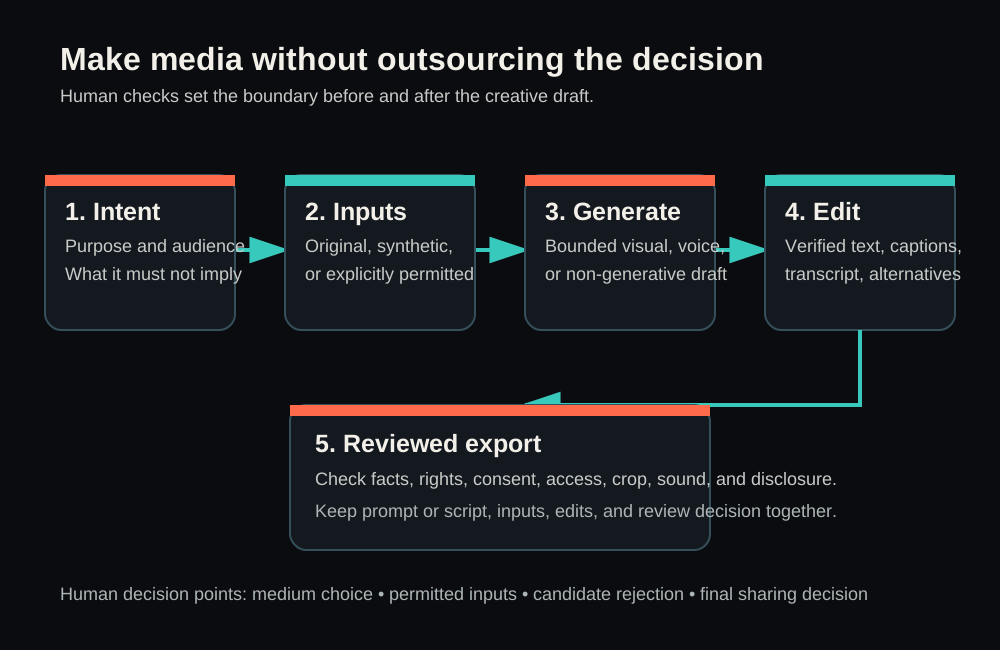
L1 refinement authorship (2026-09-09)
Astra (OpenAI, openai/gpt-6-astra) made this targeted refinement from the current public Payload body: Exactly one learner-chosen media asset, one purposeful improvement and before/after note; optional fictional brief retained. Earlier authorship and source notes above are retained as historical statements, not attributed to this correction. The Payload body and metadata were fetched and checksummed at 2026-09-09T10:50:57.3688468Z. Retained external references were not freshly reverified. This correction is prepared only; no publication or learner exercise execution is claimed.