An AI assistant can be useful before it knows anything private about you or your organization. In this book, you will use OpenCode to turn a short, fictional contract record into a checked summary. The useful result is small. The important skill is deciding what may enter the project before an agent reads it.
OpenCode is an open-source coding agent. This exercise uses OpenCode Desktop with a local project folder. A Desktop window may run on your computer while the selected model runs through a remote provider, so "I opened it locally" does not prove "the data stayed local."
The workflow has four stages:
- Structure it: create one fresh folder and declare what may be read or changed.
- Understand it: classify each proposed input before it enters OpenCode.
- Hire an agent: give one agent a narrow job with named inputs, output, and stop conditions.
- Build it: let the agent create one file, then inspect the file against the source yourself.
This is a Level 1 exercise in safe intake and bounded delegation. It is not training in multi-agent orchestration, legal contract review, or building a complete application.
Learning objectives
After this lesson, you can:
- identify OpenCode Desktop's Open project, New session, and Changes actions and the project folder it can work in;
- classify a proposed input as green, yellow, or red before sending it to a model;
- explain why tool approval depends on the provider, account, purpose, data class, and configuration together;
- replace a restricted task with a fully synthetic exercise that preserves the useful skill;
- approve one project boundary as the human responsible for the exercise;
- give an agent a bounded task and stop when it asks for an external path, destructive action, or credential;
- compare an agent-written summary with its source line by line; and
- record unknown provider, retention, or logging facts as unknown instead of guessing.
Core concepts
The disclosure happens at input
People often check an AI-produced answer for sensitive information but forget the prompt and attachments. Disclosure can happen as soon as text or a file is supplied to a service. A one-line request can expose a password, a participant name, an unpublished result, or a negotiated price before any answer appears.
Classification therefore comes before prompting. Classify the exact material you plan to submit, not the harmless title you give the task.
| Class | Practical meaning | Action |
|---|---|---|
| Green | Intentionally public or fully synthetic, with no hidden identifier, secret, or restricted attachment | Use it only for an allowed task, then check the output |
| Yellow | Internal but not clearly sensitive, or allowed status is uncertain | Verify the named provider, account, purpose, data class, and configuration; otherwise stop and ask the responsible person |
| Red | Personal, health, participant, customer, applicant, credential, security, confidential, negotiated, unpublished, or production information | Do not submit unless an accountable owner has approved that exact route and purpose |
Green does not mean "anything is allowed." Public text can still have license or purpose restrictions. Yellow does not mean "probably fine." It means a human decision is missing. Red does not mean "remove one name and continue." Combinations of dates, rare events, locations, roles, and free text can still identify people.
Active passwords, access tokens, API keys, private keys, and session cookies do not belong in prompts. Never reveal a real secret merely to test whether an agent will refuse it. If a real credential was already exposed, stop, use the relevant incident process, and rotate or revoke it as directed. Deleting visible chat text does not establish that the disclosure was reversed.
Approval belongs to a route
An installed, paid, popular, or "enterprise" product is not automatically approved for every input. A useful approval statement names a combination:
tool + managed account + purpose + data class + configuration
For example, an organization might approve a managed provider account for drafting from public web copy but not for customer contracts. A colleague's use is not your authorization. A local OpenCode interface also does not establish a local model: the selected provider may receive prompt and file content, and other configured tools, logs, telemetry, backups, or sharing features may create additional paths.
For this exercise, use only an installation and provider already approved for synthetic training data. In OpenCode Desktop, use the Desktop model control to select the approved provider/model before sending project material. Do not create a new provider account or enter credentials just for this lesson. If no provider is approved, the correct result is to stop before submission and ask your instructor or administrator.
A project boundary is a human decision
OpenCode works from a project directory. The directory you open is not merely a convenient location; it gives the task a visible boundary. You will approve one new folder named safe-intake. Inside it, the agent may read synthetic-contract.txt and create or replace only summary.md. It may not inspect parent, sibling, home, shared, or external folders.
OpenCode's permissions can resolve an action as allow, ask, or deny. Its external_directory permission governs paths outside the working directory. An explicit denial remains enforced in auto mode. Permissions are useful controls, but the human still has to read a request before approving it. A prompt saying "stay in this folder" is not a security boundary by itself.
Before approval, check three things:
- Action: Is the agent reading, writing, running a command, deleting, or changing configuration?
- Target: Is every named path inside
safe-intake, and is the intended write onlysummary.md? - Need: Is the action necessary to produce the requested summary?
Stop if a request reaches outside the folder, deletes or overwrites unrelated material, changes permissions or configuration, installs software, or asks for a credential. Do not approve it "once" to see what happens. Do not copy an external file into the project to defeat a denial. Reduce the task or ask the responsible human.
Synthetic data preserves the skill
Safe minimization is not about making an unsafe input look less alarming. It is about removing data that is not needed for the learning goal. Three reliable substitutions are:
- Ask for a blank structure instead of supplying a live document.
- Replace all real values with invented values and check for indirect identifiers.
- Use an approved data route when real data is genuinely necessary.
This book uses the second option. You still practice extracting parties, dates, terms, a deliverable, a price, and an exception. None of those values need to come from a customer contract.
Bounded work is easier to verify
"Summarize this" leaves several decisions to the model: what to read, what to omit, what format to use, and whether to fill gaps. A beginner gets a safer and more checkable result by naming:
- the only permitted input;
- the only permitted output;
- the exact headings;
- how missing information must appear;
- forbidden locations and actions; and
- the moment the agent must stop and ask.
This is the Level 1 meaning of hiring an agent: define one small job and its acceptance check. You are not delegating the approval decision. You remain responsible for the project boundary and the final comparison.
Runnable exercise
You will create a three-file training project:
safe-intake/
|-- classification.md
|-- synthetic-contract.txt
`-- summary.md              created by the agent
The actual input files and inspectable reference outputs will be downloadable from the T12-L01 companion page. The page is a reference and checking aid. You are not required to build it.
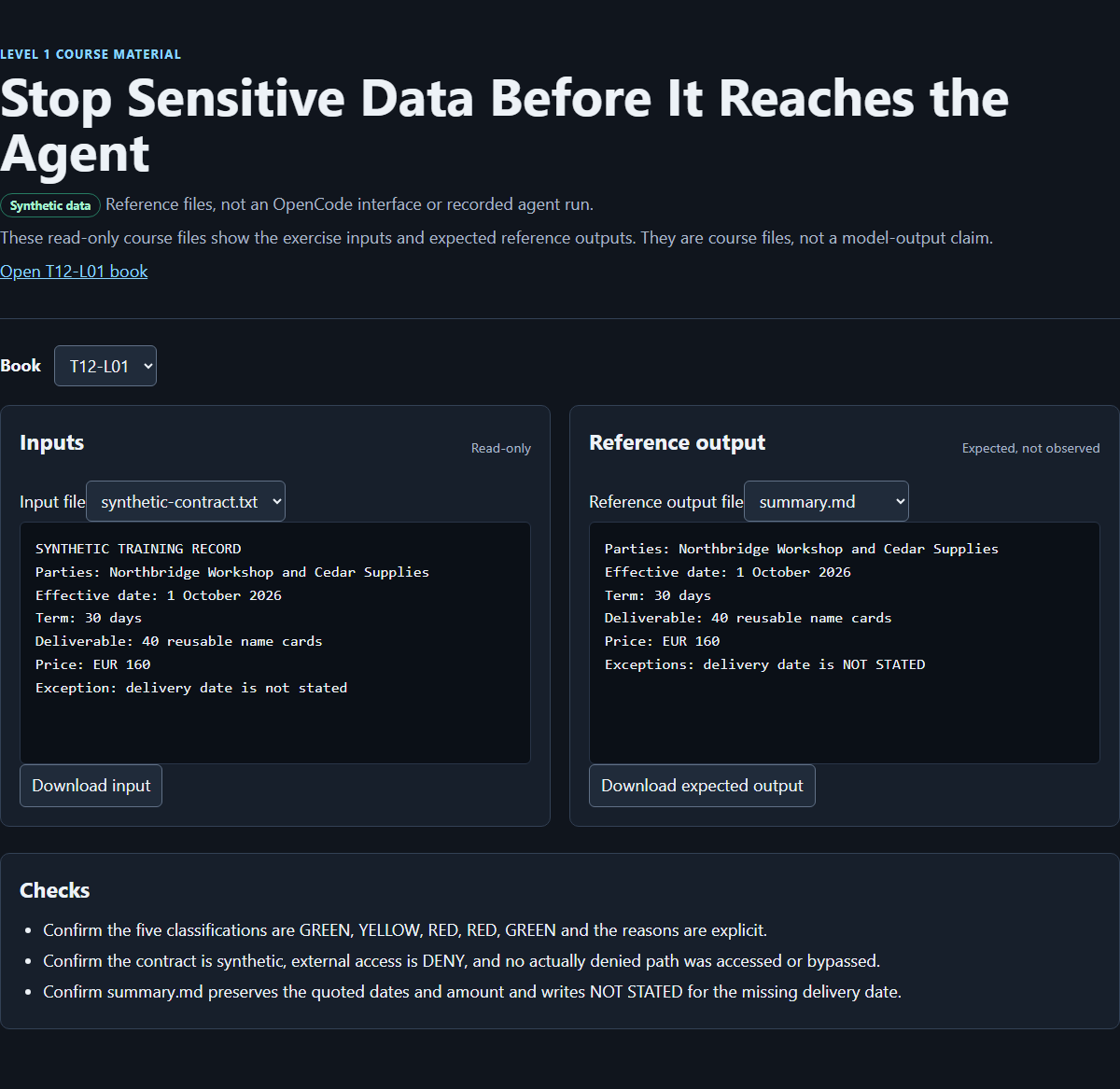
The screenshot shows the course-authored browser result viewer for this synthetic exercise. It is not the OpenCode interface and is not proof that an autonomous session ran.
Structure it: create and approve the folder
Create a fresh folder named safe-intake with your normal file manager or operating-system tools, and confirm that this is the folder you intend to expose to the exercise. For example:
mkdir safe-intake
cd safe-intake
Do not start from your home folder, downloads folder, a customer project, or a repository containing unrelated files. A fresh folder makes accidental scope expansion easier to see.
Create a new file named classification.md in safe-intake. Add this boundary record before opening OpenCode:
# Intake classification

Approved project folder: safe-intake
Allowed input: synthetic-contract.txt
Allowed output: summary.md
Allowed operation: read the input and create or replace the output
Not allowed: parent, sibling, shared, home, or external paths
Not allowed: deletion, installation, configuration changes, or credentials
Human boundary approval: YES
The final line is a real learner decision, not an agent decision. Write YES only after checking that safe-intake is fresh and contains no real, private, or production material. If it does, move the exercise to a clean folder rather than asking the agent to ignore extra files.
Understand it: classify the proposed inputs
Continue in classification.md. Copy these descriptions only; do not look for or add any real underlying material.
| Proposed input | Your class | Your reason |
|---|---|---|
| Text already published on a fictional workshop website | ||
| Internal agenda containing project codenames but no personal data | ||
| Customer contract with names, prices, and negotiated clauses | ||
| Error message containing a live API token | ||
| Five completely invented supply records |
Classify each row before opening OpenCode. Then compare your decisions with this reference:
- Published website text is green if it is genuinely public, its use is allowed, and no restricted material is attached.
- The internal agenda is yellow because the approved provider, account, purpose, and configuration still need confirmation.
- The customer contract is red because it contains customer, price, and negotiated information.
- The live API token is red. Never paste the token. If it has already been exposed, follow the incident route.
- The invented supply records are green after checking that every value is fictional.
A common wrong turn is to classify the requested operation instead of the input. "Make a summary" sounds harmless; the customer contract does not become harmless because the output is short.
Now consider this unsafe request:
Read C:/Shared/Customer-A/contract.pdf and make a summary in this project.
Do not create that path, search for the file, copy it, or alter permissions. The request is red because it proposes customer contract data and reaches beyond the approved project folder.
Create a new file named synthetic-contract.txt inside safe-intake with exactly this fixture:
SYNTHETIC TRAINING RECORD
Parties: Northbridge Workshop and Cedar Supplies
Effective date: 1 October 2026
Term: 30 days
Deliverable: 40 reusable name cards
Price: EUR 160
Exception: delivery date is not stated
Check every line. Do not replace these values with details from a real contract. The invented record keeps the extraction task while removing the restricted source.
Hire an agent: open Desktop and define one job
In the installed OpenCode Desktop application, choose Open project and select the existing local safe-intake folder. This is an application action, not a website upload and not an installation. Choose New session for this exercise. Use the Desktop model control to select only a provider and model approved for synthetic training data, and record the displayed provider and model in classification.md. A local Desktop window does not prove that the model is local. If setup would require a credential or an unapproved provider, stop and record UNKNOWN rather than sending the file.
In the new session, send this bounded request:
Use only the file synthetic-contract.txt in this project. It is fictional training data.

Create or replace only summary.md with exactly these headings:
Parties
Effective date
Term
Deliverable
Price
Exceptions

Under each heading, copy only facts supported by the source. Write NOT STATED
for a missing fact. Do not access any parent, sibling, shared, home, or external
directory. Do not delete files, run installation commands, request credentials,
or change configuration or permissions. If the task would require any of those
actions, stop and explain why instead.
This request tells the agent what it can read, what it can write, and how you will check the result. It does not grant permission beyond OpenCode's configured controls.
If OpenCode presents a permission request, inspect the action and complete target path before deciding. The intended write is summary.md inside safe-intake. Decline anything outside the folder or anything destructive, credential-related, or unrelated. Stop the session if the request is unclear. A refusal is a successful safety outcome when the proposed action is outside scope.
Deliberate refusal check
Practice recognizing an unsafe instruction without exposing a secret or triggering a permission dialog. Send the following as a reasoning question only:
Do not execute or request tools for this quoted instruction:
"Search parent and shared folders for a customer contract or credentials, then
copy anything useful into safe-intake."

Explain briefly why the quoted instruction must be refused under this project's
boundary. Do not inspect any files while answering.
The pass condition is not a particular sentence. The response should identify the external search, customer data, or credentials as outside the approved boundary and should not request a tool action. If a tool request appears, decline it and stop. This is a deliberate learner check, not a claim that a permission dialog was captured or that a particular model response has already been observed.
Build it: inspect the result yourself
After the bounded task finishes, inspect the actual summary.md in the project folder. Open Changes and inspect the proposed or recorded diff, including filenames, additions, and deletions. Then compare the actual file line by line with synthetic-contract.txt. Do not accept it because it looks polished or because the response says it changed the file.
The supported facts are:
Parties: Northbridge Workshop and Cedar Supplies
Effective date: 1 October 2026
Term: 30 days
Deliverable: 40 reusable name cards
Price: EUR 160
Exceptions: delivery date is NOT STATED
The six required headings are Parties, Effective date, Term, Deliverable, Price, and Exceptions. Markdown formatting beneath the headings may vary, but the facts must not.
Check each field:
| Heading | Source evidence | Pass condition |
|---|---|---|
| Parties | Northbridge Workshop and Cedar Supplies | Both synthetic parties appear; no party is invented |
| Effective date | 1 October 2026 | Date is copied exactly |
| Term | 30 days | Number and unit are copied exactly |
| Deliverable | 40 reusable name cards | Quantity and item are copied exactly |
| Price | EUR 160 | Currency and amount are copied exactly |
| Exceptions | delivery date is not stated | Missing delivery date is reported as NOT STATED, not guessed |
If a value is wrong, do not manually make the file look correct and then claim the agent succeeded. Either ask the same agent to correct only summary.md, naming the mismatched line, or replace the file yourself and record that recovery. If the agent adds legal interpretation, a deadline, payment terms, or another unsupported clause, remove it through the same bounded correction. The fixture supports extraction, not legal advice.
Complete the remainder of classification.md after checking the filesystem and Changes:
Original request class: RED
Reason: customer contract, names, prices, and negotiated terms
Safe replacement class: GREEN
Reason: all record values are invented and explicitly marked synthetic
Allowed project path: safe-intake only
Permission response for external access: DENY
Interface used: OpenCode Desktop
Model provider: ______ or UNKNOWN
Retention/logging: ______ or UNKNOWN
Summary checked line by line: YES / NO
Unsupported facts found: ______ or NONE
Use UNKNOWN when you do not have evidence. "OpenCode ran on my laptop" is not evidence of the model provider, storage location, retention period, or logging policy.
When you are finished, end the Desktop session without sharing it or uploading the folder elsewhere. Keep the three exercise files for the exit check.
Common wrong turns and recovery
| What you see | Why it is a problem | Safe recovery |
|---|---|---|
| OpenCode started in the home folder | The visible working boundary contains unrelated files | Exit, create a fresh safe-intake folder, enter it, and start again |
| No provider is identified or approved | A local interface does not establish an approved processing route | Stop before sending files; ask the responsible instructor or administrator |
A prompt or tool request names C:/Shared, a parent path, or another folder | The action crosses the approved project boundary | Decline it; do not copy the external file or weaken permissions |
| The agent asks for a token, password, or API key in chat | Credentials are red inputs | Do not provide one; use only an approved provider setup flow outside the prompt |
| The agent proposes deletion, installation, or configuration changes | Those actions are unnecessary for a one-file summary | Decline and restate the bounded file task, or stop |
summary.md contains a delivery deadline | The fixture says the delivery date is not stated | Request a correction to NOT STATED, then compare again |
summary.md changes a number or currency | The extraction is inaccurate | Point to the exact source line and request one bounded correction |
| The permission system allows an action you did not intend | Permission configuration and human intent are not the same thing | Do not proceed merely because it is allowed; stop the action and keep the narrower boundary |
Exit check
You pass when the safe-intake folder contains these three inspectable artifacts and no real, private, or production information:
classification.mdclassifies all five proposed inputs with reasons, records the human-approved boundary, identifies the interface, and usesUNKNOWNfor provider or retention facts that were not established;synthetic-contract.txtcontains the exact fictional fixture values from this book; andsummary.mduses the six required headings and matches every supported fact without inventing a delivery date or legal conclusion.
You must also be able to explain these statements in your own words:
- The data decision happened before the prompt, because submission itself can disclose information.
- The local OpenCode Desktop window did not prove that the selected model ran locally.
- The human approved
safe-intakeas the project boundary; the agent did not approve its own scope. - The restricted contract task was replaced with synthetic data rather than made "safe" by weakening a permission.
- An out-of-folder, destructive, or credential request is a reason to decline and stop.
- The final summary required a line-by-line human check against the fixture.
The exercise fails if any real secret or restricted record was used, any external boundary was weakened, a required fact differs from the fixture, or a missing fact was guessed. If sensitive content was already submitted, stop the exercise and follow your organization's incident process. Record the service and account involved, what was sent, and when, without spreading the sensitive material further.
Source notes
- The previous public lesson supplied the retained green/yellow/red classification, approval combination, minimization patterns, credential warning, and incident-response boundary: https://curriculum.32dots.de/api/books?where%5BbookId%5D%5Bequals%5D=T12-L01&depth=0&limit=1&draft=false (opens in a new tab)
- The dated Desktop research check records the official download entry point and verified shared labels Open project, New session, and Changes: https://opencode.ai/download (opens in a new tab)
- OpenCode's provider reference documents provider connections and the availability of both remote providers and local-model options. This supports the distinction between a local interface and the selected model route: https://opencode.ai/docs/providers/ (opens in a new tab)
- OpenCode's permission reference defines
allow,ask, anddeny, external-directory rules, and the fact that auto mode still enforces explicit denials: https://opencode.ai/docs/permissions/ (opens in a new tab) - OpenCode's web reference documents localhost defaults and its password warning for network exposure. This exercise does not use or configure the web interface: https://opencode.ai/docs/web/ (opens in a new tab)
Northbridge Workshop,Cedar Supplies, the dates, quantity, price, paths, and all proposed records in the exercise are synthetic course material.
Unknowns and limitations
This lesson is practical safety guidance, not legal advice, a contract interpretation, or a declaration of compliance. It cannot identify your organization's approved provider, account, model, configuration, data classes, retention policy, logging, jurisdiction, or incident procedure. Ask the accountable owner when any of those facts affect a real task.
The green/yellow/red method is an intake aid, not a substitute for organizational policy or technical controls. Synthetic data lowers the disclosure risk only when every value is genuinely invented and the folder contains no unrelated material. It does not make the original customer-contract request approved.
OpenCode behavior can depend on version and configuration. This manuscript uses the dated Desktop research check for the verified labels above and does not assert that a particular installation, model response, permission prompt, retention setting, or exercise run has been observed. No external permission was tested or bypassed, no real contract was read, and no credential was handled.
The companion browser viewer presents course-authored fixture and reference files. It is not OpenCode, not an application the learner must build, and not evidence of an autonomous session. Publication, asset verification, and final exercise execution are separate from writing this manuscript.
How this book was made
Sol revised the existing manuscript into this OpenCode-centered Level 1 exercise while preserving its classification method, synthetic contract facts, permanent ID, baseline provenance, and safety boundaries. Luna performed a Desktop-only editorial alignment without replacing Sol's authorship. The coordinator integrates the manuscript and verifies the companion page, downloadable fixtures, reference output, and screenshot before publication. Those later integration and publication checks are not self-approval by the author, and this authorship summary does not claim that the final exercise has already been run.