Use OpenCode Desktop to turn one small permitted table into an answer you can actually use: a total for a handoff, a comparison between groups, or a list of records that need attention. Keep the original table, the assistant's report, and your own independent check together. You choose the question; the two synthetic routes here are optional ways to practise.
In the scientific route, your useful result is a short table-summary note: the mean target-minus-reference Ct value in each named group, the difference between those means, and the IDs that need a missing-value or status follow-up. A plausible first answer can include a held row and change the comparison. You will see exactly how to correct that decision. The ordinary expenses route gives a total, a review-threshold match, and missing-amount IDs using the full existing 12-row exercise.
The working interface is the installed OpenCode Desktop application: Open project selects a local folder, New session starts its conversation, and Changes helps you inspect file edits. You do not need to write a program, install a package, build a calculator app, or learn a spreadsheet formula. The command-line workflow is optional and is not used here. If Desktop is not installed, start with the approved course download guidance at Heidelberg AI Lab (opens in a new tab); opening a portal in a browser does not install or connect an application.
A local Desktop window does not prove that the language model is local. The selected provider may process prompts and referenced file content remotely. Use your own table only when both the data and that processing route are explicitly permitted; otherwise use a synthetic route below.
Learning objectives
After this lesson, you can:
- choose a useful table question and identify the local project-folder boundary;
- audit the imported rows, headers, IDs and types before calculating;
- define blanks, numeric values, filters, thresholds and denominators precisely;
- require stable identifiers for included and excluded records;
- delegate one bounded calculation and inspect its result-file write;
- reproduce a total or small group comparison independently;
- repair an incorrect inclusion rule and explain what the result does and does not establish.
Core concepts
The project folder is the working boundary
In OpenCode Desktop, choose Open project and select your existing practice folder. This is an application action, not a website upload or an installation. The folder defines the small body of material you intend the assistant to inspect.
Each route uses three files: an unchanged source CSV, your own check.md, and the requested assistant-check.md. Keep the routes in separate folders if you try both. Do not add personal expenses, employer records, credentials, or production exports to a practice folder.
The assistant's tools can read files and, when enabled, write files or run commands. Permission behavior depends on configuration. Whether or not your setup asks before every action, inspect the requested action, allow only the named in-folder output, and stop if it asks to read outside the folder, reveal a credential, overwrite the source, or run a destructive command. Ask for the report in chat if an in-folder write is unavailable; save that response yourself as assistant-check.md and record who wrote the file.
Count before calculating
A precise-looking total can still be wrong. An assistant may read only part of a file, skip numbers stored as text, treat blanks as zero, or apply a filter you never requested. A polished chart can make that incomplete subset look convincing.
Record the expected data-row count before asking a numerical question. Request the imported count, exact headers, first and last IDs, duplicate IDs, missing expected IDs, and detected column types. CSV stores text; here, a numeric column means its nonblank cells are interpretable as numbers under the stated decimal rule. If the expense source has 12 rows and the assistant reports 11, stop. Every later total is untrustworthy. Do not repair only the final number.
For each question, require:
Expected input rows = included rows + excluded rows
Every source ID appears exactly once in that partition.
The count alone is insufficient: a duplicated ID can conceal a missing one. Source order, stable IDs and values make that visible. In the scientific route, a row excluded from the mean still belongs in the missing-value or status follow-up list; exclusion is specific to a calculation, not deletion from the source.
For larger files, reconciliation still begins with the full file. Sampling the beginning, middle and end can reveal shifted columns or truncation, but sampling does not prove complete import. Reproduce the full arithmetic with an independent spreadsheet calculation or calculator.
Define words that hide choices
“Find outliers” has no single meaning. The expenses route uses a fixed review rule: values strictly greater than 300.00. A value exactly equal to 300.00 would not qualify. A matching row does not prove fraud, error, or importance; it only meets the stated rule.
A blank, 0, N/A, and 100 EUR are different. State whether blanks are excluded, whether zero is valid, and whether text may be converted. In the expenses fixture, blank amount_eur cells are excluded from the sum and counted separately. They are not changed to zero. No text conversion is allowed.
Both fixtures use a full stop as the decimal separator. Preserve their written values. Software may represent decimal fractions with tiny binary rounding differences or interpret punctuation according to locale. For these small tables, a normal calculator gives a reproducible check without code, packages, or hidden conversion rules.
For a mean, “average the group” also hides a denominator. In the scientific route, only rows marked include with both Ct cells numeric enter a group mean. Count those eligible rows, not every row carrying that group label. If a group has no eligible rows, report its mean as unavailable; do not divide by zero or invent a value.
Ask for an evidence trail and stable identifiers
Every numerical answer should expose the method, included IDs and values, excluded IDs and reasons, active filters, and result. The evidence trail can itself be wrong, so compare it with the source. Its value is that silent choices become visible.
Row numbers change after sorting. A stable ID such as E-001 or Q-001 lets another person find the record. Reject an answer that lists only “row 5” when the table supplies durable identifiers. On your own table, preserve existing IDs; if there are none, label an unchanged working copy before sorting and keep its mapping to the original. Do not assume real IDs must form a consecutive sequence merely because the fixtures do.
Separate arithmetic from meaning
The expense calculation can show that E-005 exceeds a threshold. It cannot establish why the amount is high or whether it is allowed. Interpretation needs context, policy, and accountable people.
In quantitative PCR (qPCR), Ct, or threshold cycle, describes where an amplification curve crosses a set threshold. The manufacturer's explanation (opens in a new tab) also explains that factors other than target amount affect Ct. A tidy table does not establish that measurements are comparable.
Here, target_ct and reference_ct are invented numbers. We define a table quantity simply as target_ct - reference_ct, in cycles. “Reference” is a column label, not evidence that a reference assay is stable or suitable. Control and Wnt-label are invented group names. Neither the names nor the arithmetic establishes a Wnt response, gene-expression change, assay quality, or biological effect. No fold-change formula, significance test or replicate model is needed to answer this table question.
Hiring an agent means setting a small contract
At L1, “hire an agent” means delegate one clear, low-risk task to the assistant available in OpenCode. It does not mean building a multi-agent system or learning orchestration. Name the inputs, allowed action, output, stopping conditions, and required evidence.
For either fixture, the assistant may read two named synthetic files and create one result file. It may not edit the source, browse unrelated folders, install software, or infer scientific or business meaning. The contract makes the answer easier to inspect and easier to reject when it crosses a boundary.
Runnable exercise
Choose your table and question
Use your own permitted table or choose one of the two routes below. Choose a question useful to you and a table small enough to check fully: a total by category, a comparison over time, or records needing attention under a stated rule. Preserve the original. Record the exact file, sheet or range, headers, units, stable row IDs and expected data-row count. CSV is optional for your own task; if you export a copy, reconcile it with the original before analysis. Do not assume every format or sheet was imported.
- In your own
check.md, write the question, intended calculation, blank and text rules, filters, and any threshold before asking the assistant. A threshold is optional; a defined meaning is not. - Adapt the relevant request below to your table and expected count. Require an import audit and stop on a count or type mismatch. Keep the source unchanged and allow only
assistant-check.mdas the assistant output. - Require included IDs, excluded IDs and reasons, method and active filters. No row may vanish silently.
- Reproduce totals independently with a calculator or spreadsheet calculation covering the full intended range. For an average or comparison, check counts, subtotals and denominators too. For a non-numeric question, independently recount matching and non-matching IDs.
- Record the useful answer, independent evidence and pass/fail in
check.md. Keep interpretation separate from what the calculation establishes.
In Desktop, open the chosen local folder and choose New session. Use the model control to select only an approved provider/model and record their displayed names in check.md. If credentials or an unapproved provider are requested, stop; do not paste an API key into the conversation or invent a connection for practice. Starting a fresh session keeps unrelated project context out of the exercise.
Route A — a synthetic qPCR/Wnt table-summary handoff
This route borrows a small table-questioning idea from the approved Wnt-response and qPCR-calculator design briefs. Those are design contexts, not evidence of working applications or measured laboratory results. You are preparing a readable handoff note, not building either app.
Useful question: “Among rows marked include with both Ct values present, what is the mean target-minus-reference value in each group, how does Wnt-label compare with Control, and which IDs need follow-up before they could enter this summary?”
1. Structure it: create the source and rule
In your normal file editor, create a new folder named qpcr-table-check and a new file inside it named synthetic-ct.csv. Save this exact CSV:
record_id,group,review_status,target_ct,reference_ct
Q-001,Control,include,25.0,20.0
Q-002,Control,include,27.0,21.0
Q-003,Wnt-label,include,24.0,20.0
Q-004,Wnt-label,include,26.0,21.0
Q-005,Wnt-label,include,,20.0
Q-006,Wnt-label,hold,23.0,20.0
Each row is one invented paired record. It is not a well-layout instruction, a sample-size recommendation, or a claim about biological or technical replication. hold is a supplied administrative label; it does not mean a failed assay. Do not decide exclusions after seeing which answer you prefer.
Create a new check.md in that folder and write:
Data: wholly synthetic; no biological interpretation
Source: synthetic-ct.csv, unchanged
Expected data rows: 6
Expected headers: record_id, group, review_status, target_ct, reference_ct
Expected IDs: Q-001 through Q-006, once each, in source order
Types: first three columns text; Ct columns numeric except a permitted blank
Units: Ct and target-minus-reference difference in cycles
Eligibility: review_status must be include AND both Ct cells must be numeric
Blank rule: exclude from means and name the missing field; never fill with zero
Status rule: exclude hold rows from means, even when their numbers are complete
Conversions: none; stop on unexpected status, group or nonblank nonnumeric Ct
Calculation: subtract reference_ct from target_ct within each eligible row
Group mean: sum eligible row differences / eligible row count in that group
Comparison direction: Wnt-label mean minus Control mean
Other filters: none
Output purpose: descriptive handoff summary plus missing-value/status follow-up IDs
2. Understand it: inspect the full table
Open the CSV yourself. There are six data rows, IDs Q-001 through Q-006, two Control labels and four Wnt-label labels. Q-005 lacks target_ct; Q-006 is on hold. The other four rows meet both eligibility conditions. An assistant that reads only rows with numbers has already lost part of your question: finding records needing follow-up.
Open qpcr-table-check in Desktop and start its fresh session as described above. Provide only the two named files. The source, your rule and the requested answer now refer to the same table.
3. Hire an agent: request the usable note
Enter this request in the Desktop conversation:
Read only synthetic-ct.csv and check.md in this project. Both are synthetic.
Do not edit either input, install software, or read other folders.

Audit the full import before filtering: count, exact headers, first/last IDs,
duplicate or missing expected IDs, column types, and observed groups/statuses.
Stop if there are not exactly 6 records, Q-001 through Q-006 once each, or if
the types, group labels or statuses do not match the source contract.

Answer the question described in check.md. For every source ID, show whether it enters
the means and why. Include only review_status=include rows with BOTH Ct cells
numeric. Show each included target_ct, reference_ct and their difference.
Give each group's eligible count, difference subtotal and mean, then compute
Wnt-label mean minus Control mean. If a group has no eligible rows, report
the mean/comparison as unavailable. Show all six IDs in the reconciliation.

Finish with a short handoff note containing the descriptive comparison and
missing-value/status follow-up IDs. Do not impute, change a status, calculate
fold change, test significance, or infer Wnt response or assay validity.
Write only assistant-check.md in this folder. No chart is needed.
Inspect the intended path before permitting a write. After completion, inspect Changes and the folder itself: only assistant-check.md should be new from the assistant. Compare its row claims with the unchanged CSV. Desktop saying “complete” is not evidence that the arithmetic is right.
4. Build it: check the answer and make it useful
The following is an author-supplied reference, not a recorded assistant response. Reproduce it yourself using the CSV and a calculator; asking the same assistant to endorse its answer is not independent checking.
| ID | Decision for the means | Independent row calculation or reason |
|---|---|---|
Q-001 | Include in Control | 25.0 - 20.0 = 5.0 cycles |
Q-002 | Include in Control | 27.0 - 21.0 = 6.0 cycles |
Q-003 | Include in Wnt-label | 24.0 - 20.0 = 4.0 cycles |
Q-004 | Include in Wnt-label | 26.0 - 21.0 = 5.0 cycles |
Q-005 | Exclude | Missing target_ct; do not substitute zero |
Q-006 | Exclude | review_status=hold; complete numbers do not override status |
Control: (5.0 + 6.0) / 2 = 11.0 / 2 = 5.5 cycles
Wnt-label: (4.0 + 5.0) / 2 = 9.0 / 2 = 4.5 cycles
Comparison: 4.5 - 5.5 = -1.0 cycles
Reconciliation: 4 included + 2 excluded = 6 source rows
Control: 2 included + 0 excluded = 2 source rows
Wnt-label: 2 included + 2 excluded = 4 source rows
Add a check table to your own check.md with columns Check, Assistant claim, Independent evidence, and Pass or fail. Record the import, six-ID partition, both means, and comparison direction separately. Fill the evidence from your own row scan and calculator, not by copying the assistant's reasoning. The expected usable closing note is:
In this synthetic table, eligible mean target-minus-reference Ct is 5.5 cycles
for Control (2 records) and 4.5 cycles for Wnt-label (2 records). Wnt-label
minus Control is -1.0 cycles. All 6 source rows are accounted for.
Q-005 needs a source-value follow-up for its missing target_ct; Q-006 needs
a status clarification before inclusion could be considered. Neither is
included now. This is a descriptive table summary, not a biological finding
or evidence that either assay is valid.
That note has a practical use: another person can see the present comparison and exactly which records need clarification without guessing what disappeared. It does not tell them to fill in a value, release a hold, or rerun an experiment. Those decisions require the responsible source owner and the relevant context.
5. Improve once: correct a tempting inclusion mistake
Here is a deliberately wrong illustrative result, not an observed model failure:
I included all rows with both Ct values present. Wnt-label has three rows:
Q-003=4.0, Q-004=5.0, Q-006=3.0. Its mean is 4.0 cycles, so the difference
from Control is -1.5 cycles. Only Q-005 is excluded.
Its arithmetic follows its mistaken selection: (4.0 + 5.0 + 3.0) / 3 = 4.0 and 4.0 - 5.5 = -1.5. Its count even reconciles as 5 + 1 = 6. The error is that Q-006 violates the stated status rule. A matching total row count does not make an inclusion decision correct.
If your report has this error, save the failed claim in your own check.md, then send this correction in the same Desktop session:
The report wrongly includes Q-006. Eligibility requires BOTH status=include
and two numeric Ct cells; Q-006 is hold. Keep both inputs unchanged.
Replace only assistant-check.md. Repeat the full import audit, repartition
all six IDs using the written rule, and recompute both group summaries and
Wnt-label minus Control from the eligible rows. Name excluded IDs and reasons.
Finish with the corrected handoff note and its descriptive-only limitation.
Do not merely edit the final comparison number.
The repaired report should move Q-006 to the exclusions, give Wnt-label a count of 2 and mean of 4.5, and give the comparison as -1.0 cycles. Check it against your independent calculations and inspect the replacement diff. Record the changed rule application, not just “the AI fixed it.” If your first report was correct, explain why the illustrative version fails; do not manufacture a failed run.
Route B — the complete synthetic expenses walkthrough
Use this route if a money table is more useful to you. The final bundle contains the unchanged source, your independent reference, and the assistant's report. Its practical answer is: “What total can I report, which amount meets my review rule, and which records are missing amounts?” The EUR 1300.00 answer and E-005 match belong only to this fixture, not to your own table or Route A.
1. Structure it: prepare a fresh project
Create a new folder named table-check in a location approved for course work. Open that folder in your normal file editor and create a new file named expenses.csv. Save this exact synthetic fixture:
expense_id,team,amount_eur
E-001,Support,120.00
E-002,Sales,85.50
E-003,Support,99.50
E-004,Operations,
E-005,Sales,410.00
E-006,Operations,75.00
E-007,Support,130.00
E-008,Sales,95.00
E-009,Operations,110.00
E-010,Support,
E-011,Sales,90.00
E-012,Operations,85.00
The file has 12 data records below one header row. Keep every fixture value unchanged so your result can be compared with the course reference. The existing T10-L01 exercise resources provide expenses.csv and check.md under Inputs if you prefer the companion materials. The new Route A CSV is supplied inline above; it is not part of those downloads.
Create a second new file, check.md, in the same folder. Write this source contract before asking the assistant anything:
Expected data rows: 12
Expected headers: expense_id, team, amount_eur
Expected first and last IDs: E-001, E-012
Blank rule: exclude blank amount_eur cells from the sum; count them separately
Threshold rule: report numeric amount_eur values strictly greater than 300.00
Conversions: none
Filters: none
Data: synthetic
This contract prevents silent decisions about blanks or thresholds and provides evidence that existed before the model's answer. If using the downloaded check.md, inspect its contract before adding your own results.
In Desktop, choose Open project, select the existing local table-check folder, and choose New session. Use the approved model/provider selection and record the displayed names as described earlier. Keep this session separate from Route A.
2. Understand it: inspect and define the question
Open expenses.csv yourself before delegating. Check these visible facts:
- the header is
expense_id,team,amount_eur; - IDs run from
E-001throughE-012; - there are 12 data rows and no duplicate IDs;
E-004andE-010have empty amount cells;- the other ten amount cells use a full stop and two decimal places.
Before calculating, make sure the assistant receives the same files and rules you inspected. Provide both named synthetic files explicitly rather than asking it to search broadly. Keep the request limited to the current project folder.
3. Hire an agent: give one bounded assignment
Enter this request in the OpenCode Desktop session:
Read the two files expenses.csv and check.md in this project. Both files are
synthetic. Do not edit them, install software, or read other folders.

First audit the import. Report the data-row count, exact headers, first and last IDs,
duplicate or missing IDs, detected type of each column, and every filter. Stop if the
count is not 12 or if amount_eur is not numeric except for blank cells. Also stop
if the IDs are not E-001 through E-012 exactly once each or the headers differ.

If the audit passes, answer:
1. What is the sum of numeric amount_eur values, excluding blanks?
2. Which numeric values are strictly greater than 300.00?
3. Which IDs have blank amount_eur cells?

For every answer show the method, included IDs and values, excluded IDs and reasons,
and active filters. Do not convert text, treat blanks as zero, infer causes, or make a
chart. Write the result to assistant-check.md and change no other file.
This is a bounded hire: two named inputs, one named output, no source edits, and an explicit stop condition. If OpenCode presents a write action for assistant-check.md, check the path and intended content before allowing it. If it targets expenses.csv, check.md, a parent folder, credentials, or an unrelated file, do not proceed. Ask for a corrected in-folder action or end the session.
When the assistant finishes, inspect the folder yourself. Open Changes and inspect the proposed or recorded diff. assistant-check.md should be the only new assistant-written file. Compare its claims line by line with expenses.csv; confirm the filesystem result and diff agree.
The known reference answers are:
| Check | Expected result |
|---|---|
| Imported rows | 12 |
| Numeric rows | 10 |
| Blank rows | E-004, E-010 |
| Sum | 1300.00 |
Values greater than 300.00 | E-005 = 410.00 only |
For the sum, included IDs are E-001, E-002, E-003, E-005, E-006, E-007, E-008, E-009, E-011, E-012; excluded IDs are the two blanks. For the threshold question, E-005 matches, the other nine numeric rows do not, and the two blanks cannot be evaluated as amounts: 1 + 9 + 2 = 12. For the blank question, two rows match and ten do not. Require the actual IDs in the report, not just these counts.
If the report differs, keep the source unchanged. Look first for an omitted row, an active filter, a blank treated as zero, text conversion, a threshold interpreted as >= 300.00, or decimal punctuation interpreted under another locale. This fixture has no amount equal to 300.00, so its matching IDs alone cannot distinguish > from >=; inspect the stated method too.
4. Build it: verify and complete the evidence bundle
Now verify independently. Do not ask the same assistant to check itself; it can repeat the same mistake. Use a calculator and add the first five numeric values in source order:
120.00 + 85.50 + 99.50 + 410.00 + 75.00 = 790.00
Add the remaining five:
130.00 + 95.00 + 110.00 + 90.00 + 85.00 = 510.00
Then combine the subtotals:
790.00 + 510.00 = 1300.00
The split exposes two smaller subtotals that are easier to repeat than an opaque final number. Reconcile the file: 10 included numeric rows plus 2 excluded blank rows equals all 12 expected rows. Scan every numeric cell against > 300.00; only 410.00 qualifies, so name its stable ID E-005. Check the beginning (E-001), middle (E-006), and end (E-012) against the report to help catch a shifted or truncated range.
Return to your existing check.md and add this table below the source contract. This is your write, not another assistant task:
| Check | Assistant claim | Independent evidence | Pass or fail |
|---|---|---|---|
| Import | 12 source rows, headers and IDs checked | ||
| Sum | calculator total 1300.00 | ||
| Threshold | row scan finds E-005 only | ||
| Blanks | E-004 and E-010 |
Fill the Assistant claim cells from assistant-check.md. Mark each row Pass only when it matches your independent evidence. If the assistant imported fewer than 12 rows, used an unrequested filter, omitted IDs, changed a source file, or silently converted a value, mark the run failed. Correct the boundary or request and repeat from the import audit; do not patch the reported number alone.
For example, a report of 1215.00 accompanied by an ID list ending at E-011 suggests the final 85.00 row was missed. This is an illustrative failure, not a recorded run. Preserve the failed claim in check.md, then request:
Your evidence omits E-012, which is present in the source. Keep expenses.csv
and check.md unchanged. Replace only assistant-check.md after rereading the
complete CSV. Repeat the 12-row import audit, name each ID's inclusion or
exclusion for all three questions, and recompute from the original values.
Do not just add an adjustment to the previous total.
Inspect the replacement report and diff. The useful corrected handoff is: “The ten recorded numeric amounts total EUR 1300.00; E-004 and E-010 still need amounts clarified, and only E-005 meets the strict EUR 300.00 review rule.” It is a total of available recorded amounts, not proof that all expenses have been captured or approved.
Finish with this explain-it-back checkpoint in your own words: “The sum is defensible because every expected row is either included or named as excluded, and an independent calculation reproduces the result. The threshold flags a row; it does not explain or condemn it.”
Use the T10-L01 companion result viewer as a reference and checking aid. It is not an app you need to build. The exercise resources keep the synthetic inputs and inspectable reference outputs available in the course interface.
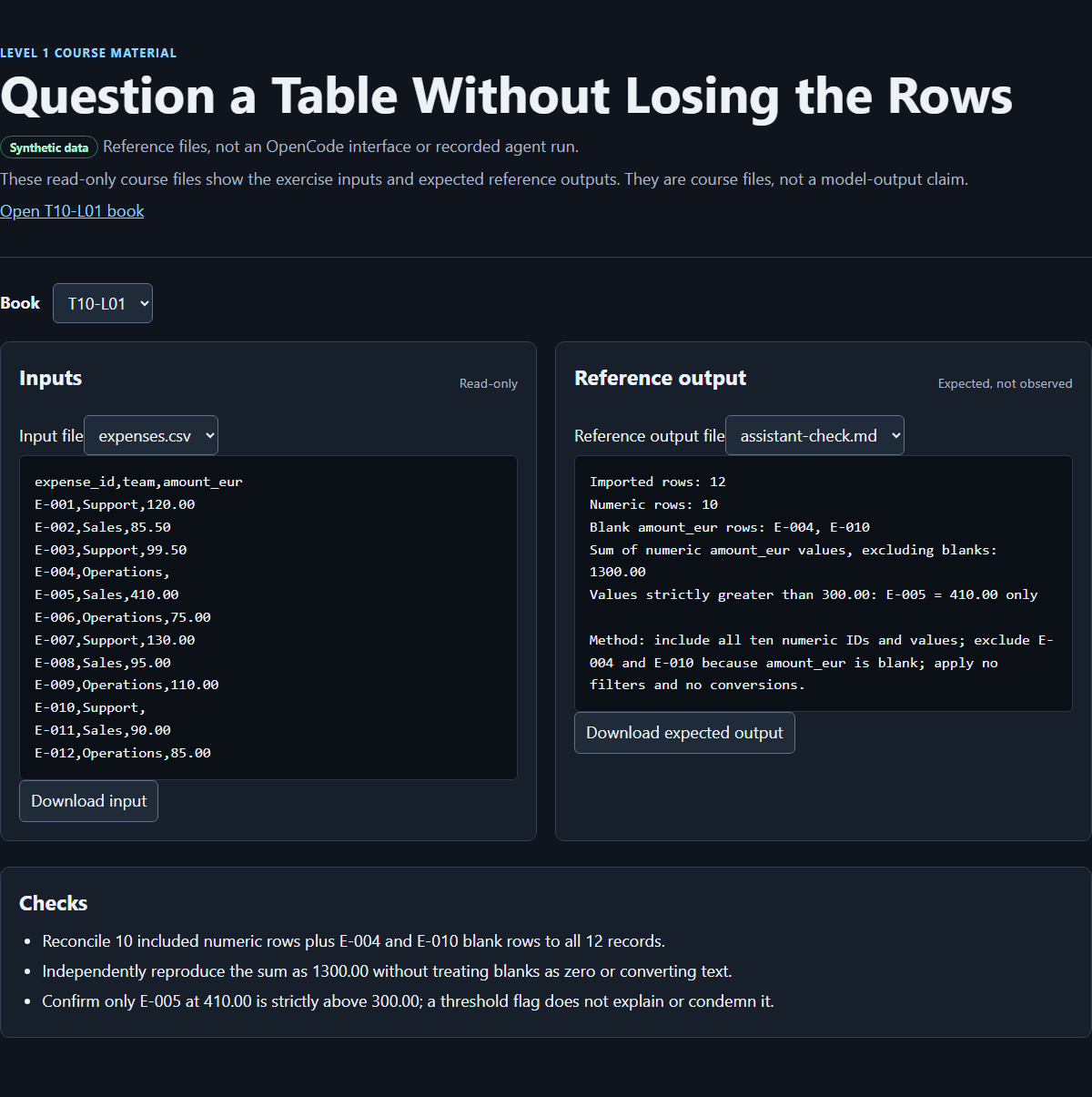
Retained course-authored image of the browser result viewer for the expenses exercise. It is not the OpenCode interface, does not show the new scientific route, and is not proof of an autonomous OpenCode session.
Exit check
Deliver one checked table-answer bundle: the unchanged permitted source, assistant-check.md, and your own completed check.md. It must contain your useful question and answer, written row/blank/filter rules, every source ID accounted for, independent numerical evidence, and one explained correction or justified rejection of an illustrative wrong answer.
For your own table, judge the result against its own question and row contract. A non-numeric result needs an independent recount of matching and non-matching IDs. For Route A, require all of these:
- the exact six synthetic source records remain unchanged;
- included IDs are
Q-001–Q-004;Q-005andQ-006have the correct exclusion reasons; - the eligible counts are two per group, means are
5.5and4.5cycles, and Wnt-label minus Control is-1.0cycles; - the four included and two excluded IDs account for the full table;
- the handoff names both follow-ups and makes no biological or assay-validity claim;
- you can explain why including the held row changes the comparison and violates the contract even though the row count still reconciles.
For the expenses route, preserve the full reference checklist:
- the project contains the expected three files and no unexplained assistant output;
expenses.csvstill has the exact 12 synthetic records;- the report names 10 numeric rows and blank IDs
E-004andE-010; - the independently reproduced sum is
1300.00; - the strict threshold result is only
E-005 = 410.00; - included and excluded rows reconcile to all 12 records for each question;
- active filters are reported as none beyond the question's stated selection rule;
- no chart, confidence statement, or polished prose substitutes for row evidence.
Fail the exercise if a row disappears, a blank is silently converted, stable IDs are absent, an inclusion rule is ignored, or the assistant changes anything beyond assistant-check.md. Recovery means returning to the unchanged source and rerunning the whole audit with the corrected request or configuration. It does not mean editing evidence to resemble the answer key. If the first result passed, record that honestly and explain the relevant illustrated failure rather than claiming a correction occurred.
Finally, explain what you would do with a 2,000-row file. A sound answer begins with whole-file count reconciliation, checks types and filters, samples beginning/middle/end for structural problems, and independently reproduces the full arithmetic. It does not claim that a small sample proves completeness.
Source notes
- Public T10-L01 baseline (opens in a new tab): the full existing manuscript was read locally from
editorial/drafts/l1-refinements/T10-L01.md. It supplied the retained import audit, row evidence, mixed-type warning, independent recount, learner-table route, larger-file reconciliation, complete 12-row expense fixture, references and image. Its public body was not freshly fetched in this session; the completion brief supplies the exact baseline checksum. - Thermo Fisher Scientific, Understanding Ct (opens in a new tab): read on 11 September 2026. The site returned its German localisation. The introduction and Ct-factor passages support the English threshold-cycle explanation and the caution that Ct depends on more than target amount. This is manufacturer guidance, not validation of this invented table. No source figures, measurements or experimental procedures are reproduced.
- The approved example associations are
app-cos-acebron-wnt-responseandapp-owner-new-qpcr-ct-calculator, as specified in the completion brief. Only their small table/question design slice is used. No institutional data, adoption, software execution or working calculator is claimed. - The historical Desktop source packet is
editorial/research/l1-desktop-start.md. The baseline identifies Open project, New session, Changes and configuration-sensitive model controls from that packet. Those instructions are retained; this author did not re-run Desktop or freshly inspect the packet's upstream sources. - Retained official references: OpenCode downloads (opens in a new tab) and English interface labels (opens in a new tab). Historical source checks are not new checks. The original refinement recorded a Payload API retrieval/checksum at
2026-09-09T10:50:57.3688468Z, via the T10-L01 API query (opens in a new tab). - All expense values, names, IDs, rules, expected outputs, companion viewer and its retained image are course-authored synthetic materials. The six Ct records, status labels, arithmetic reference, handoff notes and illustrative mistakes in this revision are newly authored synthetic teaching material. The new CSV is copyable manuscript content, not a newly published download.
Unknowns and limitations
No live OpenCode Desktop exercise, spreadsheet recalculation, manuscript validation or independent numerical verification was performed in this authoring session. Expected answers are author-supplied calculations for the coordinator's consolidated checks and the learner's independent reproduction. No model response, correction, permission prompt, screenshot capture, installation, printing, or classroom outcome is presented as observed.
Available models, tools, file-writing behavior, Changes presentation and permission prompts depend on configuration. A model may not analyze CSV consistently. The companion viewer is a checking aid, not evidence that a particular model produced a result. The retained viewer image and resources were not freshly browser-checked here.
These small clean fixtures do not cover locale-specific decimal separators, quoted newlines, duplicate headers, multiple sheets, malformed exports, file-size limits or performance on large tables. Beginning/middle/end sampling can expose structural errors but cannot prove full-file completeness. Real, private or production data requires explicit approval and a reviewed provider/data-handling path before entering model context.
The expense arithmetic has no accounting, policy or fraud meaning. The synthetic Ct table establishes no biological response, assay comparability, reference suitability, measurement quality, independence of replicates or statistical reliability. Real qPCR analysis needs scientific decisions and evidence outside this L1 question. The include/hold contract is a transparent practice rule, not a laboratory quality-control standard.
How this book was made
Coordinator editorial update, 11 September 2026: The independent Terra reader accepted this revision. The account below records authoring-stage work; learner execution and classroom outcomes remain unobserved.
This revision, 11 September 2026: Astra, provider OpenAI, exposed model openai/gpt-6-astra, authored this manuscript in one fresh, single-author session through OpenCode. The author read the completion brief, editorial style, learnings, template and entire existing T10-L01 manuscript, then consulted one manufacturer source for the bounded Ct definition and its limits. Only this assigned draft was written, using apply_patch.
The teaching change connects a useful group-summary handoff to a visible inclusion mistake and its repair, while preserving learner choice and the full expenses route. A production lesson is that row-count reconciliation alone cannot catch the wrong eligibility rule: the held-row example still counts every row but answers a different question. The handoff therefore includes the new numerical fixture and equations for coordinator checking. Verification, independent acceptance and publication belong to later coordinator work; they are not claimed here. Token, cache, reasoning and billing counters are unavailable, not zero.
Retained historical credits: Sol revised the earlier manuscript, preserving the synthetic expense fixture, expected results, permanent ID, baseline checksum and source provenance. The earlier account credits Luna with inspecting content gaps and preparing companion materials, and the coordinator with companion-page/image integration and verification responsibilities. Those are historical contributions and responsibilities, not new work by this author. Astra (OpenAI, openai/gpt-6-astra) made the 9 September L1 refinement that restored the learner's own permitted table and useful question while retaining reconciliation and independent totals. That account records the Payload fetch/checksum time above and did not claim learner execution. This revision preserves those contributions separately from the newly authored scientific teaching.