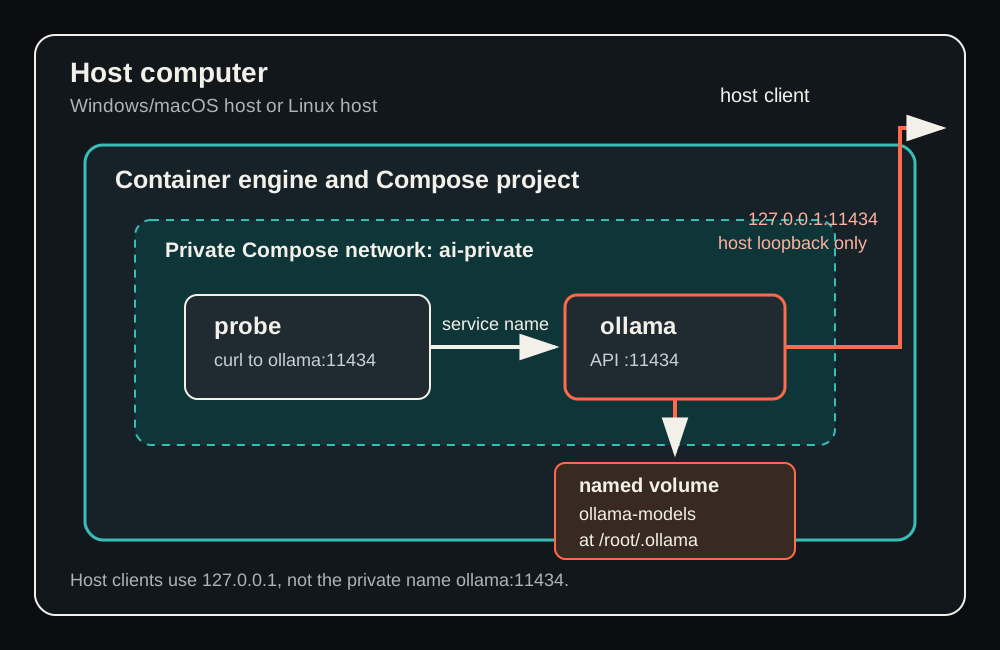
A container can make an application repeatable. It does not automatically make that application persistent, reachable only by the people who should reach it, ready for its task, recoverable after a fault, or safe to delete. Those are separate properties. This book gives you a way to see those properties rather than infer them from a reassuring word such as running.
The example is deliberately small: an Ollama service provides a local API, and a probe service checks that API from inside a private Compose network. Ollama is reachable from the same computer through an explicit loopback-only port. Its downloaded model files live in a named volume. The probe has no public port, no host mount, and no model data. You will read the declaration, observe the objects it creates, introduce one controlled address failure, recover it, stop and restart the service, replace its container, and distinguish what each result proves.
Nothing in this book claims that you have run the example. Commands and outputs are anticipated examples using synthetic data. Use an approved non-production computer, reviewed images, and an approved model if you choose to practise later. A container stack may be local while still having access to downloads, mounts, logs, and administrative users that you allow.
Learning objectives
- Explain the separate roles of an image, container, named volume, private network, and published port.
- Read a small Compose declaration field by field and predict the runtime objects and boundaries it creates.
- Distinguish a host address from an in-network service address, and a loopback publication from network-wide exposure.
- Separate process state, API readiness, model presence, and task correctness when assessing a local AI service.
- Diagnose an expected failure with state, logs, and inspection before changing configuration.
- Explain why restart, recreation, deletion, persistence, and backup are different claims.
- Prepare an optional, inspectable single-artifact exercise without treating preparation as proof that a run occurred.
Core concepts
Begin with the interface you will operate
You normally operate this example from a terminal in one new, empty project directory. A text editor creates two files in that directory: .env contains public configuration values, and compose.yaml declares the services. The container engine then creates the runtime objects described by the declaration. Docker users invoke the Compose provider with docker compose; Podman users may invoke podman compose only after confirming which approved Compose provider that command selects. These command shapes look similar, but similarity is not a compatibility guarantee. Choose one engine and one provider for the project, record that decision, and do not alternate engines midway through evidence gathering.
On Windows and macOS, Linux containers commonly run in a Linux environment managed by the desktop product or a virtual machine. Your terminal, loopback port, and files begin on the host operating system; the container process runs in the guest Linux environment. Docker Desktop often uses WSL 2 on Windows, while Podman Desktop commonly uses a Podman machine. On macOS, both commonly use a Linux virtual machine. The exact backend and its settings are local facts to inspect, not assumptions this book can make for your computer. On Linux, the engine may run directly on the host; access to a rootful Docker daemon remains highly privileged even if the commands feel routine.
This host-and-guest distinction explains several beginner surprises. A path that exists in your home directory is not automatically visible to a container. A process listening inside a container is not automatically reachable from the host. A hostname your host can resolve is not necessarily meaningful inside the private container network. Conversely, a host application model stored in a host directory is not automatically available to a new Ollama container. Explicit mounts, networks, and published ports bridge boundaries. Each bridge should be narrow and intentional.
A declaration is a desired shape, not a completed system
Compose is a way to describe related runtime objects in YAML. It is useful because the relationships are written down: which image should become which service, which storage attaches where, which services share a network, and which container ports are published to the host. The declaration is not itself the running system. It can be valid YAML yet refer to an unavailable image. It can create containers that start but whose APIs are not ready. It can describe durable storage while the application writes to a different path. It can be rendered differently when a shell environment overrides a value.
Read Compose in two directions. First, read from top to bottom and ask what each field requests. Then read from the runtime back to the declaration: when you see a container, mount, network, or port, identify the exact field that caused it. That second direction is essential during diagnosis. It replaces guessing with a small set of inspectable relationships.
The companion diagram, prepared as /img/canvases/t11-l03-overview.svg, maps this example. It is an explanatory diagram, not a screenshot and not evidence of any running stack. The host contains the engine and Compose project. Inside the project's private network are probe and ollama. The probe uses the service name ollama; it does not need the host port. Ollama has a named volume for its model directory and is the only service with a route to the host, explicitly limited to 127.0.0.1.
Image: packaged content with an identity question
An image is a packaged filesystem and configuration used to create containers. It is not a running process and not a durable copy of an application's changing data. An image reference often includes a registry, repository, and tag. For example, an image might be described by a fully qualified registry path and a release tag. A tag communicates intended release selection, but tags can be changed by a publisher. A content digest identifies specific image content more precisely. Review processes commonly require a version and a resolved digest because they answer different questions: what release did we intend, and what content arrived?
Do not turn that principle into an invented pin. A manuscript cannot establish that a digest is current, that an image remains available, or that an organisation has approved it. Before a practice run, use current official provider material and your local approval process. Avoid a floating latest reference for a stack that you expect to repeat. Also avoid short, ambiguous image names when a reviewed fully qualified reference is available; the registry from which an image is resolved matters.
An image is reusable. One image may create zero, one, or many containers. Removing a container does not normally remove the image. Pulling an image does not prove that a service can run it on your machine, that it exposes the expected API, or that it contains the model you plan to use. Treat image identity, process startup, endpoint readiness, model availability, and task output as separate checks.
Container: one replaceable runtime instance
A container is a runtime instance of an image plus settings such as environment variables, mounts, networks, command, and port publication. It has an identifier and a lifecycle. It can be created, started, stopped, restarted, removed, or recreated. These words are not interchangeable.
Stopping asks the existing process to stop while retaining the container definition and its writable layer. Starting resumes that same container. Restarting combines a stop and start for that container. Removing deletes that container object. Recreating means constructing a new container from the declaration; it should have a different container ID. A Compose command may decide it needs recreation when relevant configuration changes, but a plain restart does not apply a changed environment declaration to an already created container. When you change environment configuration, recreate the affected service rather than assuming restart rereads YAML.
Containers have a writable layer, but that layer belongs to the container lifecycle. It can survive a stop and start, which makes a restart a weak persistence test. When the container is removed and replaced, its writable layer is gone. Therefore, a replacement test is stronger: it asks whether the application data exists outside the removed container and is reattached correctly to the new one.
This does not mean every temporary file needs a volume. A probe's temporary retry state is intentionally disposable. It means you must identify data that matters, find the application's actual write path, and mount durable storage at that path if you need it across replacement. Persistence is a property you design and test; it is not a compliment that containers earn by existing.
Volume: a separate lifecycle for data
A named volume is engine-managed storage with a lifecycle separate from a container. In the example, a volume named t11-l03-ollama-models is mounted at /root/.ollama, the path intended for Ollama's model data. The service container can be removed and replaced while the named volume remains. The new container mounts the same volume at the same path and can therefore find a model downloaded during the earlier container's life.
The three claims in that sentence are independently testable. First, the old and new container IDs must differ, proving replacement rather than a restart. Second, inspection must show the intended named volume at the intended destination in the new container. Third, the exact approved model must be present after replacement. If the model command succeeds but the container ID did not change, you proved only restart-like continuity. If IDs differ but the mount differs, you have not proven the declared storage boundary. If the mount is present but the model is absent, either the application wrote elsewhere, the wrong volume is attached, or model retrieval did not complete as expected.
Persistence is not backup. A named volume can be deliberately deleted, lost with its host, corrupted, or made unusable by a software change. It may have no version history and no tested restore path. This exercise demonstrates only that data can survive replacement of one service container. A real backup decision needs an owner, retention, restoration test, suitable storage, and a decision about what data may leave the host. Do not describe a volume as a backup just because it outlives a container.
Compose cleanup is a moment where these lifecycles matter. docker compose down normally removes this project's containers and network while leaving declared named volumes. docker compose down --volumes requests volume deletion too. The latter is not a harmless finishing command. Inspect the exact volume and its users before a deliberate deletion. Do not run cleanup from an unverified project directory, and do not make --volumes habitual because a tutorial used it.
Network: private service discovery is not publication
Compose creates a project network so related containers can communicate. The important address inside this example is http://ollama:11434. ollama is a stable service name on the private network. It is not a host DNS name and not a random container IP copied from an inspection screen. Service names survive container replacement; container IP addresses may not. The probe resolves ollama through the private network and calls the API port exposed by the Ollama container.
That private route does not expose Ollama to your host. It only provides communication among containers joined to that network. The probe can call the service even if Ollama has no published host port. This is why a private network and a host port solve different problems. The network lets services find each other; the published port creates an explicit host-to-container route.
Avoid the common reaction of replacing a failed service name with a guessed IP address. A typo such as ollama-typo should fail in a controlled test because no service by that name exists on the network. The correct repair is to compare the failed address to the declaration, restore the known service name, and recreate the affected probe. Adding host networking, exposing a broad port, or substituting an IP hides the actual configuration error and changes the system boundary.
Published port: a deliberate host boundary
The Compose mapping 127.0.0.1:11434:11434 has three parts. The first 11434 is the host port. The final 11434 is the container port. The leading 127.0.0.1 is the host interface restriction: only programs on the same host can connect through that mapping. A host client can use an address such as http://127.0.0.1:11434; the probe should still use http://ollama:11434 inside the private network.
Binding to 0.0.0.0, or omitting a host address where the provider publishes broadly by default, can make the service listen on all IPv4 interfaces. That may make it reachable from a LAN or another network path. Do not treat a firewall as a substitute for declaring the narrow endpoint you intend. For this local exercise, keep the explicit loopback binding. Authentication, TLS, firewall policy, remote access, and team access are separate deployment concerns, not repairs for a local stack accidentally published too broadly.
Before starting, identify whether host port 11434 already has an owner you control. On Windows, Get-NetTCPConnection -LocalPort 11434 -ErrorAction SilentlyContinue can help find a listener. On macOS, lsof -nP -iTCP:11434 -sTCP:LISTEN can do so. On Linux, ss -lnt can show listening TCP ports. An occupied port is evidence to investigate, not a reason to stop an unknown process or broaden the binding. If an approved service needs the port, choose a deliberate alternative loopback port and update the documented host clients together.
Four readiness questions, not one green light
Local AI examples often fail because four distinct states are collapsed into “it is up.” Keep them separate.
| Question | Evidence in this example | What a pass does not prove |
|---|---|---|
| Is the container process running? | compose ps --all shows a running service. | That the API accepts requests. |
| Is the API ready? | The probe reaches /api/tags and prints PROBE_READY. | That the selected model exists. |
| Is the model present? | ollama show succeeds for the exact approved identifier. | That a generation is correct. |
| Is the task result correct? | A human checks the synthetic JSON against the prompt. | That the port, volume, or recovery boundary is correct. |
depends_on is useful for creation order but does not establish application readiness. The probe therefore uses bounded retries against the actual endpoint it needs. If retries are exhausted, it exits and leaves an error in its logs. An exited probe is more honest than a dashboard that implies success simply because the Ollama process began.
Likewise, an Ollama health check such as ollama list can provide a useful process-level signal, but it is not a proof that a particular model is installed or that a prompt result meets its requirements. An endpoint can respond while a model pull is incomplete. A model can generate a fluent response that changes a synthetic record value. The reviewer must check the output shape and values, because container health cannot judge task correctness.
Inspect before improvising
When a declared service does not behave as expected, collect evidence in an order that reduces changes.
state -> logs -> inspect -> smallest justified correction -> recreate -> repeat checks
State asks what exists and whether it is running, exited, restarting, or unhealthy. docker compose ps --all is scoped to the project directory and is a good first observation. Logs ask what the main process reported during startup or failure. Use docker compose logs --tail 50 SERVICE so that an old, huge history does not become the only thing you read. Inspection asks what configuration the engine actually applied: selected image, mounts, networks, port bindings, environment, and state. docker inspect can contain more metadata than an evidence artifact needs, so read it locally and record only necessary conclusions.
This order matters because a port allocation error can happen before a container starts; service logs alone may be empty. A DNS failure in the probe logs points to its address and private network, not to a reason to alter Ollama's host port. A model not found after recreation may point to the volume mount or the actual application data path, not to an inference error. Change one evidenced cause, recreate only the affected service when configuration changed, then repeat the relevant checks. Multiple simultaneous YAML edits create a story, not a diagnosis.
Safety belongs at the boundary it protects
Containers are configured boundaries, not miniature secure computers. Never use privileged: true, an engine socket mount, a broad host directory mount, or a home-directory mount as a casual repair. Those choices can grant a container access far beyond the two-service task. The probe example deliberately has no volume, no published port, no secret, a read-only root filesystem, a temporary filesystem for the location it needs, dropped capabilities, and a no-new-privileges option. These settings narrow its role; they do not establish universal security.
The Ollama service needs one named volume for its model data and a loopback-only port for a host client. Do not add credentials to the public .env example. Do not source arbitrary .env content into a shell merely because you need MODEL_ID; read the one expected value with a small, explicit command. A project that holds secrets needs a different review posture, and commands that print resolved environment values can expose those secrets. Only inspect compose config --environment in the isolated, non-secret practice project described here.
Use synthetic prompts. Do not enter participant, patient, customer, supplier, contract, credential, unpublished, or confidential data because the endpoint feels local. Local processes may write logs, use mounted storage, communicate through allowed networks, or be administered by others. The safe example is intentionally boring: a fictional literature note or fictional supplier message, a bounded JSON request, and a human reviewer who does not send or route anything.
Choose one engine and locate the Linux boundary
Before touching the example, make one operational choice: which engine and Compose provider will own this project? This is not a contest between product names. It is a way to keep the meaning of every later observation stable. If you create the volume with Docker, inspect containers with Podman, and then return to Docker for cleanup, matching service names can disguise the fact that you have looked at different object stores. Select Docker Compose or an approved Podman Compose provider, confirm its active local connection, and write that choice in your practice notes. From then on, every command, identifier, network, and volume belongs to that one selected environment.
The word local needs the same care. On a Linux workstation, the engine may run directly on the host and create Linux namespaces, networks, and storage there. On Windows or macOS, the command-line client commonly talks to an engine inside a managed Linux guest. Docker Desktop may use a WSL 2 distribution on Windows; another installation may use a different managed virtual machine. Podman commonly uses a Podman machine on Windows and macOS. The product and its current settings decide the exact arrangement. Do not memorize one diagram as universal. Ask instead: where does the engine process run, which connection does my client select, and where are its objects stored?
Imagine a Windows user creating compose.yaml in C:\Users\Example\t11-l03-local-ai. The file begins on the Windows filesystem. The Docker client reads it and asks the selected engine to realize its declaration. The Ollama process then runs in a Linux container controlled by the Linux engine environment, not as an ordinary Windows process. /root/.ollama is therefore a Linux path inside the container. The named volume mounted there is managed through the engine. It is not automatically the user's Windows Ollama model directory, and it is not made equivalent merely because both locations contain files with similar names. Only an explicit, reviewed mount creates a storage relationship.
The macOS story has the same logical boundaries even though the implementation differs. A terminal command starts on macOS, a client reaches the selected engine, and Linux containers run in a managed Linux environment. 127.0.0.1:11434 asks the provider to make a route available through host loopback to the container port. It does not collapse macOS, the Linux guest, and the container network into one address space. The provider performs forwarding across those boundaries. That is why a published loopback port can work while a private service name does not resolve in the host browser, and why a container path cannot be opened as though it were an ordinary host directory.
These distinctions also prevent a dangerous misunderstanding about authority. Access to a rootful Docker daemon can amount to extensive control over the machine even when the client command is run without an obvious administrator prompt. A managed desktop product still controls images, mounts, networks, and forwarding with significant privileges. Confirming a local context does not make every image or mount safe; it merely establishes which engine you intend to affect. Use an approved non-production machine and reviewed inputs. Do not respond to a permissions error by adding privileged, mounting the engine socket, or exposing an entire home directory. First identify which boundary denied the operation and why it was needed.
Provider selection matters separately from engine selection because a Compose command may be a front end that delegates work. docker compose version identifies Docker's installed Compose integration. podman compose version may reveal which external or built-in provider the Podman command invokes. Similar command spelling does not prove identical parsing, interpolation, health behavior, or lifecycle semantics. For this exercise, treat the declaration as an intended model and current provider documentation as the authority for a real run. If an approved Podman provider requires a documented syntax adjustment, record it before gathering evidence rather than silently translating commands halfway through the exercise.
Now place each address in its operating domain. http://ollama:11434 belongs to containers on ai-private, where Compose service discovery knows the name ollama. http://127.0.0.1:11434 belongs to a client on the host using the published loopback route. /root/.ollama belongs to the Ollama container's filesystem view, with the named volume attached at that destination. The project directory belongs to the host and supplies the declaration. These are four different locations. A failure in one does not authorize a broad bridge between all four. It gives you a precise question about DNS, publication, mounting, or client context.
A useful preflight statement is therefore short but specific: “I am using this named engine and provider, through this local connection, from this empty host directory; Linux containers run at this identified boundary; only Ollama receives a loopback publication; model data belongs to this named volume.” If you cannot complete one part, inspect settings before creating anything. This single statement prevents later evidence from mixing a host-native Ollama service, a containerized Ollama service, and a second engine's objects. The purpose is not paperwork. It is to ensure that when you eventually stop, replace, inspect, or delete something, you know which system will actually receive the request.
Follow an image into a container object
Start the lifecycle walkthrough before anything runs. The value of OLLAMA_IMAGE is an image reference, not a container. It tells the selected engine which packaged filesystem and default configuration should be available when creating the ollama service. Pulling resolves and downloads content according to that reference and the provider's rules. At the end of a successful pull, you have image content in the engine's image store. You do not yet have proof of a running process, an attached named volume, a listening API, an installed model, or a correct answer. Those properties arise, if at all, in later stages.
When Compose creates the service, it combines the selected image with the declaration. It asks the engine for a new container object with an identity, a writable container layer, an attachment to ai-private, a named-volume mount at /root/.ollama, a host port publication, and the configured health check. The image remains reusable input. The container is one concrete runtime instance built from that input plus settings. A second creation from the same image can produce a different container ID and writable layer while still attaching the same named volume. This distinction explains why an image digest, a container ID, and a volume name answer different identity questions.
Creation and startup are also separate ideas even when one command performs both. Creation records the object and its configuration. Starting asks the engine to launch its configured process. That process can exit immediately because of an invalid argument, missing resource, architecture problem, or application error. In that case, creation succeeded but service operation did not. Conversely, a process can remain running while its API is still initializing or while no model is installed. compose ps --all helps preserve these distinctions because an exited container remains visible instead of disappearing from a view that shows only running services.
While the container exists, writes go either to its writable layer, to a mounted volume, or to another explicitly mounted filesystem according to the path used. The path is decisive. A file written beneath the active mount at /root/.ollama belongs to the named volume's storage view. A file written somewhere else in the container ordinarily belongs to that container's writable layer. Stopping the container generally retains both, so a successful stop-and-start tells you little about which location held the model. The old writable layer is still present. This is why restart continuity cannot by itself prove that the volume was mounted at the correct application path.
A restart operates on the existing container object. It stops and starts that object; its ID normally remains the same. It does not reconstruct the container from a newly edited Compose environment merely because the YAML on disk changed. If OLLAMA_URL was wrong when a probe container was created, editing the file and restarting that same probe is not a reliable way to apply the correction. Recreation is the relevant lifecycle action: Compose removes or replaces the old instance and creates a new object from the effective declaration. Evidence should therefore pair a configuration correction with a new container ID when the changed setting is part of container creation.
Removal is the revealing boundary. Removing the Ollama container deletes that container object and its writable layer, but it does not normally delete the reusable image or the separately managed named volume. Starting the service again creates a new container from the image and declaration. If inspection shows the intended volume attached at /root/.ollama, and the exact model is still available, the observations jointly support a persistence claim. If the old and new IDs match, removal or replacement was not proved. If the IDs differ but the model is absent, replacement happened but persistence did not. Each failed condition narrows the conclusion instead of erasing the whole experiment.
Image removal and volume removal are further independent actions. Deleting an unused image may require a later pull but should not, by itself, erase data in a retained named volume. Deleting the named volume is a data action, even if all containers have already been removed. Compose cleanup flags can combine object deletions, so read them as lifecycle requests rather than as a generic “tidy up” operation. A command that removes containers and a network is categorically different from one that also requests volume deletion. The exercise avoids making volume deletion an automatic final step because model data has a different lifecycle and may have an accountable owner.
The probe follows the same object lifecycle but has a deliberately different data story. Its image supplies curl and a shell, its created container receives OLLAMA_URL, and its process tests the API before sleeping. Its read-only root filesystem and temporary filesystem support a narrow, disposable role. No named volume preserves probe state because no probe state matters after replacement. Recreating the probe after the controlled typo should discard the bad container settings and produce a new instance from the base declaration. That asymmetry is intentional: replaceable computation on both sides, persistent model data only where the application requires it.
At every stage, name only what the evidence supports. An image present means content was resolved into the selected engine. A container created means settings were accepted into an object. A running process means its main process has not exited. A ready API means a specific request succeeded. A present model means the exact model lookup succeeded. A replacement persistence pass means a different container attached the intended volume and still found that model. This vocabulary may feel slower than saying “the container works,” but it makes recovery faster because every failed statement points to a smaller part of the lifecycle.
Predict declared, rendered, and applied configuration
Compose configuration exists in at least three useful forms. The declared form is the text you wrote in compose.yaml, .env, and any explicit override file. The rendered form is the configuration the provider produces after interpolation, file merging, defaults, and validation. The applied form is the configuration attached to runtime objects by the engine. Treating these forms as identical creates avoidable surprises. They often agree, but the purpose of inspection is to discover when they do not. A disciplined run predicts the rendered form before creation and then compares selected applied facts after creation.
Begin with the base declaration and predict one runtime consequence per field. ${OLLAMA_IMAGE:?...} should resolve to the reviewed Ollama image reference or stop configuration when no value is supplied. The port entry should retain the explicit host address 127.0.0.1, host port 11434, and container port 11434. The volume entry should refer to the top-level named volume and target /root/.ollama. Both services should join ai-private. The probe environment should contain an internal URL using the service name, while the escaped dollar in its command should remain for the container shell to expand later. These predictions form a compact checklist for rendered output.
Interpolation explains why reading YAML alone is insufficient. Compose obtains values from defined sources with provider-documented precedence. A stale OLLAMA_URL in the current shell can override the intended value in the project's .env, even though the file still visibly says http://ollama:11434. A missing image variable can fail early because the declaration explicitly requires it. $$ has another role: it prevents Compose from replacing the probe shell's ${OLLAMA_URL} during rendering. The rendered command should preserve the shell reference, while the rendered environment should contain the actual internal URL that the shell will read inside the container.
Override files add another transformation. In the controlled failure, the base declaration remains correct and compose.break.yaml changes only probe.environment.OLLAMA_URL. Rendering with both files should predict http://ollama-typo:11434 for the probe while preserving Ollama's image, volume, network, and loopback port. This matters because it bounds the expected failure. If the rendered output also changed the published port or removed the network, the test would no longer isolate one cause. Always validate the same ordered file set that you intend to use for creation; rendering only the base file says nothing about an override that will be supplied later.
Validation is not evidence that objects exist. compose config --quiet can establish that the provider accepts the composed configuration without creating a container, pulling an image, allocating a port, or checking application behavior. Full rendered output can show what the provider intends to apply, but it cannot prove that port 11434 is available or that an image can run on your machine. This is a useful limitation. Configuration errors should be removed before runtime, while runtime errors remain visible as runtime evidence rather than being confused with a YAML or interpolation problem.
After creation, move from prediction to selected applied facts. compose ps identifies project services and their current state. compose port ollama 11434 reports the effective host publication and should begin with loopback for this exercise. Container inspection can reveal the selected image identity, attached network, mount source and destination, environment, and engine state. Volume inspection establishes that the named storage object exists. Do not collect all inspection output merely because it is available. Compare the handful of facts that correspond to your earlier predictions, and preserve only conclusions needed for the exercise's evidence.
Suppose the declaration shows loopback, the rendered output shows loopback, but the observed port appears broad. That mismatch is a stop condition. Do not rationalize it with assumptions about a firewall or desktop implementation. Verify that the command targeted the intended project and engine, inspect the applied binding, and correct the cause before continuing. Suppose instead that the rendered probe URL is a host address. That is already enough to stop before creation because the probe is supposed to use private service discovery. Fixing it at the rendered stage avoids turning a predictable configuration defect into noisy runtime diagnosis.
Applied configuration also has a time dimension. Editing compose.yaml changes the declared form immediately and may change future rendered output, but it does not rewrite an existing container object in place. A restart acts on the existing applied form. Recreation constructs a new applied form from the current rendering. Therefore, after correcting the bad probe URL, the evidence sequence is render the base declaration, force recreation of the probe, and inspect its new behavior. The successful log then belongs to a container created from the corrected declaration, rather than to an old object whose provenance is ambiguous.
This three-form model turns Compose from a magic command into a chain of testable transformations. Declared text answers what you authored. Rendered configuration answers what the selected provider understood for this invocation. Applied inspection answers what the engine attached to a concrete object. Runtime requests answer whether those applied relationships function. When a result differs from expectation, compare adjacent links instead of editing at random: declaration to rendering for precedence or merge errors, rendering to applied objects for creation or stale-container problems, and applied objects to runtime behavior for startup, networking, storage, or application faults.
Trace a request inside the private network
Follow the probe's successful request one boundary at a time. Compose creates probe and ollama containers and attaches both to ai-private. The probe process receives OLLAMA_URL=http://ollama:11434. When its shell runs curl, the client parses ollama as the hostname and 11434 as the destination port. It does not consult the host's browser settings, host loopback publication, or a copied container IP. It asks for name resolution from within its own container network context, where Compose service discovery associates the service name ollama with a reachable endpoint on the shared project network.
The resulting connection travels from the probe's network namespace across the private Compose network to the Ollama container's port 11434. No host port is needed for this path. In fact, the private request could still work if the host publication were removed, provided both services remained attached to the same network and Ollama listened appropriately inside its container. The published 127.0.0.1:11434 entry solves a different requirement: allowing a client on the host to reach Ollama. Keeping these routes separate lets you test internal service communication without accidentally making the probe depend on host forwarding.
The service name is preferable to a container IP because it expresses the stable relationship in the declaration. A recreated Ollama container receives a new container ID and may receive a different network address. Compose can continue to make the ollama service name meaningful to peers on the network. Hard-coding an inspected IP would couple the probe to one disposable instance and could fail after legitimate replacement. The name does not mean that any process anywhere can resolve ollama; its usefulness is scoped to the participating network and the provider's service discovery.
Now trace the deliberate typo. Rendering the override gives the probe http://ollama-typo:11434. curl asks the same private network resolver for ollama-typo, but no declared service or approved alias has that name. The request fails before it can establish a TCP connection to Ollama. Ollama can be healthy, its model volume can be mounted, and the host loopback route can work at the same time. The probe still fails because its first required relationship, name resolution, is wrong. This is why a probe log reporting name resolution should direct attention to its URL and network membership rather than to the host port.
Changing the typo to a random container IP would be a poor repair even if it produced one successful request. It would bypass the stable service relationship and encode transient runtime detail. Adding host networking would be worse because it would replace a narrow private route with a different network boundary. Publishing the probe or broadening Ollama to 0.0.0.0 would not fix the misspelled internal name at all. The smallest justified correction is to restore http://ollama:11434, recreate only the probe so its environment is updated, and repeat the same request and log observation.
Other internal failures occur at later points in the trace and therefore look different. Successful name resolution followed by connection refusal can mean that the target process has not begun listening, is restarting, or is stopped. A connection that succeeds but returns an HTTP error means DNS and TCP routing worked, while the endpoint or application rejected the request. A successful /api/tags response means that particular API path answered; it does not prove that the chosen model exists. Reading the error at the correct layer prevents one failure from becoming an excuse to modify every network and application setting at once.
The probe's bounded retries account for a normal timing difference between container startup and API readiness. depends_on can arrange creation order, but the Ollama process may need additional time before accepting requests. The retry options allow connection refusal for a limited period and then stop. That limit is important. Infinite retries could leave a nominally running probe that never records a clear failure, while no retries could mislabel ordinary startup as a lasting fault. When retries are exhausted, the probe exits and its log retains an observable result. Recovery should then be based on state and logs, not on extending the delay without evidence.
You can narrate an internal success precisely: the probe container resolved the Compose service name on ai-private, connected to Ollama's container port, received a successful response from /api/tags, printed PROBE_READY, and remained observable. That statement does not mention host loopback because the route did not use it. It does not claim a model or task pass because the endpoint check did not test either. Precision is valuable here: if later host access fails while the probe remains ready, you already know that Ollama and the private route work, so investigation can focus on publication and the host boundary.
Trace a request from the host
The host request starts in a different naming and routing domain. A browser, shell, or approved client on the same computer uses http://127.0.0.1:11434. Here 127.0.0.1 means the host's own IPv4 loopback interface. The provider's port publication maps host loopback port 11434 to port 11434 in the Ollama container. On Windows or macOS, the desktop environment may forward that traffic through its managed Linux boundary before it reaches the container. Those implementation details can vary, but the declared security intent remains narrow: accept this route from the same host, not from every network interface.
The host should not use http://ollama:11434. The name ollama is supplied by service discovery on ai-private; it is not automatically entered into host DNS. A host failure to resolve ollama therefore does not show that the private network is broken. It shows that the request began outside the scope where that service name is defined. The correct host address is the explicit loopback publication. Likewise, the probe should not use 127.0.0.1:11434, because loopback inside the probe refers to the probe container itself, not to the host and not to Ollama.
This double meaning of loopback is a frequent source of accidental complexity. Every network namespace has its own idea of “self.” On the host, 127.0.0.1 selects the host loopback route and can reach a published port. Inside the probe container, 127.0.0.1 selects the probe container. Unless the probe itself serves port 11434, that request fails. Replacing the service name with host loopback would therefore move the request to the wrong endpoint. Use addresses according to the caller's location: service name for a peer container, published loopback for a host client.
Read the publication from right to left when predicting traffic. The last 11434 is the destination port in the container. The middle 11434 is the port selected by the host client. The leading 127.0.0.1 restricts the host interface on which the publication listens. Omitting that address can allow a provider to bind more broadly. Writing 0.0.0.0 explicitly requests all IPv4 interfaces. Neither is a harmless convenience in this local exercise. A broad bind can create a route from a LAN or another attached network, subject to platform forwarding and firewall behavior, where no remote access was intended.
The loopback bind is a narrow route, not a complete security system. It does not add application authentication, TLS, authorization, or protection from other processes and users on the host. It does not prove that Ollama has no other route created outside this project. It does establish an inspectable intention for this Compose publication. That is why the exercise checks compose port and expects a result beginning with 127.0.0.1. If the effective output is broad or ambiguous, stop and resolve the mismatch rather than making a stronger security claim than the observation supports.
Port ownership is checked before startup because only one listener can normally own the same address and port combination. If an approved host-native Ollama is already listening on loopback port 11434, Compose may fail to allocate the publication before the container starts. Ollama service logs may then be empty because the failure occurred in the engine's setup path, not in the application. Preserve the error and identify the listener. Do not terminate an unknown process. Either stop an approved duplicate deliberately or select another documented host loopback port while leaving the container port and internal probe URL unchanged.
That alternative illustrates the independence of the two traces. Suppose the approved host port becomes 127.0.0.1:11435:11434. A host client would use http://127.0.0.1:11435, but the probe would still use http://ollama:11434. Only the host-side route changed. Editing OLLAMA_URL to use 11435 would be incorrect because the service-to-service request does not traverse the host publication. Conversely, changing the internal application port would require coordinated changes to the destination and health or probe assumptions, not merely a different host-side number. Keeping a written trace prevents these unrelated ports from drifting together.
Compare two simultaneous observations to localize a fault. If PROBE_READY is present but a host loopback request fails, the API and private route have evidence of success; inspect the effective port publication, host listener, and selected engine. If the host loopback request succeeds but the probe reports name resolution failure, publication and the API have evidence of success; inspect the probe's rendered internal URL and network attachment. If both fail, begin with container state and application logs rather than assuming one network explanation. The two paths are deliberately redundant enough to teach boundaries, not interchangeable enough to substitute for one another.
Separate running, API, model, and task readiness
Readiness is not one bit attached to a service. For this exercise, it is a sequence of four questions asked with different evidence: is the container process running, does the required API endpoint answer, is the exact approved model present, and does that model produce an acceptable result for the bounded synthetic task? A pass at a later layer often depends on earlier layers, but it does not retroactively prove every infrastructure detail. Keeping separate records prevents the word healthy from carrying more meaning than the check that produced it.
Process state is the narrowest observation. A running state means the container's configured main process has not exited at the moment of inspection. It can remain running while still initializing, while listening on the wrong interface, while returning errors, or while lacking model data. An exited state is equally incomplete: it says the process ended, while logs and inspection help explain why. The configured ollama list health check adds an application-related signal, but its result is still defined by that command. It is not a test of the probe's network path, the host publication, or a generation request.
API readiness asks whether the client that matters can complete the request it needs. The probe uses curl against http://ollama:11434/api/tags with bounded retries. PROBE_READY means name resolution, private network routing, TCP connection, and that HTTP request succeeded from the probe. It does not mean that host loopback is correctly restricted or even published. A separate host request would test that route. It also does not mean that a particular model exists: an API can return a valid list while the desired identifier is absent.
Model presence is checked by naming the exact approved identifier to ollama show. This is stronger than observing that some model appears in a list. It asks whether the application can locate the model selected for the exercise in its current storage view. After container replacement, the same check contributes to persistence evidence when paired with different IDs and the expected mount. Yet model presence still does not establish generation quality, license suitability, provenance beyond available provider information, or enough memory for a successful run. It proves only the bounded lookup result in that environment.
Generation readiness adds another step: the model accepts a prompt and returns a non-error completion. A completion can be syntactically plausible and factually wrong. The Lab prompt may receive JSON with the requested keys but alter LAB-C-17, infer a different material, or add a scientific conclusion not present in the synthetic note. The Company prompt may classify a no-reply message as ACTION based on a superficial word. Infrastructure cannot decide whether those outputs preserve the supplied facts. A human reviewer applies the stated acceptance criteria and records task pass or failure separately.
This separation improves recovery claims. After stopping and starting Ollama, a successful retry to /api/tags establishes API recovery on the private route. A successful ollama show establishes that the model remains present. Neither establishes task recovery until the selected synthetic prompt is repeated and reviewed. After replacement, different container IDs and the expected mount establish the object and storage relationship; model lookup and task review establish application continuity at additional layers. One green line should never be expanded into “everything recovered” when three required checks were not performed.
It also improves diagnosis because each failed layer narrows the search. If the process is exited, inspect application logs and applied configuration before testing model output. If the process runs but the API probe exhausts retries, examine listening readiness, URL, DNS, and network attachment. If the API answers but ollama show fails, inspect the exact identifier, completed pull, mount, and application data path. If model generation completes but the JSON violates the prompt, do not change ports or volumes; record a task failure and review model or task suitability within the approved process.
Timing matters when reading these observations. compose ps is a snapshot, logs describe events over time, and a successful request proves reachability at that moment. A model pull may still be underway even while the API answers. A health status can change after inspection. Bounded retries make startup tolerance explicit, while repeated checks after lifecycle actions demonstrate recovery rather than assuming it. The goal is not to create permanent certainty from one run. It is to produce enough time-stamped, scoped evidence for the exact claim being made and no broader claim.
The final language can remain simple: “process pass,” “API pass from probe,” “model presence pass for this identifier,” and “task pass under human review.” If one fails, retain the preceding passes rather than collapsing the stack into a total success or failure. This vocabulary is especially important for local AI systems because fluent output can distract from missing operational controls, while a green container icon can distract from an absent model or incorrect result. Four questions keep both infrastructure and task accountability visible without pretending that any one tool can evaluate the whole system.
Diagnose from state, logs, and inspection
Consider a concrete case: docker compose up -d returns, but the probe does not show the expected readiness line. Resist the urge to edit YAML immediately. Begin with compose ps --all in the verified project directory. Suppose it shows Ollama running and the probe exited. That state already changes the investigation. The project and both container objects exist, Ollama's main process has not exited, and the probe process did exit. It does not yet tell you whether the cause was DNS, refused connection, an unavailable executable, or an HTTP error. State selects the next evidence source; it does not supply the diagnosis by itself.
Read the bounded probe logs next. If they say that ollama-typo could not be resolved, the failure occurred at name resolution. Compare that literal host with the rendered probe environment and the base service name. If the controlled override was supplied, the evidence now forms a complete causal chain: the override rendered the wrong hostname, the created probe received it, and the network correctly had no matching service. Ollama logs are not the first priority because no request reached Ollama. Broad network changes would add variables without addressing the observed mismatch.
Inspection confirms applied facts when declaration and behavior appear inconsistent. Inspect the probe's environment and network attachments if you are unsure which configuration created it. A base file may now be correct while the existing container still carries the earlier bad environment. This is the stale-object case: declared and rendered configuration for a future container differ from the applied configuration of the current one. A restart preserves that current object and may preserve the bad value. Recreating only the probe applies the corrected base declaration while leaving Ollama and its model volume undisturbed.
Now change the hypothetical symptom. Suppose up reports that host port 11434 cannot be allocated and no Ollama application log appears. ps --all may show no running Ollama container or a created object that never started. The engine error is primary evidence because port publication occurs around container startup. Searching Ollama's logs for an explanation is unlikely to help when its process never ran. Identify the host listener with the appropriate operating-system command, verify ownership, and choose the smallest approved response. Never stop an unknown listener merely to make the tutorial proceed.
In another case, both containers are running but the probe logs repeated connection refusals before exiting. Name resolution may have succeeded, so inspect Ollama's state and recent logs for delayed startup, repeated crashes, or inability to listen. Confirm the probe URL and shared network, but do not replace the service name with an IP. If startup simply exceeded the documented bounded window on approved hardware, preserve that observation and decide whether a reviewed timing adjustment is justified. If logs show an application error, address that exact cause. “Connection refused” describes a point in the request path, not a universal prescription to increase retries.
Storage diagnosis uses the same order after replacement. First verify that the old and new container IDs are non-empty and different. Then inspect the new container's mount source and destination. Finally ask Ollama for the exact model. If IDs are equal, stop: replacement was not established. If IDs differ and the expected mount is absent, the storage declaration or applied object is wrong. If the mount is correct but the model lookup fails, investigate whether the pull completed, whether the identifier matches, and whether /root/.ollama remains the documented application path for the reviewed image. Do not repull immediately and thereby overwrite the evidence of a persistence failure.
Inspect output should answer a question rather than become an artifact by default. A full container inspection can expose environment values, labels, paths, and unrelated metadata. Read it locally and extract the selected image, mount, network, port, environment, or state fact needed for the current hypothesis. Logs deserve the same restraint: recent lines around startup or failure are usually more useful than an unbounded history. This protects irrelevant information and keeps the diagnosis legible. More output is not stronger evidence when no one can tell which line supports the conclusion.
After one correction, repeat the observations that failed and the adjacent prerequisites. For the bad URL, render the base configuration, recreate the probe, check ps --all, and read its recent log for PROBE_READY. For a corrected loopback publication, recreate the affected service, inspect compose port, and test the intended host route. For a storage correction, repeat the full replacement evidence chain because the mount is the claim under test. Do not bundle unrelated hardening, image, timing, and network edits into the same retry. Simultaneous changes can produce success without identifying which change mattered.
The discipline can be summarized as a narrated sequence: “I observed this state; the nearest log reported this failure; inspection showed this applied value; it differed from this rendered expectation; I changed one declaration; I recreated the object whose creation settings changed; the same check then passed.” That narrative is reproducible and reversible. It is also shorter than improvisation because it prevents speculative fixes from accumulating. Containers make many boundaries visible, but only if evidence is read in the order those boundaries are crossed.
Prove lifecycle and data claims without hiding failures
Lifecycle verbs support different proofs. stop asks the existing container's process to end while retaining the container object. start launches that retained object. restart combines those actions. rm removes the container object. up after removal creates a replacement from the current effective declaration. down usually removes project containers and the project network, while a volume-deletion option requests an additional data action. Before running any command, say which object should retain its identity, which should receive a new identity, and which data should remain. That prediction turns a command sequence into a test rather than a ritual.
The stop/start exercise proves detectability and bounded recovery. While Ollama is stopped, the request from the probe is expected to fail. That failed exit status is evidence and must be checked as deliberately as a success. If a script simply runs the failing request and then continues, a later successful start or show command can leave the overall shell sequence with exit status zero. An observer may then record a pass without proving that unavailability was ever detected. In PowerShell, inspect $LASTEXITCODE; in a shell, use an explicit conditional that rejects an unexpected success and intentionally accepts the expected failure.
After start, bounded retrying should eventually establish that the internal API route recovered, and ollama show should establish that the model remains visible. This is a useful operational result, but the container ID is unchanged and its writable layer remains. The check cannot tell whether model data came from the named volume or from the retained container layer. That ambiguity is not a defect in restart; it is a limit on the conclusion. Call it restart continuity, then perform a replacement if the question concerns persistence outside the container lifecycle.
The replacement sequence needs assertions that cannot be swallowed by later success. Capture a non-empty before ID, remove the Ollama service container, create it again, and capture a non-empty after ID. Require the IDs to differ. Require inspection to report t11-l03-ollama-models -> /root/.ollama. Require ollama show to succeed for the exact selected model. Group those requirements in a conditional that prints the pass line only when all succeed and exits nonzero otherwise. If the script then starts the probe or prints the port, those later commands must not convert a failed persistence assertion into an apparently successful run.
Command failure is part of evidence design beyond this one sequence. Shells usually report the status of the last command or pipeline, not a retrospective summary of every command shown in a terminal. A failed test followed by a successful compose ps can therefore produce an overall success status. Interactive readers may also overlook an error several lines above a green-looking service list. Critical proof conditions should stop the sequence or be wrapped in explicit checks. This is not elaborate automation; it is the minimum needed to ensure that the visible pass marker means every named condition actually passed.
Replacement persistence still is not backup. The named volume and its host remain part of one engine environment. The volume can be deleted intentionally, lost with the computer or managed guest, corrupted, or become incompatible with a later application version. It has no demonstrated retention schedule, independent copy, restore procedure, or accountable recovery objective. The exercise proves one narrower statement: after one service container was removed and replaced, the new container attached the intended named volume and found the selected model. Do not use the pass line to claim disaster recovery or availability.
Consider three cleanup decisions. If practice will resume soon and the model is approved to remain on that machine, compose down can remove containers and the project network while retaining the named volume, provided an owner and cleanup date are known. If the project is finished and the model data must be removed, first verify the project directory, inspect the exact volume, check that no container uses it, and deliberately remove that named volume. If ownership or retention is unclear, stop and ask rather than guessing. Convenience is not a valid basis for either indefinite retention or irreversible deletion.
A fourth case is migration or backup. Copying arbitrary files from the engine's internal volume directory is not automatically a valid backup, especially on a managed desktop guest or while the application is writing. A real plan needs provider-supported capture or application procedures, an approved destination, integrity protection, retention, and a restore test into a controlled environment. It also needs a data decision: model files may be downloadable artifacts, while other applications may store unique user data. This book does not prescribe that plan. It marks the boundary so replacement persistence is not mistaken for one.
Finish by matching every claim to visible evidence. Different IDs prove a different container object. The inspected source and destination prove the intended volume attachment. Exact model lookup proves model presence in the new application's view. PROBE_READY or a fresh request proves internal API recovery. A loopback port result proves the intended host publication is applied. Running service rows prove current process state. Human review of the repeated synthetic prompt proves bounded task recovery. No single observation covers all of them, and no later success should erase an earlier required failure. That is the honest operational meaning of the exercise.
Runnable exercise
This is optional preparation for a later hands-on journey, not evidence that it has been performed. The single exit artifact described below is a contract for a real run. Do not manufacture it from anticipated output.
Prerequisites and selection
Use an approved non-production computer with one selected local engine: Docker Compose or Podman Compose. Confirm that the selected engine points to a local, approved connection. For Docker, docker context show, docker version, and docker compose version identify the current context and installed provider. For Podman, inspect podman system connection list, podman version, and podman compose version. A remote connection is outside this exercise because it changes the ownership, network, and deletion boundary.
Choose the provider before writing files. Docker Compose and a Podman Compose provider may differ in supported details, image handling, desktop integration, and current behavior. Do not infer universal compatibility from a YAML file that resembles another tutorial. The declaration below shows the intended object model. Before running it with Podman, confirm the provider's current documented behavior and the organisation's approved image references. Do not switch from docker compose to podman compose in the same project directory and then compare results as if they came from one engine.
You need permission to pull two reviewed images, create local containers and a named volume, and bind loopback port 11434. You also need one approved Ollama model identifier, adequate disk and memory, and an approved network window if images or models are not already available. The model installed by a host-native Ollama application is not automatically available to the container; storage is separate unless you deliberately configure a connection, which this exercise does not do.
Create a new empty directory named t11-l03-local-ai. Do not place it inside a real project. It must not contain private documents, another Compose file, credentials, or a .env inherited from unrelated work. The directory is an operational boundary: run project commands from there so that compose down, ps, and logs refer to the intended stack.
Write the configuration and read it first
Create .env in the empty directory. Replace the placeholders with reviewed public values before use. This manuscript intentionally supplies no fresh image pins or model claims. A release tag and digest must be checked at the time of an approved run. OLLAMA_URL is an internal address, not a host address.
OLLAMA_IMAGE=REVIEWED_OLLAMA_IMAGE_REFERENCE
PROBE_IMAGE=REVIEWED_CURL_IMAGE_REFERENCE
MODEL_ID=APPROVED_MODEL_IDENTIFIER
OLLAMA_URL=http://ollama:11434
Create compose.yaml in the same directory:
services:
  ollama:
    image: ${OLLAMA_IMAGE:?Set OLLAMA_IMAGE in .env}
    ports:
      - "127.0.0.1:11434:11434"
    volumes:
      - ollama-models:/root/.ollama
    networks:
      - ai-private
    healthcheck:
      test: ["CMD", "ollama", "list"]
      interval: 5s
      timeout: 5s
      retries: 12

  probe:
    image: ${PROBE_IMAGE:?Set PROBE_IMAGE in .env}
    depends_on:
      - ollama
    environment:
      OLLAMA_URL: ${OLLAMA_URL}
    entrypoint: ["/bin/sh", "-c"]
    command:
      - |
        curl --fail --show-error --retry 12 --retry-connrefused --retry-delay 2 \
          "$${OLLAMA_URL}/api/tags" >/dev/null
        echo PROBE_READY
        exec sleep 7200
    read_only: true
    tmpfs:
      - /tmp
    cap_drop:
      - ALL
    security_opt:
      - no-new-privileges:true
    networks:
      - ai-private

networks:
  ai-private: {}

volumes:
  ollama-models:
    name: t11-l03-ollama-models
Do not copy this as an opaque spell. Read every declaration and predict its outcome.
| Declaration | Runtime meaning | Why it exists here |
|---|---|---|
services.ollama.image | Creates the Ollama container from the reviewed image reference. | Separates selected software from runtime data. |
ports on Ollama | Creates a host route from loopback port 11434 to the container's API port. | Lets a host client test locally without publishing to the LAN. |
ollama-models:/root/.ollama | Mounts the named volume where Ollama is expected to keep model data. | Lets model data survive container replacement. |
ai-private on both services | Joins both containers to one private network. | Lets the probe resolve ollama by service name. |
healthcheck | Repeats a command inside the Ollama container. | Adds a process/application signal, not task proof. |
depends_on | Orders service creation. | It does not wait for the API to be ready. |
probe OLLAMA_URL | Gives the probe the internal service address. | Keeps the probe independent of the host port. |
$${OLLAMA_URL} | Leaves one dollar sign for the shell inside the probe. | Prevents Compose from consuming the shell variable too early. |
retrying curl | Tests the endpoint over a bounded startup period. | Produces an observable readiness result. |
| probe hardening fields | Reduces writable storage and privileges available to the probe. | Matches the probe's narrow task. |
| named network and volume | Names the durable relationships outside individual containers. | Makes inspection and deliberate cleanup clearer. |
The command is not an application model test. It performs an HTTP request to /api/tags, writes no response body to the terminal, prints PROBE_READY only after a successful request, then sleeps so the successful probe remains observable. If the API never becomes reachable in the retry window, the shell exits. depends_on may have created Ollama first, but the retry loop is what waits for the function the probe needs.
The double dollar sign deserves close attention. Compose interprets $ for its own interpolation. $$ escapes it so the shell that starts inside the probe receives ${OLLAMA_URL}. The shell can then read the environment value passed to that container. If you changed it to a single dollar sign, Compose might try to interpolate the host-side value early, leading to a configuration that looks plausible but points somewhere unintended.
Validate rendered configuration before creating objects
Environment values in your shell can override .env values. Use a dedicated terminal session for this project and clear stale overrides before testing configuration. On macOS or Linux, the following commands remove the three relevant shell values, then show the resolved values:
unset OLLAMA_IMAGE PROBE_IMAGE OLLAMA_URL
docker compose config --environment | grep -E '^(OLLAMA_IMAGE|PROBE_IMAGE|OLLAMA_URL)='
docker compose config --quiet
docker compose config
On Windows PowerShell, use the equivalent targeted removal and display:
Remove-Item Env:OLLAMA_IMAGE, Env:PROBE_IMAGE, Env:OLLAMA_URL -ErrorAction SilentlyContinue
docker compose config --environment | Select-String '^(OLLAMA_IMAGE|PROBE_IMAGE|OLLAMA_URL)='
docker compose config --quiet
docker compose config
For a Podman run, substitute the selected approved provider command after confirming its syntax and output. Do not run an environment-display command in a real project that may contain credentials. This isolated example deliberately has no secret values, but the habit should still be narrow: inspect only what you need.
The quiet configuration check should finish without a configuration error. The rendered configuration should show the intended reviewed image references, OLLAMA_URL: http://ollama:11434, the named volume, and the explicit 127.0.0.1 publication. Read the output as a prediction. If it instead contains a host URL, a blank image, a broad port, or a different mount target, stop before pulling or starting. Fix the declaration or the known override, then render again.
Create and observe the initial runtime state
When the rendered configuration is correct and image references are approved, pull and start the project from the empty directory:
docker compose pull
docker compose up -d
docker compose ps --all
docker compose logs --tail 50 probe
The anticipated successful result is not merely two container names. ps --all should show both services, with Ollama eventually reporting its configured health state and the probe running after its readiness request. The probe log should contain PROBE_READY. If the probe exits, read its log before changing YAML. It may show a connection-refused message while Ollama starts, a DNS error for a wrong service name, or an image/application failure. Each implies a different next question.
Inspect the host route and named volume independently:
docker compose port ollama 11434
docker volume inspect t11-l03-ollama-models
docker inspect "$(docker compose ps -q ollama)"
The port result must begin with 127.0.0.1 for this exercise. A result without that loopback host restriction changes the exposure claim and should be corrected before proceeding. In the container inspection, find the selected image, the mount destination /root/.ollama, the named volume, the project network, and the running state. Do not paste a complete inspection record into shared evidence: it can include irrelevant metadata. The point is to connect declaration to runtime state, not to collect maximal output.
At this stage, make a precise statement. You may be able to say: “the engine created two services; the probe reached the Ollama API through the private service name; Ollama is published to this host's loopback address; and the declared named volume is mounted.” You cannot yet say that the approved model is present or that it performs either synthetic task correctly.
Pull and identify one model
Read only MODEL_ID from .env; do not source the entire file. In a non-secret example on macOS or Linux, a narrowly scoped loader can be written as follows:
MODEL_ID="$(sed -n 's/^MODEL_ID=//p' .env)"
test -n "$MODEL_ID" || { echo 'MODEL_ID is missing' >&2; exit 1; }
docker compose exec ollama ollama pull "$MODEL_ID"
docker compose exec ollama ollama show "$MODEL_ID" >/dev/null
docker compose exec ollama ollama list
In PowerShell, select exactly one expected line and reject ambiguity:
$modelLine = Get-Content .env | Where-Object { $_ -match '^MODEL_ID=' }
if (($modelLine | Measure-Object).Count -ne 1) { throw 'Expected one MODEL_ID line' }
$env:MODEL_ID = $modelLine -replace '^MODEL_ID=', ''
docker compose exec ollama ollama pull $env:MODEL_ID
docker compose exec ollama ollama show $env:MODEL_ID
docker compose exec ollama ollama list
These examples accept only the one intended setting. They do not execute arbitrary lines from .env or export Compose interpolation values into the shell. The expected observation is that ollama show succeeds for the exact approved identifier and ollama list displays it. Record a resolved model identity if the tool supplies one, but do not invent a value when a provider does not show it. A host-native model installation does not establish anything about the model data in this container volume.
Perform a bounded synthetic task check
The infrastructure is identical in two framings. Choose one for a real practice run. The examples are fictional and designed to reveal a subtle but important point: a model can answer in valid-looking JSON while still violating the requested facts.
For the Lab framing, open the approved model in the Ollama container:
docker compose exec ollama ollama run "$MODEL_ID"
Paste this exact synthetic prompt into the model's prompt input:
Return JSON only with keys record_id, material, temperature_c, and result.
Use only the supplied synthetic note and do not infer missing values.

Synthetic note: Record LAB-C-17 tested a polymer film at 18 C.
Result: no visible change.
The accountable Lab reviewer checks four things. The response must be valid JSON. It must have exactly the requested four keys. It must preserve LAB-C-17, polymer film, 18, and no visible change. It must not add a scientific conclusion, such as claiming a material is safe, stable under all temperatures, or suitable for a product. A response that sounds expert but changes 18 to 18.0 may or may not be acceptable depending on the agreed representation; decide that rule before judging. A response that changes the material or adds an ungrounded claim fails the task check even if the API is healthy.
For the Company framing, use the same command and paste this fictional prompt:
Return JSON only with keys record_id, label, and basis.
Label must be ACTION or INFORMATION. Use only the supplied synthetic message.

Synthetic message: Record CO-C-17 says delivery remains scheduled for Tuesday.
No reply or approval is requested.
The reviewer checks for valid JSON, exactly three keys, CO-C-17, the label INFORMATION, and a basis grounded in the absence of a requested reply or approval. The expected classification is not permission to send, route, or act on a supplier message. It is a bounded output comparison. An answer labelled ACTION because the word “delivery” appears would demonstrate why semantic-looking output requires a human check.
For either framing, separate the conclusions in your notes. Endpoint pass means the private network and service are functioning for that HTTP call. Model pass means the selected identifier is available in the container. Generation pass means a non-error completion occurred. Task pass means the accountable person compared the output against a bounded synthetic source. None substitutes for the other.
Controlled failure: break one address, retain the evidence
Now test the diagnostic path without touching model data. Keep .env unchanged. Create a new compose.break.yaml in the same directory:
services:
  probe:
    environment:
      OLLAMA_URL: http://ollama-typo:11434
This override is intentional and deterministic. It changes only the probe's internal address. It does not change Ollama, its volume, the private network, or the host loopback publication. Use both files to validate and recreate only the probe:
docker compose -f compose.yaml -f compose.break.yaml config --quiet
docker compose -f compose.yaml -f compose.break.yaml up -d --force-recreate probe
docker compose -f compose.yaml -f compose.break.yaml ps --all
docker compose -f compose.yaml -f compose.break.yaml logs --tail 50 probe
The anticipated failure is an exited probe with a log explaining that the host cannot be resolved or reached after bounded retries. That failure is useful evidence because it is specific. The correct diagnosis is not “containers are unreliable.” It is “the probe was given a name that does not match the declared service on the private network.” Check state first, then logs, then compare OLLAMA_URL with the ollama service name. The private network is working as designed when it refuses to resolve a nonexistent service.
Do not repair this by publishing the probe, adding host networking, setting administrator privileges, choosing a random container IP, or exposing Ollama broadly. Return to the base declaration and recreate only the probe:
docker compose up -d --force-recreate probe
docker compose ps --all
docker compose logs --tail 20 probe
A plain restart is insufficient here because the existing probe container was created with the bad environment setting. --force-recreate makes a new probe container from the base declaration. The pass condition is a running probe whose log contains PROBE_READY. This sequence demonstrates a disciplined recovery: one changed input, one visible failure, one corrected declaration, one re-created affected service, and one repeated readiness observation.
Stop, recover, and interpret the result
Next prove that an ordinary service stop is visible to a dependent service. Stop Ollama, make an internal request from the probe, inspect state and logs, then start Ollama and wait for the internal request to recover:
docker compose stop ollama
docker compose exec probe curl --fail --show-error http://ollama:11434/api/tags
docker compose ps --all
docker compose logs --tail 50 ollama
docker compose start ollama
docker compose exec probe curl --fail --show-error --retry 12 --retry-connrefused \
  --retry-delay 2 http://ollama:11434/api/tags >/dev/null
docker compose exec ollama ollama show "$MODEL_ID" >/dev/null && echo RECOVERY_PASS
The first curl should fail while Ollama is stopped. In a shell, a failure exit code is expected evidence, not a reason to continue as if it passed. In PowerShell, inspect $LASTEXITCODE and explicitly reject a zero exit code for the stopped-service request. If the request succeeds while the target service is stopped, verify that you are in the intended project and that you did not reach an unrelated endpoint.
After start, the retrying request should eventually succeed, then ollama show should confirm that the selected model remains available. RECOVERY_PASS means the service was detectable as unavailable, became reachable again inside the private network, and still exposes the named model. Repeat the selected synthetic task check before claiming task recovery. This does not prove automatic failover, high availability, restart policy behavior, remote accessibility, or production readiness. It proves a bounded stop-and-start recovery path in one local project.
Restart is not replacement
An ordinary restart is worth testing but has a limited meaning:
docker compose restart ollama
docker compose exec probe curl --fail --show-error --retry 12 --retry-connrefused \
  --retry-delay 2 http://ollama:11434/api/tags >/dev/null
docker compose exec ollama ollama show "$MODEL_ID" >/dev/null && echo RESTART_PERSISTENCE_PASS
docker compose ps
If this produces RESTART_PERSISTENCE_PASS, you know the service restarted, the private API became reachable, and the named model was still available. The result is useful operationally, but it does not isolate the named volume as the reason model data remained. The same container may retain its writable layer across a restart. Do not overstate it as proof of deletion resilience.
The stronger check deliberately removes only the Ollama service container, then creates a replacement. Capture the old and new IDs, verify the mount, wait for the internal API, and verify the same model:
before="$(docker compose ps -q ollama)"
docker compose rm --stop --force ollama
docker compose up -d ollama
after="$(docker compose ps -q ollama)"
printf 'before=%s\nafter=%s\n' "$before" "$after"
docker compose exec probe curl --fail --show-error --retry 12 --retry-connrefused \
  --retry-delay 2 http://ollama:11434/api/tags >/dev/null
mount="$(docker inspect --format '{{range .Mounts}}{{if eq .Destination "/root/.ollama"}}{{.Name}} -> {{.Destination}}{{end}}{{end}}' "$after")"
if test -n "$before" && test -n "$after" && test "$before" != "$after" \
  && test "$mount" = 't11-l03-ollama-models -> /root/.ollama' \
  && docker compose exec ollama ollama show "$MODEL_ID" >/dev/null; then
  printf 'REPLACEMENT_PERSISTENCE_PASS model=%s mount=%s\n' "$MODEL_ID" "$mount"
else
  echo 'Replacement persistence check failed' >&2
  exit 1
fi
docker compose up -d probe
docker compose port ollama 11434
docker compose ps
Read the expected result as a chain of evidence. before and after must both be non-empty and different, otherwise a replacement did not occur. The inspected mount must name t11-l03-ollama-models -> /root/.ollama, otherwise the new container is not using the intended durable location. ollama show must succeed for the exact approved model, otherwise the data claim fails. The probe must reach the API again, the port result must begin with 127.0.0.1, and both services should return to running. Finally, rerun the selected synthetic task check. The volume relationship, not the old container, carried the model data through replacement.
On Windows PowerShell, use the same reasoning with explicit variables and exit-code checks:
$before = docker compose ps -q ollama
docker compose rm --stop --force ollama
docker compose up -d ollama
$after = docker compose ps -q ollama
if ([string]::IsNullOrWhiteSpace($before) -or [string]::IsNullOrWhiteSpace($after)) { throw 'Missing container ID' }
if ($before -eq $after) { throw 'Container was not replaced' }
docker compose exec probe curl --fail --show-error --retry 12 --retry-connrefused --retry-delay 2 http://ollama:11434/api/tags
if ($LASTEXITCODE -ne 0) { throw 'Ollama did not become ready' }
docker compose exec ollama ollama show $env:MODEL_ID
if ($LASTEXITCODE -ne 0) { throw 'Model did not survive replacement' }
$mount = docker inspect --format '{{range .Mounts}}{{if eq .Destination "/root/.ollama"}}{{.Name}} -> {{.Destination}}{{end}}{{end}}' $after
if ($mount -ne 't11-l03-ollama-models -> /root/.ollama') { throw "Unexpected model mount: $mount" }
"REPLACEMENT_PERSISTENCE_PASS model=$env:MODEL_ID mount=$mount"
The PowerShell version does not prove more than the shell version. It makes the same assertions visible in the host's usual shell syntax. If a command differs for a selected Podman Compose provider, consult that provider's current documentation before running it; do not silently translate a command and assume matching lifecycle semantics.
Common observations and the smallest justified response
| Observation | What it may mean | First evidence to collect | Smallest justified response |
|---|---|---|---|
up cannot bind port 11434 | Another process owns the host loopback port. | Preserve the error and identify the listener with an OS command. | Stop only an approved duplicate or choose another documented loopback port. |
| Probe exits with name-resolution error | OLLAMA_URL does not match the network service name. | Probe state, probe logs, rendered override. | Restore http://ollama:11434 and recreate only probe. |
| Ollama is running but probe is not ready | API startup is incomplete or endpoint configuration is wrong. | ps --all, Ollama logs, probe logs. | Wait within the bounded retry window or correct one evidenced setting. |
ollama show fails after startup | The selected model is absent or model storage is not what you expected. | Exact model command, mount inspection, volume inspection. | Pull the approved model into the intended volume; do not assume a host copy is shared. |
| Model disappears after replacement | Data was not mounted at the actual durable path, or the wrong volume was attached. | New ID, mount destination, model command. | Correct the mount after confirming the application's path, then repeat replacement test. |
| A restart passes but replacement fails | The container writable layer masked missing persistence. | Compare lifecycle action and IDs. | Use named storage and test replacement, not restart alone. |
| A port responds from another device | Publication is broader than loopback. | Effective port mapping and host address. | Stop, restore explicit 127.0.0.1 binding, recreate, retest. |
| A permissions issue tempts a privileged setting | The real requirement is unknown. | Image documentation, engine boundary, exact path and user. | Stop and review; do not add privileged, socket mounts, or broad host mounts. |
Deliberate cleanup
When the exercise is no longer needed, remove the project's containers and network with docker compose down from the verified empty project directory. This normally preserves the named volume. Keep it only while its owner and intended cleanup date are known. To delete course model data later, inspect the exact volume and ensure no container uses it, then deliberately remove that named volume. Do not turn a cleanup instruction into a deletion shortcut. The fact that the data is synthetic does not make accidental deletion educational.
Exit check
Deliver exactly one artifact if you perform the optional exercise: one evidence screenshot showing the two-service local AI stack running after the Ollama service container was replaced, with the terminal line REPLACEMENT_PERSISTENCE_PASS visible.
The artifact passes only when all of these visible conditions can be read in the same image:
- Different, non-empty
beforeandafterOllama container IDs are visible. - The pass line names the exact approved model identifier and
t11-l03-ollama-models -> /root/.ollama. - The visible
compose portresult begins with127.0.0.1. compose psidentifies bothollamaandprobeas running.
The controlled probe failure, stop/start recovery, ordinary restart check, and selected synthetic task check should also have passed during the same real run. They do not require separate submitted artifacts. Do not submit extra logs, YAML, notes, or screenshots in place of the single contract artifact.
Before capturing, crop or recapture to remove credentials, tokens, personal data, private hostnames, broad filesystem paths, real prompts, and unrelated workloads. A screenshot of a chat answer, a running container row without replacement evidence, a volume list without the two services, or an anticipated output copied from this book does not pass.
Screenshot placeholder SC-11: Intended view: terminal after a real replacement test, showing the different IDs, REPLACEMENT_PERSISTENCE_PASS, loopback port result, and both Compose services running. Proposed caption: “The new Ollama container has a different ID but uses the same named volume; the private probe and loopback-only host route are restored.” Reference URL: https://docs.docker.com/compose/ (opens in a new tab) . Status: not captured.
Source notes
- Original Sol manuscript material supplied the two-service Ollama/probe exercise, named-volume replacement reasoning, loopback binding, controlled bad-address failure, stop/start recovery, synthetic Lab and Company prompts, and the single-artifact exit contract. Its retained references include Docker container and Compose concepts, Docker volumes, Docker logs and security material, Podman documentation, and Ollama documentation.
- This substantive Terra revision reorganised the material into capability template v1 and expanded the explanation of runtime objects, host versus guest Linux, Docker versus Podman provider selection, rendered versus declared configuration, service-name versus host addressing, readiness layers, diagnostics, lifecycle distinctions, and evidence interpretation. It also created the companion original topology SVG.
- Retained public references: Docker container concepts at https://docs.docker.com/get-started/docker-concepts/the-basics/what-is-a-container/ (opens in a new tab) ; Docker Compose at https://docs.docker.com/compose/ (opens in a new tab) ; Docker volumes at https://docs.docker.com/engine/storage/volumes/ (opens in a new tab) ; Docker Engine security at https://docs.docker.com/engine/security/ (opens in a new tab) ; Podman installation documentation at https://podman.io/docs/installation (opens in a new tab) ; and Ollama Docker guidance at https://docs.ollama.com/docker (opens in a new tab) . These are references for checking current provider behavior and primary concepts, not a claim that all pages or current UI details were freshly verified during this revision.
- All record IDs, prompts, organisations, notes, and expected observations in the worked example are synthetic. No application runtime was executed while preparing this manuscript.
Unknowns and limitations
This book does not establish which engine, Compose provider, image release, digest, model, hardware profile, license, or desktop backend is suitable for your organisation. Check current official documentation, image provenance, model terms, local connection, and approval requirements before a run. Docker and Podman are related tools, not interchangeable evidence; provider behavior and supported Compose fields must be confirmed in the selected environment.
The exercise does not cover production deployment, Kubernetes, remote access, TLS, authentication, multi-user access, backups and restore testing, GPU configuration, monitoring, upgrades, incident response, or broad compatibility. A named volume surviving one container replacement is not a backup or availability claim. A loopback binding limits this particular host route but does not prove every other access path is safe. Container hardening settings shown for the probe are narrow example decisions, not a universal security baseline.
The health check, API probe, model presence check, and synthetic output comparison deliberately measure different things. Passing one does not pass the others. The model examples do not establish reliability for real records, scientific inference, supplier decisions, or automated action. Keep human review and data boundaries appropriate to the actual task.
How this book was made
- Source manuscript: published T11-L03, written by Sol; its Ollama/probe example and persistence checks were retained.
- Research: existing manuscript plus official Docker container/Compose and Podman installation documentation.
- Runtime: commands, image pulls and current provider compatibility were not tested during authoring.
| Agent | Work in this revision | Reported tokens | Recorded tool calls |
|---|---|---|---|
| Luna, OpenAI | Source/index preparation; reader and media check | 60,788 | 4 webfetch calls |
| Terra, OpenAI | Expanded draft and topology canvas | 68,771 | 1 apply_patch |
| Sol, OpenAI | Final expansion, failure handling and canvas labels | 63,566 | 1 apply_patch |
- Revision total: 193,125 reported tokens, including cache and reasoning; coordinator and original-authoring usage excluded.
- Checks passed: manuscript format, source baseline, reading length and SVG/XML validity; not a runtime approval.
- Screenshots: not captured. Canvas: original diagram, not a screenshot.
- Learning: supply the complete source manuscript and measure reading depth before handoff.