Make one media asset that helps someone understand something: a still image, an audio-only explanation, or a short video. Keep its first version, improve one observed weakness, and hand over the finished export with the text or captions its audience needs. Your own presentation, story, explanation, invitation, or other permitted media project is welcome. You do not need to make all three formats.
The optional commission in this book is a clearly synthetic orientation asset for a fictional Harborlight practice workshop. Participants will rehearse how a request moves from intake to closure. The facilitator needs something clearer than four unexplained words on a slide: an asset that introduces each stage without suggesting a real service, customer, or performance promise. You can make a slide illustration, a spoken introduction, or a short paced explainer from the same supplied copy.
Start in the approved media application you will actually use, not in a terminal. An image generator usually gives you a prompt area and candidate previews; a speech tool takes a script and offers voice playback; a video editor has a preview and a timeline. The editor is where you arrange exact text, sound, and timing. The exported file is what your audience receives. A chat response describing a picture is not the picture, and a script is not a finished recording.
This book uses those ordinary interface areas without inventing vendor button names or assuming a paid account. For a still, an existing slide or image editor is enough to assemble the result. For audio, use an approved general synthetic voice or an authorized recording. For video, a still, editable labels, and modest timeline motion are enough. If a generator is unavailable, draw the illustration or record permitted speech yourself and describe the method accurately.
Learning objectives
- Choose image, voice, video, or a simpler non-generative method because it serves a stated audience need.
- Turn a useful media commission into a bounded brief with exact copy, permitted inputs, creative freedom, and clear exclusions.
- Produce one asset while keeping facts, labels, identity, and precise relationships under human control.
- Improve one observed weakness without losing the approved meaning or generating an unnecessary portfolio.
- Deliver an inspectable export with appropriate accessible material, accurate disclosure, and a short record of inputs, edits, and review.
Core concepts
One commission, three sensible treatments
Here is the complete fictional situation. A facilitator is introducing a rehearsal in which participants discuss invented requests. Harborlight is an invented name for this exercise, not a real organization or application. The rehearsal uses four stages with meanings defined specifically for this commission:
| Stage | Exact explanatory copy | What the audience should understand |
|---|---|---|
| Intake | Records the practice request. | The request enters this invented sequence here. |
| Review | Considers what is being asked. | This stage concerns understanding the request. |
| Response | Communicates a reply. | A reply belongs here; it is not necessarily a successful resolution. |
| Closure | Marks the end of this practice sequence. | The fictional sequence ends; this does not promise that a real problem was solved. |
Those definitions make the asset useful. A row of attractive circles labelled with four nouns would show an order, but a newcomer might still not know what any stage means. The commission asks for an introduction a facilitator can actually use in the rehearsal. It does not ask for a picture that merely looks professional.
The still route lets participants read at their own pace while the facilitator talks. The audio route gives the whole introduction through speech when listeners are not looking at a screen. The video route deliberately guides attention from one stage to the next. Each is a valid response to the same commission, provided its delivery context needs what the medium adds.
| Your audience's immediate need | A suitable first choice | Access material to prepare |
|---|---|---|
| Inspect the sequence during a discussion | An informative still with editable stage labels and explanations | A useful text alternative, with nearby structured text if needed |
| Hear the introduction without watching a screen | An audio-only reading of the approved script | A checked transcript of the actual audio |
| Follow one stage at a time during a timed introduction | A short illustrative video assembled in an editor | Synchronized captions, plus a route to essential visual information |
| Read exact steps already shown clearly in a document | Improve the existing text or diagram | Keep the content accessible in its native format |
| See evidence that a real event or demonstration occurred | An authorized real source | Appropriate access material and review of that real source |
A medium is not better because it is more elaborate. Adding a blank video track to an audio explanation creates caption and visual-delivery work without necessarily helping a listener. Adding cinematic movement to a fixed sequence may make it harder to read. Choosing a still, or choosing no additional media at all, can be the stronger production decision.
For your own project, replace Harborlight with your actual permitted purpose. A useful commission might be an illustrated story opening, an audio introduction to an approved guide, or a short abstract transition for a presentation. Keep the learner's job central: the result should communicate that project, not become a compulsory exercise in evaluating a generator.
Define the boundary before asking for a draft
The simplest useful brief tells you both what to make and what to reject. It has five parts: purpose, audience and channel, permitted inputs, controlled information, and creative freedom. Exclusions make the boundary concrete.
Compare these two requests:
Make a professional video of happy customers using Harborlight.
Show how our smart system handles every request successfully.
This invents customers, a product, automation, universal coverage, and successful outcomes. A polished output could resemble a testimonial or a real demonstration. Adding a small fictional label afterward does not remove those dominant implications.
Commission: Harborlight practice workshop orientation.
Purpose: introduce the four stages of an invented request journey.
Audience/channel: participants in a private rehearsal; choose one delivery format.
Permitted inputs: the synthetic copy supplied in this book and original abstract artwork.
Controlled information: Intake, Review, Response, Closure, in that order;
the supplied meaning of each stage; the fictional-rehearsal limitation.
Creative freedom: abstract texture, palette, spacing, neutral voice, modest pacing.
Exclude: real people, recognizable voices, logos, product screens, customer scenes,
service times, success rates, guarantees, documentary-looking workplaces and results.
The second brief makes selection possible. A plain background with room for readable text can serve it. A convincing support-desk scene cannot. The difference is not whether the scene is beautiful; it is whether it communicates the commissioned meaning without silently adding another claim.
For a real project, factual copy comes from an accountable source: approved wording, your own checked material, or an authorized subject-matter owner. Here the facts are invented and explicitly confined to the rehearsal. Do not transfer the stage definitions to a real service as if they were verified operational policy.
Separate the creative layer from the controlled layer
A generator can supply atmosphere, an abstract setting, a non-identifying illustration, or a neutral reading. It should not decide the facts because it happens to be making the pixels or sound.
Think of the asset as two layers:
Creative layer                         Controlled layer
abstract background                    title and exact stage words
texture and broad palette              stage meanings and sequence
general synthetic voice                approved script
gentle movement                        timing of labels and captions
                    \                 /
                     finished asset
                            |
                review the actual export
For the Harborlight still, the generator can make a calm abstract backdrop. In the editor, you add the four labels, explanatory sentences, arrows, and limitation. This is more dependable than asking the image tool to draw a correct four-stage workflow with perfect text. If a connector matters, draw it as an editable line. If a number matters, obtain it from a checked source and enter it as editable copy.
Generated letters can be almost readable and still wrong. A word such as Reciept is not corrected by putting Receipt in the alt text. Sighted readers would continue to receive an error. Rebuild the visible copy or select a candidate without writing. A generated chart with plausible axes is likewise not evidence; use checked data and an appropriate charting editor when a chart is the job.
Editable copy can also be wrong. Review and Response may both be spelled correctly while appearing in the wrong order. A reversed arrow or a heading such as Our guaranteed process can change meaning without a spelling error. Compare relationships and implications as well as characters.
The generated layer must yield when the controlled layer needs space. If texture makes the words difficult to read, move the words onto a plain panel. If a fifth bright shape looks like another stage, remove it or use another background. The purpose is an understandable asset, not preservation of every decorative feature.
Prompts are short production briefs
A useful visual prompt specifies the subject, broad style, composition, and exclusions. Use descriptions such as flat geometric illustration, paper-cut texture, or quiet ink rather than asking to imitate a named living creator. Describe where attention should go and where the editor needs clear space.
For this commission, a background-only prompt deliberately keeps exact stage structure outside generation:
Create an abstract background for a fictional workshop orientation slide.
Style: simple paper-cut geometry, calm blue and amber on a pale neutral field.
Composition: wide 16:9 frame, subtle decoration near the upper edge;
keep the central and lower areas quiet and open for text added in an editor.
This is a background, not a diagram or a scene of a real place.
Exclude people, faces, writing, letters, numbers, logos, screens, badges,
charts, arrows, stage markers, realistic offices and product imagery.
This prompt does not guarantee an empty center or prevent every letter-like mark. Exclusions describe what you will inspect, not what a model can be trusted to obey. If the available tool supports an aspect-ratio control, set the intended wide format there as well; do not assume a number in prose forces the actual dimensions.
A small batch of up to three candidates is enough to make a reasoned choice. You do not need to consume all three attempts. Inspect the entire frame, including pale marks and cropped edges. Reject a candidate with an invented logo or interface even if the main composition works. If every candidate is busy, one focused revision such as plain central field; all decoration confined to the top edge addresses the problem more directly than make it better.
The original four-connected-stations approach remains useful when the desired illustration includes the flow itself. In that case, count the stations and inspect their connectors. Four attractive shapes with a faint ambiguous line may still need editable arrows. Five shapes are not an acceptable substitute for a four-stage process. If exact structure keeps failing, draw it in the editor rather than extending the prompt indefinitely.
Rights, consent, approval, and disclosure answer different questions
Rights concern your permission to use each input and the resulting asset for this purpose. A photograph, stock graphic, song clip, character, slide, and generator output may have different terms. A public webpage is not automatically a reusable source. A tool's own terms do not grant rights you lack in an uploaded file. Identify the source and permitted use before uploading, including whether the intended transformation and distribution are covered.
Consent concerns a person and their portrayal. Permission for an event photograph does not automatically cover animating the face, generating new actions, or placing the person in advertising. Permission for one recording does not automatically cover cloning the voice and generating new words. Where identity is involved, documented permission needs to cover the relevant input, portrayal, edit, audience, and duration. A beginner can usually avoid this complication by using abstract imagery and a general synthetic voice.
Approval concerns your setting. An organization may restrict a tool, account type, material, or publication channel even when an input has a suitable license. Before putting a real work document, image, or script into a hosted service, establish that the upload is permitted. A listed capability or an available button is not organizational authorization.
Disclosure tells the audience what happened. It cannot grant missing rights or consent. AI-generated background; text and sequence added and reviewed by the presenter is useful if that is the actual process. It would be false for a wholly hand-drawn background, and incomplete if recognizable synthetic speech were also used.
The voice distinction is especially important. A general synthetic narrator reads text without being presented as a particular person. A request to sound like a trusted supervisor deliberately borrows identity, even without uploading a recording. Calling that request a reassuring senior manager voice does not remove the issue if the goal remains recognizable imitation. Use a non-identifying voice or a fresh authorized recording instead.
Fictional names are also insufficient by themselves. A renamed company with a distinctive real office, uniform, interface, and founder-like voice may still be recognizable. A realistic synthetic worker demonstrating a safety check may imply a real procedure even if no actual person is depicted. When the task requires evidence, obtain an authorized real record. Generation cannot supply the missing observation.
For the optional commission, upload no faces, voice samples, logos, customer files, or confidential material. The supplied text is synthetic. Use original abstract inputs or material specifically permitted for the intended tool and use. Check the applicable output terms before sharing; synthetic origin alone does not certify ownership or clearance.
Access is part of the media, not a last-minute attachment
The audience needs access to the information the medium carries. Different formats require different decisions. A transcript, captions, alt text, and audio description are not interchangeable names for one text field.
Still images: describe the contribution, not every pixel
An informative Harborlight diagram communicates stage names, meanings, and order. Blue and amber shapes misses that contribution. An appropriate alternative should preserve what the diagram adds in its context. If a nearby accessible list already contains all four definitions and their order, the image alternative can be shorter or the duplicated background can be treated as decorative as the delivery system allows.
The W3C Images Tutorial (opens in a new tab) distinguishes image purposes. These practical cases help you choose:
| Image use | What the alternative should do |
|---|---|
| Decorative abstract texture | Be ignored by assistive technology using the system's decorative/null-alternative facility; do not type the word decorative as a substitute. |
| Informative process illustration | Convey the sequence and other important information not already provided nearby. |
| Thumbnail that opens a larger view | Name the action or destination, such as Open enlarged Harborlight journey diagram; provide the diagram's meaning separately as needed. |
| Complex branching flow or chart | Orient the reader and point to nearby structured explanation or checked data that supplies the full relationships. |
Context travels imperfectly. An image shared alone loses the paragraph that originally explained it. A PNG does not carry the slide application's accessibility structure into every destination. Add the text alternative in the actual presentation, document, or publishing interface, and keep the corresponding text with the handoff. Do not assume a local note automatically becomes alt text when the image is uploaded.
For a branching process, a short summary may be insufficient. If Review can return to Intake or proceed to Response, those alternatives need an accessible explanation. Sometimes real headings and lists are better than a complex diagram. If color identifies responsibility, state the responsibilities in words or labels too; do not require readers to decode blue versus amber.
Do not use an alternative to correct a false visible claim. Correct the asset. Do not describe a synthetic face as a real employee or infer an emotion such as dishonesty from appearance. The alternative should be grounded in the intended information, not promotional interpretation.
Audio: a script is the plan; a transcript reflects the recording
An audio-only file needs a checked transcript available with it. If the recording follows the script exactly, they can use the same words, but listening is how you establish that match. A fluent reading may omit fictional, substitute a stage name, or make the limitation nearly inaudible. Do not alter the transcript to legitimize an unauthorized change in the audio. Correct the recording or approve an intentional script change first.
A transcript may identify speakers and meaningful sounds. If one narrator speaks and there are no meaningful non-speech sounds, ordinary paragraphs are enough. If a facilitator gives a separate instruction, identify that role when it matters. Do not assign a colleague's name to a general synthetic voice. If a chime tells participants to stop an activity, describe its function, for example [chime signals the end of the arrangement period]. A purely decorative sound need not become an elaborate description.
Speech-to-text can provide a draft transcript of permitted audio; it does not verify it. Compare names, numbers, technical terms, speaker changes, omissions, and meaning against the actual recording. A transcript of audio-only content does not need video-caption timestamps just to look technical.
Video: speech and meaningful sounds need timing
Captions appear in time with speech and meaningful non-speech sound. Leaving the entire script on screen for the entire clip is not the same as synchronizing its phrases. A separate transcript helps readers but does not replace timed captions. The retained W3C Captions Tutorial (opens in a new tab) is the source reference for this distinction.
Automatic captions are a starting draft. A correctly timed in section is still wrong if the speaker said inspection; omitting fictional changes the claim. Compare the caption words with the approved script and the final audio. Identify a meaningful speaker change or transition sound at the time it occurs. Do not invent a bell caption when the clip contains no bell.
Captions should not cover labels, limitations, or other essential information. Give them space in the composition instead of shrinking them to protect decorative artwork. Allow enough time for reading, including the final sentence. Review the actual player with its controls visible: the bottom edge of a clean editor preview may become a progress bar in delivery.
Captions mainly provide access to audio information. They do not automatically explain essential silent visual information to someone who cannot see the video. The Harborlight route keeps the whole process in narration; highlights merely repeat it visually. If your own video adds an important silent branch, warning, demonstration, or change, integrate that information into narration or arrange an appropriate description or audio-description approach. A paragraph below a complex video is not a universal substitute. These choices do not by themselves establish WCAG conformance.
One improvement should solve a named communication problem
The useful comparison is before and after against the same commission, not which version looks more expensive. Good reasons to revise include an unclear reply stage, labels competing with the background, rushed speech, or captions that cover the limitation.
Consider this designed before/after example, not an observed export:
| Element | Version 1 design | Version 2 design |
|---|---|---|
| Background | Abstract blue-and-amber artwork behind the entire composition | Same artwork retained as a decorative upper band |
| Controlled copy | Four labels and their sentences placed directly over variable texture | Same copy arranged left to right on one plain high-contrast panel |
| Sequence | Arrows compete with the artwork | Editable arrows sit between evenly aligned text groups |
| Intended gain | The viewer must search for each explanation | The viewer can follow one uninterrupted reading line |
The improvement is separating the reading area from the artwork. The copy and stage order stay identical, making the comparison meaningful. This is not proof that a particular rendering is readable. In your own exercise, inspect version 1 at its intended size and use the panel revision only if it addresses an actual weakness. Record what you really observed, including no improvement if that is the outcome.
For audio, the equivalent change might be separating the four stage sentences with clear pauses so Response is not heard as an extension of Review. For video, it might be extending the final limitation long enough to read. Make one purposeful improvement to the same asset. Required corrections to rights, facts, or access still apply; one revision is not permission to deliver a remaining defect.
The exported representation is the product
An editor preview can hide delivery failures. A substituted font may wrap Response over an arrow. Compression may blur a label. A crop can remove Fictional rehearsal only. Audio can start abruptly or lose a quiet word. A platform can process captions differently from the local editor.
Review the actual exported file and, when authorized and relevant, its intended delivery route. For an image, inspect full size and the actual presentation or embedded size. For audio, listen through while reading the transcript. For video, review with sound and muted. With sound, compare narration and timing; muted, check captions, reading time, and visual meaning.
This is a bounded review of the intended use, not a claim about every device or player. If the audience will use a small mobile embed, that size belongs in the review. Desktop success does not establish mobile readability. If an upload fails, keep a controlled local version and use a supported alternative instead of pretending the delivered version is complete.
Keep version names distinct. You should be able to tell which export was reviewed and which one is ready to hand over. Move a failed draft out of the share location so the facilitator does not accidentally select it, while retaining the first version according to policy. Do not overwrite your only copy of the source project.
Provenance explains the making; it does not certify truth
A small record should identify the final filename, purpose, exact prompt or script, actual tool and date, input sources and permissions, candidate decision, edits, access material, disclosure, and review result. It should also point to the first version and name the improvement.
Retain a tool's provenance metadata or content credentials when practical. They may be removed during export, upload, or reposting. Keep the plain-language record as well. The retained C2PA reference concerns a provenance specification; it does not establish that your chosen tool creates credentials or that a delivered asset retains them.
Metadata and disclosure do not prove a claim true, identify every right, or establish consent. A record that says candidate selected after human comparison with the brief is more honest than verified by AI or copyright safe. If a real person's consent is documented through a controlled organizational process, point to that process without exposing unnecessary personal details in the public asset.
The connected production map
The source manuscript's companion canvas relates intent, permitted inputs, bounded generation, controlled editing and accessible alternatives, then export review. Human decisions connect the stages rather than appearing only at the end.
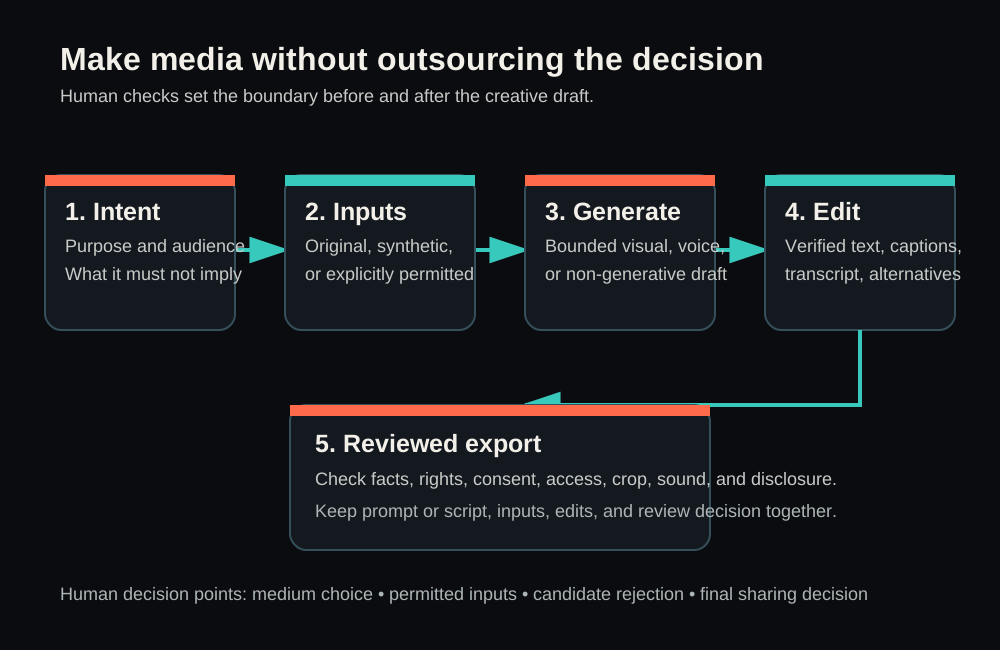
This is a retained original diagram, not a screenshot. Its availability and rendering are not newly checked in this authoring session; the process above is also explained in text.
Screenshot placeholder SC-01
Intended view: a separately approved media editor showing the Harborlight abstract background, editable stage copy, readable limitation, and dedicated caption area if the selected asset is video.
Proposed caption: “The editor controls exact words and access material; generated artwork supplies only the flexible background.”
Reference URL: not applicable; no vendor interface is specified.
Capture status: not captured. No authoring-session control or simulated interface was used.
Runnable exercise
The commission and what you will hand over
Choose your own permitted media project or use the complete Harborlight commission. Make one finished still, a roughly 20–60-second audio-only introduction, or a roughly 10–30-second illustrative video. The supplied script is intended for a clear short reading, not a guaranteed duration. If your recording needs more time, preserve intelligibility rather than forcing it into an arbitrary limit.
The result is one media handoff: the final asset, its format-appropriate access material, and a compact production record. The first version supports the before/after comparison; it is not a second commission. Reading the book stands on its own if you cannot make media now. A plan without an exported asset is preparation, not a completed production exercise.
You need an approved application for the medium, an ordinary editor where necessary, and a place you may save the project. You do not need an API, terminal, code, real customer material, or a particular subscription. If a provider or editor is not available, use an existing permitted manual route rather than installing something for this exercise.
1. Create a new working project
In your computer's file manager, create a new folder named harborlight-media in an approved working location, or use a project-specific name for your own brief. Do not replace an existing folder. If the editor stores its native project in an approved cloud workspace, give that project a distinct name and record where it lives.
In an ordinary text editor, create a new production-note.txt inside the folder. Start with the following and replace the bracketed choices before production:
Project: Harborlight practice workshop orientation.
Audience: participants in a private fictional-request rehearsal.
Chosen asset: [still / audio-only / video; choose one]
Purpose: introduce Intake, Review, Response and Closure and their supplied meanings.
Must not imply: a real company, customer, product, service time or successful resolution.
Delivery: [the actual intended presentation, audio player or video player]
Permitted inputs: synthetic copy from T09-L01; [other inputs and permission, or none]
Creative method: [approved generator, original drawing or authorized recording]
Tool/account approval: [actual decision; unresolved means do not upload]
Use ordinary project controls in the selected editor to create a new blank project. For a still or video, choose a wide format if that fits your delivery. For audio, create a new recording or speech-generation item. The expected state is an empty working project and a saved brief, not an existing presentation silently overwritten.
2. Save the exact copy outside the generator
Create a new approved-copy.txt in the working folder. The following is the complete synthetic text set for the commission:
TITLE
Harborlight practice request journey

STAGES, IN ORDER
Intake
Records the practice request.

Review
Considers what is being asked.

Response
Communicates a reply.

Closure
Marks the end of this practice sequence.

VISIBLE LIMITATION
Fictional rehearsal only. Not a real service promise.

SPOKEN SCRIPT
This is the Harborlight practice request journey.
Intake records the practice request.
Review considers what is being asked.
Response communicates a reply.
Closure marks the end of this practice sequence.
The four stages are intake, review, response, and closure.
This is a fictional rehearsal, not a real service promise.
The title, four definitions, and limitation are the finished information, not instructions to invent more copy. The script says that a response communicates a reply; it does not promise a favorable answer. Closure ends this invented sequence; it does not claim every request is solved. Preserve those distinctions when you choose images, emphasis, and sound.
For your own project, save your checked equivalent in the same way. Names, dates, numbers, quotations, and factual claims need their own approved source. If a generator suggests a more persuasive line, treat it as a proposed copy change, not an automatic improvement. Every request gets expert help instantly would change this commission even if the voice reads it beautifully.
3A. Still-image route: make an orientation visual people can read
In your approved image generator's prompt area, paste the background-only prompt from Core concepts. Do not include confidential context or upload unrelated reference material. Use available ordinary size controls to request the intended format. Make one candidate first; use up to three only if needed. If drawing manually, treat the same prompt as art direction and make a simple background in your editor.
Save the selected candidate in the working folder, for example as background-selected.png if PNG export is available. Keep the tool's original filename if necessary and record it. This is source artwork, not the finished orientation asset.
Use the following anticipated candidate comparison to understand selection. These are teaching possibilities, not generated outputs from this authoring session:
| What a candidate contains | What to do |
|---|---|
| Quiet open field with abstract edge decoration | Consider it for use behind controlled copy. |
| An attractive smartphone dashboard | Reject it: it suggests a real interface or feature. |
| Pale writing or a seal-like mark | Reject or replace it: viewers may read it as information or endorsement. |
| Busy abstract texture but no false claim | Consider whether the editor can confine it to decoration; do not sacrifice text readability. |
In the slide or image editor, import the selected background into the new project. Add the title from approved-copy.txt as editable text. Arrange four text groups left to right, each with its stage name and exact explanatory sentence. Draw three editable arrows to show the order. Place the visible limitation in its own readable area. Do not ask generation to render these words.
The following is a text layout specification, not a screenshot or a rendered asset:
Harborlight practice request journey

Intake                 Review                    Response                Closure
Records the            Considers what            Communicates            Marks the end of
practice request.  ->  is being asked.        ->  a reply.            ->  this practice sequence.

Fictional rehearsal only. Not a real service promise.
[Accurate production disclosure in a readable separate area]
Do not paste that spacing as an image. Build real editable text groups with the editor's layout tools. Choose readable type and contrast at the intended display size; the text need not be tiny to preserve wide margins. If the four explanations do not fit, use a simpler composition or a vertical sequence appropriate to your own delivery rather than shrinking the meaning out of sight.
Save the native project with a distinct name such as harborlight-still-source. Export a first image as harborlight-still-v1.png if supported. An image export is convenient to share, but it flattens the editable text; retain the source project for corrections.
For a standalone informative still, this is a worked text alternative carrying the complete commissioned meaning:
Fictional Harborlight request journey, in order: Intake records the practice
request; Review considers what is being asked; Response communicates a reply;
Closure marks the end of this practice sequence. This is a rehearsal, not a
real service promise.
Put the alternative in the actual destination's image-description field when available. If the surrounding accessible document already states all definitions in order, use a shorter contextual alternative or mark redundant decoration appropriately. Include the full text in the handoff so it survives transfer. A local text file alone does not configure the destination's image description.
The worked result is one orientation visual whose message comes from the supplied title, ordered definitions, and limitation. The background makes it visually inviting; it does not carry unique factual information. No exported image is supplied or claimed here. You create and inspect that export in your selected editor.
3B. Voice route: make the introduction clear when heard once
In an approved text-to-speech application's script field, paste only the SPOKEN SCRIPT section, not the headings or the entire brief. Select a general, non-identifying synthetic voice using the controls actually available to you. Do not upload a colleague's recording or request a founder, celebrity, or supervisor's voice. Alternatively, record the script with an authorized narrator in your existing recording application.
If the tool has a separate delivery-instruction field, use this direction there. If it has no such field, use its ordinary voice and pace controls; do not paste production instructions into words that will be spoken.
Read the supplied script exactly in a clear, neutral, general synthetic voice.
Do not imitate a person or add an introduction, endorsement or new claims.
Make each stage sentence distinct, with natural short pauses.
Keep the fictional-rehearsal limitation as audible as the rest of the script.
Preview the reading. Follow approved-copy.txt line by line. Listen especially for Review versus Response, the full word Closure, the repeated stage order, and the final limitation. Smoothness is not enough. If the tool replaces a word, regenerate that passage or the short script using supported controls. Do not silently change the approved meaning to match the mistake.
Save or download the first recording to the working folder as harborlight-voice-v1 with the real extension your tool provides. Use a supported delivery format such as MP3 or WAV where available; do not rename an extension to pretend a conversion occurred. Save the editable project or generation reference if your tool supports it.
Create a new transcript.txt from the actual final recording. The expected words for a correct reading are exactly the supplied spoken script. Verify that expectation by listening. This route contains one narrator and no planned music or effects, so it needs no invented speaker identities or sound labels. If you add a meaningful permitted sound, account for it in the transcript.
If a stage is unclear, one purposeful improvement can be to introduce a clearer pause between stage sentences while keeping every word unchanged. Avoid long silences that make listeners think playback ended. If an essential term remains unintelligible after a focused correction, use an authorized human recording or a text-based medium. A brief, clear reading is more useful than repeated synthetic attempts that keep obscuring the message.
The worked result is a standalone spoken orientation paired with a transcript. The copy supplies the whole meaning without requiring a screen. Its actual duration, pronunciation, and intelligibility depend on the recording you produce; none has been measured in this authoring session.
3C. Video route: use movement to guide attention
In your approved video editor, create a new short project. Import your selected abstract background or draw one with the editor's ordinary tools. Add the exact title, stage words, and explanatory copy as editable elements. Import an authorized or general synthetic narration of the supplied script, following the voice route's copy comparison. This is still one video asset; you are not being asked to deliver an additional audio commission.
Simple highlighting can do the job. Keep the four stages visible while emphasizing the one being introduced. Use a subtle change in outline, emphasis, or position that does not rely solely on color. Avoid rapid flashes, unnecessary camera movement, and scenes that look like real customer interactions. A slow pan is optional, but do not pan important words out of view.
This is the planned sequence. Set durations by the actual narration and comfortable reading time, rather than copying invented timestamps:
| Part of the clip | Exact narration | Intended visual |
|---|---|---|
| Opening | This is the Harborlight practice request journey. | Title and all four stage names |
| Intake | Intake records the practice request. | Emphasize Intake and its sentence |
| Review | Review considers what is being asked. | Emphasize Review and its sentence |
| Response | Response communicates a reply. | Emphasize Response and its sentence |
| Closure | Closure marks the end of this practice sequence. | Emphasize Closure and its sentence |
| Recap | The four stages are intake, review, response, and closure. | All stages and arrows equally visible |
| Close | This is a fictional rehearsal, not a real service promise. | Readable limitation and production disclosure |
If you want to generate motion rather than assemble it, keep that generation restricted to the decorative background. A bounded direction is:
Subtle movement of abstract paper-cut shapes confined to the upper edge
of a wide frame; quiet open central and lower field for editor-added text.
No scene changes, people, writing, numbers, logos, interfaces, diagrams,
flashing light or realistic locations. Do not depict a real event.
Use only permitted input artwork if the service needs a starting image. Inspect the entire resulting clip for added symbols, morphing text-like shapes, and unwanted scene changes. If it cannot stay within that boundary, use the still with editor-controlled emphasis. There is no need to generate a whole cinematic story to introduce four stages.
In the editor's caption track or caption-editing area, create captions from the actual narration. Use the script as the expected text, but compare it with the sound. The sentences in the sequence table are a copy reference, not a ready-timed caption file. Split long phrases where needed, keep them in order, and time each to its spoken passage. Do not show the entire script throughout the clip.
This design includes no meaningful non-speech sounds. Do not add [gentle transition sound] unless such a sound actually exists and contributes meaning. If a later version uses a bell to tell participants to pause, its sound source needs permission and its function needs a synchronized caption. New facilitator speech also needs approval and captioning; it cannot remain in the audio while disappearing from text.
Reserve separate space for stage copy, captions, and the limitation. The final line must remain visible long enough to read. A player progress bar should not cover it. All essential visual meaning is already stated in narration here, so the decorative highlights do not introduce a silent instruction. If you change that design, revisit how a listener will obtain the new visual information.
Save the native project and export harborlight-video-v1 using the real format your editor offers. If your delivery supports a separate caption file, export and attach it through that delivery's normal controls. If you use open captions rendered into the picture, check the words and visibility in the resulting video. The presence of a caption track inside a project does not prove the audience receives it.
The worked result is a short illustrative introduction, not footage of a service. Its narration communicates every stage; its motion directs attention; its captions provide timed access to the spoken message. This is a complete production specification, not a claim that a clip, caption file, or hosting result was generated here.
4. Improve the same asset once
Open the first exported version in the viewer or player intended for your audience. Keep version 1. Name an actual weakness in production-note.txt before changing the source project.
For the optional still, the designed improvement is to move all controlled copy onto a plain high-contrast reading panel if the artwork competes with it. This preserves the creative background while giving the audience one clear reading area. Use the same words and stage order so that you are comparing layout, not a different message.
For audio, use a concrete listening problem such as a rushed transition between Review and Response. For video, use an observed timing or composition problem such as the close disappearing too quickly. You may identify a different weakness in your own asset. Do not deliberately degrade a good first version just to manufacture a before/after story.
First version: [actual filename]
Observed weakness: [what was difficult at the intended size or during playback]
One purposeful change: [the layout, voice or timing change you made]
Revised version: [actual v2 filename]
Comparison: [what became clearer, stayed the same or became worse]
Remaining problem and delivery decision: [none observed in this review, or actual limit]
A useful observation would be The response sentence was hard to locate over the texture; after moving the four text groups onto one plain panel, I could read the sequence without searching between decorative shapes only if that is what you actually observed. If the change did not help, say so and keep the better version. Do not write accessibility verified based only on personal preference or one viewing.
Save the revised native project and make a new export with v2 in its name. Keep the first version separate. If a rights or consent problem appears, stop using the affected material rather than treating it as an optional aesthetic improvement. Correct all release-blocking defects before sharing, even if that requires a simpler authorized method.
5. Review the file that will be delivered
Use a single focused review of your completed work, after the planned edits. This is the learner's production review; no authoring-session execution is claimed by the book.
For a still, compare every word and arrow with approved-copy.txt, then inspect at full size and actual delivery size. Confirm that all four definitions and the limitation can be read. Check that the destination contains the appropriate text alternative; the artwork alone cannot carry it for you.
For audio, play the whole export while following transcript.txt. Check the start and end for clipped speech, stage order, pronunciation, and the audibility of fictional rehearsal. The written transcript must be available with the audio, not only in a forgotten source folder.
For video, play the export with sound and then muted. With sound, compare words and timing. Muted, confirm captions, visible sequence, reading time, and the limitation. If the delivery platform processes the file, check that representation too when you are authorized to use it. A local success does not establish that a later transcode preserves timing or caption selection.
For every route, compare the asset with the brief: it must not suggest real customers, a working application, a guaranteed outcome, or a particular person speaking. Verify the source and permitted use of every input. If one is unresolved, replace it or keep the asset private.
Use disclosure that matches the actual production. These are alternatives, not text to paste all at once:
AI-generated abstract background; text and sequence added and reviewed by the presenter.
Fictional rehearsal only. Not a real service promise.
General synthetic narration of a fictional rehearsal script.
Script and transcript reviewed by the presenter.
AI-generated abstract background and general synthetic narration.
Script, labels and captions reviewed by the presenter. Fictional rehearsal only.
If you drew the background or recorded authorized human speech, replace the corresponding synthetic claim with the actual method. Do not claim a review you have not done. Place the disclosure where the intended audience can encounter it, including accompanying text for an audio-only file. Retain the fictional limitation within the content itself so it is not lost when a filename or description is omitted.
6. Complete the handoff record
Append the following fields to production-note.txt. Fill them from your work; no field should claim generation, review, or permission merely because a template contains it.
Final asset: [actual reviewed filename and intended delivery location]
Source project: [native project filename or controlled project reference]
Production date and actual tool: [record what you used; model/version if exposed]
Inputs and permissions: [each input, source and permission for this use]
Exact prompt/script: [copy here or refer to the included approved-copy.txt and prompt]
Candidate decision: [actual selection/rejection reason; or manual method]
Controlled edits: [text, arrows, voice edits, timing or other actual work]
First version and improvement: [the completed before/after entry]
Access material: [destination alt text, transcript, or captions and visual-information decision]
Disclosure: [the exact wording delivered]
Final-export review: [who/role, what was inspected, actual findings]
Delivery decision: [ready for the defined use / private draft; unresolved reason if any]
The asset and its supporting record form one handoff package. You do not need a website, portfolio, new approval system, or multiple media outputs. Keep only the selected final export in the intended share location, with the appropriate supporting material. Preserve the first version and native source according to your setting's retention policy.
Transfer case: Mira's fictional laboratory explainer
The source manuscript's Mira case shows why the same production method matters in a different setting. Mira is preparing an internal practice talk about an invented BlueRiver sample journey. Her approved stage words are Receipt, Preparation, Review, and Archive. A realistic laboratory animation with white coats and equipment would look impressive, but the talk is not evidence of a laboratory procedure or result.
Her controlled copy is:
A sample moves through receipt, preparation, review, and archive.
This fictional sequence is for training only.
The words do not establish a specimen type, handling method, test, or organization. The illustration should not add those implications. Mira's bounded prompt therefore asks for four abstract stations with no people, laboratory logos, writing, instruments, hazard symbols, realistic samples, results, badges, or watermarks. She adds exact labels and connectors in the editor.
In the synthetic teaching comparison, a four-circle candidate is potentially useful, a tube-and-person candidate resembles an unverified procedure, and a graph-like candidate implies measurement. The first can support the talk; the others should be rejected. Mira can pan slowly across a still rather than inventing new scenes. A general synthetic voice can read the checked sentences without borrowing a colleague's identity.
The meaningful correction in the original case is a disclosure too small at the intended presentation size. Enlarging it in the source and re-exporting changes what viewers can actually read. This remains an anticipated teaching case, not an observed laboratory or provider run. The point is media production: a concept illustration must not turn into fabricated scientific evidence. It is not an image-analysis or microscopy exercise.
Transfer case: Jonas's company-like illustration
The original Jonas case underpins the Harborlight commission. Jonas initially asks for a happy customer receiving rapid expert support. That request adds a testimonial-like person, speed, expertise, and a favorable outcome. He instead chooses a still with the controlled sequence Intake → Review → Response → Closure and a fictional-training limitation.
A candidate with a smartphone interface is inappropriate because it suggests an actual application. Abstract shapes with space for labels serve the limited brief. His useful alt text names the sequence rather than describing only colors. In the original synthetic recovery, a footer covers Closure; moving the footer preserves the label instead of shrinking it into unreadability.
This edition makes the same commission more useful to a newcomer by supplying a meaning for each stage, a complete narration, and a video sequence. It preserves Jonas's central decision: explain the invented journey instead of pretending to demonstrate a product. Your own project can make a different aesthetic choice while keeping that separation between illustration and evidence.
Common failures and practical recovery
A found image, recording, or music clip seems free because it downloads
Availability does not establish permission to upload, transform, or distribute it. A brief song fragment may still have rights restrictions. A stock license may not cover every transformation, and organizational approval is separate. Identify the exact source and permitted use; if either remains uncertain, replace the input with original or specifically authorized material. A credit line cannot supply missing permission.
Generated copy or symbols escape into the finished visual
A pale numeral, fake certification seal, misspelled stage, or invented chart may look decorative to the maker and informative to the audience. Remove the candidate or rebuild the affected layer. Do not use an image alternative to excuse a visibly wrong label. Exact values, citations, and relationships belong in controlled copy based on checked sources.
If generated connectors repeatedly fail, stop generating connectors. Use editable arrows and known stage positions. Luis's original book-donation teaching case makes this concrete: Offer, Check, Accept, and Shelve are four controlled stages. A fifth station or approval stamp changes the meaning, while a faint line can be replaced with an unambiguous editable arrow. The creative method should serve the relationship, not dictate it.
A readable word moves into the wrong relationship
Nadia's original idea-review case uses Submit, Clarify, Consider, and Close. Every word can be spelled correctly while Clarify and Consider are reversed. A font substitution can also wrap a label over the wrong connector after export. Compare the ordered meaning against the source, widen or realign the controlled panel, and export again. A spelling checker does not verify the process.
The audio sounds fluent but alters the message
Evan's original museum-storage case shows three different failures: a stage is replaced with another word, a pause makes the sequence sound finished too early, and the fictional limitation becomes quiet. Fix the audio instead of rewriting the transcript to match an unauthorized version. Remove an unnecessary introduction if it creates pronunciation trouble. Add appropriate opening space if export clips the first sound. When essential speech remains unclear, an authorized human reading is a practical alternative.
Captions contain the right words but fail the viewer
The whole script displayed for the whole video may cover important labels and fail to follow speech. Keisha's original bicycle-check-in case separates phrase timing, a meaningful transition bell, speaker identification, and placement. Correct each from the actual audio and visual sequence. If a bell signals a move to inspection, caption that function at the correct time. If a facilitator adds an unapproved instruction, remove it or approve the revised script and caption it; do not leave two conflicting versions.
A description is treated as universal accessibility
An image description does not supply timed video captions. A transcript does not automatically describe an essential silent event. A decorative image may need to be ignored rather than described. A branching diagram may require nearby structured text. Ask what information is unavailable without sight or sound in this particular delivery, then supply that information through the appropriate route. Seek accountable accessibility guidance when the intended use needs more than this bounded exercise covers.
A generated scene or voice borrows credibility it has not earned
Amara's original identity scenarios distinguish a general narrator from a supervisor imitation, and an old authorized recording from consent to new public synthetic speech. Changing the name of a recognizable person or organization does not settle the question. Redesign with non-identifying media or obtain the necessary specific documented permissions before using identity-bearing material. If the job is a real demonstration, use authorized real evidence rather than a realistic synthetic substitute.
The preview passes but the delivered export fails
Ravi's original export case includes a cropped limitation, audio starting before the relevant visual, an unnecessary tone that resembles an alert, captions ending too soon, and blurred text after compression. Correct the source project and re-export only the affected asset. Remove an unnecessary ambiguous sound rather than explaining it away. Give essential text more space and contrast. Keep the final frame long enough to read.
If platform processing leaves a defect you cannot fix, keep the video private or use the reviewed still and written script instead. Do not mark the wrong file as reviewed because a better version exists elsewhere. These cases illustrate possible failures; they are not observations of a named provider or evidence that all of them will occur.
Regeneration replaces a decision
After a small batch, name the repeated failure. If the central area remains busy, request a plain central field once or draw it. If exact stage count keeps changing, use editor shapes. If the task requires real evidence, no amount of prompt refinement can generate the missing event. Keep one useful improvement tied to the commission and choose the simplest method that actually communicates it.
Exit check
Deliver one finished media handoff for your chosen project or the optional Harborlight commission: the selected export, its appropriate access material and accurate disclosure, plus one production record containing the exact prompt or script, first-version reference, and observed result of one purposeful improvement.
The handoff passes when a reviewer can inspect the following:
- The asset serves its stated audience and purpose. For Harborlight, it introduces the four stages and their supplied meanings without implying a real service or guaranteed outcome.
- Each input has an identified source and permission for the intended use. Necessary rights, identity consent, and organizational approval are resolved; uncertain material is excluded.
- Exact copy and relationships match the approved source and remain understandable in the delivered file. Generated imagery has not introduced unsupported facts or apparent evidence.
- The format has appropriate access material: an informative still's text alternative, a checked audio-only transcript, or synchronized video captions including meaningful sounds, with essential visual information addressed as the content requires.
- Disclosure matches the actual production. The final export and intended delivery representation have been reviewed within the stated scope, with limitations recorded honestly.
- The first version and meaningful revision can be compared. The record explains the actual difference, including a revision that did not improve the result; it does not invent feedback or a successful test.
A prompt, script, storyboard, or attractive preview without a finished export is prepared work, not this exit artifact. An unresolved rights, consent, factual, or accessibility defect means the asset stays private until corrected or replaced by a suitable authorized alternative. A simpler completed illustration is a stronger result than an unshareable cinematic draft.
Source notes
- Public baseline: T09-L01 — Images, Voice And Video For Your Own Work (opens in a new tab). This revision used the complete local source
editorial/drafts/l1-refinements/T09-L01.mdand the exact public-body baseline hash supplied in the 11 September completion brief. The source's API fetch and checksum timestamp,2026-09-09T10:50:57.3688468Z, is historical evidence, not a fresh retrieval here. - Authoring instructions read in full:
editorial/briefs/example-led-l1-completion.md,editorial/STYLE.md,editorial/LEARNINGS.mdversion 7, andeditorial/book-template.md. No existing catalogue example is associated with this book; the Harborlight commission develops its own synthetic material. - Retained accessibility sources: W3C Images Tutorial (opens in a new tab) and W3C Captions Tutorial (opens in a new tab). The prior manuscript identifies these as verified supplied references. Their historical status is retained; neither page was freshly fetched for this edition. They underpin the distinct image-purpose and synchronized-caption guidance, not a claim of compliance for a produced asset.
- Retained broader references: WCAG 2.2 (opens in a new tab) and the historical C2PA Technical Specification 1.4 (opens in a new tab). These are not new source checks, legal clearance, current provider instructions, or proof of retained credentials.
- Primary-document retrieval in this session: none. The revision changes no vendor-specific button path, account claim, price, installation instruction, or API. It uses ordinary editor concepts and supplied historical references instead of expanding product research.
- Synthetic material: Harborlight, BlueRiver, and the named teaching characters are fictional. Copy, layout specifications, storyboard, candidate comparisons, and recovery cases are authored teaching inputs or anticipated outcomes. They are not customer work, research observations, real companies, institutional adoption, or generated-media execution evidence.
Historical contributors retained
Sol's original manuscript supplied Mira and Jonas, the medium-choice reasoning, five-step workflow, rights/consent/disclosure/provenance distinctions, recovery patterns, and single-asset exit contract. The source credits Terra with the brief-version-2 expansion, production reasoning, candidate interpretation, accessibility distinctions, export teaching, and original process canvas. It credits Luna with source/index preparation and reader/media work, and Sol with final expansion and targeted corrections. All are recorded there as OpenAI contributors; exact historical model identifiers are not exposed in that contributor table.
The source reports 53,592 tokens for Luna, 56,560 for Terra, and 56,256 for Sol, with three webfetch calls, one apply_patch, and one apply_patch respectively. Its reported total of 166,408 includes cache and reasoning and excludes original-authoring and coordinator usage. These are retained historical reports, not independently reconstructed telemetry or costs for this edition. Historical manuscript-format, baseline, reading-length, and SVG/XML checks are likewise not new verification of this draft.
On 9 September, Astra (OpenAI, openai/gpt-6-astra) refined the manuscript around exactly one learner-chosen asset, one purposeful improvement, and a before/after note while retaining the optional brief. This edition preserves that learner-choice contract and the useful teaching contributions, consolidating repeated cases around the connected commission rather than attributing them to the new author.
Unknowns and limitations
No generator, voice service, editor, export, player, or learner project was operated in this authoring session. No screenshot, installation, caption timing, actual duration, print result, or classroom outcome was observed. The supplied text is sufficient to make the synthetic exercise; it is not a downloadable media bundle or evidence that an asset already exists.
Available tools, account plans, usage limits, upload policy, output terms, model behavior, and export features depend on the learner's setting. This book does not assert current vendor availability or provide a legal clearance or publication approval. An approved manual method remains valid. If no permitted method is available, the work remains prepared rather than finished.
The retained canvas and external links need coordinator integration checks; this writing session did not verify their delivery. No tests, lint, typecheck, manuscript validation, browser checks, dependency installation, commits, pushes, or publication were performed. The coordinator's consolidated verification and independent reader gate remain pending.
Rights, consent, privacy, publication rules, and accessibility requirements vary by material and delivery. The synthetic commission avoids real identities and high-stakes claims so you can practice production decisions. It does not certify anonymity, ownership, truth, universal accessibility, or WCAG conformance. A complex video, scientific result, real person's portrayal, or public campaign may need accountable specialist review beyond this exercise. Do not turn the rehearsal into apparent evidence by removing its limitation.
How this book was made
Coordinator editorial update, 11 September 2026: The independent Terra reader accepted this revision. The account below records authoring-stage work; learner execution and classroom outcomes remain unobserved.
Astra, OpenAI model openai/gpt-6-astra, was the single substantive writer for this 11 September 2026 revision in a fresh author context. The full source and named editorial instructions were read, and only this manuscript was written with apply_patch. No extra agents were used. The new work connects the retained teaching to one complete synthetic commission, supplies exact copy for all three media routes, and makes the before/after improvement concrete without inventing an export.
The production lesson is to keep the message fixed while changing its treatment: one approved copy source supports an image, a voice recording, or a video, but each needs its own access and delivery work. Historical contributors are credited above. Current token, cache, reasoning, and billing counters are not available; independent acceptance, execution, and publication remain unobserved.