Session 3
Same agents in your terminal: the Antigravity CLI
Goal. Drive the same agents from your terminal with the Antigravity CLI — and learn the rest of the toolchain you can build on.
▶ Try this prompt
add a greeting function
Launch the Antigravity CLI, pick a colour scheme when prompted, then type a task. The agent replies with the change as a code diff right in the terminal.
- 1Start the Antigravity CLI. On first run it greets you with 'Welcome to Antigravity CLI!' and a colour-scheme picker (light, dark, tokyo night and more).
- 2Type a task like the one above. The agent (shown as AGY) answers with the proposed change as a diff, so you see exactly what it would edit before accepting.
- 3Beyond the desktop app and CLI, Antigravity also ships an SDK and a managed agent service — so the same agents can run inside your own scripts and pipelines, not just the IDE.
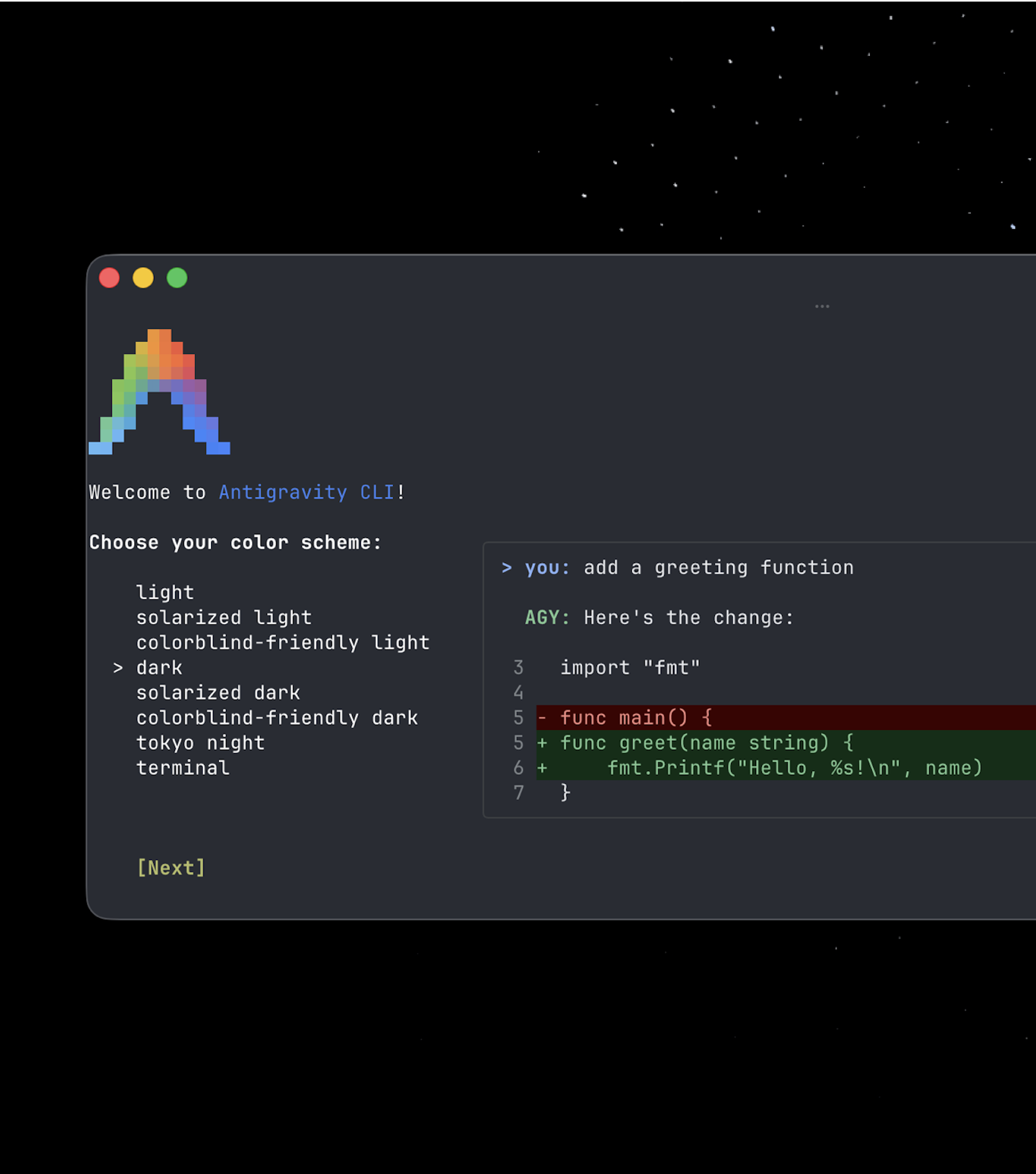
You'll see. A terminal session where you ask for a change in plain English and the agent replies with a ready-to-review code diff.
Cost. The CLI runs on the same free For Individuals plan and the same weekly rate limits — no separate cost for using the terminal instead of the app.
Takeaway. Antigravity isn't just an app: a CLI, SDK and managed service mean you can reach the same agents from the terminal or from your own code.