Shape your data in plain English
Goal. Refine the app's data — its entities and fields — by describing them, with no schema, SQL or connection step.
Each booking should record the room, the person's name and email, the date, start and end time, and a status (confirmed / cancelled). Add a 'capacity' number to each room.
Base44 updates the built-in database entities directly. You can also open Dashboard → Data to edit tables by hand.
- 1Send the prompt above to add/adjust fields, then open Dashboard → Data to see your entities (tables) update live.
- 2In the Data tab you can add/edit/delete records, search and filter, set per-entity view/edit permissions, and import a CSV (More Actions → Import) or export. Field types include Text, Number, Date, File, and Reference (links one entity to another).
- 3Add a couple of rows by hand to confirm the structure matches how people will use the app.
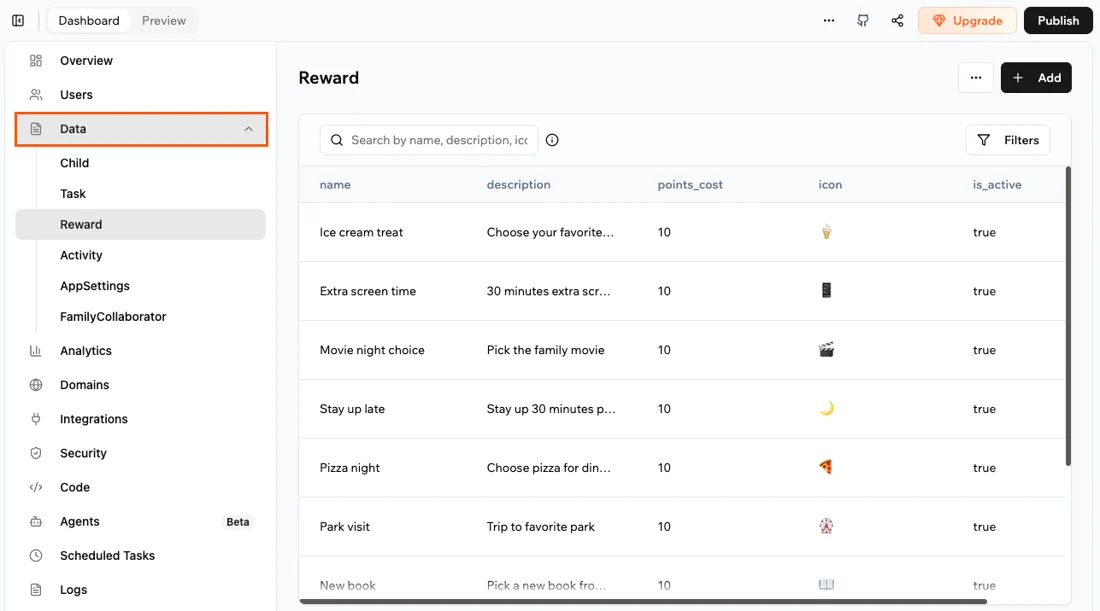
You'll see. Your entities and fields reshaped by description and editable in the Data tab — no schema file, no DB connection.
Cost. Shaping data via chat uses message credits; the database itself (reads/writes) costs no integration credits and is included free.
Takeaway. Modelling data in plain English is Base44's core no-code move — it replaces the whole 'connect a database' step other tools make you do.