Session 5
AI Agents: apps that take actions
Goal. Go beyond generating screens — give your app an AI agent that can take actions on your data.
▶ Try this prompt
Mark booking #5 as cancelled and free up that room.
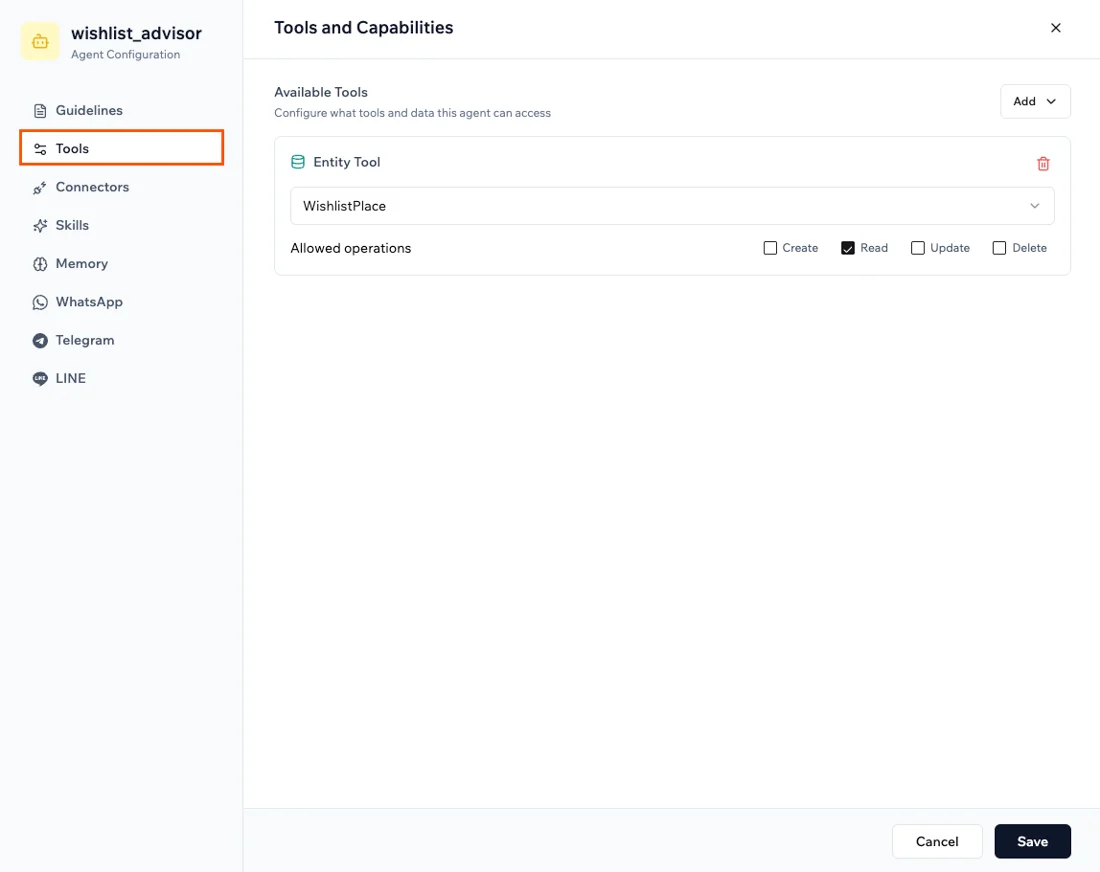
First create the agent in Dashboard → Agents and give it a tool to update records; then chat commands like this and it acts.
- 1Open Dashboard → Agents and create an agent from scratch. Give it a description/instructions, pick a model, and add Tools (what it may do — e.g. update a record, trigger an automation).
- 2Agents also support Skills, Memory, and channel connections (WhatsApp, Telegram, LINE) so users can talk to them outside the app.
- 3Chat a command like the prompt above and watch the agent take the action — it's scoped to the tools you granted, not fully autonomous.
You'll see. An agent that updates records and triggers workflows from a plain-language instruction.
Cost. Agent activity uses credits like other AI calls. (For a separate, cross-tool autonomous assistant, see Base44 Superagents — Gmail/Drive/Slack/WhatsApp with scheduled tasks.)
Takeaway. Base44 apps can act, not just display — an in-app agent turns 'a chat' into 'a chat that does things', within the tools you allow.