Session 9
Security scan: 5 checks before you ship
Goal. Run Base44's automated security check and fix what it flags before real users arrive.
- 1Open Dashboard → Security and Run Security Scan. It checks five categories: data-permission gaps, exposed credentials, login-verification gaps, package vulnerabilities, and security headers.
- 2Open Issues details, expand a finding (description, affected components, recommended fix), apply the fix, then re-run.
- 3Docs advise running it before your first publish and again after any significant change. There are also Advanced Security Settings (prevent embedding, restrict browser features).
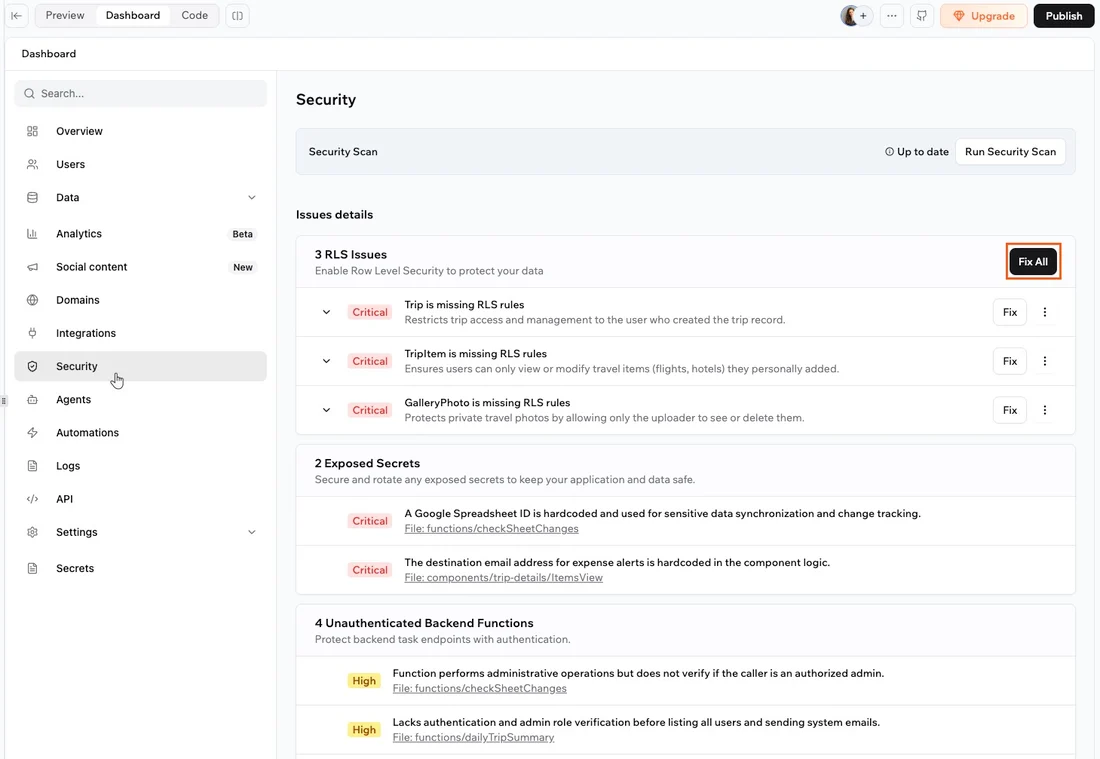
You'll see. A categorised list of security issues with concrete fixes — and a clean scan after you address them.
Cost. The security scan is free on all plans, including the free tier.
Takeaway. A real, free vulnerability scan ships in the box — run it before every launch, not just the first.