“Make this better” sounds simple, but it quietly transfers every important decision to the assistant. Better for whom? Shorter or more complete? May missing facts be invented? Which file may change? What does finished look like?
This lesson repairs that vague request. You will open a fresh synthetic project in OpenCode Desktop, keep one source file fixed, and make one controlled instruction change at a time. The finished artifact is only four lines long. That small size is useful: you can inspect every claim instead of trusting a fluent answer.
OpenCode is the workbench, not the source of truth. This lesson uses OpenCode Desktop. The Desktop window can run on your computer while the selected model is supplied by an external provider. A local Desktop window therefore does not prove local model processing, private retention, or approval for sensitive data. The CLI/TUI is optional and is not required for this lesson.
Learning objectives
After this lesson, you can:
- turn a vague request into a task, source boundary, output contract, and stop rule;
- open a bounded project in OpenCode Desktop with an approved provider;
- reference a synthetic project file deliberately and inspect requested writes;
- change one prompt element at a time and describe the visible effect;
- treat missing evidence as
NOT STATEDrather than inviting a guess; - verify a generated file line by line against its source.
Core concepts
Structure it: turn a wish into a work order
A prompt for file work should make the job inspectable. Four parts are enough for this exercise:
| Part | Question it answers | Useful form |
|---|---|---|
| Task | What single job should happen? | Extract four values |
| Context | Which permitted source defines the facts? | Use only request.txt |
| Constraints | What must remain true? | Do not infer missing values |
| Output | What can a person inspect? | Write exactly four labelled lines to card.txt |
A stop rule completes the boundary: if the task would require another source, an unknown fact, a credential, a destructive action, or a file outside the project, stop and ask instead of improvising.
Words such as “professional,” “useful,” and “high quality” can express intent, but they are weak acceptance tests. “Exactly four labelled lines” and “write NOT STATED when the source lacks a value” are observable. These constraints do not guarantee a correct result. They make an incorrect result easier to find.
Understand it: separate evidence from presentation
The assistant may reorganize text, but it must not upgrade an absence into a fact. No prompt can extract a deadline that the source does not contain. Better wording can tell the model how to represent the gap; it cannot supply the missing evidence.
This distinction matters in ordinary work. A polished date may look more useful than NOT STATED, yet it is less reliable because nobody can trace it to the permitted source. When evidence is missing, the safe choices are to retain the unknown, ask an authorized person, or provide another approved source. Guessing is not a fourth option.
Hire an agent: delegate a bounded job
In this Level 1 exercise, “hire an agent” means assigning one narrow task to the OpenCode assistant with a visible contract. It does not mean building an agent team, automating a workflow, or letting several agents coordinate themselves.
The human remains the task owner. You choose the permitted input, decide the file boundary, examine any requested action, and judge the result. The assistant drafts card.txt; it does not approve its own work.
Use the named project file as the factual source for the Desktop request. That is also a data disclosure to the configured processing path. Use only public, synthetic, course-provided, or explicitly approved files. Never substitute a real customer request, private budget, contract, credential, or production file for this exercise.
OpenCode permissions can allow an action, ask you to approve it, or deny it. An approval request is a checkpoint, not an obstacle to click through. Compare the proposed path and action with the work order. For this lesson, a write to prompt-repair/card.txt is in scope. An edit to request.txt, a write outside prompt-repair, a destructive command, or a request for credentials is not. Deny it, restate the boundary, and continue only when the requested action matches the job.
Build it: change one variable and inspect the effect
If the source, prompt, model, and output format all change together, you cannot explain what improved. Keep the source and selected provider fixed. Start with V1, add the work-order constraints for V2, and add only one format example for V3. Compare the resulting artifacts rather than claiming one version “felt better.”
The exercise uses two different kinds of writing:
- OpenCode may create or replace only
card.txt. - You, the learner, maintain
prompt-log.mdmanually after each version.
That distinction prevents a contradiction. The assistant is not asked to write a second log file while operating under a card.txt-only permission. Manually recording the exact prompt, the actual response, and your own observation also keeps the evidence separate from an assistant's account of itself.
Runnable exercise
1. Prepare a fresh project
Create a new folder named prompt-repair. Open that folder in a text editor and create request.txt with exactly this content:
Project: Cedar Room refresh
Requested change: replace the paper sign with a reusable notice board
Budget ceiling: EUR 180
Decision owner: Facilities team
Deadline: not stated
The fixture is synthetic. Keep its wording and values unchanged for V1, V2, and V3. In the same folder, create an empty prompt-log.md. This log belongs to you and will be edited manually, not by the assistant.
Before opening OpenCode, inspect the folder. It should contain only:
prompt-repair/
  prompt-log.md
  request.txt
2. Open the correct interface and provider
In OpenCode Desktop, choose Open project and select the existing prompt-repair folder. This is an application action, not a website upload or an instruction to install anything. Choose New session before sending the exercise request. The expected project boundary is the prompt-repair folder, not its parent and not your home directory.
Use the Desktop model control to select a provider and model approved by your school, employer, or project owner for this synthetic exercise. Record the displayed provider and model in prompt-log.md; if either is not verifiable, record unknown. If credentials or an unapproved provider are requested, stop. Do not paste credentials into the conversation. A local Desktop window does not prove local model processing.
Record only the provider name, or unknown, in prompt-log.md. Do not record an API key, token, password, or other credential. A provider connected to the local OpenCode Desktop application may still process the referenced file remotely.
3. Create the learner-owned log
Add these headings to prompt-log.md yourself:
# Prompt repair log

Provider: [approved provider name or unknown]
Project boundary: prompt-repair
Assistant may write: card.txt only
Learner maintains: prompt-log.md

## V1

## V2

## V3

## Final comparison
Under each version, you will paste the exact prompt you sent, the response you actually received, and your observation. Do not invent a response to make the log look complete.
4. V1: expose the ambiguity
Send this message in the OpenCode Desktop session:
Read `request.txt` and make a useful project card.
This intentionally vague instruction does not name a target file, required fields, missing-value behavior, or write boundary. Observe what your selected model actually does. It might answer in the conversation, request a write, or choose wording you did not expect. Those are possibilities, not predicted results.
If OpenCode requests a write, inspect the requested path before deciding. V1 has not authorized a destination, so deny any write and keep the response as the baseline. Do not grant broader access merely to obtain a tidier experiment.
In the learner-maintained prompt-log.md, record:
Prompt: [paste the exact V1 prompt]
Response: [paste or accurately transcribe what appeared]
Visible result: [name one observable feature]
Source check: [pass or fail, with one reason]
A useful observation names a checkable symptom: “No output file was specified,” “the response omitted the deadline,” or “the deadline was unsupported.” Do not write that V1 made a particular mistake unless you observed it.
5. V2: add the complete work order
V2 changes only the instruction. The source file, provider, project, and intended four values stay fixed. Send:
Use only `request.txt` as the factual source.
Create or replace card.txt with exactly these four labelled lines:
PROJECT:
CHANGE:
BUDGET CEILING:
DEADLINE:

Copy supported values without changing their meaning.
For an absent value or a value stated as not stated, write NOT STATED.
Do not add advice, dates, owners, suppliers, or commentary.
Do not modify request.txt or prompt-log.md.
Do not write any file other than card.txt inside the current project folder.
If completing the task would require another file, an outside path, a destructive
command, or a credential, stop and explain what is needed instead.
After writing, name the file changed.
Using request.txt deliberately places this synthetic file in the conversation. Check any proposed action before approval. Approve only creation or replacement of prompt-repair/card.txt. Stop and deny if the request targets another path, changes a source, runs a destructive command, or asks for a credential.
After the action, open card.txt in your editor. The expected reference content is:
PROJECT: Cedar Room refresh
CHANGE: replace the paper sign with a reusable notice board
BUDGET CEILING: EUR 180
DEADLINE: NOT STATED
Do not grade by visual polish. Compare each label and value with the source. Facilities team is present in request.txt, but it is correctly absent from card.txt because the output contract does not request an owner line. A new date would fail because the source states that the deadline is not stated.
Record the exact V2 prompt and observed response under ## V2 in prompt-log.md. Add what became checkable and whether each of the four source checks passed.
If V2 fails, keep the actual result in the log. Restate only the failed requirement and ask for a correction to card.txt. Do not silently edit the artifact into a passing answer and then attribute it to the assistant. If the assistant repeatedly seeks broader access, stop the session and complete the source comparison manually.
6. V3: test one example, not a new task
V3 keeps every V2 instruction and adds one representative example immediately before the live task:
Example input: Project: Willow shelf; Requested change: add labels; Budget ceiling:
not stated; Deadline: 4 October 2026
Example output:
PROJECT: Willow shelf
CHANGE: add labels
BUDGET CEILING: NOT STATED
DEADLINE: 4 October 2026
Then include the complete V2 work order unchanged. Run it against the unchanged request.txt, with card.txt as the only assistant-writable file.
The example demonstrates two format cases: a missing budget and a stated deadline. It does not supply facts about Cedar Room. If V2 already produced the exact expected content and V3 produces the same content, “no useful change” is a valid result. Extra prompt text should earn its place by correcting an observed, recurring problem, not by making the prompt look sophisticated.
Under ## V3, record the exact combined prompt, the actual response, and one visible comparison with V2. Do not claim the example improved the model unless the inspected output supports that statement.
7. Inspect the final result line by line
Open request.txt, card.txt, and prompt-log.md side by side. Complete this table manually under ## Final comparison:
| Version | One controlled prompt change | Visible result | Source check |
|---|---|---|---|
| V1 | Baseline vague request | Record what you observed | Pass or fail |
| V2 | Added source, output, boundary, and stop rule | Record what changed | Pass or fail |
| V3 | Added one format example | Record the effect or no useful change | Pass or fail |
Then check every output line:
PROJECTmatchesCedar Room refresh.CHANGEpreservesreplace the paper sign with a reusable notice board.BUDGET CEILINGpreservesEUR 180without changing currency or amount.DEADLINEisNOT STATED; it is not a guessed date.request.txtis unchanged.- No assistant-written file exists other than
card.txt. prompt-log.mdcontains your records rather than an invented assistant history.
The course companion provides downloadable synthetic inputs and inspectable reference outputs: open the T03-L01 companion viewer. It is a reference and checking aid, not an application you are expected to build or an OpenCode Desktop capture.
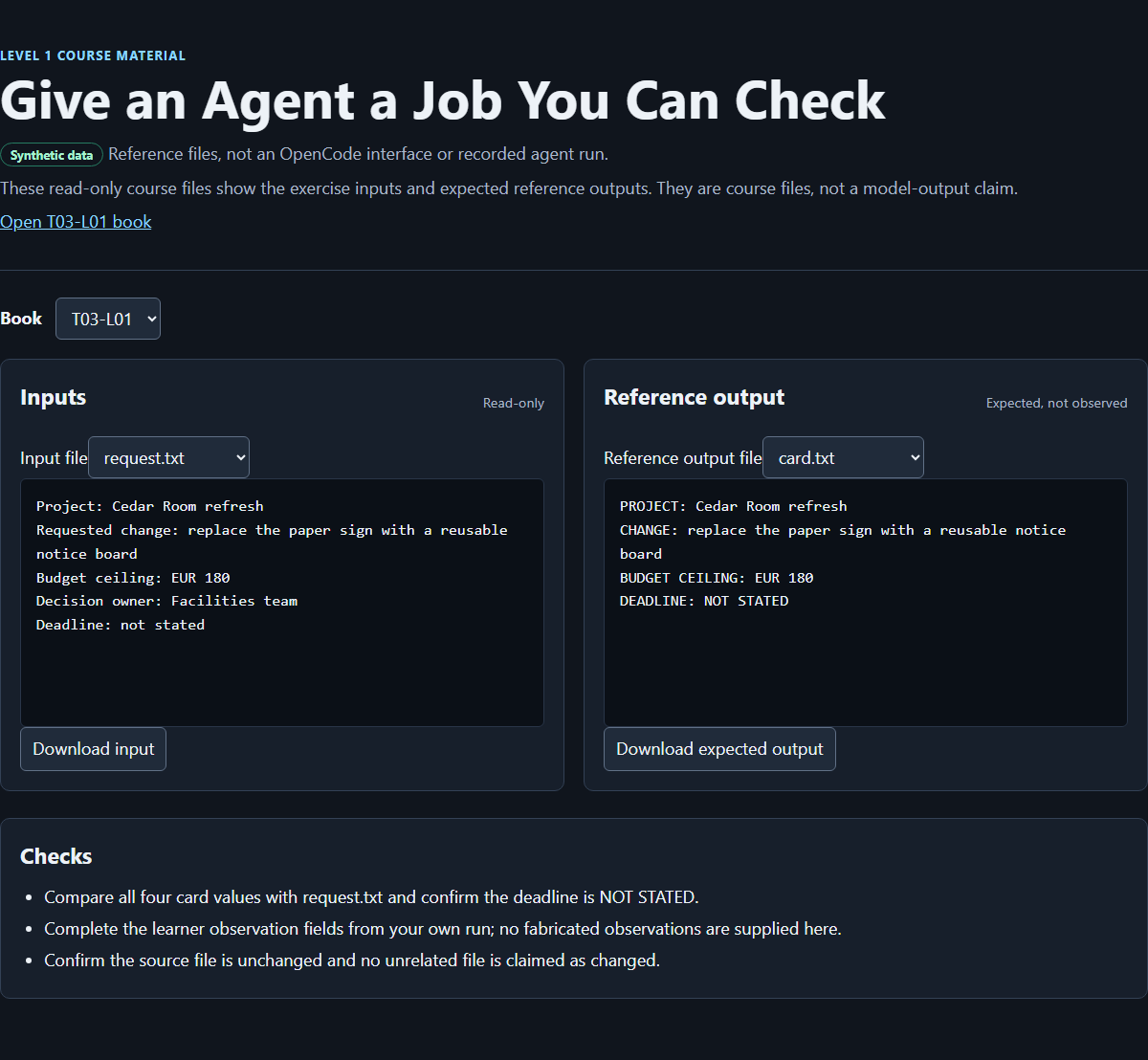
The image shows the course-authored browser result viewer for this synthetic exercise. It does not depict OpenCode Desktop, a captured model run, or evidence that the exercise was executed for you. Compare the downloadable fixture and reference output with your own files; do not replace your inspection with a screenshot match.
Finish prompt-log.md with:
The useful improvement was ______ because ______ became directly checkable.
Prompting could not supply the deadline because ______.
The human remained responsible for ______.
A sound answer identifies a concrete requirement such as the four-line output contract or missing-value rule, states that the source lacks a deadline, and names approval or source verification as the human responsibility.
Exit check
You pass when the prompt-repair folder contains the unchanged request.txt, one checked card.txt, and the learner-maintained prompt-log.md with honest records for V1, V2, and V3.
The final card.txt passes only when all four labels and values match the expected reference, no deadline is invented, and no unrelated file was changed by the assistant. The log passes only when it distinguishes actual observations from possibilities and identifies the one controlled prompt change at each step.
Explain the lesson without saying only that V2 was “more detailed.” Name the observable requirement that made it better. Explain whether V3 earned its extra text. Finally, describe what you would do if an agent requested an outside folder, destructive command, or credential: deny or stop, preserve the current files, and restate the bounded job.
Source notes
- The prior public T03-L01 lesson supplied the retained role-task-constraints-example pattern, controlled revision method, and explicit missing-value behavior: https://curriculum.32dots.de/api/books?where%5BbookId%5D%5Bequals%5D=T03-L01&depth=0&limit=1&draft=false (opens in a new tab)
- The OpenCode download page identifies Desktop downloads for Windows, macOS, and Linux: https://opencode.ai/download (opens in a new tab)
- The OpenCode English application locale is the source for the verified Desktop labels Open project, New session, and Changes: https://github.com/anomalyco/opencode/blob/dev/packages/app/src/i18n/en.ts (opens in a new tab)
- The OpenCode repository README provides project context but is not evidence for an unverified Desktop click path: https://github.com/anomalyco/opencode/blob/dev/README.md (opens in a new tab)
- OpenCode's provider documentation explains provider connection and configuration: https://opencode.ai/docs/providers/ (opens in a new tab)
- OpenCode's permission documentation defines
allow,ask, anddenyactions. This lesson uses the approval moment as a human boundary check rather than assuming every installation has identical settings: https://opencode.ai/docs/permissions/ (opens in a new tab) - The Cedar Room and Willow shelf records are synthetic course fixtures. The companion viewer and screenshot are course-authored checking aids, not source evidence about OpenCode behavior.
Unknowns and limitations
Generated wording, permission prompts, and whether V1 produces a file vary by OpenCode version, configuration, provider, model, and operating system. This manuscript does not claim that a particular V1 mistake occurred or that the exercise has already run in your environment. The expected card.txt is derived from the fixed fixture and output contract. Desktop controls beyond Open project, New session, Changes, and the model control are not asserted.
Using request.txt in the Desktop session may add its content to the conversation; it does not prove local model processing. Provider approval, retention, logging, network path, and account terms remain specific to your environment. Use no real, private, secret, or production input in this exercise.
This small fixture tests instruction clarity and four-field extraction. It does not measure model accuracy, prove reliable behavior on larger documents, teach orchestration, build a full application, or authorize facilities, purchasing, legal, or budget decisions. The viewer helps you inspect a reference result; it is not a substitute for checking your own source and output.
How this book was made
Sol revised the manuscript, preserving the permanent ID, public-body provenance, synthetic fixture values, controlled V1/V2/V3 method, and expected four-line result. Luna made a bounded Desktop-only orientation edit and inspected content gaps; the companion materials remain course-authored references. The coordinator integrates the manuscript and verifies the companion page and image before publication.
Authorship is separate from publication and final exercise execution. This section does not claim an independent approval, a captured OpenCode session, or a successful learner run. The examples are synthetic, and their expected outputs are designed to be inspectable.