OpenCode can read files, propose changes, and write files in a project. In this book you will use OpenCode Desktop with a local project folder. A Desktop window may run on your computer while the selected model runs through a remote provider, so "I opened it locally" does not prove "the data stayed local."
You will create a tiny project called weekly-brief. It contains synthetic notes about a fictional community event, Northbridge Skills Evening. You will give one OpenCode agent one bounded job: turn notes.txt into brief.md. Then you will inspect the result line by line.
This is a good first job because the material is synthetic, the consequence of an error is low, the output is small, and every claim can be checked against one source file. The aim is not to build an app or learn multi-agent orchestration. It is to practise the basic pattern: structure it, understand it, hire an agent, build it, and check it.
Learning objectives
After this lesson, you can:
- choose a bounded, low-risk job for an AI assistant;
- open a fresh project folder with OpenCode Desktop and use New session;
- give one agent an explicit input, output, boundary, and stop rule;
- inspect a requested file change against its source, line by line;
- stop safely when an action reaches outside the project or asks for credentials.
Core concepts
1. Structure it: choose a job you can check
The quickest way to get disappointed by AI is to give it a large, vague job. A safer first job has four properties:
- Permitted input: you are allowed to send the material to the selected provider.
- Low consequence: a mistake will not harm a person, spend money, or create a binding commitment.
- Small boundary: the agent needs only a named file or folder.
- Direct check: a person can compare the output with the source.
Use three labels when considering a task:
| Label | Meaning | Example |
|---|---|---|
| Good first job | Permitted input, low consequence, easy review | Turn synthetic notes into a brief |
| Use with checks | Helpful draft, but facts or commitments matter | Rewrite an approved email without changing its deadline |
| Keep human | Restricted data, high-impact judgement, or no reliable check | Rank applicants or diagnose a patient |
These labels apply to the particular task, not to AI in general. A job can move category when its data, consequences, or review method changes. Real customer notes, private employee details, production credentials, or an official event announcement would not be substitutes for this exercise unless their use had been explicitly approved.
For this first job, success is visible: one unchanged source file and one short output file whose facts all trace back to that source.
2. Understand it: know where the work happens
You will work in three distinct places:
| Place | What you do there |
|---|---|
| Operating-system tools | Create the weekly-brief folder and its source file |
| OpenCode Desktop | Choose Open project, start New session, select an approved provider/model with the Desktop model control, give the agent its job, and inspect requested actions |
Files in weekly-brief | Read notes.txt and compare it with the new brief.md |
The OpenCode interface can run on your computer while the selected language model runs through a remote provider. A local interface does not mean a local model. Before adding any input, identify the provider and model shown by OpenCode and use only a combination approved for the material. OpenCode's provider documentation (opens in a new tab) describes connecting providers and selecting models. This exercise does not require or justify entering a new API key merely for practice. If no approved provider is available, stop before sending the notes.
OpenCode can request tools to read, edit, or run commands. Its permission rules can allow, ask about, or deny actions. A permission request is a decision point, not proof that an action is safe. Compare the request with your stated boundary.
Stop and reject the request if it asks to:
- read or write outside
weekly-brief; - delete, overwrite, or move unrelated files;
- run a destructive or unrelated command;
- reveal, paste, search for, or modify credentials;
- use real, private, or production information.
After rejecting it, restate the narrow task. If the agent still cannot complete the job inside the boundary, end the session and leave the files unchanged.
3. Hire an agent: write a small job description
To “hire” an agent here means assigning a clear unit of work. It does not mean assembling an autonomous team. You remain responsible for choosing the input, approving the boundary, and accepting or rejecting the result.
A useful first instruction names five things:
- Input: which files or text may be used.
- Output: one file or visible answer.
- Exclusions: what must not be invented or changed.
- Check: how a person will compare result with evidence.
- Stop point: what requires a question rather than a guess.
OpenCode's agent documentation (opens in a new tab) distinguishes primary agents from subagents and describes the built-in Build and Plan agents. This lesson needs only one agent that is permitted to write the requested output. Do not delegate further: a second agent would not make this one-file transformation easier to verify.
The prompt in the exercise is the job description. It names the only readable source, the only writable output, facts that must not be invented, and the point at which the agent must stop and report.
4. Build it: treat the output as a candidate
A language model produces plausible text from context. It can shorten notes, add headings, and reorganize material, but fluent wording is not evidence. A date, place, quotation, total, or promise is supported only when you can trace it to an approved source.
For this project, inspect the requested write before accepting the work. The requested change is the creation of brief.md inside weekly-brief; notes.txt must remain unchanged. Whether OpenCode shows a permission question or performs an allowed action depends on the active permission configuration, so do not wait for a particular dialog. Check the files themselves.
Do not ask the agent whether its own answer is correct and accept “yes” as the check. Open both files. Match every output line to evidence, preserve unknowns as unknowns, and correct only what failed.
Runnable exercise
Prepare the fresh project
In your operating-system terminal, create a new folder named weekly-brief and enter it. Use your normal file manager or terminal commands. The folder should be empty.
Inside weekly-brief, create a new plain-text file at weekly-brief/notes.txt with exactly this synthetic content:
Event: Northbridge Skills Evening
Date: 18 September 2026
Place: Room 2
Planned activities: short talks, tool demonstrations, question table
Open item: accessibility contact has not been confirmed
Attendance: not stated
Do not add real names, contact details, or event records. Your folder should now contain only notes.txt.
The T01-L01 companion page provides downloadable synthetic input and inspectable reference outputs. It is a checking aid: you are not required to build the viewer, and its reference output does not replace your own comparison with notes.txt.
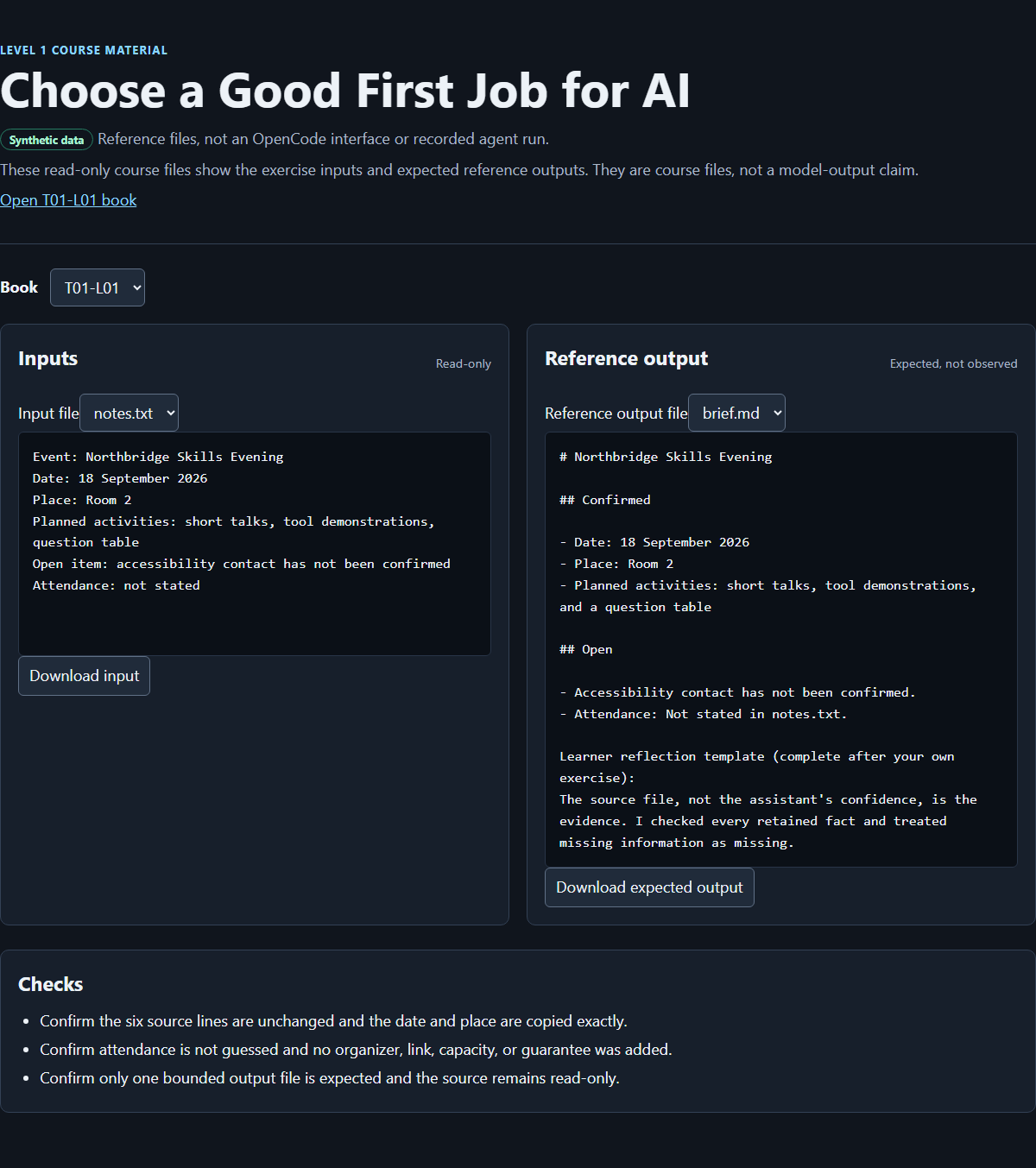
The course-authored browser result viewer for this synthetic exercise. It is not the OpenCode interface and is not proof of an autonomous session or a completed learner run.
Open the folder in OpenCode
In the installed OpenCode Desktop application, choose Open project and select the existing local weekly-brief folder. This is an application action, not a website upload and not an installation. Choose New session for this exercise. Use the Desktop model control to select an approved provider and model for synthetic course material before sending the notes. Record the displayed provider/model if your exercise evidence supports it. A local Desktop window does not establish that the model is local. If OpenCode asks for credentials or an unapproved provider, stop; do not search the computer for a key or paste someone else's key.
Give the agent the bounded job
In the new Desktop session, use one agent that can write files. Send this instruction exactly:
Read only notes.txt. Create brief.md with exactly these headings:
# Northbridge Skills Evening
## Confirmed
## Open

Under Confirmed, use bullets for facts explicitly stated in notes.txt.
Under Open, list unresolved or unstated items.
Do not infer attendance, add contacts, make promises, or change notes.txt.
If a requested fact is absent, write "Not stated in notes.txt."
After writing, summarize which file changed.
This prompt deliberately makes unknown information visible instead of inviting a guess. It also gives the agent no reason to browse the web, install a package, run a script, or inspect another folder.
If OpenCode requests an action, compare it with the job before deciding. Reading notes.txt and creating brief.md inside this project are in bounds. An out-of-folder read, an unrelated command, deletion, or a credential request is out of bounds. Reject it and say:
Stop. Work only inside the current weekly-brief folder. Read only notes.txt,
create only brief.md, and do not run commands or request credentials.
This is a deliberate learner check, not a claim that a particular permission dialog will appear.
Inspect the requested write
When the agent reports completion, inspect the actual brief.md and the project folder. Open Changes to inspect the proposed or recorded diff, including filenames, additions, and deletions. The agent's summary is helpful, but it is not evidence that only one file changed.
Wording may differ slightly, but the headings, values, and unknowns should match this expected result:
# Northbridge Skills Evening

## Confirmed

- Date: 18 September 2026
- Place: Room 2
- Planned activities: short talks, tool demonstrations, and a question table

## Open

- Accessibility contact has not been confirmed.
- Attendance: Not stated in notes.txt.
The expected result preserves the distinction between confirmed information and open information. It does not turn “not stated” into zero attendees, an invitation, or a promise to confirm attendance.
Verify it line by line
Open notes.txt and brief.md side by side in your editor or file viewer. Check each output line rather than judging the document by its overall tone.
Line in brief.md | Evidence or rule |
|---|---|
# Northbridge Skills Evening | Event: Northbridge Skills Evening |
## Confirmed | Required by the job description |
| Date bullet | Exact value from Date: 18 September 2026 |
| Place bullet | Exact value from Place: Room 2 |
| Activities bullet | All three activities from the source; “and” may be added for readable prose |
## Open | Required by the job description |
| Accessibility bullet | accessibility contact has not been confirmed |
| Attendance bullet | Attendance: not stated and the required missing-information wording |
Then check the boundary:
- Confirm that
18 September 2026andRoom 2are unchanged. - Confirm that all three activities remain present.
- Confirm that attendance is not guessed.
- Confirm that no organizer, registration link, capacity, or guarantee was added.
- Confirm that
notes.txtis unchanged and no other file was created.
If every check passes, the file is an inspected candidate suitable for this synthetic exercise. This does not prove that the model will be accurate on other material.
Recover from a failed result
If a fact is wrong or invented, do not widen the prompt or ask the agent to “improve everything.” Keep the source unchanged and request one bounded correction, for example:
In brief.md, replace the unsupported attendance statement with
"Attendance: Not stated in notes.txt." Do not change any other line or file.
Inspect the correction against the same source line. If the agent changed another line, restore that line from the last checked version and stop the session. A narrow correction is easier to understand than repeated whole-document rewrites.
If notes.txt was changed, restore its exact fixture content shown above before continuing. If another file was created, inspect its name and contents before removing it; do not approve a broad cleanup command. If the agent accessed material outside the folder or exposed a credential, stop immediately and follow the relevant organizational incident process. This exercise cannot make an exposed secret safe.
After the file itself passes, add this explain-it-back note at the bottom of brief.md. Add it yourself in your text editor so that you practise distinguishing the agent's draft from your own verification record:
Checkpoint: OpenCode transformed one permitted source into a draft. The source file,
not the assistant's confidence, is the evidence. I checked every retained fact and
treated missing information as missing.
Exit check
You pass when your local weekly-brief folder contains the unchanged notes.txt and a checked brief.md, with no unrelated files created by the task.
Before finishing, answer these questions without asking the agent:
- Why was this a good first job? Your answer should include synthetic input, low consequence, and direct inspection.
- What was the agent allowed to read and write? Your answer should be
notes.txtandbrief.md, both insideweekly-brief. - Which details remained unknown? Your answer should include attendance and the accessibility contact.
- What would make you stop? Your answer should include out-of-folder access, destructive actions, and credential requests.
The artifact fails the exit check if any value was invented, either required heading is missing, notes.txt changed, or you accepted the result without comparing every factual line with the source.
Source notes
- The previous public lesson supplied the durable principles retained here: plausible language is not evidence; approval comes before input; consequences determine checking strength; people remain accountable. Baseline: https://curriculum.32dots.de/api/books?where%5BbookId%5D%5Bequals%5D=T01-L01&depth=0&limit=1&draft=false (opens in a new tab)
- The dated Desktop research check records the official download entry point and verified shared labels Open project, New session, and Changes: https://opencode.ai/download (opens in a new tab)
- OpenCode's official provider documentation describes connecting a provider and selecting a model: https://opencode.ai/docs/providers/ (opens in a new tab)
- OpenCode's official agent documentation describes primary agents, subagents, and the built-in Build and Plan agents: https://opencode.ai/docs/agents/ (opens in a new tab)
- OpenCode's official permission documentation defines
allow,ask, anddeny: https://opencode.ai/docs/permissions/ (opens in a new tab) Northbridge Skills Evening, its date, place, activities, and open items are synthetic course fixtures. They describe no real event or person.- The companion page and screenshot are course-authored checking aids. Their reference files do not establish what happened in a learner's OpenCode session.
Unknowns and limitations
The exercise has not been executed against your OpenCode version, provider, operating system, permission configuration, or organizational policy. Interface details and generated wording may differ. A local Desktop window and local project folder do not establish local model execution, private retention, or approval for real data.
This small fixture checks whether a short transformation can be traced to one source. It does not measure model accuracy or establish reliability for web research, arithmetic, confidential work, orchestration, autonomous operation, full application development, or consequential decisions. Passing this exercise does not authorize broader file access or remove the need for human accountability.
How this book was made
Sol revised the existing T01-L01 manuscript, preserving its permanent ID, source provenance, synthetic fixture, expected values, and central lesson that plausible text is not evidence. The revision organizes the lesson around structuring the task, understanding the interface and provider boundary, hiring one bounded agent, building the file, and checking it line by line. Luna performed a Desktop-only editorial alignment without replacing Sol's authorship.
Luna inspected content gaps and prepares the companion materials. The coordinator integrates the manuscript and verifies the companion page, downloadable files, screenshot, and publication path. Those integration checks and final exercise execution are separate from authorship; this manuscript does not claim that publication, an independent review, or a learner run has already occurred.