Session 5
Go visual + deploy from GitHub (hosted AMP)
Goal. Take your code-first crew to the optional hosted platform (CrewAI AMP) and deploy it straight from a GitHub repo.
- 1Push your crew to a GitHub repo, then in CrewAI AMP choose Deploy your crews from GitHub and select that repository and branch — no servers to manage by hand.
- 2Add the environment variables your crew needs (such as your LLM API key) in the same screen, and optionally tick Automatically deploy new commits so future pushes redeploy.
- 3The Basic tier is free and includes the visual editor, an AI copilot and GitHub integration, with 50 workflow executions/month; an Enterprise tier is quote-only for CrewAI-hosted or private infrastructure.
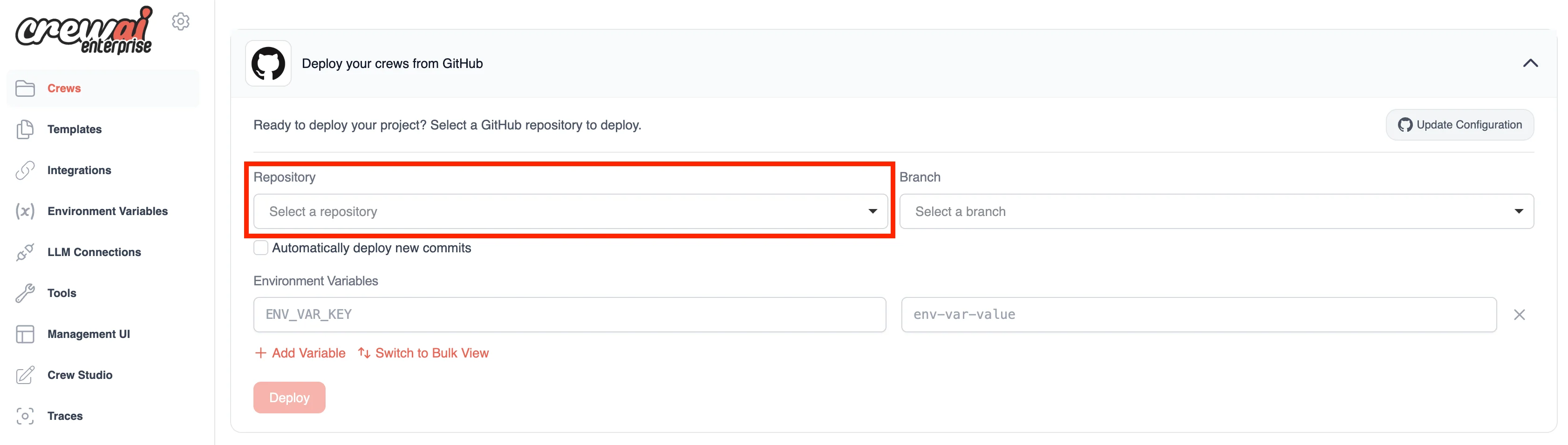
You'll see. Your local crew connected to a hosted platform that builds and deploys it directly from your GitHub repository.
Cost. AMP's Basic tier is free (50 workflow executions/month, visual editor, AI copilot, GitHub integration). Enterprise is custom-quote (50 hours of development/month, hosted or private infra). You still bring your own LLM key — that usage is billed separately.
Takeaway. The framework stays code-first and free; AMP is an optional layer that adds a visual editor and one-screen GitHub deploys.