Session 6
Monitor your crew in production
Goal. See where deployed crews live, get the URL and token to call them, and manage them from one dashboard.
- 1After deploy, AMP shows a progress view — the first deploy can take several minutes while it builds images for your crew — followed by a live URL and a Bearer Token you use to call your crew securely over HTTP.
- 2Use the management dashboard to see all your deployed crews side by side, each with its URL, token (with a Reset option), and Manage / Re-deploy / Delete controls.
- 3From here you can re-deploy after a code change, rotate a token if it leaks, and keep an eye on your crews running in production — the operations layer on top of the open-source framework.
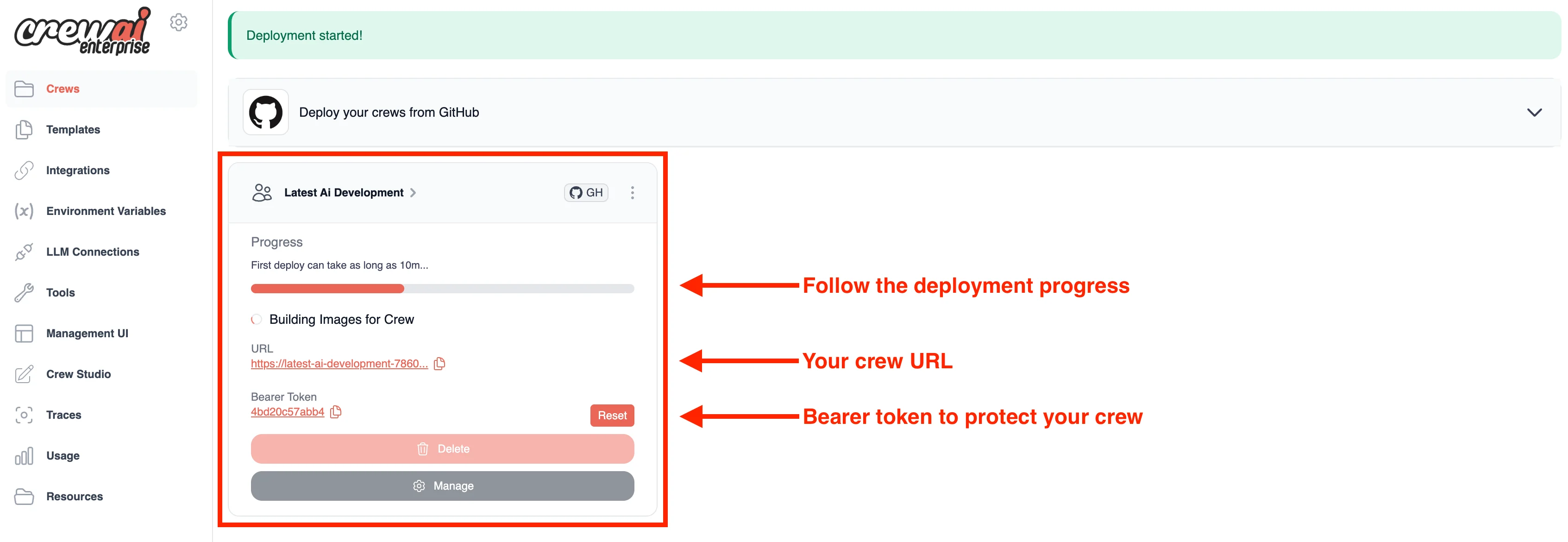
You'll see. A production dashboard listing your deployed crews with their URLs, bearer tokens and management controls — your crew is genuinely callable over the internet.
Cost. Included in the AMP tier you're on (Basic counts runs against its 50/month). Calling your crew still spends your own LLM tokens, billed by your provider.
Takeaway. AMP closes the loop: deploy, get a secured endpoint, then monitor and manage your crews from a single dashboard.