Trace, evaluate & monitor runs
Goal. See exactly what your agent did on each run — every step, its inputs, timing and token cost — and evaluate quality over time.
Open the trace for the last run and check which agent handled each step, how long it took, and how many tokens it used.
Flowise includes tracing/analytics and Evaluations & Metrics (the latter is on every plan, including Free) for monitoring runs.
- 1Run a multi-step Agentflow, then open its execution trace — a step-by-step view (Start → workers → final answer) showing each agent's input and output.
- 2Read the per-step timing and token counts to find slow or expensive steps; this is how you debug a flow that gives a wrong or costly answer.
- 3Use Evaluations & Metrics to score runs against expected answers so you can tell whether a change to the flow actually improved it — not just feels better.
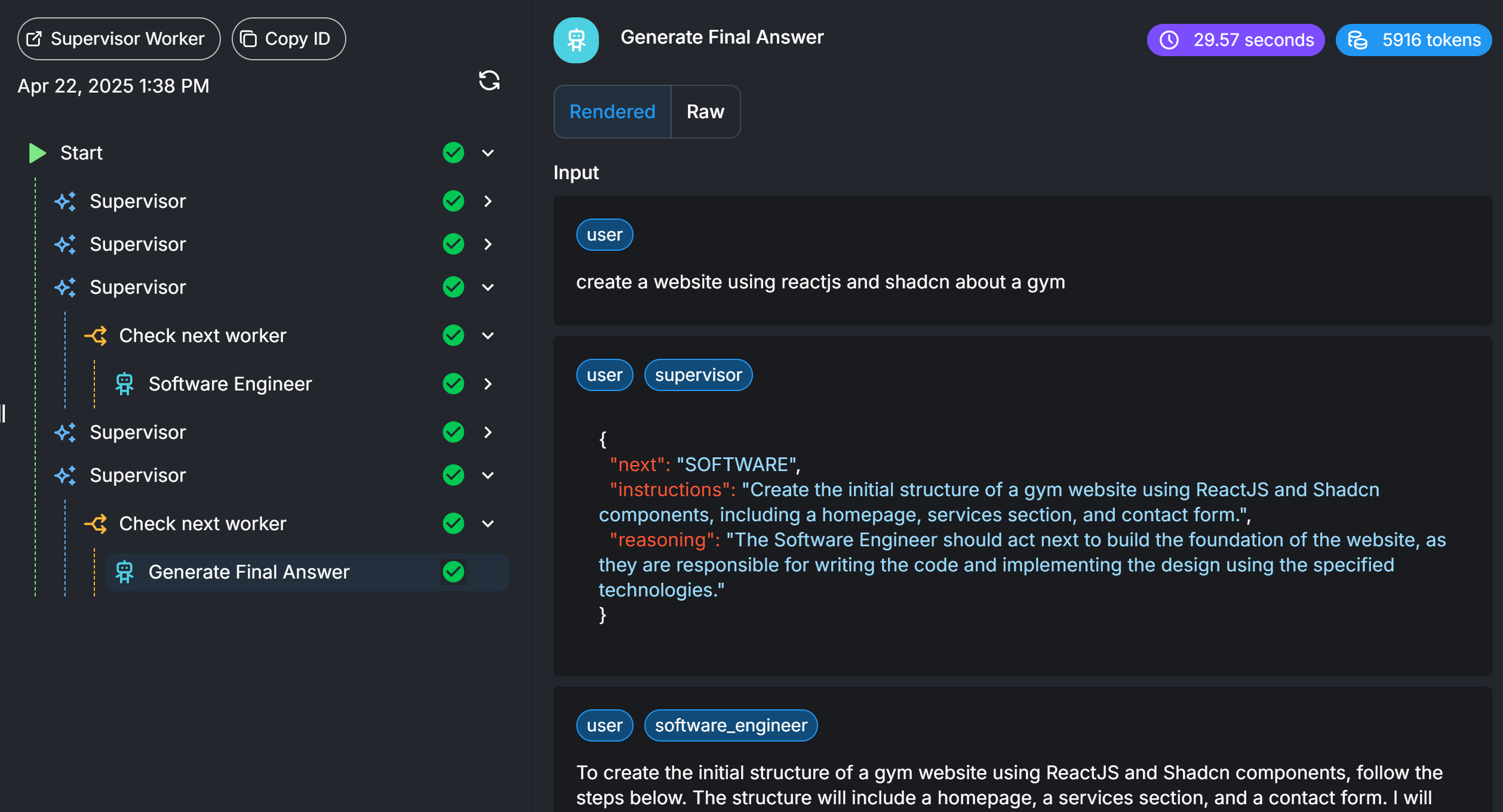
You'll see. A trace listing every step of a run with its inputs, duration and token usage — a clear record of what the agent actually did.
Cost. Tracing, analytics and Evaluations & Metrics are included on the Free plan; running the evaluations themselves spends normal model tokens.
Takeaway. You can't improve what you can't see — traces and evaluations make an agent's behaviour and cost measurable.