Session 4
Let Cascade self-correct: Auto-fix
Goal. Watch Cascade catch and fix the lint errors it introduces mid-task — without you stepping in.
- 1Give Cascade a multi-file task (for example, "add an analytics summary to the panel"). As it edits files, it shows each change — what it edited and the lines added or removed.
- 2When an edit introduces lint errors, Cascade flags them (e.g. "5 new lint errors") and, with Auto-fix on, corrects them itself before moving on — so the task ends with clean, working code.
- 3Let it run and read its summary. Use Open diff on any edit to see exactly what changed, and only intervene if a fix isn't what you wanted.
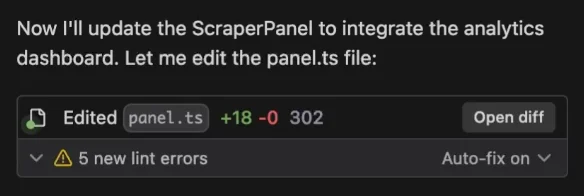
You'll see. Cascade reporting the lint errors its own edits caused and clearing them automatically before finishing the task.
Cost. Auto-fix happens inside the same Cascade task, so it uses your agent quota rather than adding a separate charge.
Takeaway. Cascade doesn't just write code and walk away — with Auto-fix on it catches and clears the lint errors it introduces, so a task lands working.