In this chapter you will learn how to use AI tools without exposing your secrets or private data. You’ll discover which kinds of information must never be pasted into a chatbot, how to configure the service’s training defaults, retention policies and tier settings to keep your inputs under control, and when a piece of data should stay completely off‑cloud. The material is organized as weak‑to‑strong habit pairs and includes a ready‑to‑copy cheat sheet that shows you the exact opt‑out paths for each risk.
Paste into a chatbot and that text goes to a third party's servers. Usually fine — but an API key, a customer list, or unpublished work should never make that trip. This lab is the handful of habits that keep you safe: what never goes in the box, how to control what the tool does with what you send, and when to keep data off the cloud entirely.
1.1After this chapter you can
→Keep secrets and personal data out of the chat box
→Set the training default on each tool — and know opt-out is not deletion
→Pick the right tier for confidential vs regulated data
→Know when to keep data local instead of sending it at all
1.2What should never be pasted?
Never paste API keys, passwords, or any personal data into a chatbot, because that text is sent out of your computer and could be stored or used by the service.
1.3How can I limit data retention?
You can control how the AI tool handles your input by adjusting settings such as training defaults, opting out of data storage, and selecting tiers that offer stricter privacy guarantees.
1.4When must data stay offline?
If a piece of information is too sensitive to risk exposure—like confidential business details or personal identifiers—you should keep it entirely off the cloud and use local processing instead.
1.5The moves — weak → strong ladder
1Never paste secrets, keys or passwords
2Strip personal data before you paste
3Mind chat history and shared links
4Know the training default — and set it
5Opting out of training is not deletion
6A paid plan is not a private plan
7For regulated data, use enterprise & residency controls
8Some data should never reach the cloud — keep it local
9Give regulated data a lawful home
10Keep a human accountable for the decision
11Be honest about the AI — and verify what it says
2Techniques
Learn
Before you paste
What never goes in the box
Never paste secrets, keys or passwordsA chatbot is the wrong place for a credential. Once it is in the chat, treat it as compromised — it has left your machine and may sit in logs you cannot reach.
✕Instead of
Paste your whole .env file (or a stack trace with the API key in it) so the AI can "see everything" while it debugs.
✓Try this💬 AI chat
Paste only the error message and the relevant code, with the secret removed (replace it with YOUR_KEY). If a real key ever lands in a chat, rotate it: revoke the old one and issue a new one.
Why it works: You do not control where the chat is stored, who can review it, or how long it is kept. A leaked key is cheap to rotate and expensive to ignore — so the moment one touches a chat, the only safe assumption is that it is burned.
Strip personal data before you pasteThe AI almost never needs real names, emails or ID numbers to do the work. Remove or mask them and the same answer comes back — without putting people’s data at risk.
✕Instead of
Paste the raw customer spreadsheet — names, emails, phone numbers, account IDs — and ask for a summary of the complaints.
✓Try this💬 AI chat
Replace identifiers first (names → [PERSON], emails → [EMAIL], account numbers removed), or paste just the free-text comments. Ask the same question of the anonymised version.
Why it works: Personal data carries legal and contractual duties (GDPR and the like) the moment you process it. Anonymising before you paste keeps the useful signal — the words — while removing the part that creates the obligation and the risk.
Mind chat history and shared linksWhat you paste does not vanish when you close the tab. It sits in your history, and a "share this chat" link hands everything in the thread to whoever opens it.
✕Instead of
Share a public chat link to show a colleague the clever answer — forgetting the thread above it contains a client name and some numbers.
✓Try this💬 AI chat
Read back through the whole thread before sharing, or copy just the part you mean to send. Delete conversations that contain sensitive data instead of leaving them in history.
Why it works: A share link is the full conversation, not the single message you have in mind — and your history is a standing record. Both are easy to forget and easy to leak; a quick scroll-up before you share is the whole defence.
Control your data
Training, tiers & history
Know the training default — and set itWhether your chats train the next model depends on the tool, and the defaults differ. Two of the big three are ON until you turn them off.
✕Instead of
Assume "my chats are private" — or assume "they all train on everything." Both are wrong, and which is wrong depends on the tool.
✓Try this💬 AI chat
Set it per tool. ChatGPT and Gemini use consumer chats to improve their models BY DEFAULT — turn that off (ChatGPT: Settings → Data Controls; Gemini: Apps Activity). Claude is the exception: it only trains on your chats if you opt in, so the default is already off.
Why it works: You cannot manage a setting you assume the value of. Anthropic made consumer training opt-in; OpenAI and Google made it opt-out. Knowing that one fact tells you exactly which toggle you need to find — and that a fresh ChatGPT or Gemini account is training on you until you say otherwise.
Opting out of training is not deletionTurning off "train on my chats" does one specific thing: it stops your chats feeding future models. It does not stop them being sent, stored, or reviewed.
✕Instead of
Flip the training toggle off and treat the chatbot as if nothing is recorded anymore.
✓Try this💬 AI chat
Separate the two ideas. Training opt-out = "don’t learn from this." Retention = "we still keep it for a while." Even with training off, chats are transmitted to the provider and kept for a period (e.g. roughly 30 days) for safety and abuse review — sometimes longer.
Why it works: Opt-out and zero-retention are different promises. Mixing them up is how confidential text ends up somewhere you thought it could not be — the toggle changes what they LEARN from your data, not whether they HAVE it.
A paid plan is not a private planThe $20/month personal upgrade buys you more usage, not a confidentiality guarantee. Contractual "we will not train on this" lives on the business tiers.
✕Instead of
Do confidential client or company work on your personal Pro / Plus account because "I’m paying, so it must be private."
✓Try this💬 AI chat
Use a Team / Enterprise / Workspace tier (or the API) for confidential work. Those are contractually not used for training by default and add retention and admin controls a personal plan does not have.
Why it works: Price is not privacy. Personal paid tiers follow the same consumer data terms as the free one; the business tiers are where the data-processing agreement and the no-train commitment actually live.
When privacy is critical
Regulated data & going local
For regulated data, use enterprise & residency controlsSome data (health, finance, EU personal data) comes with rules about where it lives and who can touch it. Consumer chatbots are not built to satisfy those rules.
✕Instead of
Paste regulated EU personal data, patient information, or audited financials into a consumer chatbot and hope it is fine.
✓Try this💬 AI chat
Route it through a business tier with a signed data-processing agreement and the controls the rules require — region / data-residency options (e.g. EU regions), SSO, audit logs and a custom retention policy. If you cannot meet the rule, do not use cloud AI for that data.
Why it works: Compliance is about provable guarantees — where data is processed, who accessed it, how long it is kept. Those exist on enterprise tiers and via cloud providers’ regional offerings; a consumer chat window offers none of them.
Some data should never reach the cloud — keep it localFor the most sensitive material, the safest setting is not a toggle — it is not sending it at all. A model running on your own machine never transmits anything.
✕Instead of
Paste unpublished IP, raw patient notes, or a whole confidential deal folder into ChatGPT to "just summarise it."
✓Try this💬 AI chat
Run a local model so the data never leaves your computer — no transmission, no retention, no training, online or off. This is the subject of the "Run AI privately" chapter (local models with Ollama, LM Studio or Jan).
Why it works: Every cloud control is a promise about data you have already handed over. Keeping the data local removes the handover entirely — the strongest privacy guarantee there is, at the cost of your own RAM and disk.
Using AI responsibly at work
Rules the pros must follow
Give regulated data a lawful homeSome data is not just sensitive, it is governed — by a contract (an NDA) or a law (personal data). For that data the right tool is an obligation, not a preference: use a workspace whose terms make it compliant (no training, a data-processing agreement, the right region), or do not send it at all.
✕Instead of
Paste a confidential, NDA-covered document into a free chatbot because it is the quickest way to get a summary.
✓Try this💬 AI chat
Check what the data is bound by first. Put contractual or regulated material in a no-train business/enterprise tier with a data-processing agreement, or strip the identifiers — and for the most sensitive, keep it on a local model.
Why it works: For regulated or contractual data the question is not "is this private enough for me" but "does this tool meet the obligation" — and a consumer chatbot almost never does, while a no-train business tier or a local model can.
Keep a human accountable for the decisionAI is excellent at drafting, summarising and shortlisting — but the final call on money, hiring, or anything with legal weight stays with a named person. Let AI assist; never let it decide alone.
✕Instead of
Wire the AI to act on a consequential outcome automatically, with nobody reviewing what it did.
✓Try this💬 AI chat
Have the AI recommend and draft; a human reviews, can override, and owns the outcome — with a short record of why.
Why it works: Accountability does not transfer to software. Regulators expect a human to own high-stakes outcomes — and for hiring, an AI-only rejection is exactly what bias-audit and high-risk rules are written to prevent.
Be honest about the AI — and verify what it saysTwo traps catch professionals: claiming more "AI" than you really use, and trusting a confident answer that is wrong. Only claim what is true, and check facts and figures before they leave your hands.
✕Instead of
Ship the AI’s output unchecked and market it as a magic "AI-powered" result.
✓Try this💬 AI chat
Verify the claims and numbers against the source, and describe honestly what the AI did versus what you did.
Why it works: Both traps have real consequences: a hallucinated number blows up a memo, and an overstated AI claim is now an enforcement target. A quick verify-and-be-honest pass is the cheapest insurance there is.
?Check yourself
Answer from memory, then scroll up to re-read anything you blank on.
Before pasting a document into a chatbot, what should you strip out first — and why?
Why does turning off model training (or using a no-train workspace) matter when you handle sensitive data?
Opting out of training is not the same as deletion — so what should you assume happens to what you send?
When is it safer to describe a situation in neutral terms than to paste the raw file?
When AI helps with a hiring or investment decision, who must stay accountable for the final call — and why?
What does "AI-washing" mean, and why is overstating your AI risky for a regulated professional?
3Lessons 7
3.1Strip personal identifiers from text before feeding it to an AI
A short manual process for removing names, emails, phone numbers and other direct identifiers from any snippet you plan to paste into a chatbot.
You will be able to produce a cleaned version of any document that no longer contains personal data before sending it to an AI service.
Copy the original text into a plain‑text editor.
Search for common identifier patterns (e.g., email@domain.com, +1‑555‑123‑4567, SSN format) and replace each with a generic placeholder such as or .
Remove any full names by substituting them with and delete or mask street addresses, city names, and ZIP codes.
Save the edited text as a new file and paste only this version into the AI chat window.
You'll see The AI’s response will be based on the sanitized content, and no personal identifiers appear in the conversation history.
Takeaway Systematically stripping identifiers eliminates the primary vector for accidental data leakage when using generative AI.
3.2Share only the final answer from a chat
A quick method to share only the final answer from a chatbot without exposing earlier private messages.
Create a shareable link that displays just the intended response and nothing else
Open the completed conversation in the chatbot UI
Locate any prior messages containing client names, numbers or other sensitive data and remove them from view
Select the final answer you want to share and copy it to the clipboard
Paste the copied text into a new document to double‑check that no hidden context remains
Click Share this chat to generate a link
You'll see The generated link opens a page showing only the pasted final answer, with no preceding conversation visible
Takeaway A shareable chat link is a snapshot of whatever text you placed in it, so prune manually before generating it to avoid accidental leaks
Check What actions do you take to ensure that the shareable link contains only the final answer and excludes any earlier private messages?
3.3Remove personal identifiers from a dataset before using an AI
A process for stripping personal identifiers from text before feeding it to a chatbot.
Remove names, emails, phone numbers and similar identifiers while keeping surrounding context intact
Open the source file that contains the personal data
Replace each name, email address, phone number or ID with placeholders such as [NAME], [EMAIL], [PHONE]
Verify that only the placeholders changed and the rest of the text remains unchanged
Copy the anonymised content to the clipboard
Paste the cleaned data into the chatbot and request the desired analysis
You'll see The AI returns a summary that mirrors the original content but contains no real personal identifiers
Takeaway Anonymising data lets you exploit AI without exposing private information
Check How do you confirm that after swapping identifiers with placeholders the surrounding text is still exactly as it was before submitting to the chatbot?
3.4Limit permissions of an AI agent or plugin before installation
A checklist‑driven review of an AI skill/plugin’s requested access rights, based on ESET’s recommended habits.
You will be able to evaluate and install only those AI agents that request the minimum necessary permissions.
Open the marketplace page for the desired AI skill or plugin.
Locate the permission list and note each capability (e.g., file system access, network calls).
Compare the listed permissions against the documented purpose of the skill; if any seem excessive, reject the installation.
If acceptable, click install and immediately enable your security software’s AI monitoring feature to watch the agent’s activity.
You'll see The installed agent runs with only the approved permissions and any unexpected behavior is flagged by the security tool.
Takeaway Restricting permission scopes reduces the attack surface of autonomous AI agents.
3.5Disable chat‑training on your AI account
A checklist for turning off chat‑training and data‑use options on major AI platforms.
Ensure your prompts are not used to train the provider’s models
Log into the web console of the AI service (e.g., ChatGPT, Claude, Gemini)
Open the platform’s Settings or Privacy section and locate the data‑control area
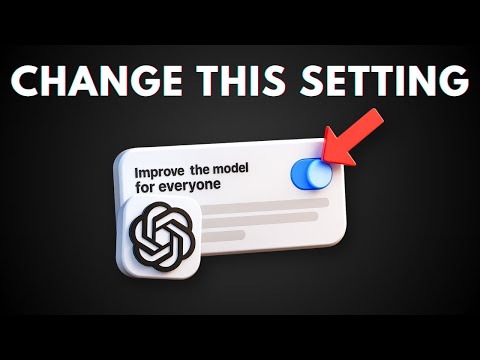
Find the toggle labelled “Improve the model for everyone”, “Help improve Claude” or similar and note its current state
If the toggle is on, click it to switch it off and then press the Save button
Capture a screenshot of the settings page confirming the opt‑out status
You'll see A saved settings screen showing the training option set to OFF, confirming future chats will not be used for model improvement
Takeaway Disabling the training toggle stops your data from being fed into model updates while you can still manage other retention policies separately
Check Which specific setting do you need to locate and switch off on platforms such as ChatGPT, Claude or Gemini to prevent your chats from being used for model training?
3.6Pay an AI service using a Privacy.com virtual card
A payment method that masks your real credit/debit card number, creating a disposable virtual card for transactions with AI agents.
You will be able to complete an AI‑related purchase without exposing your actual financial details.
Log in to your Privacy.com account and click “Create Virtual Card”.
Select “Single‑Use Card”, set a spend limit that covers the AI service cost, and name the card (e.g., ).
Copy the generated 16‑digit card number, CVV, and expiration date.
On the AI provider’s billing page, paste the virtual card details instead of your real card information and complete the purchase.
You'll see The transaction is approved, and the virtual card is automatically locked to that merchant or closed after use, keeping your real card number hidden.
Takeaway Virtual cards provide a practical layer of financial privacy for any AI‑driven workflow that requires payment.
3.7Create synthetic data to replace personal records for model training
A process that generates statistically similar but non‑identifiable data points, allowing you to train AI models without using real personal information.
You will be able to produce a synthetic dataset that mimics the structure of your original data while eliminating privacy risks.
Export the original dataset (e.g., CSV) containing personal fields such as name, email, and address.
Use an open‑source synthetic data generator (e.g., SDV or similar tool mentioned in the webinar) to define a model based on column types and distributions.
Run the generator to produce a new dataset of equal size, then verify that no real identifiers appear by searching for known values from the source file.
Save the synthetic dataset and use it as input for your AI training pipeline.
You'll see Your model trains successfully on the synthetic data, and attempts to locate original personal entries in the new file return none.
Takeaway Synthetic data lets you leverage the power of AI while complying with privacy regulations and protecting sensitive information.
4FAQ, Tips & How-to 11
one problem, one solution, one action
▸How-toEveryone
Turning off "train on my chats" does one specific thing: it stops your chats feeding future models. It does not stop them being sent, stored, or reviewed. Opt-out and zero-retention are different promises. Mixing them up is how confidential text ends up somewhere you thought it could not be — the toggle changes what they LEARN from your data, not whether they HAVE it.
The $20/month personal upgrade buys you more usage, not a confidentiality guarantee. Contractual "we will not train on this" lives on the business tiers. Price is not privacy. Personal paid tiers follow the same consumer data terms as the free one; the business tiers are where the data-processing agreement and the no-train commitment actually live.
Whether your chats train the next model depends on the tool, and the defaults differ. Two of the big three are ON until you turn them off. You cannot manage a setting you assume the value of. Anthropic made consumer training opt-in; OpenAI and Google made it opt-out. Knowing that one fact tells you exactly which toggle you need to find — and that a fresh ChatGPT or Gemini account is training on you until you say otherwise.
For the most sensitive material, the safest setting is not a toggle — it is not sending it at all. A model running on your own machine never transmits anything. Every cloud control is a promise about data you have already handed over. Keeping the data local removes the handover entirely — the strongest privacy guarantee there is, at the cost of your own RAM and disk.
Some data (health, finance, EU personal data) comes with rules about where it lives and who can touch it. Consumer chatbots are not built to satisfy those rules. Compliance is about provable guarantees — where data is processed, who accessed it, how long it is kept. Those exist on enterprise tiers and via cloud providers’ regional offerings; a consumer chat window offers none of them.
What you paste does not vanish when you close the tab. It sits in your history, and a "share this chat" link hands everything in the thread to whoever opens it. A share link is the full conversation, not the single message you have in mind — and your history is a standing record. Both are easy to forget and easy to leak; a quick scroll-up before you share is the whole defence.
Need a complaint summary from a sheet full of names and emails
The AI almost never needs real names, emails or ID numbers to do the work. Remove or mask them and the same answer comes back — without putting people’s data at risk. Personal data carries legal and contractual duties (GDPR and the like) the moment you process it. Anonymising before you paste keeps the useful signal — the words — while removing the part that creates the obligation and the risk.
A chatbot is the wrong place for a credential. Once it is in the chat, treat it as compromised — it has left your machine and may sit in logs you cannot reach. You do not control where the chat is stored, who can review it, or how long it is kept. A leaked key is cheap to rotate and expensive to ignore — so the moment one touches a chat, the only safe assumption is that it is burned.
Claiming more AI than you used and trusting unchecked answers
Two traps catch professionals: claiming more "AI" than you really use, and trusting a confident answer that is wrong. Only claim what is true, and check facts and figures before they leave your hands. Both traps have real consequences: a hallucinated number blows up a memo, and an overstated AI claim is now an enforcement target. A quick verify-and-be-honest pass is the cheapest insurance there is.
AI is excellent at drafting, summarising and shortlisting — but the final call on money, hiring, or anything with legal weight stays with a named person. Let AI assist; never let it decide alone. Accountability does not transfer to software. Regulators expect a human to own high-stakes outcomes — and for hiring, an AI-only rejection is exactly what bias-audit and high-risk rules are written to prevent.
Some data is not just sensitive, it is governed — by a contract (an NDA) or a law (personal data). For that data the right tool is an obligation, not a preference: use a workspace whose terms make it compliant (no training, a data-processing agreement, the right region), or do not send it at all. For regulated or contractual data the question is not "is this private enough for me" but "does this tool meet the obligation" — and a consumer chatbot almost never does, while a no-train business tier or a local model can.
A short tour of the account privacy controls — data collection, history, and what each toggle actually does.
6FAQ 9
Does ChatGPT, Claude or Gemini train on my chats?
It depends on the tool. ChatGPT and Gemini use consumer chats to improve their models BY DEFAULT — you have to turn it off (ChatGPT: Settings → Data Controls → "Improve the model for everyone"; Gemini: Apps Activity). Claude is the exception: Anthropic makes consumer model training opt-in, so Claude does not train on your Free/Pro/Max chats unless you explicitly enable Model Improvement.
No — those are two different things. Opting out stops your chats being used to train future models, but the provider still receives and stores them. OpenAI, for example, keeps conversations for around 30 days for safety and abuse review even when training is off (longer if required for legal or security reasons). Treat "training off" as "they won’t learn from it," not "they don’t have it."
Is it safe to paste an API key or password to get help?
No. A chat leaves your machine and is stored where you cannot control it, so any credential in it should be treated as compromised. Paste only the error and the relevant code with the secret replaced by a placeholder. If a real key ever lands in a chat, revoke it and generate a new one.
Not by itself. A personal paid plan (Plus/Pro) buys more usage, not a confidentiality guarantee — it follows the same consumer data terms as the free tier. The contractual "not used for training" commitment and the admin/retention controls live on the business tiers: Team, Enterprise, Workspace, or the API.
Yes — Google says human reviewers (including service providers) review some Gemini Apps conversations to improve the service, and those reviewed chats can be kept for up to three years, separate from your activity and not deleted when you delete your activity. Google explicitly warns not to enter information you would not want a reviewer to see. Work/school (Workspace) accounts are covered by different, stricter terms.
What is the safest way to use AI with confidential or regulated data?
Match the home to the data. Confidential work belongs on a no-train business tier; regulated data needs an enterprise tier with a data-processing agreement and region/residency controls. For the most sensitive material, run a local model so the data never leaves your machine — no transmission, retention or training at all.
It is allowed but regulated. In the EU, recruitment AI is classified "high-risk" under the AI Act, which adds duties like human oversight and documentation. In the US, some jurisdictions (e.g. New York City) require an independent bias audit of an automated hiring tool before you use it. The throughline everywhere is the same: keep a human in the loop and never auto-reject a candidate on an AI score alone.
Can I paste confidential deal documents into a chatbot?
Not into a personal consumer account. Deal materials are confidential and often price-sensitive (material non-public information), and a consumer chat is received, stored and possibly used for training — which can breach an NDA or data-room terms. Use an enterprise tool whose terms say your inputs are not used for training and are kept isolated; for the most sensitive material, run a local model so it never leaves your machine.
What is "AI-washing"?
Overstating how much AI a product, fund or service actually uses. It is now an enforcement target — the US SEC has charged investment advisers for exaggerating their AI in marketing — so only claim capabilities you can back up.
7Glossary 17 terms
Show the 17 terms
Your data
API key
A secret string that authenticates you to a service. Anyone who has it can use (and bill) your account — never paste it into a chat.
Secret / .env
Any credential — key, token, password, connection string. Often kept in a .env file that should never be shared or pasted.
PII
Personally identifiable information — names, emails, phone numbers, IDs. Strip or mask it before sending data to a chatbot.
Regulated data
Data governed by law or contract (health, financial, EU personal data). Comes with rules about where it lives and who can access it.
Settings & tiers
Training opt-out
A setting that stops your chats being used to train future models. On ChatGPT/Gemini you must turn it on; on Claude training is off by default.
Data retention
How long the provider keeps your chats. Independent of training — chats are usually kept for a window (e.g. ~30 days) even with training off.
No-train tier
A business plan (Team / Enterprise / Workspace / API) that is contractually not used to train models by default — unlike the consumer tiers.
Data residency
A guarantee about which region your data is processed and stored in (e.g. the EU) — an enterprise/cloud-provider control, not a consumer one.
Concepts
GDPR
The EU data-protection law. In plain terms: processing someone’s personal data carries duties — so minimise and anonymise before sending it anywhere.
Chat history
The stored record of your past conversations. It persists after you close the tab, and a share link exposes the whole thread.
Local model
An AI model that runs on your own machine, so prompts and data never leave it — the strongest privacy option (see "Run AI privately").
Using AI at work
MNPI
Material non-public information — confidential, potentially price-moving facts. Mishandling it, including pasting it into the wrong tool, can breach the rules on inside information.
High-risk AI
Under the EU AI Act, AI used for things like hiring counts as "high-risk" and carries extra duties: human oversight, documentation and transparency.
Bias audit
An independent check that an automated hiring tool does not discriminate. Some places (e.g. New York City) require one before such a tool is used.
AI-washing
Overstating how much real AI a product, fund or service uses. Now an enforcement target — the US SEC has charged advisers for it.
Human-in-the-loop
A person reviews and owns an AI-assisted decision instead of letting the AI act alone — the core safeguard for high-stakes use.
Fiduciary duty
A legal duty to act in a client’s best interest. It cannot be delegated to an AI.