Understand itTrace what the app does with a frame: it shows it, overlays the published boxes, and lets a reviewer say what they see — nothing more.
Input: three dated frames + the boxes published with the paper
↓Process: display frames side by side at equal scale, toggle the boxes
↓Output: a reviewer note per frame with the frame's timestamp and source
Choose toolsPick the smallest toolset: an image viewer, the CMS record, and a vision-capable model only for describing what is visible.
YOLOX — the workflow label shown on screen; boxes come from the paper, not re-runPayload CMS + PostgreSQL — the publishable app recordVision-capable LLM (optional) — drafts the reviewer note from the visible frame; never writes a number
Build itPaste the brief into OpenCode, run the app, and compare the three frames against the paper's figure before you publish the record.
OpenCode · development brief
Build a phenotyping review workspace that shows three dated rice frames side by side with their published detection boxes, a toggle for the boxes, and a note field per frame. Keep the source citation and licence visible ▎
Detect rice flowersSource & credit
Detect rice flowers: Trace what the app does with a frame: it shows it, overlays the published boxes, and lets a reviewer say what they see — nothing more.
Where and when did the panicles flower? Owner-supplied illustrative interface; source figures credited below.
Muranaka et al. 2025, J Plant Res, Fig. 2a — CC BY 4.0 (https://pmc.ncbi.nlm.nih.gov/articles/PMC12441105/)
Full-resolution Fig. 2 (Springer) (https://media.springernature.com/full/springer-static/image/art%3A10.1007%2Fs10265-025-01650-8/MediaObjects/10265_2025_1650_Fig2_HTML.png)
Fig. 1 — glasshouse setup and crop regions (alternative hero) (https://media.springernature.com/full/springer-static/image/art%3A10.1007%2Fs10265-025-01650-8/MediaObjects/10265_2025_1650_Fig1_HTML.png)
Owner-supplied illustrative interface; source figures credited below.
Understand itFollow one plate through the app: it is shown, its published boxes are overlaid, and a reviewer accepts or rejects boxes; the count exists only after review.
Input: plate photo + published boxes (dataset annotations)
↓Process: overlay, zoom, accept / reject / add a box, keep an audit trail
↓Output: reviewed box list + a count that is labelled 'after human review'
Choose toolsChoose a viewer with overlays, the CMS record, and — optionally — OpenCFU as the upstream detector learners can run themselves.
Image viewer with box overlay — the core of the appOpenCFU (optional upstream) — produces candidate boxes on a learner's own plate photoPayload CMS + PostgreSQL — stores plates, boxes and review decisions
Build itPaste the brief into OpenCode, load the plate queue, and verify that an unreviewed plate never shows a count.
OpenCode · development brief
Build a colony-review workspace: a plate queue, a plate view with the published detection boxes as an overlay, accept/reject per box, and a count that only appears once every box is reviewed. Show the dataset citation an▎
Count coloniesSource & credit
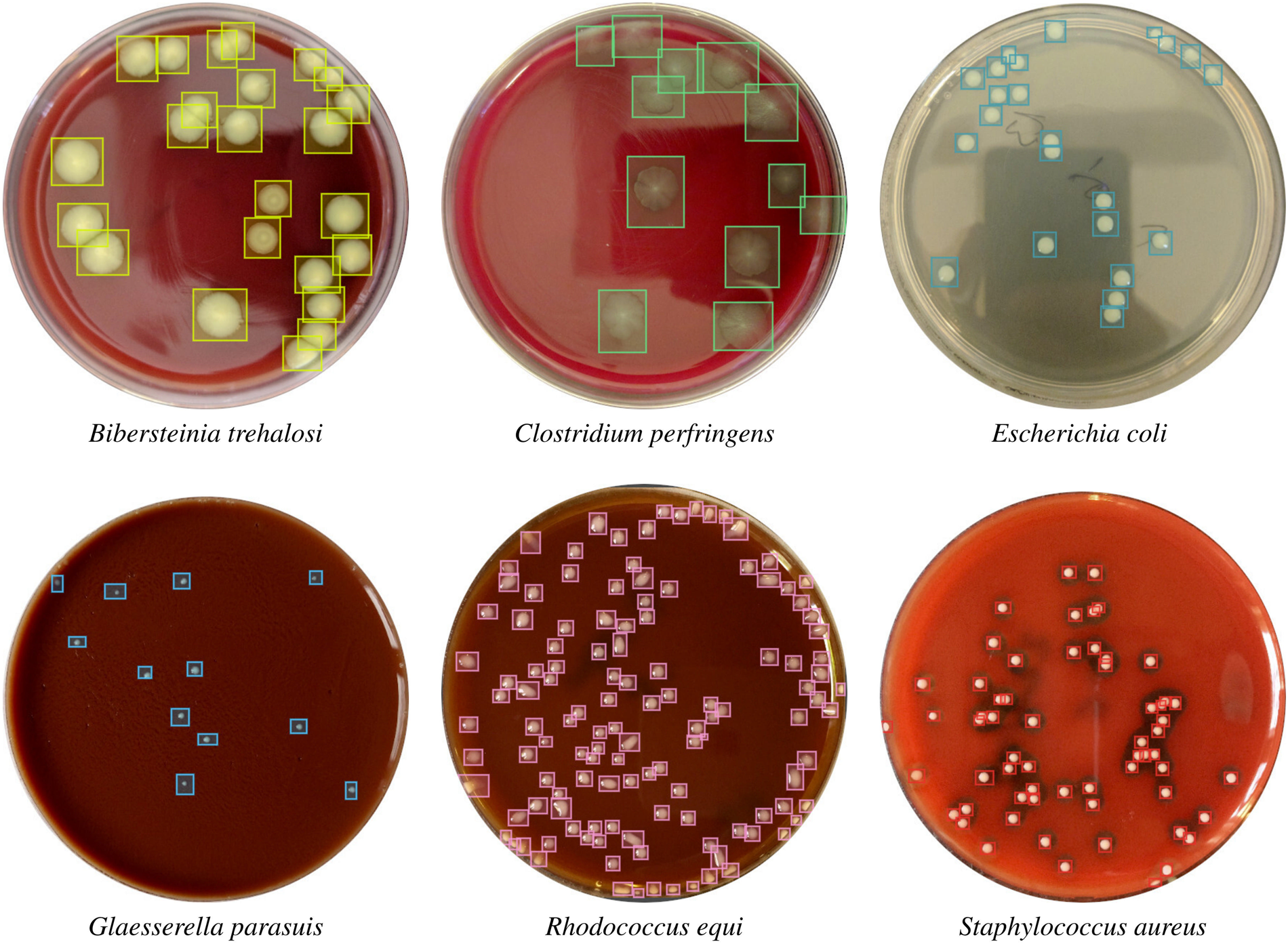
Count colonies: Follow one plate through the app: it is shown, its published boxes are overlaid, and a reviewer accepts or rejects boxes; the count exists only after review.
Every colony, visible. Owner-supplied illustrative interface; source figures credited below.
Makrai et al. 2023, Sci Data 10:497, Fig. 1 — six annotated plates, CC BY 4.0 (https://media.springernature.com/full/springer-static/image/art%3A10.1038%2Fs41597-023-02404-8/MediaObjects/41597_2023_2404_Fig1_HTML.png)
Geissmann 2013, PLoS ONE — OpenCFU Fig. 6 (CC BY) (https://journals.plos.org/plosone/article/figure/image?size=large&id=10.1371/journal.pone.0054072.g006)
Owner-supplied illustrative interface; source figures credited below.
Understand itTrace a question end to end: retrieve passages → draft an answer that only uses those passages → show each passage next to its sentence.
Input: a question + the curated library
↓Process: retrieve top passages, draft an answer constrained to them, attach a citation to every sentence
↓Output: answer with [n] chips, each opening the highlighted passage
Choose toolsChoose an embedding model, an LLM for drafting, and a viewer that highlights passages; pick local or hosted models deliberately.
Embedding model — turns chunks into vectors (local: nomic-embed / bge; hosted: any)LLM — drafts the answer under a 'cite or delete' rulePassage viewer — highlights the cited span in the source document
Build itPaste the brief into OpenCode, ask three questions whose answers you know, and check each citation opens the right passage.
OpenCode · development brief
Build a document-chat app over the documents/ folder. Index the documents, answer questions using only retrieved passages, attach a citation chip to every sentence, and open the highlighted passage when a chip is clicked▎
Chat over documentsSource & credit
Chat over documents: Trace a question end to end: retrieve passages → draft an answer that only uses those passages → show each passage next to its sentence.
Every answer, traceable. Owner-supplied illustrative interface; source figures credited below.
Understand itTrace one variant: it is a VCF row → shown on the variant track → supported (or not) by the reads underneath.
Input: reference + VCF + BAM
↓Process: JBrowse 2 renders synchronised tracks; the learner navigates to a variant
↓Output: a review note per variant with locus, call, and what the reads show
Choose toolsJBrowse 2 does the inspection; the CMS keeps the review; no LLM touches the genome.
JBrowse 2 — genome browser (Apache-2.0)Payload CMS — review recordNo LLM: nothing here is a language task
Build itPaste the brief into OpenCode, open the CUZD1-style locus and write one review note that a colleague could verify.
OpenCode · development brief
Build a variant-review companion around JBrowse 2: load reference, VCF and BAM as synchronised tracks, let the reviewer jump to a variant from a list, and store a note with locus, call and read support. Do not alter call▎
Explore DNA variantsSource & credit
Explore DNA variants: Trace one variant: it is a VCF row → shown on the variant track → supported (or not) by the reads underneath.
Build itPaste the brief into OpenCode and check one annotation lands on the right residues.
OpenCode · development brief
Build a structure-inspection companion: embed Mol* with PDB 6AU3, list annotations from annotations.csv, highlight the residues of a selected annotation and show its source. Reject annotations outside the sequence and ne▎
Explore molecular structuresSource & credit
Explore molecular structures: Trace one annotation: a residue range → highlighted on the surface → its source shown in a side panel.
What do you want to achieve — and what will a useful result look like?
Paste the brief into OpenCode and confirm the exported labels reopen with the same IDs.
Structure it
napari-review/↳ data/volume.tif (or an IDR Zarr URL)↳ data/labels.tif↳ open.py↳ README.md
Understand itTrace one review action: change slice → toggle labels → add a point annotation → export points and labels.
Input: volume + labels
↓Process: layered inspection, point annotations
↓Output: exported labels + points + a short inspection summary
Choose toolsnapari and Python; a segmentation model only upstream and named.
napari (BSD-3) — viewerPython — layer scripts and exportCellpose / StarDist (optional upstream) — named in the export
Build itPaste the brief into OpenCode and confirm the exported labels reopen with the same IDs.
OpenCode · development brief
Write a napari script that opens a microscopy volume with optional labels and a points layer, adds keyboard shortcuts for slice navigation and layer toggling, and exports reviewed labels and points with a JSON summary of▎
Explore microscopy in 3D with napariSource & credit
Explore microscopy in 3D with napari: Trace one review action: change slice → toggle labels → add a point annotation → export points and labels.
Build itPaste the brief into OpenCode and check that changing the diameter changes the run record.
OpenCode · development brief
Build a Cellpose review tool: run cyto3 on an image with configurable diameter and thresholds, show masks beside the source pixels, let a reviewer accept or reject each mask with a reason, and export accepted labels with▎
Segment cells with CellposeSource & credit
Segment cells with Cellpose: Trace one cell: pixels → mask → accepted or rejected by a reviewer → exported with the run record.
Boundaries checked against the pixels. Owner-supplied illustrative interface; source figures credited below.
↓Process: click a cell → highlight it on every time point → show its rows
↓Output: linked mesh view + measurement table + export of the selection
Choose toolsUse MorphoGraphX for the science, a browser 3D viewer for display, and a data tool for table checks; an LLM only scaffolds the interface.
MorphoGraphX — segmentation, growth and fluorescence measurement (the result)three.js or a PLY viewer — displays the meshes with cell coloursData-analysis tool (pandas / DuckDB) — validates the measurement table
Build itPaste the brief into OpenCode, load the T2 mesh, and verify the cell-area heatmap matches the paper's colour range (0–200 µm²).
OpenCode · development brief
Build a research companion for MorphoGraphX output: show a segmented organ mesh per time point, colour cells by a chosen measurement (area, expansion, anisotropy), and link every cell to its rows in measurements.csv. Kee▎
MorphoGraphXSource & credit
MorphoGraphX: Trace one cell: it has a mesh position, a measured area per time point, and a growth value between time points; the app links the three.
How did each cell grow? Owner-supplied illustrative interface; source figures credited below.
Strauss et al. 2022, eLife 11:e72601, Fig. 1 — CC BY 4.0 (https://iiif.elifesciences.org/lax:72601%2Felife-72601-fig1-v2.tif/full/full/0/default.jpg)
Vijayan et al. 2021, eLife 10:e63262, Fig. 1 — segmented ovule atlas, CC BY 4.0 (alternative hero) (https://iiif.elifesciences.org/lax:63262%2Felife-63262-fig1-v1.tif/full/full/0/default.jpg)
MorphoGraphX gallery (no licence stated — do not reuse) (https://morphographx.org/gallery/)
Owner-supplied illustrative interface; source figures credited below.
↓Process: overlay detections on the tile, filter by class, summarise per region
↓Output: region view with counts and the percentage shown next to its denominator
Choose toolsUse QuPath for detection and classification, a tiled image viewer for display, and a table tool for the summary.
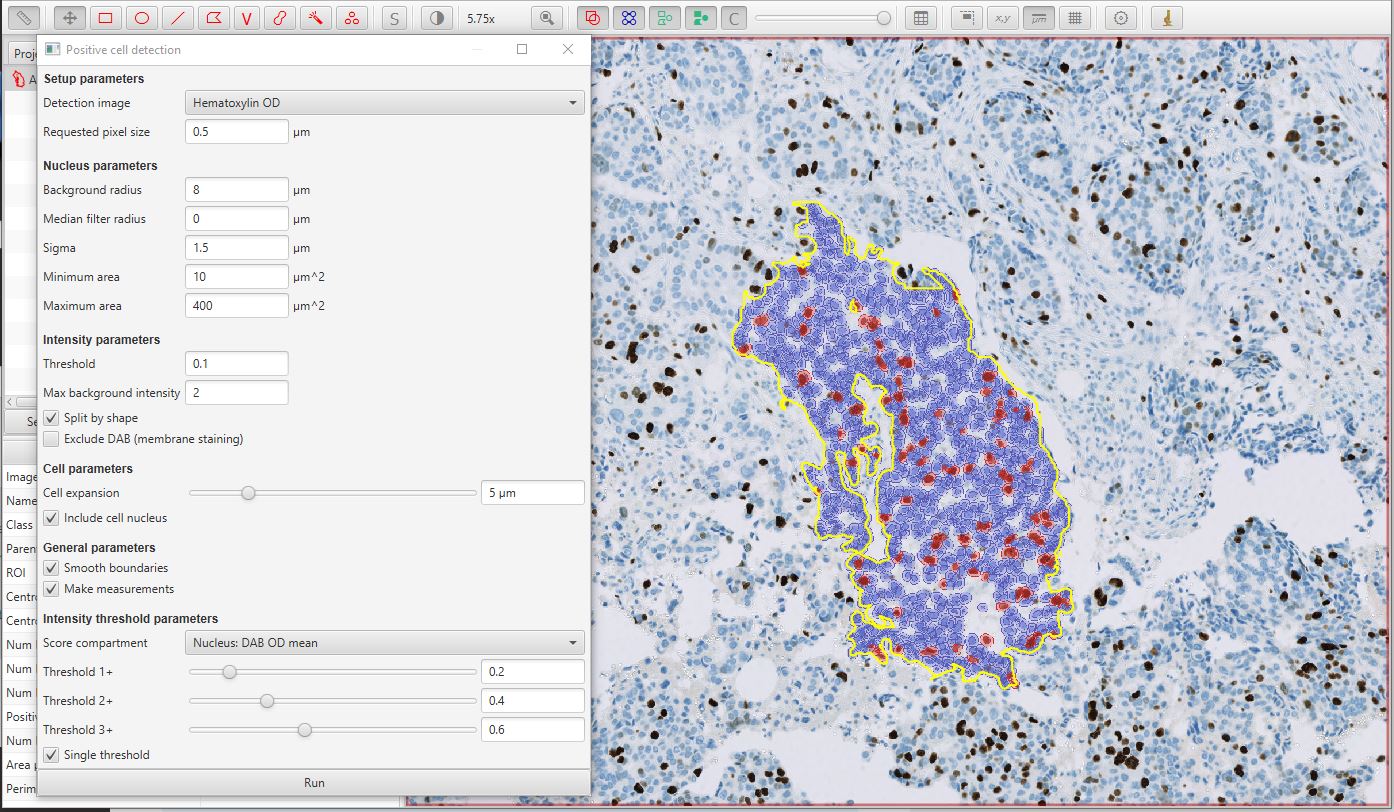
QuPath — annotation, cell detection and classification (the science)OpenSeadragon or a canvas tile viewer — displays the regionData tool — recomputes the summary from detections.csv to cross-check QuPath's numbers
Build itPaste the brief into OpenCode, open the Ki67 region, and check the class colours match the QuPath convention (red positive, blue negative).
OpenCode · development brief
Build a slide-review companion: show a tissue region tile with QuPath detections overlaid and coloured by class, a class filter, and a per-region summary that always shows numerator and denominator. Keep the chain slide ▎
QuPathSource & credit
QuPath: Trace the chain slide → region → detections → summary and decide which of those the app shows (all four, linked).
Understand itTrace one chapter: draft → review → publish → rendered page with shared layout.
Input: content in Payload
↓Process: workflow states, access rules, preview
↓Output: published page + changelog entry
Choose toolsPayload for content, PostgreSQL for storage, Next.js for rendering, OpenCode for scaffolding.
Payload CMS (MIT)PostgreSQLNext.js
Build itPaste the brief into OpenCode and publish one chapter end to end.
OpenCode · development brief
Scaffold a Payload CMS project with collections for levels, chapters, app examples and glossary, a draft/review/publish workflow, PostgreSQL storage and a Next.js site that renders published content with a shared layout.▎
Build a curriculum with PayloadSource & credit
Build a curriculum with Payload: Trace one chapter: draft → review → publish → rendered page with shared layout.
The site that teaches, built the same way. Owner-supplied illustrative interface; source figures credited below.
Choose toolsChoose a UI-capable coding agent and a calendar library; compare against Cal.com (MIT) only to check states you forgot.
OpenCode / coding agent — builds the three screens from SLICE.mddate-fns or Luxon — time-zone arithmeticCal.com (MIT, open source) — the reference you compare states against
Build itPaste the brief into OpenCode and test every state in SLICE.md by hand before calling the slice done.
OpenCode · development brief
Build a booking flow with three screens: month view with available days, slot list for the chosen day in the booker's time zone, and a confirmation form. Read availability from data/availability.json, reject a slot that ▎
Clone existing softwareSource & credit
Clone existing software: Walk the slice as a user and as the system: what is entered, what is checked, what is stored.
One booking slice, end to end. Owner-supplied illustrative interface; source figures credited below.
Build itPaste the brief into OpenCode and test the board at arm's length on a tablet.
OpenCode · development brief
Build a plant-floor status board from FLOOR.md and status.json: equipment tiles ordered by severity, one clear next action per tile, large touch targets, and an action log. Optimise for a wall display and a tablet.▎
Start with a UXSource & credit
Start with a UX: Trace one shift: status feed → board → operator action → logged.