A small server that publishes tools, resources and prompts over the Model Context Protocol, so any MCP-speaking assistant can use your systems without a bespoke integration.
MCP shows up in a dozen chapters of this course, always as something you install. This one is the other side: writing a server so an assistant can reach your systems — your database, your ticket tracker, your internal API — with auth, an allowlist, and a shape a model can actually use. → Built on the first-party Python SDK, whose v2 is stable against the 2026-07-28 spec, with FastMCP as the ergonomic layer and an honest note on how much of it the official SDK has absorbed. → The hard part is not the protocol. It is designing a tool surface small enough that the model picks the right one.
Writing the server, not installing one. A tool your assistant can call, wrapped around a system only you have — with authentication, an explicit allowlist, and error messages a model can act on. The protocol takes an afternoon; the tool design is what decides whether the model uses it correctly.
→Explain what MCP standardises and what it deliberately leaves to you
→Expose a working tool from your own system and call it from an assistant
→Design a tool surface a model can choose from without guessing
→Authenticate a server and restrict it to an explicit allowlist
→Return errors a model can recover from instead of ones that end the turn
→Decide when a tool should be an MCPserver and when a plain script is enough
1.3When to reach for it
When more than one assistant needs the same capability, or when the capability touches something that needs auth and an audit trail.
1.4Key parts
A transport, a set of tool definitions with typed inputs, an auth layer, an allowlist of what the tools may reach, and structured errors.
1.5Free vs paid
The SDKs and the protocol are free and open. The cost is maintenance: a tool surface is an API, and it gets used by something that will not read your changelog.
1.6Watch out
Twenty tools with overlapping names is worse than five with distinct ones. The model picks by description, so a vague description is a bug.
2Lessons 7
2.1Identify MCP protocol guarantees and design responsibilities
MCP — the Model Context Protocol — defines a JSON‑RPC wire format plus three primitives (tools, resources, prompts) that any assistant and server can agree on.
Identify the protocol guarantees and the design decisions you must make.
READ the description of the three primitives in the official specification
OPEN the spec page at modelcontextprotocol.io/specification/latest in a browser
REVIEW the fixed message shapes and discovery endpoints under tools/list and resources/list
You'll see A clear mental model of what the wire format mandates versus what you must implement yourself
TakeawayMCP standardises the wire format and three primitives while leaving tool design, authentication and error handling to you
Check Your assistant should decide mid‑answer whether to look up a customer record. Which primitive handles that – tool, resource, or prompt?
Cost Free. Both SDKs are open source; nothing in this lesson needs an account.
2.2Run an MCP tool from the Inspector
mcp dev is the test harness that launches MCP Inspector, a local UI that speaks MCP to your server so you can call tools without an assistant.
Start a local MCPserver, invoke its tool through the Inspector and make it reachable to Claude Code.
Tryclaude mcp add my-demo -- uv run python server.py
Run it in the folder that holds server.py. Everything after -- is the command Claude Code runs to start your server as a subprocess over stdio; no --transport flag is needed for a local server.
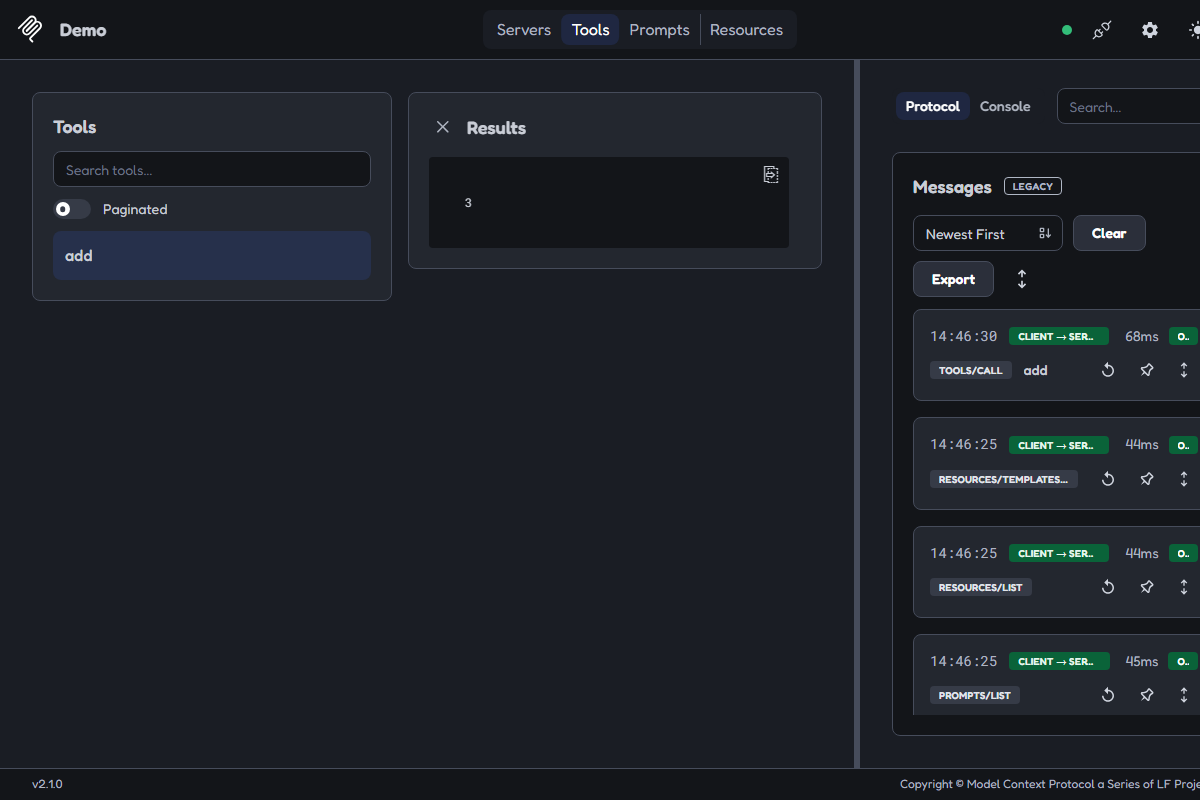
1addYour Python function, discovered over the protocol. The name is the `def`, the description is the docstring.
2Results: 3Computed by your code. If the model had done the arithmetic there would be no TOOLS/CALL in the log.
3TOOLS/CALL addProof the request crossed the protocol boundary and came back OK.
Best viewed on desktop — tap Enlarge to read the numbered controls.
Your first tool, answering.uv run mcp dev server.py opens this at localhost:6274. The 3 in Results came from your Python function — not from the model doing arithmetic.Credit: MCP Inspector ↗
OPEN a terminal, create a project folder and install the SDK with uv add "mcp[cli]"
CREATE server.py in that folder and paste the provided example code
RUN uv run mcp dev server.py, then toggle the Server card to Connected
IN the Inspector, open the Tools tab, click the add entry, type 1 and 2, and press Execute Tool
REGISTER the tool for Claude Code with claude mcp add my-demo -- uv run python server.py
LIST the registered tools with claude mcp list to confirm a ✔ Connected status
You'll see The Tools tab shows the add tool, the Results panel displays 3, and the protocol log records a successful TOOLS/CALL entry
Takeaway A type‑hinted function decorated with @mcp.tool() becomes a full tool any local assistant can invoke via claude mcp …
Check You never wrote a JSONSchema. Where did the Inspector obtain the types for the parameters a and b?
Cost Free. Everything here runs on your own machine — no account, no key.
2.3Add resources and prompts to your MCP server
A resource is addressable data a client can read or attach to context, while a prompt is a canned template a human selects; both are added with decorators on the server object.
Create reusable data endpoints and human‑chosen templates alongside your tools.
Tryuv run mcp dev server.py
Click through Tools, Resources and Prompts. In Claude Code the same three surface as a callable tool, an @-mentionable reference, and a / slash command.
ADD a @mcp.resource() decorator to server.py exposing a greeting function
ADD a @mcp.prompt() decorator below it defining a code‑review template
RESTART the development server with uv run mcp dev server.py
OPEN the Resources tab to see the new greeting endpoint listed
OPEN the Prompts tab to see the new code‑review template displayed
You'll see Three populated tabs – Tools, Resources, Prompts – showing the newly added decorators
Takeaway Choose a resource when data is attached, a prompt when a human selects it, and a tool when the model decides
Check “List my open tickets” needs no judgement from the model. Should it be implemented as a tool or a resource?
Cost Free — same server, same process, two more decorators.
2.4Create a concise ticket‑status tool
A tool surface is the list of names and one‑line descriptions the model sees when selecting a tool; it is the only view the model has of your server’s capabilities.
Reduce a noisy API surface to a single, well‑described function that the model can pick correctly.
Tryuv run mcp dev tickets.py
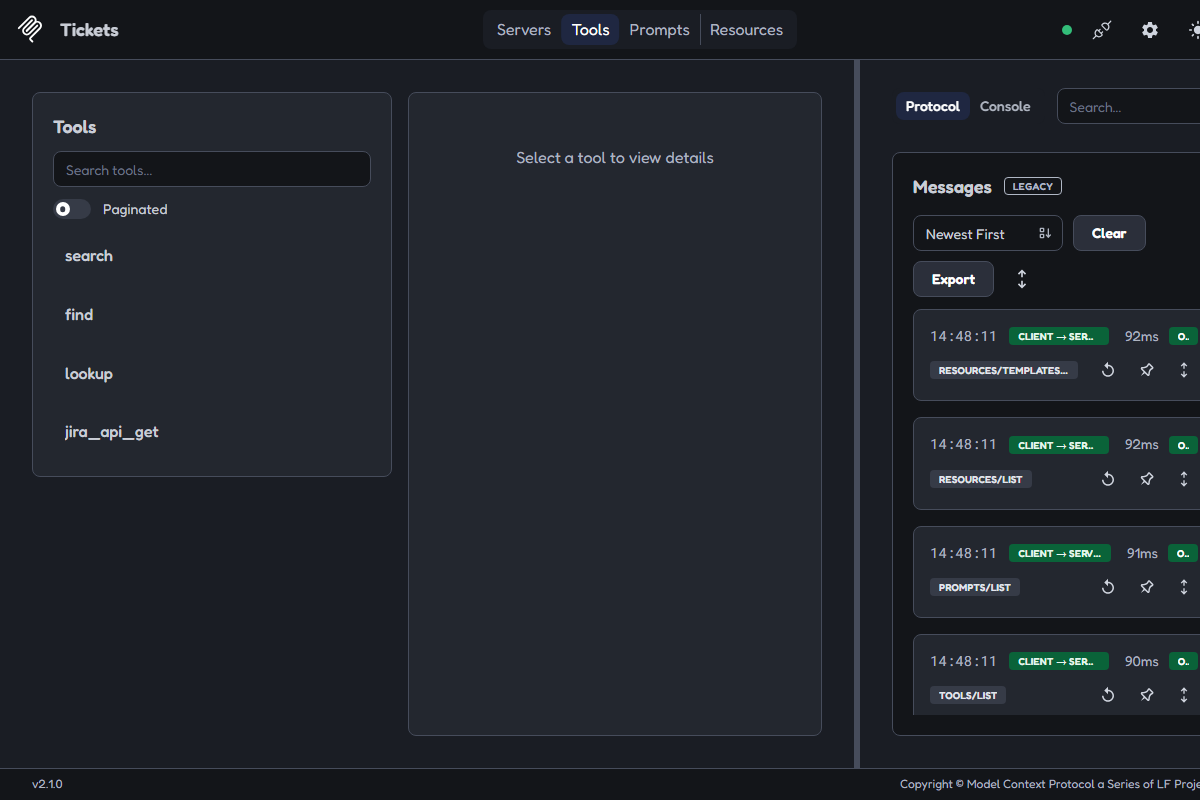
Open the Tools tab and read only the names. That is the model's whole view at selection time — your source code is not in it.
1searchNamed for the verb, not the answer. Nothing here says what it searches or what comes back.
2jira_api_getNamed after the endpoint it wraps. The request is about a ticket; the name is about your HTTP client.
3TOOLS/LISTThe single call the client makes before choosing. What it returns is the whole surface the model reasons over.
Best viewed on desktop — tap Enlarge to read the numbered controls.
This list is the model's entire view of your server. Four names, no way to tell which one answers "what is the status of PROJ-142". A vague tool surface is a bug, not a style choice.Credit: MCP Inspector ↗
CREATE a file called tickets.py containing four example @mcp.tool() functions
RUN uv run mcp dev tickets.py, open the Tools tab in the Inspector and note the list with the source file closed
IDENTIFY which listed tool should answer “what is the status of PROJ‑142”
REPLACE the four functions with a single get_ticket_status(ticket_id: str) tool and add a docstring that also states when not to use it
RELOAD the Inspector and verify the Tools list now shows only the appropriate entry
You'll see Initially four indistinguishable tools, then one clearly named entry matching the query
Takeaway Clear naming and explicit docstrings let the model choose the right tool without ambiguity
Check Two of your tools could both plausibly answer the same request. Should you merge them or add a caveat to each docstring?
Cost Free — a design pass, not new infrastructure. It costs you the discipline to delete tools, which is the part people skip.
2.5Require tokens and enforce an allowlist
TokenVerifier converts a bearer token into an AccessToken; AuthSettings declares the issuer, serverURL and required scopes. An allowlist is a custom pattern you code into tool bodies.
Require a valid token before any tool runs and keep the set of reachable systems in an explicit, reviewable list.
Trycurl -i http://127.0.0.1:8000/mcp
Run it against the auth-protected server with no token. The 401 is the lesson: rejection happens at the boundary, not inside your code.
CREATE a verifier class implementing TokenVerifier.verify_token that returns an AccessToken or None
INSTANTIATE the server with both token_verifier and auth arguments; omitting either should raise a startup error
CALL get_access_token() inside a tool to obtain caller token details for per‑tool scope checks
START the MCPserver over HTTP and issue a request without a token (e.g. curl -i http://127.0.0.1:8000/mcp) to see the 401 response
WRITE an allowlist as plain text enumerating exactly which tables, paths or repositories each tool may access
You'll seeHTTP/1.1 401 Unauthorized with a WWW-Authenticate: Bearer error="invalid_token" header and a JSON body indicating the request was refused before any tool executed
Takeawaytoken_verifier + AuthSettings gate who can call at all; an allowlist provides a separate, reviewable list of what each tool may touch
Check Your server has exactly one trusted caller and you trust them completely. Do you still need an allowlist?
Cost Free at the SDK level. The token issuer — your own or a third-party OAuth provider — is the piece that may carry infrastructure cost, separate from MCP itself.
2.6Select appropriate error type for each failure
Plain Python exceptions are returned as tool content the model can read; MCPError aborts the JSON‑RPC request itself, ending the exchange.
Decide whether to raise a plain exception or an MCPError for each individual error condition.
Tryget_author(title="Nonexistent Book")
Call it once against each version of the tool in the Inspector and read what comes back in the Results panel.
FOR each raise statement, ASK whether a smarter model could have avoided the error and note the answer in a comment
RAISE a plain exception for errors another call could fix, such as an invalid title or malformed date
RAISE MCPError for protocol‑level failures the model cannot influence, like authentication rejection or structurally invalid parameters
INVOKE both functions from the Inspector with identical bad input and observe the differing outcomes
INCLUDE the problematic value in the error message and, when possible, suggest a corrective action
You'll see The same bad title is processed twice – once the model reads the exception and retries, once the request ends with a hard failure
Takeaway Plain exceptions let the model recover while MCPError terminates the turn
Check The caller's token expired halfway through a session. Should you raise a plain exception or an MCPError?
Cost Free — this is a decision made per raise statement, not new infrastructure.
2.7Choose a script over a server when appropriate
A script is a one‑off piece of code the assistant runs directly in its own environment, requiring no protocol, auth or persistent tool surface.
Decide whether to implement a one‑off task as a script instead of building a server.
ASSESS the three conditions: multiple callers, authentication/audit requirements, repeated cross‑session use
DETERMINE that only a single person will run the task in one session and no auth boundary is needed
WRITE a plain script that performs the required work
EVALUATE maintenance implications before committing to an API or server
You'll see A decision matrix showing when a script suffices and when a server is required
Takeaway Match infrastructure level to number of callers, auth needs and maintenance impact
Check Three teams need the same capability against a system that logs every access. Should you use a script or a server?
Cost The script costs nothing to build or retire. The server costs ongoing maintenance the moment a second caller depends on it — which is exactly the condition that justifies building it.
3You’ll know it worked 13 checkable outcomes in this chapter
✓Calling the registered "get_pokemon" tool from the client returns JSON data for the requested Pokémon
✓In the MCPUI, the tool appears in the list and can be executed manually, returning expected results
✓Invalid payloads cause a 400 response with clear error messages; valid payloads pass through to the handler
✓Attempting to run `INSERT`, `UPDATE`, or a function with side effects inside the wrapper throws an error and no data is changed
✓The IDE shows a green status for the server and lists its tools/resources in the UI
✓The browser lists your defined tools/resources and returns correct responses when you click ‘Invoke’
✓Running `uv run python -m fastmcp --help` shows the serverCLI without errors
✓After running the command, opening Claude Desktop shows a new MCPserver named “leave manager” with its three tools listed
13 outcomes in all — one per recipe below.
4FAQ, Tips & How-to 13
one problem, one solution, one action
▸How-toEveryone
Want an LLM to fetch current Pokémon info
The video shows how to create a lightweight Model Context Protocol (MCP) server in Python that queries the public PokéAPI and exposes the query as an MCP tool. By registering the function with the server, any LLM client can call it via the standard MCP transport.
The tutorial demonstrates that MCP tools are just Python callables wrapped with metadata (name, description). Registering them lets any compatible LLM discover and invoke the function without additional glue code.
Need to run SQL from TypeScript but prevent any writes
By wrapping the official Python SDK with FastMCP and using tsx you can run TypeScript directly, exposing only read‑only queries. The server validates incoming tool calls, opens a BEGIN READ ONLY transaction, runs the query, then rolls back to guarantee no writes.
Bad command‑line or JSON‑RPC arguments cause errors
Using Zod to parse and validate command‑line or JSON‑RPC arguments prevents malformed requests from reaching the database, making the MCP surface minimal and safe.
Wrapping every query in `BEGIN READ ONLY` followed by `ROLLBACK` leverages PostgreSQL’s native protection: even if a malicious SELECT contains a write via dblink or side‑effecting functions, the transaction aborts on any attempted modification.
The Model Context Protocol (MCP) server is built by decorating ordinary Python functions with FastMCP decorators. Resources expose static data, tools perform actions, and prompts guide the LLM on how to call them. Using these decorators lets the server automatically publish a JSON‑RPC interface that any MCP client can discover.
IDE extensions like Cursor, Cloud Code, or Root Code read an MCP.json file that describes how to launch and communicate with an MCPserver. By specifying the command, arguments, working directory, and transport mode, the client can automatically start the server and discover its capabilities.
A client uses the FastMCP client library to connect via HTTP or stdio, query the server’s catalog, and call a tool with JSON‑RPC parameters. The response is returned as plain JSON, making it easy to integrate into any Python automation.
The MCP inspector is a lightweight web UI that connects to any MCPserverURL and displays its resources, tools, and prompts. It lets you manually invoke methods without writing code, confirming the server behaves as expected before integration.
UV is a fast, cross‑platform Python package manager that can create a new project with all required files (pyproject.toml, main.py, README). Initializing with UV gives you a clean skeleton ready for the MCPSDK and FastMCP.
FastMCP provides an ergonomic wrapper around the MCP protocol. By creating a FastMCP object and registering Python functions as tools, you expose callable actions (e.g., get_balance, apply_leave) that LLMs can invoke via function calls.
The `ubmcp install` command writes a JSON entry into Claude Desktop’s configuration, telling the client how to launch your server (the UV run command). Once registered, the desktop app automatically starts the server and makes its tools available.
MCP relies on the function’s docstring to generate a schema for the language model. A clear description of each parameter, its type, and example values enables Claude (or any MCP client) to map natural‑language requests to the correct tool and format arguments properly.