 Base44
Messy spreadsheet of leads
Your whole team works one shared pipeline instead of a messy spreadsheet — with logins, so everyone sees the same live data.
A no-code app builder — describe an app, get a full backend, database, auth and hosting
A no-code full-stack app builder from Base44 (acquired by Wix, 2025). Describe an app and it generates the UI, a database, user auth and hosting — all managed for you, no separate backend.
Base44 builds the whole thing from a plain-English brief — UI, database, user accounts and hosting — with no code and no separate backend to wire up. One of its public templates, a study app called StudyBuddy, has been cloned over 2,000 times. Base44 (founded by Maor Shlomo, acquired by Wix in 2025) is the "backend baked in" end of the app-builder spectrum: the fastest route to a working, hosted app — at the cost of running on Base44's platform rather than code you export. → Unlike Lovable and v0 (which hand you a React codebase to own), Base44 keeps the app on its managed infrastructure: great to ship fast, a trade-off to weigh before you build something you'll later need to migrate.
Reach for it when you want a working app today rather than a codebase to maintain — a Kanban tracker, an internal tool, a quiz app — built inside the free tier, no separate dev environment needed.
Built-in database + auth, no-code connectors (Google Calendar, Slack, Notion, HubSpot, Salesforce), built-in AI (text, images, speech), Automations and Analytics — and GitHub 2-way sync when you outgrow it.
Create a working front‑end, database, authentication and hosting by describing your app in Base44
Build a conference-room booking app for our office. Staff can see room availability, book a room for a time slot, and the system must prevent double-booking. Admins can add or remove rooms.Type it in the AI chat. Use Discuss mode first if you want the AI to plan with you (Discuss costs ~0.3 credits and changes nothing); Default mode builds right away.
Do this first Generate a full‑stack app from a description
Reshape entities and fields by describing them instead of writing schema or SQL
Each booking should record the room, the person's name and email, the date, start and end time, and a status (confirmed / cancelled). Add a 'capacity' number to each room.Base44 updates the built-in database entities directly. You can also open Dashboard → Data to edit tables by hand.
Do this first Define your app's data using natural language
Activate user accounts, assign roles and choose whether the app is public, workspace‑only or private
Add user login with Google. Give 'admin' users the ability to add or remove rooms; regular users can only book. Show a landing page to anyone who isn't logged in.Base44’s auth is native — no external provider, no keys. Live-app roles are Admin and User.
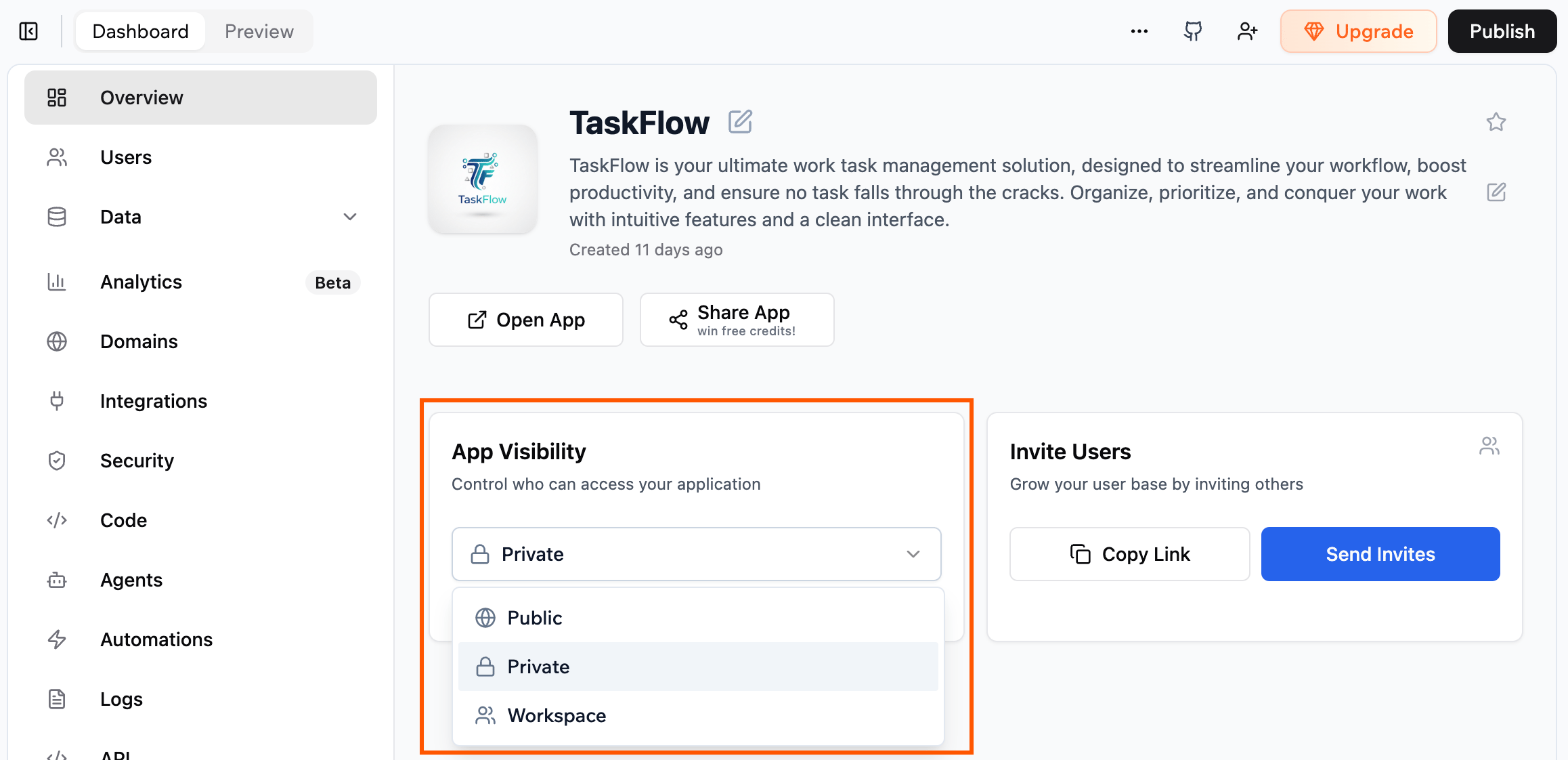
Best viewed on desktop — tap Enlarge to read the numbered controls.
Do this first Enable authentication and set app visibility
Add integrations such as Stripe, Gmail or Slack to your app while the platform manages authentication
Add the Stripe connector and put a checkout button on the booking confirmation page.Connectors are OAuth integrations — Base44 handles the keys. Browse them in Dashboard → Integrations → Browse.
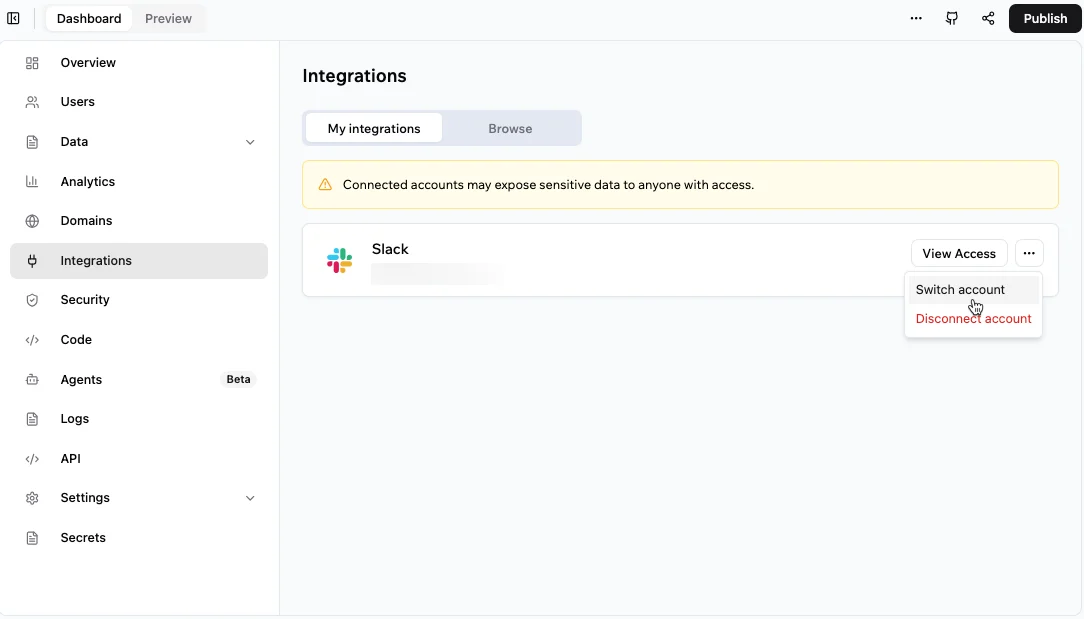
Best viewed on desktop — tap Enlarge to read the numbered controls.
Do this first Add external services to your app
Create text, image, speech and data‑extraction capabilities without entering API keys
Add a button that uses AI to suggest the best free room for a given time and group size. And when a booking is confirmed, email the person a confirmation.Base44 ships AI as built-in functions — invokeLLM (text), GenerateImage, GenerateSpeech, SendEmail, and ExtractDataFromUploadedFile. No keys.
Do this first Add AI features to your Base44 app
Give your Base44 app an AI agent capable of updating records and triggering workflows from plain‑language commands
Mark booking #5 as cancelled and free up that room.First create the agent in Dashboard → Agents and give it a tool to update records; then chat commands like this and it acts.
Do this first Add an AI agent that can act on your app’s data
Execute backend work automatically on a schedule or when data changes
Every morning at 8am, email me a count of new bookings made in the last 24 hours.Automations live in Dashboard → Automations. Triggers: Scheduled, Data event, In-app agent, or Connector event (e.g. a new Gmail/Calendar item).
Do this first Run automated backend jobs
See who is using your live app and what is converting into sales
Open **Dashboard → Analytics**, switch to the **Traffic** tab, and display the visits, unique visitors, average duration, and real‑time users for the past 7 days. Then go to the **Sales** tab and list total payments, number of transactions, and refunds received this week.Paste this into the Base44 command bar in Dashboard → Analytics. Verify that data appears only after your app has been published; otherwise the tables will be empty.
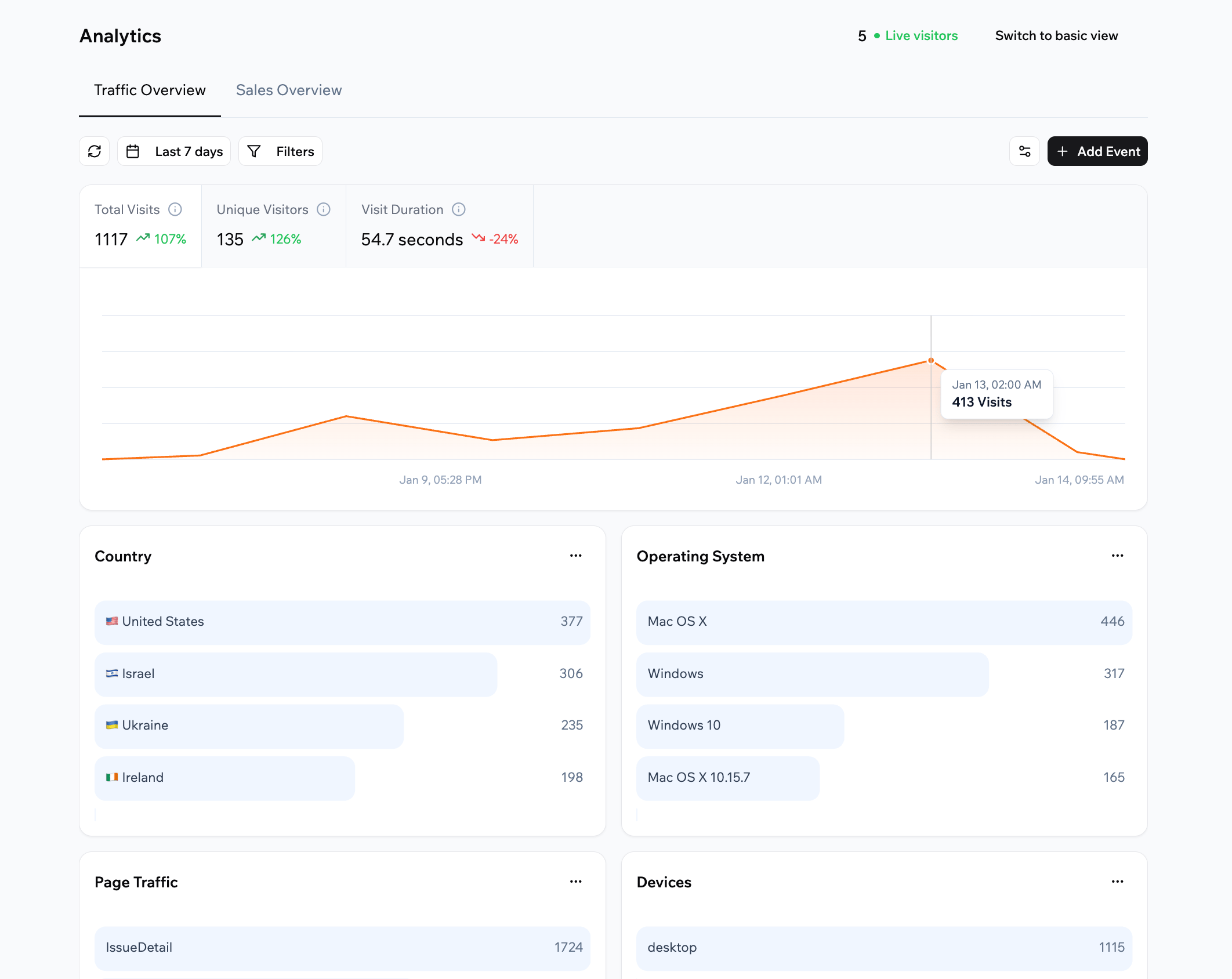
Best viewed on desktop — tap Enlarge to read the numbered controls.
Do this first Check traffic and sales analytics of your published app
Generate ready‑to‑post launch content and send it directly to social platforms
Generate a launch announcement for my booking app for LinkedIn and X, in a friendly, concise tone.This lives in Dashboard → Marketing → Social content, which builds a promotion strategy and platform-specific posts.
Do this first Create and publish AI-generated launch posts
Execute Base44's automated security check and remediate all reported problems before users access the app
Open Dashboard → Security and click **Run Security Scan**In the Base44 interface navigate to Dashboard, select the Security section, then press the Run Security Scan button. Watch the resulting categorized issue list and note any flagged items to address before publishing.
Do this first Secure your app by scanning for vulnerabilities and fixing them
Connect the app to a GitHub repository for two‑way code sync and make it publicly accessible
Click the **GitHub** icon, choose Connect, authorize, create a repo named myapp-sync, enable **2‑way sync**, then click **Publish**, set visibility to Public and copy the provided URL.Paste this into Base44’s editor top panel. After authorising, watch the warning that GitHub sync is permanent before confirming.
76 outcomes in all — one per recipe below.
Messy spreadsheet of leads
Your whole team works one shared pipeline instead of a messy spreadsheet — with logins, so everyone sees the same live data.
Investor introductions go cold
Run your raise like a sales pipeline so no warm intro goes cold.
Affiliates can’t view their performance
Runs a referral program transparently so partners trust their numbers.
Unsure which sales quotes are pending
No quote falls through the cracks and finance can forecast revenue from accepted proposals.
Want reps to see only their accounts but I need a full pipeline view
Each rep sees only their territory and the manager gets a cross-territory pipeline view for fair workload distribution.
Deal pipeline scattered across sheets
Your whole deal pipeline is in one searchable place instead of a spreadsheet no one trusts.
When your search team needs one shared pipeline
The whole search team works one shared pipeline so nothing drops and clients get consistent updates.
Shared inbox is a mess
Replaces a chaotic shared inbox with a tracked queue and accountability per agent.
Never know who has which laptop
Always know where every device is and who’s responsible for it.
New hires missing onboarding tasks
New hires ramp faster and nothing falls through the cracks across IT, HR, and their manager.
Messy staff reimbursements
Turns reimbursement chaos into a clean approval queue with an audit trail.
Need a single place to see who’s doing what
A shared source of truth for who’s doing what, tailored to your team’s exact workflow.
Running out of bestsellers or over‑ordering slow items
Stop running out of bestsellers and over-ordering slow movers.
Too many incoming support tickets
Deflects routine questions automatically while keeping a human in the loop for the tricky ones.
Need to pull data from PDFs without typing
Turns piles of documents into clean data without manual re-typing.
When meeting decisions get lost
Decisions and follow-ups actually get done because every action has an owner and a deadline.
Too many email chains for vacation requests
Replaces email chains for leave requests and gives managers a coverage view before they approve.
Appreciation gets buried in DMs
Appreciation is visible to the whole company instead of disappearing in a direct message.
Support tickets hide deadline risks
Support teams stop missing SLAs by accident because the breach risk is always visible.
Need a free meeting room that fits our group
Automates venue selection and notifications, cutting planning effort and minimizing scheduling mistakes.
Need to collect payment right after a booking
Enables seamless payment collection directly after booking, boosting conversion without extra navigation.
Want admins to add or delete rooms while regular users only book
Admins manage inventory securely while regular users see only booking options, streamlining permissions and enhancing the overall user experience.
Can't limit number of guests per room
Enables tracking how many guests each room can host, supporting booking limits automatically.
Can’t locate samples or know if they’re expired
No more lost samples or expired reagents discovered mid-experiment; the whole lab queries one searchable database.
Email juggling to recruit participants
Cuts the email back-and-forth of recruiting and scheduling a study cohort into one self-serve system.
Need a searchable, shareable record of experiments
A searchable, shareable record of every experiment that survives staff turnover.
Scattered PDFs across the lab
The whole lab’s reading becomes collective knowledge instead of scattered PDFs.
Can’t tell which papers are best
Runs a small conference’s review process without expensive dedicated software.
Hard to follow participant visit dates
Keeps a multi-visit study on schedule and flags participants who are overdue.
Paper field sheets become digital
Replaces paper field sheets with structured, instantly-shared data the whole team can analyze.
Can’t keep track of funding deadlines
Never miss a funding deadline again — the team sees every application’s stage at a glance.
Can't keep hiring steps and interview feedback together
Keeps every hire’s pipeline and interview notes in one accountable place.
Clients missing their weekly check‑ins
Keeps clients accountable between sessions and shows them their own progress over time.
Lost track of referral progress
Staff can see at a glance which referrals are stuck instead of losing track in a fax pile or shared inbox.
Unsure if people want your local service
Validates a marketplace idea with real bookings and reviews before you invest in a custom build.
Need a niche gear‑rental platform that tracks dates
Stands up a niche rental marketplace with bookings and calendars handled for you.
Need an interactive property showcase that captures buyer inquiries
A branded listings portal with a captured-lead inbox instead of a static page.
Want a searchable member list that works as a community
Turns a list of members into a living, searchable network they keep coming back to.
Want a referral‑ranked pre‑launch waitlist
Builds pre-launch demand and a referral loop without stitching together third-party tools.
Coordinating multi‑channel publishing and approvals
Keeps a multi-channel content team aligned with one calendar and a clear approval gate.
Can’t locate the latest brand files
Everyone grabs the latest on-brand assets instead of digging through old chat threads.
Unsure which influencers deliver results
See which creators actually drive results before renewing a partnership.
Clients call to book and I end up double‑booking
Fills the calendar with self-serve bookings and stops double-booking, no phone tag required.
Customers book jobs online
Runs the whole day from request to invoice without paper job cards.
Scheduling volunteers is hard
Fills shifts with self-serve signups and shows exactly where you’re short-staffed.
Patients can’t book by phone
Fewer no-shows and less phone tag for reception — purely admin scheduling, no clinical logic involved.
Can't keep shift schedules up‑to‑date
Everyone sees the current rota and swap requests in one place instead of a shared spreadsheet that drifts out of date.
Can't track who owes you without spreadsheets
Know exactly who owes you what without a spreadsheet that nobody updates.
Fans need a login for posts
Owns your audience relationship directly instead of renting it from a platform.
Suppliers juggling emails for quotes
Replaces scattered supplier emails with one system of record for procurement.
Gives customers a self-serve home and cuts repetitive support requests.
Running a cohort class without an LMS
Run a cohort course with submissions and grading without paying for a heavy LMS.
Can't track returns via email
Support handles returns through a structured queue instead of a flood of one-off emails.
Need a way for users to suggest and vote on ideas
Surfaces what users actually want and shows them you’re shipping it.
Need a real‑time view of who’s checked in at your event
Handles signups and day-of check-in in one place, with live attendance counts.
Need to see survey results as they come in
Own your survey data end to end with custom analysis instead of a locked-in form tool.
Performance reviews are scattered across PDFs
Every review is completed on time and in one place instead of scattered PDFs emailed to HR.
Need customer feedback after tickets are closed
Support quality is measured with real customer data instead of guesswork.
No patient history at check‑in
Front-desk and clinical staff walk into the visit with the intake already on file instead of a clipboard in the waiting room.
Too many separate KPI sheets
Gives the leadership team one honest scoreboard instead of five conflicting spreadsheets.
Can’t tell which vendor invoices are past due
Finance knows exactly what is owed and when, so nothing slips past due and cash-flow forecasting is based on real numbers.
Can't track department budget vs spend without spreadsheet emails
Department heads log in to see how much of their budget remains, eliminating the monthly spreadsheet email cycle.
Collecting each startup’s monthly numbers is a pain
Portfolio monitoring shifts from chasing founders for spreadsheet updates to a self-serve dashboard with consistent numbers.
Need a personal workspace and free usage
You get a personal workspace and free message/integration credits to start building apps
Need to see how your generated app looks right away
You get immediate visual feedback as the generated app is deployed to a live URL
Can’t edit app fields without code
You can define and modify your app's entities and fields without writing schema or SQL
Changes made through chat appear immediately in the Dashboard → Data tab
Want to add lots of data from a CSV file
You can quickly populate a table by importing a CSV file
Link one entity to another
A Reference field creates a relationship between two tables
Need to decide who can view or change each record
You can set who can see or modify records for each entity
Adding bookings by hand
Adding a few records by hand lets you confirm the structure matches real-world usage
Need to control who opens your app
You can instantly control whether anyone, only workspace members, or invited users can access the app
You can verify that regular users see only the pages and data you allow them to
Visitors who aren’t logged in
Setting the app to Public lets anyone see a landing page without logging in
Not sure whether users should share one account or have their own
Selecting the correct mode determines whether one account is used for all users or each user connects their own account
Connectors use OAuth, so you never have to paste an API key into your app
Need a checkout button on my booking page
You can instruct the built-in AI to call the connected service directly from your app logic
All linked services are listed in one place for easy management
Need automatic confirmation emails from my app
Your app can send confirmation emails automatically without external services
Want to turn a text prompt into a picture inside your app
Create images from text prompts inside your app without external APIs
Need spoken audio from written text
Convert any text into spoken audio without third-party services
Uploaded PDF, CSV or image won’t give me usable data
Turn uploaded PDFs, CSVs, or images into structured rows automatically
Users can’t reach the AI outside the app
Connecting WhatsApp, Telegram or LINE lets external users interact with the same AI agent
Need to cancel a booking with plain text
A user can issue a natural language instruction and the agent will perform the scoped action
Need a backend task but don’t want to code
You can set up a backend job without writing code by creating an automation in the Dashboard
When a trigger fires, specify the exact action
You specify the work the automation performs, such as sending an email or updating records
Each automation run cannot exceed three minutes and must wait at least five minutes before running again
Running an automation consumes credits, so you can estimate usage costs
Automations are only available to projects with a Builder+ plan
Analytics data only starts recording after the app is published, so publishing is required to see usage
You can monitor visits, unique visitors, average session duration, real-time users and detailed breakdowns by page, geography, source and device
For apps connected to Stripe, the Sales tab summarizes payments, transactions, customers and refunds
Want to know each time a booking happens
You can define up to three custom events on the free plan to count specific actions like a completed booking
My launch post is dull
You can quickly enhance copy and regenerate images without leaving the dashboard
Can't post the same thing on Facebook, Instagram and TikTok
For platforms without direct integration you can still quickly copy the generated content
Need a launch announcement for LinkedIn and X
You can ask Base44 to draft a friendly, concise launch announcement for specific platforms
Unsure which vulnerabilities your app has
You can quickly identify and fix security problems before users see them
You can see exactly why an issue was flagged and how to resolve it
App not connected to GitHub
Enables two-way synchronization of your Base44 app's source code with GitHub
Edits in my note tool never reach my code repo
Changes made in either environment automatically propagate to the other
Once enabled, the project remains tied to GitHub and cannot be moved back to a standalone Base44 app
Wix acquired Base44 in 2025. The core product and brand stayed intact, and the platform has continued to grow to hundreds of thousands of users. Some users have reported pricing increases and slower support after the acquisition. On balance it is well-funded and not going away soon, but factor the post-acquisition changes into your decision.
According to Base44's terms, you own your apps and your data. Base44 does not claim ownership of what you create and lets you request a copy of or delete your data. One caveat: servers are in the United States by default, and EU data residency is only on higher plans — relevant if you handle EU personal data.
There is significant lock-in. Your backend runs on Base44's proprietary infrastructure, and while the frontend code can be exported to GitHub, the backend cannot be self-hosted without a rewrite. If you cancel, your apps go offline at the end of the billing period. For a low-stakes project this is fine; for anything long-term or customer-facing, weigh the risk.
Any web app that needs a database and user accounts — for example a lab data tracker, a survey/form tool that stores responses, a literature-review organizer, a shared protocol library with role-based access, or a class quiz app. The AI generates the full app from a plain-English description, so you describe what you need the way you'd explain it to a colleague.
Yes, they are a separate pool. Integration credits are consumed not when you build, but when your live app's users trigger Base44's built-in services — sending an email, an AI/LLM call, generating an image. If your app emails users frequently, these can run out independently of your message credits.
Partially. The GitHub integration lets you push your frontend code to a repo and edit it locally, but the backend — your database connections, authentication, and business rules — is wrapped inside Base44's proprietary SDK and runs on their servers. You can't export a fully independent, self-hostable app: leaving Base44 means rebuilding the backend elsewhere.
Yes, both are fully built-in with zero setup. When you describe your app, Base44 automatically creates database tables, relationships, and permissions, plus user registration, login, and role-based access — no external service like Supabase or Firebase needed. This all-in-one approach is Base44's main selling point over tools like v0, which only generate frontend code.
Yes, but it requires a higher paid plan — it is not available on the free or entry tier. You can buy a domain through Base44 (SSL handled automatically) or connect one you already own by adding a DNS record at your provider. Free SSL is included; DNS propagation can take up to 72 hours.
Several integrations are available out-of-the-box on all plans, including AI/LLM calls, sending email, file upload, image generation, and data extraction from files. Paid plans add OAuth connectors to services like Slack, Notion, and Google Workspace, and any service with an OpenAPI spec can be added as a custom integration.
Base44 works better out-of-the-box for non-technical users: it handles the full stack (frontend, backend, database, auth) automatically with the fewest decisions. Lovable generates real exportable React/TypeScript code you own and can deploy anywhere, but requires a bit more setup. Short version: Base44 for speed and simplicity; Lovable if you care about code ownership and long-term flexibility.
They serve different purposes. v0 is a frontend-only UI generator for developers who already know React — it does not handle databases, authentication, or hosting. Base44 builds a complete working app including backend, database, and auth from plain-language descriptions, with no coding needed. With no coding background, v0 alone cannot build a deployable app; Base44 can.
Know how many credits you use for each change to manage your budget
The same set on /recipes, filtered by tool and role.
The shortest credible 'I built a thing' video for Base44. Pair with the independent review below if you want a non-sponsored counterweight.
Wix acquired Base44 in 2025. The core product and brand stayed intact, and the platform has continued to grow to hundreds of thousands of users. Some users have reported pricing increases and slower support after the acquisition. On balance it is well-funded and not going away soon, but factor the post-acquisition changes into your decision.
According to Base44's terms, you own your apps and your data. Base44 does not claim ownership of what you create and lets you request a copy of or delete your data. One caveat: servers are in the United States by default, and EU data residency is only on higher plans — relevant if you handle EU personal data.
There is significant lock-in. Your backend runs on Base44's proprietary infrastructure, and while the frontend code can be exported to GitHub, the backend cannot be self-hosted without a rewrite. If you cancel, your apps go offline at the end of the billing period. For a low-stakes project this is fine; for anything long-term or customer-facing, weigh the risk.
Any web app that needs a database and user accounts — for example a lab data tracker, a survey/form tool that stores responses, a literature-review organizer, a shared protocol library with role-based access, or a class quiz app. The AI generates the full app from a plain-English description, so you describe what you need the way you'd explain it to a colleague.
Yes, they are a separate pool. Integration credits are consumed not when you build, but when your live app's users trigger Base44's built-in services — sending an email, an AI/LLM call, generating an image. If your app emails users frequently, these can run out independently of your message credits.
Partially. The GitHub integration lets you push your frontend code to a repo and edit it locally, but the backend — your database connections, authentication, and business rules — is wrapped inside Base44's proprietary SDK and runs on their servers. You can't export a fully independent, self-hostable app: leaving Base44 means rebuilding the backend elsewhere.
Yes, both are fully built-in with zero setup. When you describe your app, Base44 automatically creates database tables, relationships, and permissions, plus user registration, login, and role-based access — no external service like Supabase or Firebase needed. This all-in-one approach is Base44's main selling point over tools like v0, which only generate frontend code.
Yes, but it requires a higher paid plan — it is not available on the free or entry tier. You can buy a domain through Base44 (SSL handled automatically) or connect one you already own by adding a DNS record at your provider. Free SSL is included; DNS propagation can take up to 72 hours.
Several integrations are available out-of-the-box on all plans, including AI/LLM calls, sending email, file upload, image generation, and data extraction from files. Paid plans add OAuth connectors to services like Slack, Notion, and Google Workspace, and any service with an OpenAPI spec can be added as a custom integration.
Base44 works better out-of-the-box for non-technical users: it handles the full stack (frontend, backend, database, auth) automatically with the fewest decisions. Lovable generates real exportable React/TypeScript code you own and can deploy anywhere, but requires a bit more setup. Short version: Base44 for speed and simplicity; Lovable if you care about code ownership and long-term flexibility.
They serve different purposes. v0 is a frontend-only UI generator for developers who already know React — it does not handle databases, authentication, or hosting. Base44 builds a complete working app including backend, database, and auth from plain-language descriptions, with no coding needed. With no coding background, v0 alone cannot build a deployable app; Base44 can.
invokeLLMGenerateImageGenerateSpeechSendEmailExtractDataFromUploadedFilenpm installApp VisibilityConnectorsintegration creditsAutomationsSecurity ScanAsk, share, or report — over on the Heidelberg AI community forum.
