Heidelberg AICurriculum
Track 4 · Intermediate
4.2

Lovable

A no-code app builder — chat to build full-stack React apps you own and export to GitHub

10 lessons 2026-08-06 AI-generated

1Overview

A no-code app builder from Anton Osika's Stockholm-based team — start from a Figma file or screenshot, and everything it generates exports as portable React you keep owning outright.

A marketer with no engineering background built Plinq — an instant safety app — entirely in Lovable and grew it to thousands of users in its first months. Lovable (Anton Osika, Stockholm) lets you chat to build a full-stack app while a live preview updates as you type, then export the whole React + Supabase codebase to GitHub in one click — so what you ship is code you own. → Unlike Base44 (which keeps your app on its platform), Lovable is the "you own the code" end of the spectrum; unlike v0 (UI-first), it wires up auth and a database for you. Watch the credit meter: iterative debugging loops can burn through credits faster than you expect.

1.2After this chapter you can
Chat-build a full-stack React app with a live preview that updates as you go
Add a real backend and per-user auth (Lovable Cloud / Supabase) with no schema work
Own the output: one-click GitHub export — and iterate without burning credits
1.3When to reach for it

You want a working app AND the code — portable React you can keep building on outside the platform. Its sweet spot is a Supabase backend; a non-JS or heavily custom backend is not.

1.4Key parts

Live preview, Supabase-backed auth + database, Figma/screenshot import, built-in AI features, one-click GitHub export and publish — metered by credits (debugging loops can be pricey).

2Lessons 10

2.1 Create your first full‑stack app with Lovable

Generate a complete React + TypeScript app from a single prompt

TryBuild a personal task tracker web app. Users can add tasks with a title, due date, and status (todo / doing / done), see them in three columns, and mark them complete. Clean, modern design with a calm colour palette.

Before prompting, sketch the screens and who sees what — Lovable's docs say a specific, detailed first prompt beats a vague one.
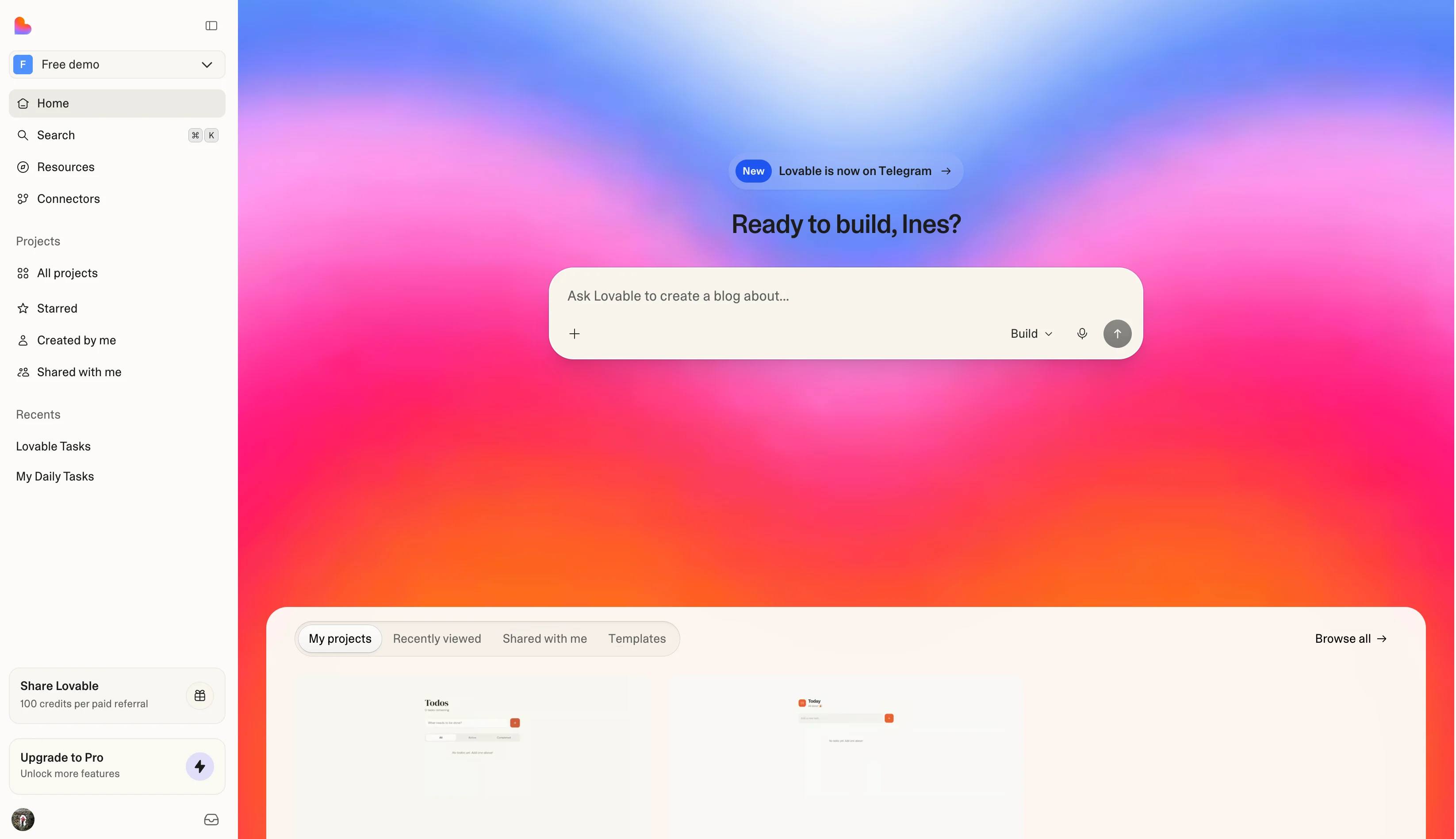
The Lovable home with the build prompt box and Build mode selected
  1. 1 Pro upgrade button unlock additional features and credits Why this exists →

Best viewed on desktop — tap Enlarge to read the numbered controls.

The Lovable home — type your app in the prompt box with Build mode selected. Credit: docs.lovable.dev ↗
  1. Visit lovable.dev, click Sign up and register without a credit card, select New Project
  2. Paste the detailed prompt into the input box and press Build
  3. Observe the free quota displayed in the dashboard and plan your prompts accordingly
  • You'll see A live multi‑screen task app running in the browser, built from your initial prompt
  • Takeaway A precise first prompt drives Lovable to scaffold an entire full‑stack project
  • Check Why does a strong, specific first prompt in Lovable matter more than later small tweaks?
  • Cost Free = 5 daily / ~30 monthly credits; each chat build consumes credits. Front-load planning to make them count.

2.2 Make focused incremental updates with chat prompts

Do this first Create your first full‑stack app with Lovable

Update the app in small, testable batches and edit copy for free using the inline text tool

TryAdd a search box above the task columns that filters tasks by title, and add a small count badge to each column header.

Keep each request small and focused. Lovable's docs put it as "the smaller the part, the smarter the response".

  1. Send a prompt describing two related changes in the chat input
  2. Review the generated result in the preview area
  3. Edit wording using the preview toolbar's inline text edit by pointing at the text and typing
  4. Repeat the process with the next small batch of changes
  • You'll see The app expands step by step, with text changes applied instantly via the toolbar
  • Takeaway Small scoped requests keep output reliable and preserve daily credit usage
  • Check Why should you refine a Lovable app in small batches rather than one giant prompt?
  • Cost Chat builds use credits; inline text edits are free (≤100/day). Batch logic changes; use the toolbar for text.

2.3 Add a real backend to your app

Do this first Make focused incremental updates with chat prompts

Persist task data in a database

TryAdd a database so tasks are saved permanently and reload when I come back. Store each task's title, due date, and status.

Connect the backend only after the frontend is stable — Lovable's docs warn that reverting a version after the DB is wired can break the schema.

Viewing table tasks: Lovable Cloud's built-in database browser — the same tasks table this lesson creates. Credit: official Lovable product video (youtube.com/@lovable)
  1. Open the integrations panel and select Supabase to attach a backend
  2. Confirm the automatic creation of the tasks table in the connected database
  3. Reload the preview and verify that tasks remain after the page refresh
  • You'll see Tasks persist across reloads, backed by a real Postgres database you didn't have to hand‑wire
  • Takeaway Connect the backend after the UI is stable to avoid reverts breaking the database
  • Check Why should you connect Lovable's backend only after the UI is stable rather than wiring the database first?
  • Cost Lovable Cloud is usage-based, and every workspace — including Free — currently gets a free $25 Cloud + $1 AI balance each month (Lovable flags this as a temporary offering); a Supabase free tier also works if you'd rather bring your own.

2.4 Add authentication and per‑user data

Do this first Add a real backend to your app

Create a multi‑user app where each person sees only their own tasks after logging in

TryAdd email and Google sign-in. Each user should only see and edit their own tasks. Show a login screen to logged-out visitors.

Lovable configures authentication (via Lovable Cloud / Supabase Auth) and wires per-user data access for you.

A login screen assembled inside Lovable's editor — chat on the left describing the auth flow, live preview on the right with Google among the sign-in options and an email/password fallback.
  1. Chat panel — the request and Lovable’s plan for the auth screen.
  2. Live preview — the generated "Welcome back" login screen with social + email sign-in.
  3. Top bar — Supabase and GitHub connection status, Publish button.
Credit: lovable.dev ↗
  1. Send an authentication prompt to Lovable; the editor will generate a Sign up / Log in flow and protect the app’s routes
  2. Click the Sign up button, register as the first user, then create a task and verify it appears in the list
  3. Log out, then click the Log in button and sign in as a second user; create a different task and confirm the first user's tasks are not visible
  4. Open the app without logging in to see that the Login screen is displayed instead of the task view
  • You'll see When logged in, the task list shows only items belonging to that user; logged‑out visitors see the login screen
  • Takeaway A single well‑scoped prompt can provide full authentication and row‑level data ownership in Lovable
  • Check Why is checking that two different signed‑in users each see only their own tasks the real proof that auth works?
  • Cost Auth is part of the built-in backend; the build prompt consumes credits like any chat change.

2.5 Make visual edits and recover from mistakes

Do this first Add authentication and per‑user data

Apply quick style changes with the preview toolbar and restore a working version when an edit breaks the app

TryChange the navigation bar background to a light teal (#e0f7fa) and increase font size of links to 16px.

Paste this into the preview toolbar after selecting Edit mode.

Every message's ··· menu has Restore — roll the whole project back to that version. It also shows the credits used for that step. Credit: lovable.dev ↗
  1. Open the preview toolbar, choose a mode, hover over an element and describe the change you want
  2. Edit inline text directly in the preview when needed – these edits are free up to the daily limit
  3. If the app breaks after an edit, click Try to Fix so Lovable scans the logs and attempts an automatic repair
  4. When Try to Fix does not resolve the issue, open the version history and select revert to a prior stable version
  • You'll see The element updates as described and any broken state is repaired either by Try to Fix or by reverting to a previous version
  • Takeaway Use Try to Fix first, then revert if needed to keep your project stable
  • Check Why should you stop repeating Try to Fix after a try or two and switch to planning or reverting instead of running it again?
  • Cost Inline text edits are free; select/annotate toolbar modes and chat fixes use credits. Reverting is free.

2.6 Add AI features without API keys

Do this first Make visual edits and recover from mistakes

Create smart AI‑powered features directly in your app without managing API keys

TryAdd an AI button that turns a rough, messy note into a clean task: a clear title, a suggested due date, and 2–3 tags.

Turn on the backend first (Lesson 2). Lovable manages the model key for you (LOVABLE_API_KEY) and runs the call server-side in an edge function, so no key is ever exposed in the browser.

  1. Turn on Lovable Cloud
  2. Select a model in the Model selector and switch to a deeper or image model as needed
  3. Open Settings → Plans & credit usage to monitor your credit balance
  • You'll see An AI‑powered feature – messy note in, clean tagged task out – running inside your app with no provider setup required
  • Takeaway Lovable wires the model server‑side from a description, so you only need to watch your credit usage
  • Check Why should you keep an eye on your credit usage even though Lovable handles the model server‑side without a key?
  • Cost Built-in AI runs on your workspace's credit balance (a free 4-credit monthly AI grant for deployed apps, then normal credits, usage-based by model); building the feature also spends credits. No external API keys.

2.7 Wire your app to external services

Do this first Add AI features without API keys

Connect payments, email and other services directly from Lovable

TryAdd a Stripe checkout so visitors can upgrade to a Pro plan for $9/month, and let me test it before going live.

Lovable can create a Stripe sandbox account for you (no prior Stripe needed), build the checkout UI, and show a test-mode banner in preview; you claim or relink the account when you publish.
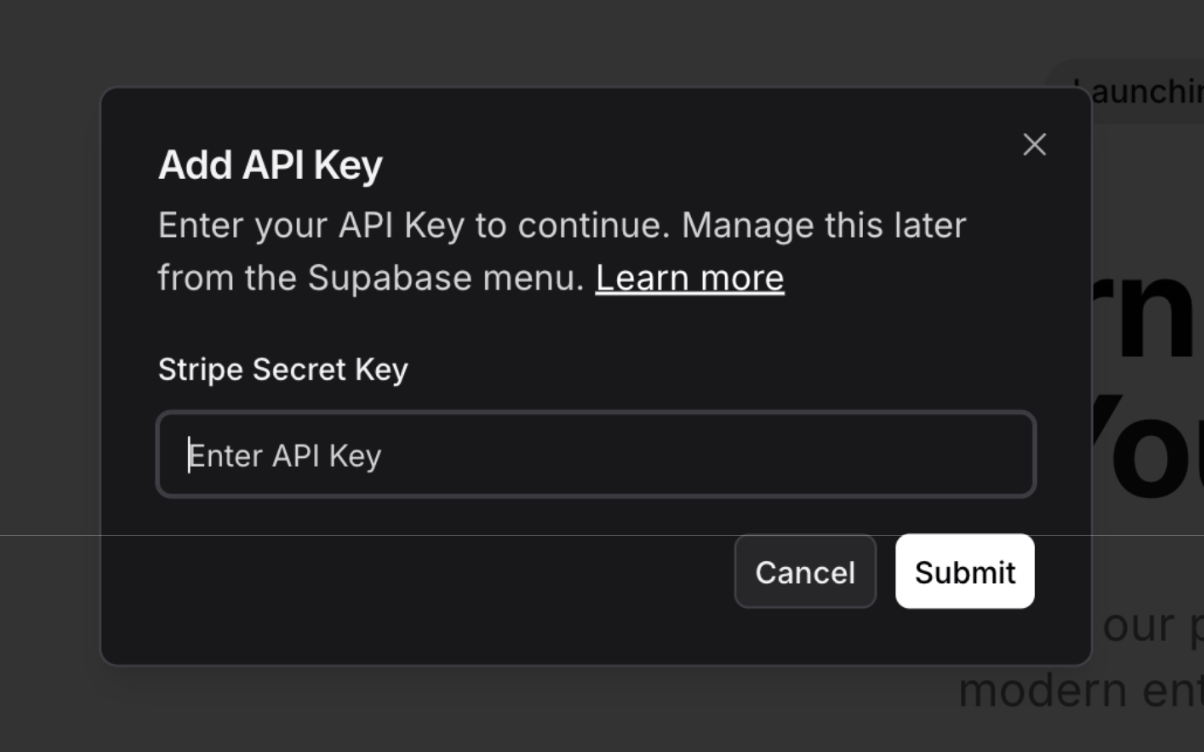
Lovable's Add API Key dialog prompting for a Stripe Secret Key to connect the integration
  1. 1 API key field input your Stripe secret Why this exists →
  2. 2 Save button stores the entered key

Best viewed on desktop — tap Enlarge to read the numbered controls.

Connecting Stripe: Lovable's key-entry dialog for wiring a Stripe account into your app. Credit: docs.lovable.dev/integrations/stripe ↗
  1. Open the Add API Key dialog, paste your Stripe secret key and confirm to provision keys and webhooks for checkout testing
  2. Select Resend in the integrations list, enter your domain details and save to enable branded email confirmations
  3. Browse the Connectors panel, choose a service such as Supabase or Slack and click Add to grant the chat agent access
  • You'll see A test checkout runs successfully and the Connectors panel shows the linked services
  • Takeaway Integrations are driven by describing what you need rather than manual code
  • Check Why can you wire Stripe payments or email into a Lovable app mostly just by describing what you want?
  • Cost Connecting most services is free — you pay only the provider (e.g. Stripe's transaction fee). Building each feature spends chat credits.

2.8 Run a security scan and fix issues

Do this first Wire your app to external services

Run Lovable's security scan and fix flagged issues before real users arrive

TryRun a security scan on my app and fix any high-severity issues you find.

Lovable also re-checks security automatically at publish time.

Graded findings: the Security Advisor sorts issues into Errors, Warnings, and Info — exactly what a scan hands you to fix. Credit: official Lovable product video (youtube.com/@lovable)
  1. Open the Security view
  2. Start a Basic scan to lint row‑level‑security policies, review the database schema and audit dependencies
  3. Run a Deep scan to read the codebase for access‑control gaps, unprotected endpoints, exposed secrets and unsafe input handling
  4. Review each finding graded Error / Warning / Info, read the recommended fix and click the one‑click fix
  5. Re‑run the scan until no findings remain
  • You'll see A graded list of security issues with one‑click fixes – and a clean re‑scan
  • Takeaway A real vulnerability scan ships in the box – run it before every publish, especially once your app holds personal or customer data
  • Check Why should you re‑run Lovable's security scan before every publish rather than only the first time you ship?
  • Cost Both the Basic and Deep scans are free and don't use credits — and so is Try to fix all from the Security view. Only a chat-based 'review my security' counts as a normal (credit-using) message. Wiz needs a connected Wiz account.

2.9 Publish your app and configure domains

Do this first Run a security scan and fix issues

Put the app online at a chosen URL and manage updates with Test and Live environments

TryPublish my app now, using the subdomain tasktracker.lovable.app, make it public, set the title to "Task Tracker", favicon URL to https://example.com/favicon.ico, and social image URL to https://example.com/social.png.

In the Publish dialog (top‑right), fill in the subdomain, visibility, title, favicon and social image fields, then click Publish. Verify the generated URL appears correctly before moving on.
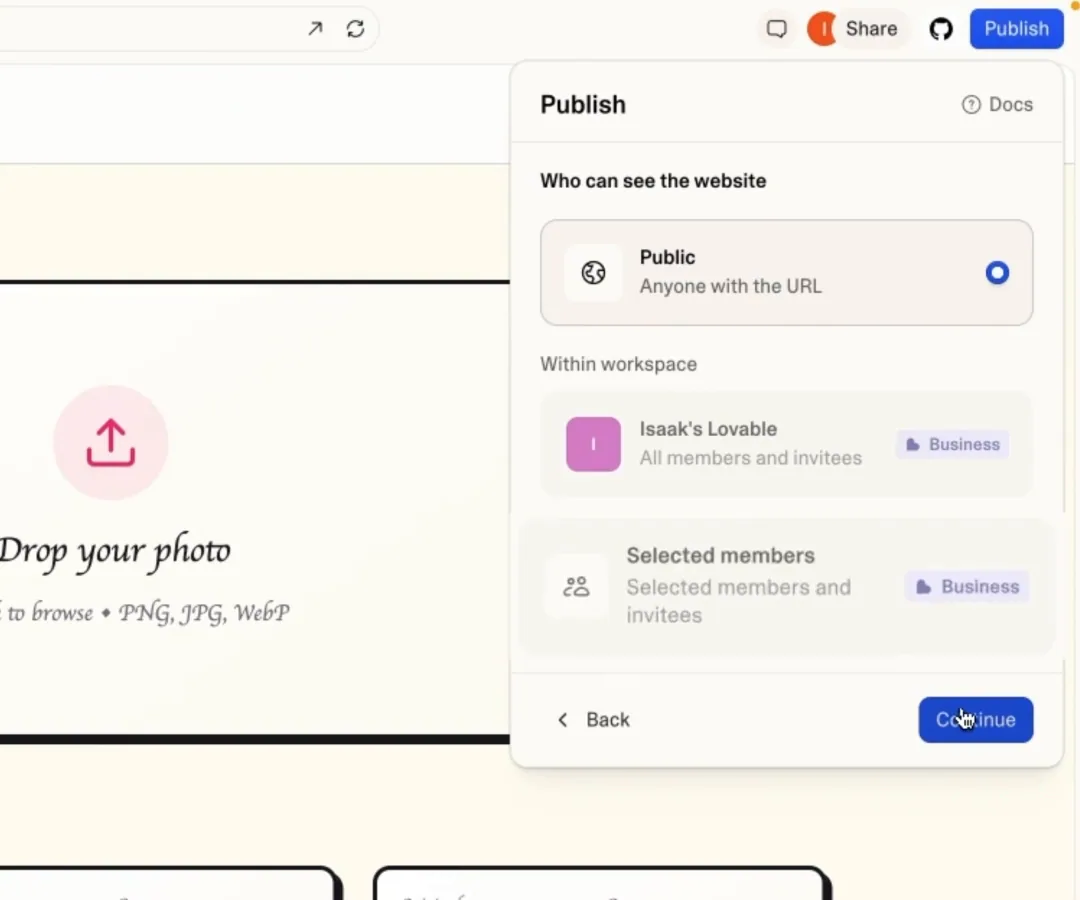
Lovable's Publish dialog showing the 'Who can see the website' setting with Public selected, plus workspace-restricted options requiring a Business plan
  1. 1 Public option makes site visible to anyone Why this exists →

Best viewed on desktop — tap Enlarge to read the numbered controls.

Publish → visibility: pick who can see the site before it goes live — Public by default, workspace-only needs Business. Credit: official Lovable product video (youtube.com/@lovable)
  1. Click Publish in the top‑right corner of the editor, next to Share
  2. Choose a subdomain (e.g., name.lovable.app), set visibility, and fill the metadata fields
  3. To push later edits to the live site, open the same dialog and click Publish changes
  4. On a paid plan, add a custom domain to replace the Lovable subdomain with your own URL
  • You'll see A public, shareable URL for the app – either a Lovable subdomain or your own domain – that only changes when you publish an update
  • Takeaway Publishing creates a snapshot of the current version, so remember to run Publish → Update after any edits and use the Test environment for risky changes
  • Check When you edit a published Lovable app, why doesn't the live URL change until you click Publish then Update?
  • Cost Publishing to a lovable.app URL is free; custom domains require a paid plan. A Cloud-backed app's hosting draws on your monthly Cloud balance (currently a free $25/month).

2.10 Sync your app to GitHub and edit it in Code mode

Do this first Publish your app and configure domains

Push the full React/TypeScript code to a GitHub repository and modify it directly in Code mode

TryConnect this app to my GitHub repository https://github.com/your-username/awesome-app and enable two‑way sync on the main branch.

Paste the prompt into the Lovable chat input box, then click Send. Verify that a confirmation appears showing the integration is linked and that the sync status reads Connected – two‑way before proceeding to Code mode.

Code mode's file tree and a real React + TypeScript file open in the browser — the banner is Lovable telling you the code becomes editable, not just viewable, once GitHub sync is on.
  1. File tree — the project’s real folder structure (src/components, src/pages, …).
  2. Code pane — src/pages/Index.tsx, actual React + TypeScript source.
  3. Banner — Code mode is read-only until you connect GitHub sync.
Credit: lovable.dev ↗
  1. Open the project's Integrations panel and click GitHub to link a repository, then choose the branch for two‑way sync
  2. Enter Code mode, navigate the file tree, select a file such as src/pages/Index.tsx, and edit its contents in the browser
  3. Press Clone on the GitHub sync banner, copy the repo URL, and run git clone … to work locally in any editor
  • You'll see A GitHub repo containing your portable React+TS project, viewable and editable in Code mode
  • Takeaway You own the complete source and can move it anywhere without being locked into the platform
  • Check Why does Lovable's two‑way GitHub sync and Code mode prove you own the whole stack and not just a preview?
  • Cost GitHub sync is free; editing code in Code mode requires a paid plan (viewing and cloning are free).

3You’ll know it worked 60 checkable outcomes in this chapter

  • A new user registers, picks a Stripe plan, and is taken to a personal dashboard that displays only their own data
  • Team members see updated KPI cards and trend charts without manual refresh
  • Employer receives a Stripe receipt, the new job listing appears on the board, and the employer dashboard shows incoming applications
  • All lab members see newly added papers appear instantly in a shared feed and can filter the library by tags
  • Dashboard shows clicks per link over time
  • Team members see a dashboard showing each objective's completion percentage
  • HR dashboard shows all offboarding tasks marked complete for the departing employee
  • Clinician sees a chronological timeline of patient entries during appointment

60 outcomes in all — one per recipe below.

4FAQ, Tips & How-to 96

one problem, one solution, one action

Commerce & payments8

How-to Lovable Founder +1

Need a billable subscription app fast

Skip weeks of boilerplate and get a billable product you can put in front of users this week.

~12 min · no code AI-generated
How-to Lovable Creator

Want an easy way to sell video lessons

Sell your knowledge as a polished course without a bulky LMS.

~12 min · no code Lovable users ↗ AI-generated
How-to Lovable Creator +1

Need a paid members‑only forum

Run a recurring-revenue community you fully own.

~12 min · no code Lovable users ↗ AI-generated
How-to Lovable Small biz +1

Can’t tell which invoices are overdue

Send professional invoices and see at a glance what’s unpaid.

~12 min · no code AI-generated
How-to Lovable Small biz +1

Want to avoid delivery‑app fees

Take orders directly and skip the delivery-app commission.

~12 min · no code Lovable users ↗ AI-generated
How-to Lovable Small biz +3

Need a box site that bills automatically

Launch a recurring-revenue product with billing handled for you.

~12 min · no code AI-generated
How-to Lovable Creator +2

Need to sell digital files online

Sell templates, presets, or ebooks with delivery handled automatically.

~12 min · no code Lovable users ↗ AI-generated
How-to Lovable Founder

Need to sell AI text runs by credits

Productize an AI idea with auth, metering, and billing already wired.

~12 min · no code AI-generated

Content & marketing4

How-to Lovable Founder +1

Collect email sign‑ups and see your place in line

Validate demand and build an audience before you’ve written a line of product code.

~12 min · no code AI-generated
How-to Lovable Creator

Readers only see article teasers

Turn your writing into recurring revenue without Substack’s cut.

~12 min · no code AI-generated
How-to Lovable Creator

Need to change your portfolio yourself

Update your own site without touching code or a separate CMS.

~12 min · no code Lovable users ↗ AI-generated
How-to Lovable Creator

Can't tell which bio links get clicks

Own your link page and actually see what your audience clicks.

~12 min · no code Lovable users ↗ AI-generated

Research & data tools4

How-to Lovable Scientist

Want participants to sign consent, complete timed surveys and view progress

Run a longitudinal study without paying for enterprise survey software.

~12 min · no code AI-generated
How-to Lovable Scientist +1

Can't keep lab inventory up to date

Replace the shared spreadsheet that nobody keeps up to date.

~12 min · no code AI-generated
How-to Lovable Scientist

Collect field observations from researchers

Standardize field data capture across a whole research team.

~12 min · no code AI-generated
How-to Lovable Scientist

Team needs a searchable, timestamped experiment log

Keep a searchable, timestamped record the whole team can trust.

~12 min · no code AI-generated

Booking & scheduling5

How-to Lovable Small biz +1

Clients can book a slot and pay a deposit up front

Stop the back-and-forth emails and collect deposits up front to cut no-shows.

~12 min · no code Lovable users ↗ AI-generated
How-to Lovable Small biz +1

Struggling to fill volunteer slots

Fill shifts without a chaotic group chat.

~12 min · no code AI-generated
How-to Lovable Operations +1

Staff keep fighting over the same microscope or meeting room

End the double-booking arguments over the shared microscope or meeting room.

~12 min · no code AI-generated
How-to Lovable Small biz +2

Clients can’t schedule or pay outside business hours

Let clients book and pay themselves around the clock.

~12 min · no code Lovable users ↗ AI-generated
How-to Lovable Sales

Reps keep call notes in their own calendars

Sales activity is visible and accountable instead of living only in each rep private calendar.

~12 min · no code AI-generated

Marketplaces & directories4

How-to Lovable Creator +1

Need a searchable list of local coffee shops

Build a monetizable directory in an afternoon and charge businesses to be featured.

~12 min · no code Lovable users ↗ AI-generated
How-to Lovable Founder +2

Need a job board that earns from day one

Launch a focused job board that earns from day one via paid postings.

~12 min · no code Lovable users ↗ AI-generated
How-to Lovable Founder

Can't tell if providers and customers will sign up

Stand up a marketplace MVP to test both sides of the market.

~12 min · no code Lovable users ↗ AI-generated
How-to Lovable Small biz +1

Small agency needs a polished listings site

Give a small agency a polished listings site without a costly platform.

~12 min · no code Lovable users ↗ AI-generated

Customer & client portals3

How-to Lovable Small biz +1

Clients can’t see all updates in one place

Look like an established agency and keep every client conversation in one place.

~12 min · no code AI-generated
How-to Lovable Small biz +1

Juggling spreadsheets and DMs with clients

Deliver a premium coaching experience without juggling spreadsheets and DMs.

~12 min · no code Lovable users ↗ AI-generated
How-to Lovable Support +1

Customers keep asking about outages

Customers check the status page instead of flooding support with duplicate tickets during an outage.

~12 min · no code AI-generated

Dashboards & analytics6

How-to Lovable Operations

Juggling several KPI spreadsheets

Give the team a single live view instead of five disconnected spreadsheets.

~12 min · no code AI-generated
How-to Lovable Founder +1

Customers need separate login to view only their data

Ship the dashboard layer of your product without building UI from scratch.

~12 min · no code AI-generated
How-to Lovable Finance +1

Can’t get a quick view of future cash

Leadership sees the forward cash picture in minutes, not after a multi-tab spreadsheet rebuild.

~12 min · no code AI-generated
How-to Lovable Finance +1

Finance uploads monthly metrics and board waits for PDFs

Board members always see the current numbers without waiting for a PDF email.

~12 min · no code AI-generated
How-to Lovable Sales +1

Sales reps keep fighting over pay

Reps stop arguing about their commission because the numbers are transparent and auto-calculated.

~12 min · no code AI-generated
How-to Lovable Support +1

Unsure which customers might churn

At-risk accounts are visible weeks before churn so the team can intervene.

~12 min · no code AI-generated

Trackers4

How-to Lovable Scientist +1

Missing grant deadlines

Never miss a submission or progress-report deadline again.

~12 min · no code AI-generated
How-to Lovable Creator +1

Want to keep track of daily habits

Ship a clean consumer app to test an idea fast.

~12 min · no code Lovable users ↗ AI-generated
How-to Lovable HR / People +1

Need to track who finished mandatory training

HR can prove company-wide training compliance without chasing individuals by email.

~12 min · no code AI-generated
How-to Lovable Physician

Patients forget details between visits

Gives the clinician real between-visit data to review instead of relying on a patient's memory — the log is a discussion aid, not a diagnosis.

~12 min · no code AI-generated

CRM & sales1

How-to Lovable Founder +2

Track your first hundred deals

Track your first hundred deals without paying for a heavyweight CRM.

~12 min · no code AI-generated

Forms, surveys & feedback6

How-to Lovable Creator +2

Sell tickets and keep the guest list

Sell tickets directly and own your attendee list instead of renting it from a platform.

~12 min · no code Lovable users ↗ AI-generated
How-to Lovable Operations +1

Need a survey people can fill anonymously

Collect feedback on your own domain instead of a generic form service.

~12 min · no code AI-generated
How-to Lovable Small biz +1

Quote requests that are vague

Turn vague enquiries into structured leads you can actually act on.

~12 min · no code AI-generated
How-to Lovable Founder +1

Customers want to suggest ideas and see progress

Let customers tell you what to build and show them you’re listening.

~12 min · no code Lovable users ↗ AI-generated
How-to Lovable Scientist

Running a small conference’s abstract submissions

Run a small conference’s submissions without clunky academic software.

~12 min · no code AI-generated
How-to Lovable HR / People

Need a monthly pulse on employee feelings

People teams track employee sentiment over time with a single number and real comments.

~12 min · no code AI-generated

Internal tools & ops6

How-to Lovable HR / People

Onboarding info gets lost in email threads

Make onboarding consistent and visible instead of buried in email threads.

~12 min · no code AI-generated
How-to Lovable Finance

Sending receipts via email and spreadsheets

Replace the email-and-spreadsheet expense process with a clear audit trail.

~12 min · no code AI-generated
How-to Lovable Operations +1

Goals get lost after meetings

Make goals visible and reviewable instead of forgotten after the offsite.

~12 min · no code AI-generated
How-to Lovable Founder +1

Need separate team workspaces with private data

Get the multi-tenant foundation most B2B SaaS needs, generated for you.

~12 min · no code AI-generated
How-to Lovable Finance +1

Purchase requests get lost in email chains

Every purchase is authorized and traceable, replacing email chains that lose the approval history.

~12 min · no code AI-generated
How-to Lovable HR / People

An employee is leaving

Every exit is handled completely and nothing is missed, from account revocation to final pay.

~12 min · no code AI-generated

Knowledge & docs4

How-to Lovable Scientist

Scattered PDFs across the team

Keep the group’s literature in one searchable place instead of scattered PDFs.

~12 min · no code AI-generated
How-to Lovable Operations

Team keeps asking the same questions

Stop answering the same questions in chat over and over.

~12 min · no code AI-generated
How-to Lovable Support

Need fast, consistent answers for common issues

Agents reply faster and consistently because every common answer is one search away.

~12 min · no code AI-generated
How-to Lovable Physician

Patients need reliable info instead of Googling

Patients get consistent, clinic-approved handouts instead of googling their condition — content is authored and reviewed by the clinic's own clinicians.

~12 min · no code AI-generated
How-to Lovable Everyone

Want your own database instead of the built‑in cloud

Connect a Superbase project to give you full backend control

Tech With Tim ↗ Summary → AI-generated
How-to Lovable Everyone

Want a simple way to tell AI what to build

Use a five-part prompt format to generate reliable app code

Tech With Tim ↗ Summary → AI-generated
How-to Lovable Everyone

Pressing the fix button but builds still fail

Use Lovable's Try to fix feature to troubleshoot generation errors

Tech With Tim ↗ Summary → AI-generated
How-to Lovable Everyone

Need a fresh look but only vague ideas

Request a new visual style with the /redesign command and revert if needed

Tech With Tim ↗ Summary → AI-generated
How-to Lovable Everyone

Need a step‑by‑step guide for Google sign‑in

Use plan mode to generate a step-by-step OAuth setup for Google sign-in

Tech With Tim ↗ Summary → AI-generated
How-to Lovable Everyone

Use your own domain but keep the backend on Supabase

Publish a Lovable app to a custom domain while keeping the backend on Superbase

Tech With Tim ↗ Summary → AI-generated
How-to Lovable Everyone

No payment info needed

You can start building apps on Lovable instantly without any payment information

The Lovable home — type your app in the prompt box with **Build** mode selected. Credit: docs.lovable.dev ↗
Free = **5 daily / ~30 monthly credits**; each chat build consumes credits. Front-load planning to make them count. AI-generated
How-to Lovable Everyone

Knowing you have only 5 credits per day prevents wasteful prompting and encourages planning

AI-generated
How-to Lovable Everyone

Need a multi-screen task app from a text prompt

Lovable can turn a single natural-language description into a live, multi-screen task application

AI-generated
How-to Lovable Everyone

Providing a concrete prompt (personal task tracker) shows how to specify UI, data fields, and design preferences

~12 min · no code AI-generated
How-to Lovable Everyone

Huge prompt eats my credit budget

Making 2-3 related changes at a time lets you verify each step and keeps credit usage low

Chat builds use credits; **inline text edits are free** (≤100/day). Batch logic changes; use the toolbar for text. AI-generated
How-to Lovable Everyone

Want to tweak copy right in the preview without using credits

You can adjust copy directly in the preview without spending credits

AI-generated
How-to Lovable Everyone

Need to change lots of logic but keep credit use steady

Grouping related logic updates into small batches keeps credit consumption predictable

AI-generated
How-to Lovable Everyone

Can’t find tasks by name or see column totals

A concrete illustration of a two-change batch that can be applied instantly

~12 min · no code AI-generated
How-to Lovable Everyone

Reloading the app shows whether tasks are truly saved in a real database

AI-generated
How-to Lovable Everyone

Users should only see their own tasks

After authentication, Lovable automatically scopes data so users can only view and edit their own records

A login screen assembled inside Lovable's editor — chat on the left describing the auth flow, live preview on the right with Google among the sign-in options and an email/password fallback.
  1. **Chat panel** — the request and Lovable’s plan for the auth screen.
  2. **Live preview** — the generated "Welcome back" login screen with social + email sign-in.
  3. **Top bar** — Supabase and GitHub connection status, Publish button.
Credit: lovable.dev ↗
Auth is part of the built-in backend; the build prompt consumes credits like any chat change. AI-generated
How-to Lovable Everyone

Visitors without a session are sent to login

The app automatically redirects any visitor without a session to the login page instead of the main UI

AI-generated
How-to Lovable Everyone

Need to tweak an element without re-prompting the whole layout

You can make targeted visual changes without re-prompting the whole layout, saving credits

Every message's **···** menu has **Restore** — roll the whole project back to that version. It also shows the **credits used** for that step. Credit: lovable.dev ↗
Inline text edits are free; select/annotate toolbar modes and chat fixes use credits. Reverting is free. AI-generated
How-to Lovable Everyone

Need quick text tweaks without leaving the app

Simple text tweaks cost nothing, letting you iterate quickly within the free quota

AI-generated
How-to Lovable Everyone

Need to highlight or annotate elements without guessing

Using selection or annotation tools lets you apply precise style changes, but each use consumes credits

AI-generated
How-to Lovable Everyone

You can explore the full app code directly in the browser without leaving Lovable

Code mode's file tree and a real React + TypeScript file open in the browser — the banner is Lovable telling you the code becomes editable, not just viewable, once GitHub sync is on.
  1. **File tree** — the project’s real folder structure (src/components, src/pages, …).
  2. **Code pane** — src/pages/Index.tsx, actual React + TypeScript source.
  3. **Banner** — Code mode is read-only until you connect GitHub sync.
Credit: lovable.dev ↗
GitHub sync is free; **editing code in Code mode requires a paid plan** (viewing and cloning are free). AI-generated
How-to Lovable Everyone

Want to edit live source files from your browser

With a paid plan you can edit the live source files directly from the browser, and those edits sync back to GitHub

AI-generated
How-to Lovable Everyone

Messy note with vague details

An AI-powered button can automatically generate a tidy task title, suggested due date, and tags from an unstructured note

~12 min · no code Built-in AI runs on your workspace's **credit balance** (a free **4-credit monthly AI grant** for deployed apps, then normal credits, usage-based by model); building the feature also spends credits. No external API keys. AI-generated
How-to Lovable Everyone

Need to send branded confirmation emails without SMTP setup

Connecting Resend lets your app send custom emails from your own domain without manual SMTP setup

**Connecting Stripe**: Lovable's key-entry dialog for wiring a Stripe account into your app. Credit: docs.lovable.dev/integrations/stripe ↗
Connecting most services is free — you pay only the provider (e.g. Stripe's transaction fee). Building each feature spends chat credits. AI-generated
How-to Lovable Everyone

You can quickly catch common security misconfigurations before publishing

**Graded findings**: the Security Advisor sorts issues into Errors, Warnings, and Info — exactly what a scan hands you to fix. Credit: official Lovable product video (youtube.com/@lovable)
Both the **Basic and Deep scans are free** and don't use credits — and so is **Try to fix all** from the Security view. Only a chat-based 'review my security' counts as a normal (credit-using) message. Wiz needs a connected Wiz account. AI-generated
How-to Lovable Everyone

A deeper analysis finds hidden vulnerabilities that a basic lint might miss

AI-generated
How-to Lovable Everyone

Want to resolve a security finding fast

You can let Lovable resolve many issues instantly, saving manual effort

AI-generated
How-to Lovable Everyone

Need to resolve every fixable issue in one go

You can automatically address every fixable issue in one operation

AI-generated
How-to Lovable Everyone

No static analysis or dependency scanning

Connecting Wiz expands the security coverage beyond Lovable's native checks

AI-generated
How-to Lovable Everyone

Running a fresh scan after changes ensures no new vulnerabilities slipped in

~12 min · no code AI-generated
How-to Lovable Everyone

Need to try out edits without affecting users

Beta Test and Live environments let you validate edits without affecting users

**Publish → visibility**: pick who can see the site before it goes live — Public by default, workspace-only needs Business. Credit: official Lovable product video (youtube.com/@lovable)
Publishing to a lovable.app URL is free; **custom domains require a paid plan**. A Cloud-backed app's hosting draws on your monthly Cloud balance (currently a free $25/month). AI-generated
How-to Lovable Everyone

Ready to push tested changes live

After confirming in Test, you can promote the snapshot to Live with a single action

AI-generated
How-to Lovable Everyone

Get a discounted Pro plan if you're a verified student

~12 min · no code Lovable — Students ↗ AI-generated
How-to Lovable Everyone

Want your bot on your own web address

You can point a personal domain at your Lovable project by adding DNS records

Lovable Docs — Custom Domain ↗ AI-generated
FAQ Lovable Everyone

What do I do when I'm stuck in a debugging loop burning credits?

When an error appears, first click the 'Try to Fix' button — Lovable scans your logs and attempts a repair at no extra credit cost. If that fails, avoid vague re-prompts like 'fix it'. Instead revert to the last working version (View History), then write a clearer, more specific prompt. For simple visual fixes, switch to Code mode and edit manually — manual edits are free.

Lovable ↗ AI-generated
FAQ Lovable Everyone

Lovable vs Base44 vs v0 — which should I use?

Lovable is best if you want to own your code, hand the project to a developer later, or want a real React codebase you can deploy anywhere. Base44 is slightly simpler to start and includes a fully managed backend, but your code is harder to export. v0 is primarily a frontend UI generator and needs more technical knowledge. With no coding background, Lovable or Base44 are the most practical.

Lovable ↗ AI-generated
FAQ Lovable Everyone

How does GitHub export work — do I need to know Git?

In your project settings you connect your GitHub account and Lovable creates a repository automatically; after that, changes sync to the repo (two-way on paid plans). You don't need Git commands to export — it's a one-click setup. Once the code is on GitHub you can open it in any editor, deploy it to Vercel or Netlify, or hand it to a developer.

Lovable ↗ AI-generated
FAQ Lovable Everyone

What tech stack does Lovable generate — can a developer read and edit it?

Lovable generates standard React + TypeScript projects styled with Tailwind CSS (recent projects use modern frameworks with server-side rendering). The code is clean, readable, and standard — a developer can open the GitHub repo and edit it normally. There is also a built-in Code mode inside Lovable for manual edits without leaving the platform.

Lovable ↗ AI-generated
FAQ Lovable Everyone

Is Lovable good for a quick prototype or for a production app?

Lovable shines for quick prototypes and MVPs you can get to a shareable URL fast. You can take a project toward production because you own the exportable code and can connect a real Supabase backend and custom domain — but complex, scale- or compliance-sensitive apps will eventually need a developer to take over the exported codebase. Start with a prototype, then decide.

Lovable ↗ AI-generated
FAQ Lovable Everyone

Can I export my code and own it? Do I need to keep paying Lovable to keep my app?

You own everything you build — there are no licensing fees on your code. You can export the full project to GitHub at any time, including on the free plan. Once your code is on GitHub you can deploy it anywhere (Vercel, Netlify, your own server) and stop paying Lovable; the app keeps running. The export includes your React components, styles, Supabase config, and folder structure.

Lovable ↗ AI-generated
FAQ Lovable Everyone

What can I realistically build with Lovable as a non-coder?

Lovable suits landing pages, portfolios, forms, dashboards, simple SaaS tools, internal team apps, and MVPs with authentication and a database. It cannot produce native iOS/Android apps (only mobile-responsive websites), and it struggles with very complex business logic or compliance-heavy domains. Most non-coders can get a polished working prototype to a shareable URL in an afternoon.

Lovable ↗ AI-generated

The same set on /recipes, filtered by tool and role.

5Videos 2

6FAQ 7

What do I do when I'm stuck in a debugging loop burning credits?

When an error appears, first click the 'Try to Fix' button — Lovable scans your logs and attempts a repair at no extra credit cost. If that fails, avoid vague re-prompts like 'fix it'. Instead revert to the last working version (View History), then write a clearer, more specific prompt. For simple visual fixes, switch to Code mode and edit manually — manual edits are free.

Lovable vs Base44 vs v0 — which should I use?

Lovable is best if you want to own your code, hand the project to a developer later, or want a real React codebase you can deploy anywhere. Base44 is slightly simpler to start and includes a fully managed backend, but your code is harder to export. v0 is primarily a frontend UI generator and needs more technical knowledge. With no coding background, Lovable or Base44 are the most practical.

How does GitHub export work — do I need to know Git?

In your project settings you connect your GitHub account and Lovable creates a repository automatically; after that, changes sync to the repo (two-way on paid plans). You don't need Git commands to export — it's a one-click setup. Once the code is on GitHub you can open it in any editor, deploy it to Vercel or Netlify, or hand it to a developer.

What tech stack does Lovable generate — can a developer read and edit it?

Lovable generates standard React + TypeScript projects styled with Tailwind CSS (recent projects use modern frameworks with server-side rendering). The code is clean, readable, and standard — a developer can open the GitHub repo and edit it normally. There is also a built-in Code mode inside Lovable for manual edits without leaving the platform.

Is Lovable good for a quick prototype or for a production app?

Lovable shines for quick prototypes and MVPs you can get to a shareable URL fast. You can take a project toward production because you own the exportable code and can connect a real Supabase backend and custom domain — but complex, scale- or compliance-sensitive apps will eventually need a developer to take over the exported codebase. Start with a prototype, then decide.

Can I export my code and own it? Do I need to keep paying Lovable to keep my app?

You own everything you build — there are no licensing fees on your code. You can export the full project to GitHub at any time, including on the free plan. Once your code is on GitHub you can deploy it anywhere (Vercel, Netlify, your own server) and stop paying Lovable; the app keeps running. The export includes your React components, styles, Supabase config, and folder structure.

What can I realistically build with Lovable as a non-coder?

Lovable suits landing pages, portfolios, forms, dashboards, simple SaaS tools, internal team apps, and MVPs with authentication and a database. It cannot produce native iOS/Android apps (only mobile-responsive websites), and it struggles with very complex business logic or compliance-heavy domains. Most non-coders can get a polished working prototype to a shareable URL in an afternoon.

7Glossary 22 terms

Show the 22 terms
Lovable
Build mode
Lovable's implementation mode where agents write code, apply changes across files, and verify results.
Plan mode
Lovable's reasoning mode for exploring ideas, comparing approaches, and reviewing plans without modifying any code.
Prompt
A plain-English instruction you type to tell Lovable what to create, change, fix, or explain in your app.
Prompt queue
A queue of pending prompts you can reorder, edit, copy, or remove before Lovable processes them.
Preview
The live, interactive view of your app shown inside Lovable while you are building, so you can see changes as they happen.
Preview toolbar
An overlay above the preview that lets you select any element, edit text directly, add annotations, and leave comments.
Visible tasks
The step-by-step progress shown in the chat during a build, displaying the current step, files being modified, and tools being used.
Diff
A side-by-side file change comparison showing exactly which lines were added or removed by Lovable.
History
The chronological log of every change made to your project, letting you revert to any earlier version or save a checkpoint.
Remix
A way to create an independent copy of a project as the starting point for a brand-new project, preserving the original.
Knowledge
Persistent instructions you write once that Lovable follows across all future conversations, available at both workspace and project level.
Publish
The action that deploys a snapshot of your project to a live URL so others can visit and use your app.
Custom domain
A web address you own (such as myapp.com) that you connect to your published Lovable project instead of the default lovable.app URL.
Lovable Cloud
Lovable's built-in full-stack platform that provides a database, user authentication, file storage, and edge functions without any manual setup.
Secrets
Securely stored credentials (API keys and passwords) that are automatically injected into your edge functions so they never appear in your code.
GitHub integration
A two-way sync between your Lovable project and a GitHub repository so your code is version-controlled and other developers can collaborate on it.
Credits
The units Lovable uses to measure usage — both Plan mode messages and Build mode runs consume credits from your workspace's shared balance.
Workspace
The top-level container that holds all your projects, team members, billing, and settings for one account or organisation.
Project
A single app you are building inside Lovable, with its own code, chat history, integrations, and settings.
Subagents
Temporary, read-only helper agents Lovable spins up to research, inspect code, and browse the web in parallel before the main agent makes changes.
Browser testing
A feature where Lovable controls a real browser to click buttons, fill forms, and capture screenshots to verify your app's end-to-end behaviour.
Edge functions
Serverless TypeScript functions that run on Lovable Cloud and handle backend tasks such as APIs, webhooks, and third-party integrations.

8See also

💬 Discuss this chapter

Ask, share, or report — over on the Heidelberg AI community forum.