Heidelberg AICurriculum
Track 4 · Intermediate
4.3

v0

A no-code app builder — prompt polished React UI, now a full agent that tests and deploys

10 lessons 2026-08-06 AI-generated

1Overview

A no-code app builder from Vercel with a visual Design Mode for pixel-level tweaks on the generated UI, plus AI features wired through the Vercel AI Gateway rather than one built-in model.

A developer built a full production website for a therapist in two days with v0 — contact form, admin dashboard and a real backend. v0 (from Vercel) generates polished, accessible React UI from shadcn/ui + Tailwind, and since its February 2026 relaunch it is a full agent: it searches the web, uses a browser to test what it builds, runs commands in a sandbox and fixes its own errors, then deploys to Vercel in one click. → Unlike Base44 and Lovable, v0 is the UI-first, React/Next.js end of the spectrum — the most polished front-end, with backends added as one-click integrations (Supabase, Neon) rather than a single managed cloud.

1.2After this chapter you can
Generate polished, accessible React UI (shadcn/Tailwind) straight from a prompt
Let the v0 agent test, browse and auto-fix — then add a one-click database
Ship it: production-accurate preview, one-click Vercel deploy, code you own on GitHub
1.3When to reach for it

You want the most polished front-end and you are on React/Next.js. Backends are "bring a provider" one-click integrations (Supabase, Neon), not a single managed cloud.

1.4Key parts

shadcn/Tailwind UI generation, an agent that web-searches + browser-tests + auto-fixes, Design Mode, one-click databases and AI via the Vercel AI Gateway, GitHub sync + one-click Vercel deploy.

2Lessons 10

2.1 Generate your first React app

v0 is an AI‑driven no‑code builder you run in the browser that turns a short prompt into a live React + Next.js app with instant preview and one‑click deployment.

Create a v0 account and generate a simple landing page from a single sentence

TryCreate a landing page for a campus plant shop: a hero with a heading and tagline, an 'about' section, a grid of 6 plants with names and prices, and a contact form. Use a fresh green colour scheme and lots of whitespace.

Open v0.app, sign in, and type your idea into the prompt box on the home screen — in any language you like.

The core v0 layout every generation lands in — chat and build history on the left, a live, production-accurate preview on the right, with the toggle to switch to the Code view next to it.
  1. Chat panel — the running conversation and what changed in the last turn.
  2. Live preview — the generated app rendering for real, not a mockup.
  3. Preview / Code toggle — switch between the live app and its source.
Credit: v0.app/docs ↗
  1. Open v0.app and sign in with a Vercel, Google or GitHub account
  2. Enter your sentence in the chat input and press Enter to start generation
  3. Select the Code tab to view the generated source files
  4. Click the mobile preview icon to see the responsive layout
  • You'll see A multi‑section landing page renders in the preview while the corresponding React + Next.js code appears beside it
  • Takeaway v0 instantly turns plain English into production‑ready React code with a real preview
  • Check Why does seeing a live preview that runs a full build matter more than just viewing a static design mockup?
  • Cost Free plan = $5 of monthly credits and 7 messages/day, metered by tokens per generation. A page like this is a few cents — plan your prompts rather than spraying them.

2.2 Refine your app with precise prompts

v0 is an AI agent you converse with in the browser, generating polished UI and handling testing and deployment as you iterate.

Do this first Generate your first React app

Update the generated UI by describing exact changes and see them applied instantly

TryIn the header, swap the order of the 'Shop' and 'About' links. Make the hero heading larger and add a short sub-heading under it. Add a 3-tier pricing section below the plant grid.

Send this as a follow-up to the same chat — v0 keeps iterating the existing app instead of starting over. Short on typing? Click the microphone in the prompt bar to dictate it.

Versions: every change you send creates a new, restorable version in the chat, so you can compare and roll back — iterate in small, precisely-named steps. Credit: v0.app/docs ↗
  1. Recall v0’s five prompting principles: start simple, plan, provide context, be specific, then iterate
  2. Send a prompt that names the element to change and describes the precise modification
  3. Watch the preview update after each focused batch of instructions
  • You'll see The page updates in place showing your requested modifications while preserving earlier work
  • Takeaway Small, precise prompts let you steer the UI without restarting the project
  • Check Why does naming exactly what to change and where it changes produce better results than asking v0 to simply improve the design?
  • Cost Each message is a metered generation against your 7/day — group related changes to make them count.

2.3 Generate an app from a design file

v0 can ingest designs and output a full‑stack React/Next.js site with one‑click deployment.

Do this first Refine your app with precise prompts

Turn a Figma file, screenshot or community template into a working app

TryHere's a screenshot of the dashboard I want — rebuild it as a responsive React page with the same layout, colours and components.

Click the attachment icon (or drag the file into the chat) to add the image. v0 analyses the layout, colours and components and generates code that closely replicates it.

v0's Remix a Template gallery — fork a community starter (Apps, Landing pages, Dashboards, Components, Login) instead of starting from a blank page. Credit: v0.app/docs ↗
  1. Attach a screenshot or mockup using the Attachment icon so v0 can infer layout
  2. Paste a Figma link via the Attachment icon – v0 now reads the file structure and styles directly
  3. Browse the Templates gallery, click Fork on a template and customise it with prompts
  • You'll see A high‑fidelity app generated from your design or template, ready for further prompt‑based refinement
  • Takeaway v0 can bootstrap an app straight from images, Figma links or community templates
  • Check Why does providing a Figma file or screenshot give you a faster start than describing the whole design in text?
  • Cost Generating from an image, a Figma link or a template is a normal metered generation like any other prompt.

2.4 Refine your app’s visual design and manage versions

Design Mode lets you fine‑tune visual details directly in the live preview while versioning protects experiments.

Do this first Generate an app from a design file

Apply visual tweaks without rewriting prompts and revert safely if needed

TryIn Design Mode, click the hero heading text and change its typography to bold 48px, then set its colour to #2E7D32. Next, select the primary call‑to‑action button and increase its padding by 10 px and change its background colour to #FF6600.

Open Design Mode from the prompt‑bar toolbar, make the edits as described, then use the version dropdown (top‑right) to verify a new version was created; you can restore a previous version if needed.

Design Mode: select any element in the live preview and edit its typography, colour, spacing and layout in the left panel — the changes apply back to your React code. Credit: v0.app/docs ↗
  1. Open Design Mode from the prompt‑bar toolbar
  2. Click any element in the live preview and adjust its typography, colour, spacing or layout in the left panel
  3. Select a different version from the dropdown at the top‑right to view that state
  4. Click restore on the chosen version to create a new version that reverts the changes
  • You'll see The live preview updates with your styling changes and the version list shows a new entry after a restore
  • Takeaway Design Mode handles appearance while versioning safeguards experiments
  • Check Why use Design Mode for look‑and‑feel adjustments but rely on prompts for structural changes?
  • Cost Adjusting the look in Design Mode means you don't spend a chat message on layout, and restoring a version is free — both are cheaper than re-prompting in chat.

2.5 Add a real database to your app

v0 adds backends with one‑click integrations, turning your front end into a full‑stack app you own.

Do this first Refine your app’s visual design and manage versions

Connect a real database so the app can store and retrieve data

TryAdd a database so each contact-form submission is saved, and show the saved messages in an admin table.

When v0 suggests Add Integration / Add authentication backend, accept it — or just ask v0 to add a database integration.
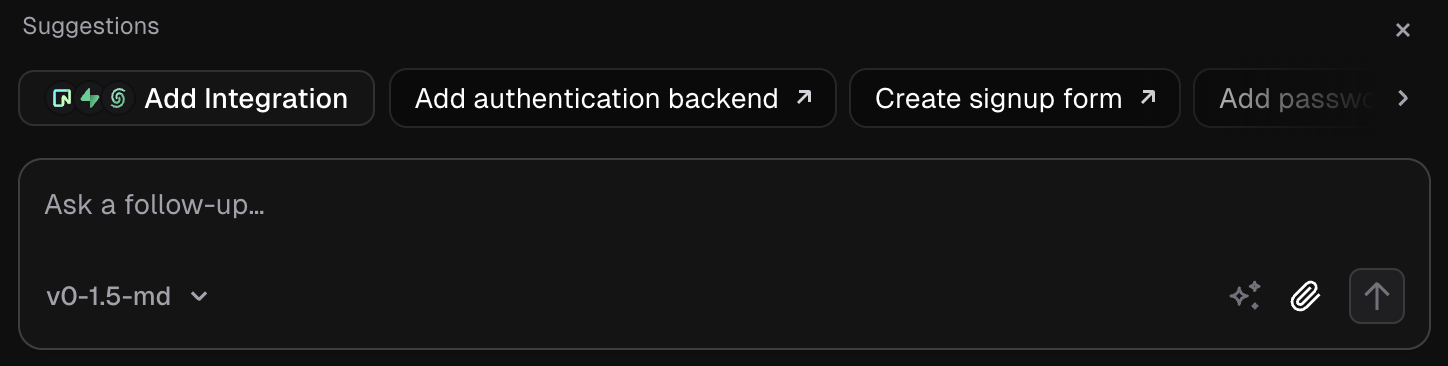
v0's chat prompt bar showing suggestion chips: Add Integration, Add authentication backend, Create signup form
  1. 1 Add integration button connect external service Why this exists →
  2. 2 Authentication backend option configure login provider Why this exists →
  3. 3 Signup form creator build user registration UI

Best viewed on desktop — tap Enlarge to read the numbered controls.

v0's chat suggests Add Integration and Add authentication backend — one click wires a database provider (Supabase, Neon, Upstash or Vercel Blob) into your project. Credit: v0.app/docs ↗
  1. Open Project Menu ⋯ → Integrations, choose a provider such as Supabase or Neon and accept its terms
  2. Prompt v0 to create the required tables; it will generate and run the SQL for the selected provider
  3. Submit the live form in the preview and verify that a new row appears in the database
  • You'll see A real row appears in your database after you submit the form, confirming full‑stack functionality
  • Takeaway One click adds a genuine database you can manage, not a hidden no‑code layer
  • Check Why is adding a v0 one‑click database different from using an opaque no‑code backend you cannot see or control?
  • Cost The providers have free tiers; adding the integration is free and wiring it up spends normal messages. The integration creates your own account on that provider, which you manage.

2.6 Make v0 research, test and fix your app

v0 acts as an autonomous agent that can browse the web, test builds in a sandboxed browser and auto‑fix errors before deployment.

Do this first Add a real database to your app

Run v0 as an autonomous assistant that researches, tests and repairs your app

TryOpen the app, click through the contact form, and fix anything that's broken. Look up the latest Next.js image-optimisation API if you need to.

v0 runs every action in an isolated sandbox, and you choose how much autonomy it has.

v0 deciding on its own to open the built app in a browser and test it, then asking permission before running the command — exactly the agent loop the lesson describes: reason, act, ask.
  1. Agent reasoning — v0 explains its plan before acting.
  2. Bash tool call — the actual terminal command v0 wants to run.
  3. Skip / Allow — the permission gate you control.
Credit: v0.app/docs ↗
  1. Ask v0 to perform a web search and view results with clickable source links
  2. Set the permission mode to Ask using the dropdown control
  3. Click Allow on the Bash tool‑call card to authorise browser automation
  4. Observe the built app launch in a real browser as v0 navigates flows and applies fixes
  • You'll see The app opens in a real browser, v0 clicks through flows, shows source links for its research and automatically patches code errors
  • Takeaway An AI can act as a self‑contained development assistant when you control its permission level
  • Check Why does letting v0 search the web, test in a browser and auto‑fix errors provide more capability than a plain code generator?
  • Cost Agent steps (search, browser, terminal) run inside your messages and use tokens — a deep agentic turn can cost more credits than a simple edit.

2.7 Add AI features without API keys

v0 wires AI model access through an integrated gateway so you can add intelligent features without handling API keys yourself.

Do this first Make v0 research, test and fix your app

Add AI‑powered summaries, chat or classification to your app without creating a model account

TryAdd an 'AI care tips' button to each plant card that generates 3 short care tips for that plant.

By default v0 uses the Vercel AI Gateway to reach AI models — no setup or API key required.

v0's Integrations panel — add AI providers like fal, Deep Infra or Grok by xAI (next to the databases) with one click. By default v0 reaches models via the Vercel AI Gateway, no key needed. Credit: v0.app/docs ↗
  1. Open Project Menu ⋯ → Integrations and click Add Provider, then select a platform such as fal, Deep Infra or Grok by xAI
  2. In the provider settings enable Spend limits and auto‑top‑ups to cap your budget for the AI feature
  3. If you prefer a third‑party model, open Environment Variables and add its API key as a new variable
  • You'll see An AI‑powered feature runs inside your app without you managing any model accounts or keys
  • Takeaway v0’s AI Gateway lets you describe an AI capability and have it work automatically
  • Check Why can you add a real AI feature in v0 without ever creating a model provider account or pasting an API key?
  • Cost AI usage is billed through the gateway by what the model consumes — set a spend limit during setup to stay in control.

2.8 Wire your app to external services

Integrations Marketplace lets you connect third‑party APIs and Model Context Protocol servers, storing credentials securely as environment variables.

Do this first Add AI features without API keys

Wire your app to external services and keep keys safe per deployment stage

TryShow today's weather for the shop's city in the header, using a weather API.

Store the API key as an environment variable; your app code calls the service with it.

The prompt-form menu exposes MCPs (Model Context Protocol) alongside Design System and Instructions — connect external tools the agent can use. Credit: v0.app/docs ↗
  1. Open Project Menu ⋯, choose Environment Variables and add the API key for the required environment (Development / Preview / Production)
  2. Browse the Integrations Marketplace, select a service and install it so its env vars are created automatically
  3. Configure MCPs by opening the MCP settings in the prompt‑form menu and entering your server URL or selecting a preset
  • You'll see The app makes live calls to the external service while keys remain hidden in environment variables for each environment
  • Takeaway Integrations rely on description‑driven code, with secrets kept out of the source via env vars
  • Check Why are external API keys kept in v0 environment variables per environment rather than written into the app's code?
  • Cost You pay each external provider directly; building the feature spends normal messages.

2.9 Publish your app to a live URL

v0 publishes apps to Vercel with a single click, turning the preview into a production‑grade site on a global CDN.

Do this first Wire your app to external services

Deploy the app to a live URL and optionally attach a custom domain

TryPublish the current app to production, then open **Publish → Customize Domain** and add the custom domain myapp.example.com (configure DNS as instructed).

In the v0 interface, click Publish → Publish to Production, wait for the live URL, then go to Publish → Customize Domain (or Project Menu ⋯ → Domains) to enter your domain. Watch that the DNS records are correctly set at your registrar before confirming.
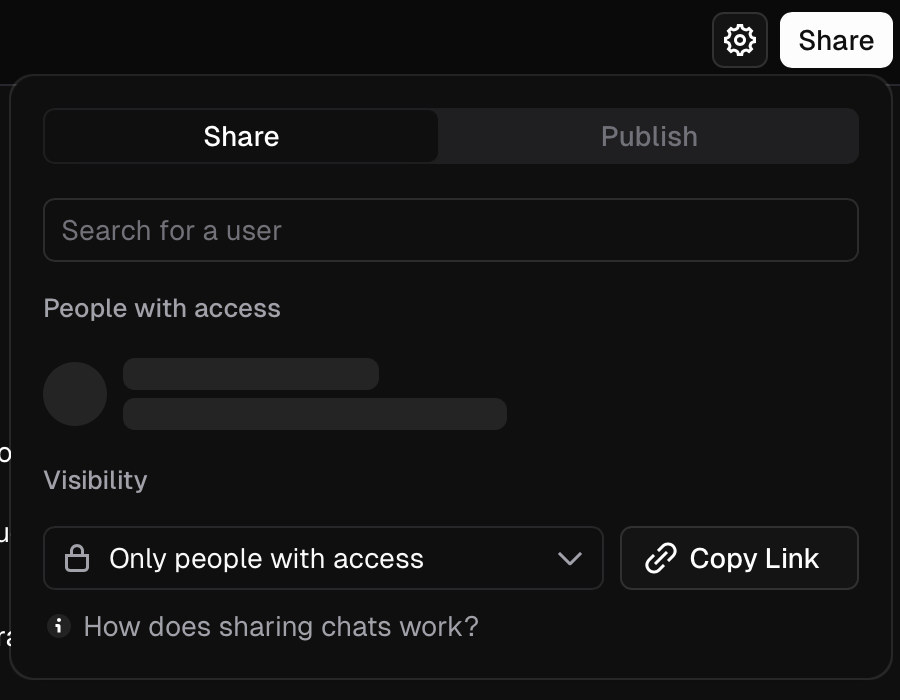
v0's Share dialog with the Publish tab — deploy to production and manage the domain
  1. 1 Publish tab switch from sharing with people to publishing on the web Why this exists →
  2. 2 Access restriction toggle limits view to invited users Why this exists →
  3. 3 Copy Link button shares direct URL to chat

Best viewed on desktop — tap Enlarge to read the numbered controls.

Publish: the Share dialog ships your app to Vercel's global CDN at a live URL; Customize Domain adds a free .vercel.app subdomain (instant, HTTPS) or your own domain via DNS. Credit: v0.app/docs ↗
  1. Click Publish → Publish to Production to build and deploy the app on Vercel’s CDN
  2. Open the generated URL in a browser or on your phone to verify the live site
  3. Click Publish → Customize Domain (or Project Menu ⋯ → Domains) and choose a free .vercel.app subdomain or add your own domain, following any DNS instructions shown
  • You'll see A public URL serves your app instantly, or your own domain points to it
  • Takeaway One click sends the app to Vercel’s CDN so it is truly deployed, not just previewed
  • Check When you click Publish to Production in v0, why is the result genuinely shipped rather than just another preview?
  • Cost Deploying and a .vercel.app URL are included; bringing your own domain means buying it from a registrar. Check Vercel's domain docs for current limits.

2.10 Sync your project with GitHub

v0 can sync a project with GitHub, creating branches and pull requests automatically while keeping full source code accessible.

Do this first Publish your app to a live URL

Connect your project to GitHub and confirm you own portable Next.js code

TryConnect this project to my GitHub account, create a new repo called "my-next-app" under my user, push the current Next.js code to a new branch off main, and open a pull request for the initial commit.

In v0, click the Connect GitHub button on the sidebar, authorize if needed, then type the above command in the prompt box and hit Enter. After it runs, verify that a PR appears in the GitHub view panel.

Connect a chat to GitHub and v0 works on a branch off main, tracks its status, and opens a pull request you review and merge. Credit: v0.app/docs ↗
  1. Click Connect GitHub to link the chat with a repository
  2. Select the automatically created branch (e.g., v0/main‑abc123) for development
  3. Create a pull request using the Create PR button and merge it with Merge PR
  4. Push changes to trigger automatic deployment via CI/CD
  5. Open the repository on GitHub and browse the Next.js + Tailwind source files
  • You'll see Your app appears as a standard Next.js repository on GitHub that you can run, edit and deploy anywhere
  • Takeaway v0 is a starting point, not a walled garden — you finish owning production‑grade, portable code
  • Check Why does v0 working on a branch off main and using pull requests mean you end up owning portable Next.js code, not being locked in?
  • Cost GitHub sync is included on the free plan; a free GitHub account is all you need.

3You’ll know it worked 56 checkable outcomes in this chapter

  • A live Vercel URL shows the published site and the dark-mode switch changes the theme without reloading
  • Ops staff open the panel, sort or filter the customer table, select a row and see a slide-over drawer display that customer's full details
  • Changing a metric, date range, or category instantly updates the line chart and sortable data table on screen
  • Hero, services list, portfolio of case studies, client logo strip, and contact form are visible
  • Team members can find each other by searching or filtering departments
  • Users see a grid of course cards and can click to open lesson view
  • Team members see the KPI cards, spend-versus-revenue chart, channel breakdown bar chart, and campaign table update in real time when data changes
  • Each proposal row shows prospect name, deal value, deadline, stage badge and days-until-deadline countdown, sorted by deadline, while the summary strip at the top accurately reflects the count of proposals in each stage

56 outcomes in all — one per recipe below.

4FAQ, Tips & How-to 89

one problem, one solution, one action

Content & marketing12

How-to v0 Founder +1

Need a quick SaaS homepage with no design work

A launch-ready page you can publish to Vercel the same afternoon, no designer needed.

~8 min · low code Vercel ↗ AI-generated
How-to v0 Founder +1

Need a quick link for investors instead of a PDF deck

A link you can drop into an investor email instead of yet another PDF deck.

~8 min · low code AI-generated
How-to v0 Creator

Want a quick personal showcase

A sharp personal site online in minutes that actually looks designed.

~8 min · low code AI-generated
How-to v0 Scientist

University CMS is a nightmare

A credible lab presence without fighting an old university CMS.

~8 min · low code AI-generated
How-to v0 Creator +1

Want a quick newsletter sign‑up page

A high-converting capture page you can point ads or social traffic at.

~8 min · low code AI-generated
How-to v0 Small biz +1

I need a quick restaurant homepage

A tasteful single page that replaces a tired template site.

~8 min · low code AI-generated
How-to v0 Creator +1

Need a single page to hype your conference

A registration-ready event page you can ship before tickets go live.

~8 min · low code the v0 community ↗ AI-generated
How-to v0 Creator

Want an editorial‑style blog front page

An editorial-quality blog front-end without wrestling a theme.

~8 min · low code AI-generated
How-to v0 Creator +1

Need an online showcase for your agency

A site that signals craft to prospective clients.

~8 min · low code AI-generated
How-to v0 Creator

Need a compact personal link hub

A custom link hub that looks better than the off-the-shelf ones.

~8 min · low code AI-generated
How-to v0 Founder

Unsure about demand before you launch

A buzzy waitlist page to validate demand before you build.

~8 min · low code the v0 community ↗ AI-generated
How-to v0 Creator +2

Messy spreadsheet for posting schedule

A visual planner that replaces a messy posting spreadsheet.

~8 min · low code AI-generated

Dashboards & analytics11

How-to v0 Founder +1

I need a ready‑made product analytics dashboard

A real-looking internal dashboard shell you can wire to your own data later.

~8 min · low code Vercel ↗ AI-generated
How-to v0 Scientist +1

Want to play with your data

A hands-on way to let people poke at your data instead of reading a static chart.

~8 min · low code AI-generated
How-to v0 Finance +1

Can't see where my money goes

A clear money overview for a solo business or small team.

~8 min · low code AI-generated
How-to v0 Creator +1

Can’t make sense of campaign results

A reporting surface that makes campaign results legible.

~8 min · low code AI-generated
How-to v0 Finance +2

Need a single‑page finance snapshot

A clean one-page finance summary you can wire to your data and share with leadership.

~8 min · low code AI-generated
How-to v0 Finance

Can't see which invoices are past due

A clear receivables view for a finance team or a SaaS billing module.

~8 min · low code AI-generated
How-to v0 HR / People +1

Need a unified view of headcount and hiring spend

A hiring plan surface that aligns HR and finance on headcount spend.

~8 min · low code AI-generated
How-to v0 HR / People

Hard to see HR trends

A data-driven people overview that makes HR metrics legible to leadership.

~8 min · low code AI-generated
How-to v0 Sales +1

Need a sales pipeline snapshot for standups

A visual pipeline review surface for a sales team standup or exec briefing.

~8 min · low code AI-generated
How-to v0 Support

Need a real‑time snapshot of support tickets

A clean, at-a-glance support operations view for a team standup or wall display.

~8 min · low code AI-generated
How-to v0 Physician +1

Quality audit meetings need a clear overview

Gives a department a clean view for quality-audit meetings, built on de-identified aggregate data handled per clinic policy — not a diagnostic or per-patient tool.

~8 min · low code AI-generated

Commerce & payments4

How-to v0 Small biz +2

Want a product page that drives sales

A conversion-focused product page you can adapt for any shop.

~8 min · low code Vercel ↗ AI-generated
How-to v0 Founder +1

Unsure which subscription to pick

A pricing page that makes the upgrade choice obvious.

~8 min · low code Vercel ↗ AI-generated
How-to v0 Small biz +1

Need quick, accurate invoices without designing them

A self-serve invoicing front-end for a solo operator.

~8 min · low code AI-generated
How-to v0 Founder +1

Need a compelling campaign page

A persuasive campaign front-end ready to drive pledges.

~8 min · low code AI-generated

Knowledge & docs6

How-to v0 Scientist

Can’t locate papers by topic, year, or author

A browsable paper list that beats a static reference dump.

~8 min · low code AI-generated
How-to v0 Founder +1

Want users to see releases at a glance

A “what’s new” page that keeps users in the loop and looks intentional.

~8 min · low code AI-generated
How-to v0 Support +1

Too many support tickets

A self-serve support surface that deflects tickets.

~8 min · low code AI-generated
How-to v0 Creator +1

Can't find courses

A credible e-learning front-end for a course creator.

~8 min · low code Vercel ↗ AI-generated
How-to v0 Operations

Need a searchable internal wiki

A tidy home for internal know-how as a team scales.

~8 min · low code AI-generated
How-to v0 Support

Need customers to find answers fast

A polished self-serve help surface that deflects tickets and looks trustworthy to customers.

~8 min · low code AI-generated

CRM & sales1

How-to v0 Sales +1

Ops need a way to find customers

A usable internal tool shell your ops team can live in.

~8 min · low code AI-generated

Internal tools & ops7

How-to v0 Founder +1

Need quick sign‑up & log‑in screens

Professional auth UI you can drop into any Next.js app.

~8 min · low code Vercel ↗ AI-generated
How-to v0 Creator +1

Your team has no shared UI guide

A living style guide you can hand to a team and build from.

~8 min · low code AI-generated
How-to v0 Operations +1

Want a visual task board for my team

A working project board UI for a small internal tool.

~8 min · low code AI-generated
How-to v0 Founder +1

Want a chat window in my app

A clean chat front-end ready to connect to any model API.

~8 min · low code Vercel ↗ AI-generated
How-to v0 Founder +1

New users are lost on first launch

A smooth first-run experience that lifts activation.

~8 min · low code AI-generated
How-to v0 Operations

Controlling feature rollouts in dev, staging and prod

A real admin surface for an internal platform tool.

~8 min · low code AI-generated
How-to v0 Small biz +1

Can't keep track of inventory without spreadsheets

A no-spreadsheet way for a shop to watch stock.

~8 min · low code AI-generated

Forms, surveys & feedback3

How-to v0 Scientist +1

Hard to make sense of raw survey data

A clear visual readout of your study or feedback data.

~8 min · low code AI-generated
How-to v0 Founder +1

Let users suggest and vote on ideas

A transparent roadmap surface that turns users into contributors.

~8 min · low code the v0 community ↗ AI-generated
How-to v0 HR / People +1

Interviewers give inconsistent scores

All interviewers' scores land in a consistent format that the hiring manager can compare at a glance.

~8 min · low code AI-generated

Booking & scheduling2

How-to v0 Small biz +1

Clients need an easy way to choose a date and time

A clean booking front-end for a salon, clinic or consultancy.

~8 min · low code AI-generated
How-to v0 Scientist +1

When shared instruments clash in schedules

Stops the spreadsheet chaos around shared lab gear.

~8 min · low code AI-generated

Trackers3

How-to v0 Scientist +1

Lab can’t follow grant applications

A tidy way for a lab to see funding pipeline at a glance.

~8 min · low code AI-generated
How-to v0 Creator +1

Need to see habit streaks and goals

A motivating progress UI for a coaching product or personal app.

~8 min · low code AI-generated
How-to v0 Sales

Hard to track proposal deadlines

A clean proposal tracker front-end that keeps a sales team on top of live bids.

~8 min · low code AI-generated

Marketplaces & directories4

How-to v0 Small biz +1

Want to browse homes by price or bedroom count

A polished listings front-end for an agent or rental host.

~8 min · low code AI-generated
How-to v0 HR / People +1

Team members can’t find each other

A friendly internal “who’s who” for a growing team.

~8 min · low code AI-generated
How-to v0 HR / People +1

Need a hiring page where visitors can filter jobs and read details

A hiring page that reflects well on the company.

~8 min · low code Vercel ↗ AI-generated
How-to v0 HR / People +1

Finding out who reports to whom is hard

A navigable visual org chart that beats a static slide deck.

~8 min · low code AI-generated

Research & data tools2

How-to v0 Scientist

Need a trustworthy first impression for study sign‑ups

A trustworthy front door for recruiting study participants.

~8 min · low code AI-generated
How-to v0 Scientist

Need a web page to showcase a research paper

A modern alternative to a static PDF when sharing your work.

~8 min · low code AI-generated
How-to v0 Everyone

Want to test the platform without a credit card

You can start using v0 without providing payment details, enabling quick experimentation

The core v0 layout every generation lands in — chat and build history on the left, a live, production-accurate preview on the right, with the toggle to switch to the Code view next to it.
  1. **Chat panel** — the running conversation and what changed in the last turn.
  2. **Live preview** — the generated app rendering for real, not a mockup.
  3. **Preview / Code toggle** — switch between the live app and its source.
Credit: v0.app/docs ↗
Free plan = **$5 of monthly credits and 7 messages/day**, metered by tokens per generation. A page like this is a few cents — plan your prompts rather than spraying them. AI-generated
How-to v0 Everyone

Struggling to get good AI answers

Following the five rules lets you get high-quality output quickly and with fewer messages

**Versions**: every change you send creates a new, restorable version in the chat, so you can compare and roll back — iterate in small, precisely-named steps. Credit: v0.app/docs ↗
Each message is a metered generation against your 7/day — group related changes to make them count. AI-generated
How-to v0 Everyone

Need to edit a specific part of text

Stating exactly which element to modify and its position yields precise updates instead of vague revisions

AI-generated
How-to v0 Everyone

Want to test a small change safely

Applying small, focused batches lets you see each effect instantly and reduces the risk of unwanted side-effects

AI-generated
How-to v0 Everyone

Too many tiny changes eat up my daily quota

Combining several related edits into a single message conserves your limited 7-messages-per-day allowance

~8 min · low code AI-generated
How-to v0 Everyone

Need to adjust typography, colours and layout on a running app

You can edit the look of your app without writing a new prompt

**Design Mode**: select any element in the live preview and edit its typography, colour, spacing and layout in the left panel — the changes apply back to your React code. Credit: v0.app/docs ↗
Adjusting the look in Design Mode means you don't spend a chat message on layout, and **restoring a version is free** — both are cheaper than re-prompting in chat. AI-generated
How-to v0 Everyone

Edit a visual element’s style while designing

Changes you make visually are written back to the underlying code automatically

AI-generated
How-to v0 Everyone

Design Mode cannot be used on read-only chats or mobile viewports, preventing accidental edits in those contexts

AI-generated
How-to v0 Everyone

Seeing your app on a phone proves it's truly hosted on the public web

**Publish**: the Share dialog ships your app to Vercel's global CDN at a live URL; Customize Domain adds a free .vercel.app subdomain (instant, HTTPS) or your own domain via DNS. Credit: v0.app/docs ↗
Deploying and a **.vercel.app** URL are included; bringing your own domain means buying it from a registrar. Check Vercel's domain docs for current limits. AI-generated
How-to v0 Everyone

Need a personal subdomain for your site

You can instantly get a branded sub-domain with HTTPS without extra cost

AI-generated
How-to v0 Everyone

Need to add a new integration

You can provision your own database account with one click, and v0 will set the required environment variables automatically

v0's chat suggests **Add Integration** and **Add authentication backend** — one click wires a database provider (Supabase, Neon, Upstash or Vercel Blob) into your project. Credit: v0.app/docs ↗
The providers have free tiers; adding the integration is free and wiring it up spends normal messages. The integration creates **your own account** on that provider, which you manage. AI-generated
How-to v0 Everyone

I have to write table definitions manually

v0 can generate and execute the necessary SQL so you don't have to write schema definitions manually

AI-generated
How-to v0 Everyone

Form submissions don’t stick

Submitting a live form now writes a real record to your backend database, proving the front-end is fully connected

~8 min · low code AI-generated
How-to v0 Everyone

Want to protect the main branch while developing

All work happens on a separate branch, leaving the protected `main` untouched

Connect a chat to GitHub and v0 works on a branch off **main**, tracks its status, and opens a **pull request** you review and merge. Credit: v0.app/docs ↗
GitHub sync is included on the free plan; a free GitHub account is all you need. AI-generated
How-to v0 Everyone

Can’t open a pull request from the chat

You can open PRs directly from v0 and merge them, streamlining code review

AI-generated
How-to v0 Everyone

Need to edit an existing Next.js GitHub project

You can start working on any existing Next.js repo inside the v0 environment

AI-generated
How-to v0 Everyone

Got a design mockup image

You can turn a high-resolution design mockup into a working app without writing code

v0's **Remix a Template** gallery — fork a community starter (Apps, Landing pages, Dashboards, Components, Login) instead of starting from a blank page. Credit: v0.app/docs ↗
Generating from an image, a Figma link or a template is a normal metered generation like any other prompt. AI-generated
How-to v0 Everyone

Figma design link

Feeding v0 a Figma URL yields higher-fidelity code because it also extracts design tokens

AI-generated
How-to v0 Everyone

Want to let others reuse your chat design

After building an app, you can turn it into a reusable community template for others

AI-generated
How-to v0 Everyone

Screenshot of a dashboard

A clear prompt tells v0 exactly what code to generate from your design

~8 min · low code AI-generated
How-to v0 Everyone

Bash scripts keep breaking

v0 can run shell commands in a sandbox, detect failures, and automatically apply fixes to the code

v0 deciding on its own to open the built app in a browser and test it, then asking permission before running the command — exactly the agent loop the lesson describes: reason, act, ask.
  1. **Agent reasoning** — v0 explains its plan before acting.
  2. **Bash tool call** — the actual terminal command v0 wants to run.
  3. **Skip / Allow** — the permission gate you control.
Credit: v0.app/docs ↗
Agent steps (search, browser, terminal) run inside your messages and use tokens — a deep agentic turn can cost more credits than a simple edit. AI-generated
How-to v0 Everyone

Need quick plant care advice

You can quickly prototype an AI-driven UI element that returns multiple short tips for a given item

v0's **Integrations** panel — add AI providers like **fal**, **Deep Infra** or **Grok by xAI** (next to the databases) with one click. By default v0 reaches models via the Vercel AI Gateway, no key needed. Credit: v0.app/docs ↗
~8 min · low code AI usage is billed through the gateway by what the model consumes — set a spend limit during setup to stay in control. AI-generated
How-to v0 Everyone

Different API keys for each app environment

Store third-party API credentials safely and control which app environment can access them

The prompt-form menu exposes **MCPs** (Model Context Protocol) alongside Design System and Instructions — connect external tools the agent can use. Credit: v0.app/docs ↗
You pay each external provider directly; building the feature spends normal messages. AI-generated
How-to v0 Everyone

When testing in Preview, you can rely that only Development-level secrets are available, preventing accidental use of Production keys

AI-generated
How-to v0 Everyone

Need to set up a new service from the marketplace

Adding a service from the Integrations marketplace automatically creates the required environment variables for you

AI-generated
Tip Everyone

Full ownership of generated code — the platform doesn’t claim any rights

You retain ownership of code generated by Vercel v0

How-to Everyone

No login for v0

You need a Vercel account to use v0

v0 — FAQ ↗ Lesson → AI-generated
How-to v0 Everyone

Need a starter React project with Next.js and Tailwind

v0 generates React projects using Next.js, styled with Tailwind CSS and shadcn/ui components

~8 min · low code v0 — FAQ ↗ AI-generated
How-to v0 Everyone

Need a UI component without coding it

v0 can produce Svelte, Vue, or plain HTML/CSS code using its Blocks feature

~8 min · low code v0 — FAQ ↗ AI-generated
FAQ v0 Everyone

How is v0 different from asking ChatGPT to write React code?

v0 gives you a live, interactive preview of the generated UI alongside the code — you see what it looks like instantly and can click through it before exporting. It also has one-click deploy to Vercel, GitHub sync with automatic branching, and is fine-tuned specifically on Next.js and shadcn/ui patterns. ChatGPT generates code only, with no visual preview or deployment pipeline.

mindstudio.ai ↗ AI-generated
FAQ v0 Everyone

Can I use what v0 generates commercially — do I own the code?

Vercel does not claim ownership of the code v0 generates; you are responsible for evaluating whether it's suitable for your commercial use. The output is standard React/Tailwind, so there are no unusual licensing restrictions from the framework side.

v0 (Vercel) ↗ AI-generated
FAQ v0 Everyone

What exactly does v0 generate — a full app or just UI?

v0 generates production-ready React components and pages using Next.js, Tailwind CSS, and the shadcn/ui component library. As of 2026 it can also build full-stack apps with authentication, databases, and API integrations — but the backend is optional and you still configure it; it is not automatically included the way it is in Lovable or Base44.

v0 (Vercel) ↗ AI-generated
FAQ v0 Everyone

How does the credit system work — what counts as one 'use'?

v0 uses token-based pricing rather than a fixed number of generations. Each prompt consumes tokens based on complexity — a simple button costs far less than a full dashboard. You can track spending in your usage settings. Different v0 models have different per-token rates.

v0 (Vercel) ↗ AI-generated
FAQ v0 Everyone

How do I deploy my app so others can see it online?

Click 'Publish' in the top right and v0 deploys your app to Vercel instantly — no setup, and you get a live URL in under a minute. If you already have a Vercel account, the same login works for v0. You can also deploy to other hosts by exporting the code.

v0 (Vercel) ↗ AI-generated

The same set on /recipes, filtered by tool and role.

5Videos 3

6FAQ 5

How is v0 different from asking ChatGPT to write React code?

v0 gives you a live, interactive preview of the generated UI alongside the code — you see what it looks like instantly and can click through it before exporting. It also has one-click deploy to Vercel, GitHub sync with automatic branching, and is fine-tuned specifically on Next.js and shadcn/ui patterns. ChatGPT generates code only, with no visual preview or deployment pipeline.

Can I use what v0 generates commercially — do I own the code?

Vercel does not claim ownership of the code v0 generates; you are responsible for evaluating whether it's suitable for your commercial use. The output is standard React/Tailwind, so there are no unusual licensing restrictions from the framework side.

What exactly does v0 generate — a full app or just UI?

v0 generates production-ready React components and pages using Next.js, Tailwind CSS, and the shadcn/ui component library. As of 2026 it can also build full-stack apps with authentication, databases, and API integrations — but the backend is optional and you still configure it; it is not automatically included the way it is in Lovable or Base44.

How does the credit system work — what counts as one 'use'?

v0 uses token-based pricing rather than a fixed number of generations. Each prompt consumes tokens based on complexity — a simple button costs far less than a full dashboard. You can track spending in your usage settings. Different v0 models have different per-token rates.

How do I deploy my app so others can see it online?

Click 'Publish' in the top right and v0 deploys your app to Vercel instantly — no setup, and you get a live URL in under a minute. If you already have a Vercel account, the same login works for v0. You can also deploy to other hosts by exporting the code.

7Glossary 20 terms

Show the 20 terms
v0
Sandbox
An isolated virtual machine that hosts your project files, runs the live preview, and executes commands on your behalf — completely separate from your deployed app, so each chat gets its own environment with no state leaking between them.
Live preview
A real-time view of your running app inside v0's chat, served from the sandbox so what you see matches what your users will experience.
Deployment
Publishing your v0 project to Vercel so it runs at a public URL with automatic HTTPS and global CDN distribution.
Production URL
The single public web address that represents the live version of your project; the URL stays constant across all deployments so your app is always reachable at the same address.
Design Mode
A visual editing tool in v0 that lets you click any element in the live preview and adjust its appearance using a style panel or natural-language instructions, without writing code directly.
React Server Components
A Next.js feature where parts of your page are rendered on the server before being sent to the browser, improving load speed and search-engine visibility; v0 uses Next.js, which enables these by default.
Server actions
Functions that run on the server rather than in the browser, used in v0's Next.js projects to handle form submissions, database writes, and other backend tasks.
Environment variables
Secret configuration values (like API keys) stored outside your code and managed through your connected Vercel project, so sensitive credentials are not hard-coded or publicly visible.
NEXT_PUBLIC_
A required prefix for environment variable names in Next.js when the value needs to be accessible in the browser; without it, the variable is available on the server only.
Connect panel
The v0 interface where you link external services — databases, AI models, and other integrations — to your project.
Vercel
The cloud hosting platform that v0 is built on; it handles deploying your app, managing your domain, and distributing it globally — and your v0 account is a Vercel account.
Versions
A saved snapshot of your project's code created each time v0 updates a code block in response to a message; you can review, compare, or restore any earlier version.
Duplicate
Creating your own copy of a shared v0 chat so you can make changes without affecting the original, with the option to keep it linked to the same Vercel project.
Unlisted
A sharing setting where anyone with the link can view your project, but it will not be indexed by search engines or appear in public galleries.
Templates
Published v0 chats you can fork as a starting point, giving you a working app structure to customise instead of starting from a blank prompt.
MCP integrations
Connections to external tools and data sources (such as databases, APIs, and services like Stripe or Neon) that v0's AI automatically considers when generating responses, allowing it to incorporate real external context.
Figma integration
A v0 feature that lets you attach a Figma link and have v0 convert the design — including layout, colors, and spacing — into working code.
GitHub integration
A v0 connection that automatically commits every code change to a dedicated branch in your GitHub repository and lets you open a pull request to merge it into main.
Custom domain
A web address you own (like myapp.com) that you can attach to your deployed v0 project instead of using the default Vercel URL.
Agentic features
Autonomous capabilities where v0 plans and carries out multi-step tasks on its own — such as running terminal commands, searching the web, fixing errors, and calling external integrations — without you directing every step.

8See also

💬 Discuss this chapter

Ask, share, or report — over on the Heidelberg AI community forum.