 Dify
DifyNew lab members can’t locate SOPs quickly
New lab members find protocol answers in seconds instead of hunting through shared drives or asking a senior colleague.
Open-source LLM app builder — upload papers, get a grounded chatbot
Built by LangGenius, open-sourced in 2023 — the pitch is one stack instead of stitching several tools together to get a chatbot talking to your own documents.
Dify is an open-source platform for building LLM-powered applications — chatbots, document Q&A, agent pipelines — through a visual interface. It handles the whole stack: prompt management, RAG with a built-in vector store, tool calling, conversation memory, and a publishable chat UI. Upload twenty PDFs, let Dify chunk and embed them, and ask a chatbot to synthesise findings across the corpus with citations. 50+ model providers (OpenAI, Anthropic, Groq, local Ollama) swap behind one UI. → Where n8n excels at API-level plumbing, Dify is LLM-first: the knowledge base is the product. Apache 2.0 and self-hostable; the cloud free tier is 200 messages a day.
Dify is the LLM-first member of the automation family: a visual builder for chatbots, document Q&A and agent pipelines, with RAG and a vector store built in. Below: what it is best at, what to watch for, and its full lesson set.
Standing up a document Q&A chatbot without picking a vector database or writing retrieval code yourself — the RAG pipeline is already wired in.
The cloud free tier (200 messages/day) is exhausted quickly in a classroom. Retrieval quality depends on the chunking strategy — defaults need tuning for dense scientific PDFs — and self-hosting needs Docker and ≥4 GB RAM. The course instance (dify.32dots.de) is currently paused.
Cloud free tier: 200 LLM messages/day, unlimited RAG queries. Professional $59/mo. Self-hosted: fully free under Apache 2.0.
A custom tool that lets a Dify app call Azure Cognitive Search via its REST API.
You will be able to invoke Azure AI Search from a Dify workflow and see search results returned as tool output.
A self‑hosted instance of the open‑source Dify platform running in Docker containers.
You will have a running Dify service accessible at http://localhost:3000.
A Dify Knowledge Base that stores uploaded PDFs and provides vector‑based retrieval for chat interactions.
You will receive natural‑language answers that cite specific sections of the PDFs you added
Best viewed on desktop — tap Enlarge to read the numbered controls.
A feature that shows numbered source references for AI answers drawn from uploaded documents.
Your chatbot will display citation numbers linking back to the original PDF chunks after each response.
A Dify Chatflow linked to the knowledge base, exposed via a shareable URL for anyone to use.
You will have a live web link where users can ask questions and receive cited answers drawn from your PDFs
An opening message that greets users and offers clickable suggestions to start the chat.
Your chatbot will greet users with a custom welcome text and display suggested prompts they can click.
A file‑upload feature that lets end users attach documents, images, or audio while chatting.
Your chatbot will accept user uploads and make the file content available to the LLM for processing.
11 outcomes in all — one per recipe below.
New lab members can’t locate SOPs quickly
New lab members find protocol answers in seconds instead of hunting through shared drives or asking a senior colleague.
Employees stuck waiting for policy answers by email
Finance handles fewer one-off policy queries by email; employees get instant, policy-grounded answers any time of day.
Need instant competitive talking points on a call
Reps handle competitive objections confidently without putting prospects on hold to find the right slide deck.
Routine FAQ traffic is deflected automatically, cutting first-response time from hours to seconds.
Agents stuck searching docs while handling tickets
Average handle time drops because agents find answers in seconds rather than searching the knowledge base or pinging a colleague.
Users ask routine support questions
Routine tier-1 questions are deflected without a human agent, reducing ticket volume while still capturing contacts who need real help.
Summarizing research papers in a spreadsheet takes days
Early-stage literature synthesis that takes days in a spreadsheet is turned into an interactive Q&A session.
Employees waiting on policy answers
HR ticket volume for common policy questions drops, and answers are traceable to the exact policy clause.
Can't find the right leave form after asking HR
HR is freed from repeat policy queries by email; employees get instant answers at any hour and are guided to the right form for transactional requests.
Blank page for a new piece
Writers start every piece with a consistent, on-brand brief instead of a blank page, cutting brief-writing time by around 80%.
Need to create an app fast without coding
You can access Dify's drag-and-drop interface to start building apps
Need a brand‑new chatbot project
Creates a fresh app of type Chatbot that you can configure and publish
Make your chatbot reachable online
Makes the chatbot reachable via a URL or embeddable widget
Want the chatbot to sound different
Changing the chatbot's instruction text reshapes its output without affecting grounding
You can instantly see which LLM your app is using without opening any code
Running the same query on two models lets you see concrete differences in output quality and style
Testing both models with identical input provides concrete data to decide which fits your constraints
Unsure which LLM to pick for new chats
Designating a winner makes future chats automatically use the chosen model without extra steps
Need a way to build multi‑step workflows
You can begin building multi-step workflows by creating a Workflow app in Dify's Studio
Can’t find the right info in your knowledge base
Linking a Knowledge Retrieval node lets the workflow pull relevant text from your knowledge base
Need separate paths for long and short questions
An If/Else node enables conditional routing so different question lengths follow separate paths
Factual and open‑ended questions
A classifier node can split incoming queries into categories so each follows a tailored processing path
Question types need separate workflow branches
Linking each classification outcome to a different node chain lets the workflow handle distinct question types appropriately
Running one example of each class proves the classifier and branching logic work as intended
My bot can’t see my files
Linking a knowledge base lets the agent retrieve information from your documents while reasoning
Enumerating the exact nodes or tools clarifies implementation requirements and avoids missing functionality
Stating whether the solution is a public chat URL, embedded widget, or Service API determines integration and access strategy
Dify is an open-source platform for building AI-powered applications — like chatbots and question-answering assistants — without writing code. You design your app visually, connect an AI model (such as ChatGPT or Claude), and optionally upload documents for the AI to answer questions from. It is especially well-suited for non-technical users who want a working chatbot over their own documents in a short time.
Dify Cloud means signing up at dify.ai and using it in your browser with no installation — the easiest option for beginners. Self-hosting means running Dify on your own computer or server with Docker, which gives full data privacy and no usage limits beyond your hardware. Cloud is best for building quickly; self-hosting makes sense if your data is sensitive (e.g. unpublished research) or you need more documents and storage than the free cloud tier provides.
Dify is built specifically for AI chatbots and knowledge-base apps, with RAG, prompt engineering, and chat interfaces built in — you can have a working chatbot in under an hour with no coding. n8n is a general workflow-automation tool with hundreds of integrations that treats AI as one optional component; it has a steeper learning curve. For a chatbot over your papers, Dify is the right choice; n8n shines when you need to connect many external systems alongside AI.
A Knowledge Base is a collection of your own documents (papers, notes, PDFs) that you upload into Dify. When someone asks a question, Dify first searches those documents for the most relevant passages, then sends those passages along with the question to the AI model — a technique called Retrieval-Augmented Generation (RAG). The result is an AI that answers based on your specific materials rather than just its general training, making it far more accurate for specialized topics.
Dify supports a wide range of formats: TXT, Markdown, PDF, HTML, Excel, Word, CSV, PowerPoint, and more, up to a per-file size limit. For most uploads of paper PDFs or Word notes, the standard mode works without extra setup; an alternative processing option unlocks the broader format list including presentations.
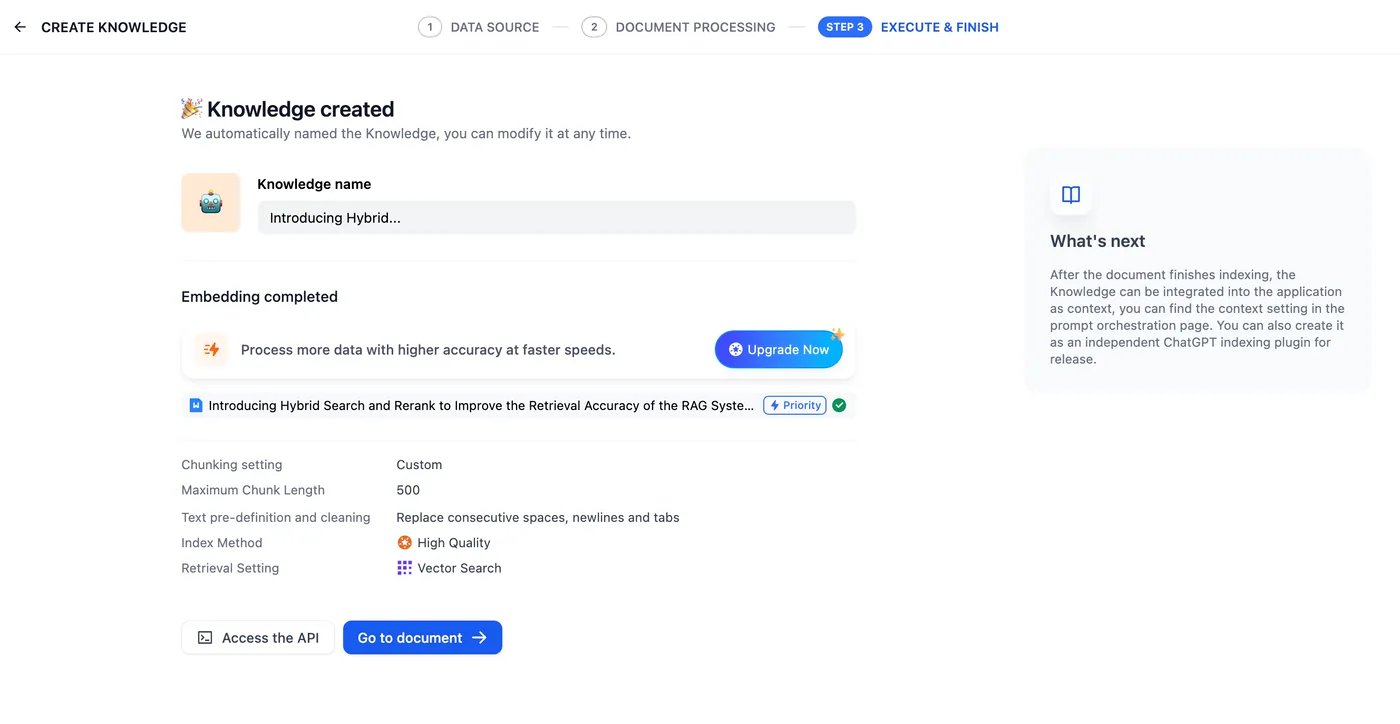
Go to the Knowledge section, click Create Knowledge, and name it. Drag-and-drop or browse to select your files, then choose automatic text chunking (recommended for beginners) and a high-quality indexing mode for better accuracy. Click Save and Process — indexing may take a minute or two. Once complete, attach this Knowledge Base to your chatbot app, and the bot can answer questions based on its contents.
All of them. Dify supports OpenAI (GPT), Anthropic (Claude), Google (Gemini), and many more cloud providers, and it also supports local models running on your own computer via Ollama — meaning you can run open-source models for free with no per-message cost, though that needs a capable machine. You add any provider under Settings → Model Providers by pasting in your API key.
Need others to try your bot without logging in
Anyone can access the bot without a Dify account via a shared URL
Need a local AI assistant server
Learn how to install and start Dify on your own machine using Docker
Need Notion pages in a knowledge base
Learn how to bring Notion content into a Dify Knowledge Base and keep it updated
Define your bot’s tone and behavior
Define the bot's behavior and tone in plain language
The same set on /recipes, filtered by tool and role.
Best taxonomic intro: lets you map a problem to the right Dify pattern before you start building.
The best 'I have one evening' intro to Dify. By the end you'll know which of the four app patterns fits your use case.
Authoritative source on Dify's current positioning. Watch when you've outgrown 'just give me an answer' RAG and need agents that decide what to look up next.
Dify is an open-source platform for building AI-powered applications — like chatbots and question-answering assistants — without writing code. You design your app visually, connect an AI model (such as ChatGPT or Claude), and optionally upload documents for the AI to answer questions from. It is especially well-suited for non-technical users who want a working chatbot over their own documents in a short time.
Dify Cloud means signing up at dify.ai and using it in your browser with no installation — the easiest option for beginners. Self-hosting means running Dify on your own computer or server with Docker, which gives full data privacy and no usage limits beyond your hardware. Cloud is best for building quickly; self-hosting makes sense if your data is sensitive (e.g. unpublished research) or you need more documents and storage than the free cloud tier provides.
Dify is built specifically for AI chatbots and knowledge-base apps, with RAG, prompt engineering, and chat interfaces built in — you can have a working chatbot in under an hour with no coding. n8n is a general workflow-automation tool with hundreds of integrations that treats AI as one optional component; it has a steeper learning curve. For a chatbot over your papers, Dify is the right choice; n8n shines when you need to connect many external systems alongside AI.
A Knowledge Base is a collection of your own documents (papers, notes, PDFs) that you upload into Dify. When someone asks a question, Dify first searches those documents for the most relevant passages, then sends those passages along with the question to the AI model — a technique called Retrieval-Augmented Generation (RAG). The result is an AI that answers based on your specific materials rather than just its general training, making it far more accurate for specialized topics.
Dify supports a wide range of formats: TXT, Markdown, PDF, HTML, Excel, Word, CSV, PowerPoint, and more, up to a per-file size limit. For most uploads of paper PDFs or Word notes, the standard mode works without extra setup; an alternative processing option unlocks the broader format list including presentations.
Go to the Knowledge section, click Create Knowledge, and name it. Drag-and-drop or browse to select your files, then choose automatic text chunking (recommended for beginners) and a high-quality indexing mode for better accuracy. Click Save and Process — indexing may take a minute or two. Once complete, attach this Knowledge Base to your chatbot app, and the bot can answer questions based on its contents.
All of them. Dify supports OpenAI (GPT), Anthropic (Claude), Google (Gemini), and many more cloud providers, and it also supports local models running on your own computer via Ollama — meaning you can run open-source models for free with no per-message cost, though that needs a capable machine. You add any provider under Settings → Model Providers by pasting in your API key.
ChatbotAgentWorkflowChatflowNodeLLM NodeKnowledge BaseRAGChunkingEmbeddingRerankingReActSystem PromptVariableAnnotationPluginToolAPI KeyAsk, share, or report — over on the Heidelberg AI community forum.


