 ChatGPT
Script crashes with an error
A working script and an explanation you can learn from — no install needed.
OpenAI's assistant — broadest features, strong data analysis
OpenAI's assistant, launched in 2022.
ChatGPT (OpenAI, 2022) is the most feature-broad frontier chatbot: voice, image generation, web search with citations, custom GPTs, and Advanced Data Analysis that runs Python on the files you upload. → Its default setting trains on your chats — turn off "Improve the model for everyone" in Data Controls, and use Team or Enterprise for confidential work.
ChatGPT is OpenAI's frontier chatbot and the most feature-broad of the four — voice, image generation, web search, custom GPTs, and a Python-powered data analyst built in. Below: what it's best at, what to watch for, and how to keep your data private.
Everyday questions and real data analysis — upload a CSV or spreadsheet and it runs Python to compute stats, tables, and plots.
Team and Enterprise plans layer on a contractual no-train guarantee and SSO, on top of the free toggle — worth it once the data is genuinely confidential.
Free tier; Plus $20/mo; Team and Enterprise add no-train, SSO, and audit controls. Data residency available via Azure OpenAI.
The Ask anything box (or the optional Ask ChatGPT sidebar) is where you type prompts and receive answers directly in the chat window.
Open ChatGPT, start a conversation and get an answer to a real research question
I'm a biologist. In plain language, explain the difference between a paired and unpaired t-test, then tell me which one fits this design: the same 12 cell cultures measured before and after adding a drug.Go to chatgpt.com, sign in (or sign up free), and paste this into the message box. No setup, no install — it answers in the browser.
A prompt combines role, context and output format in a single message to guide the model’s response.
Do this first Run your first real research task in ChatGPT
Produce sharper answers by specifying a role, providing relevant context, and requesting an exact output format
Act as a careful molecular biology reviewer. Here is my abstract draft: [paste 150 words]. Give me (1) three specific weaknesses, (2) one suggested rephrasing of the final sentence, and (3) a one-line verdict on clarity. Use bullet points.Notice the four parts: a role, your material, a numbered request, and a format. That structure is most of what makes a prompt work.
The paperclip / attach control in the message box lets you add files; for CSVs it triggers Data analysis, running Python behind the scenes.
Do this first Write prompts that set ChatGPT’s role, give context, and dictate output format
Upload a document and receive a structured summary, extraction or statistical analysis performed by ChatGPT
Here is a CSV of my qPCR results (columns: sample, condition, Ct). Compute mean and SD of Ct per condition, run a t-test between 'control' and 'treated', and plot Ct by condition as a box plot. Show me the numbers and the figure.Click the paperclip / attach icon in the message box, upload your file, then send the prompt. For data files, ChatGPT writes and runs Python in the background (this is the Data analysis feature) and hands you the results and a plot.
The Sources row appears under a web‑search answer, listing the pages the model consulted.
Do this first Generate a summary or data analysis from an uploaded file
Verify each claim by opening the cited webpages yourself
Search the web for review articles from the last two years on CRISPR base editing safety in human cells. Give me 5 with title, journal, year, and a one-line finding — and include the link for each so I can open it.ChatGPT searches the web when a question needs current or factual sourcing. Ask explicitly for links, then open each one — do not trust the summary alone.
The composer lets you generate images from text or interpret uploaded visuals, producing illustrations or textual descriptions.
Do this first Confirm ChatGPT's web‑search answers
Produce an illustration from a description and obtain a plain‑language interpretation of an uploaded image
Generate a clean, labelled schematic of the central dogma (DNA → RNA → protein) suitable for a lecture slide: simple, high-contrast, with arrows and labels. Then suggest a one-line caption.Send this to generate an image. To go the other way, upload a photo of a gel or a chart and ask "what does this figure show, and what stands out?" — that uses ChatGPT's vision to read the image.
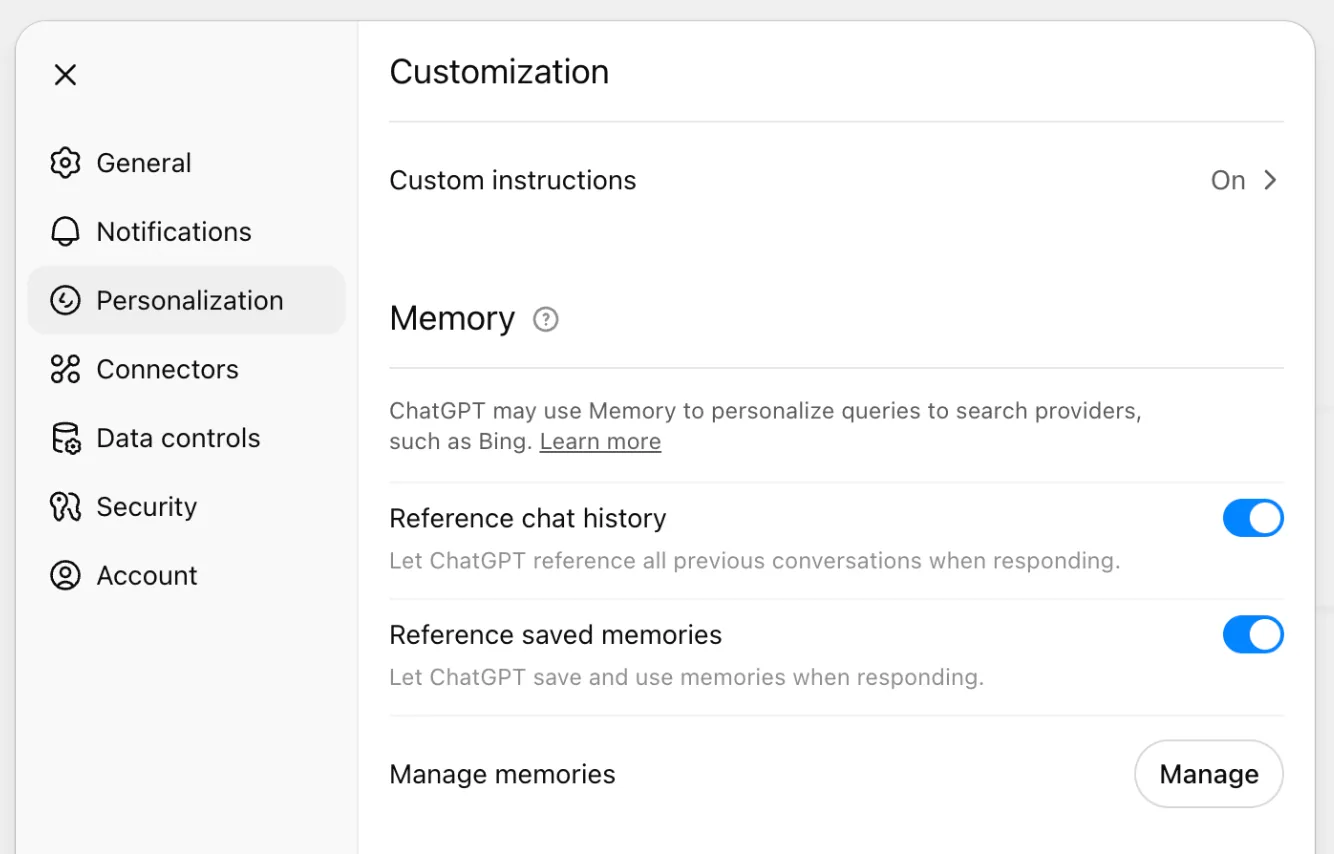
Settings → Personalisation contains Custom instructions, Memory and Projects that persist across chats.
Do this first Generate and interpret images using ChatGPT
Set up persistent instructions, enable memory for key facts, and group related conversations and files into a Project
Set as a standing instruction: I'm a molecular biology researcher. Always use precise scientific terminology, define acronyms on first use, give SI units, and flag when a claim needs a primary-source check. Apply this to all future chats.Open Settings → Personalization → Custom instructions and put your standing context there. It then applies automatically to every new chat — you stop re-explaining who you are.
Best viewed on desktop — tap Enlarge to read the numbered controls.
The Improve the model for everyone toggle under Settings → Data Controls controls whether your chats are used to train OpenAI models.
Do this first Create custom instructions and organise chats using Projects
Your chats are no longer sent for model improvement
A custom GPT is a saved wrapper around a chat that bundles role, workflow steps and output format for reuse.
Do this first Stop ChatGPT using your chats for model training
Create a reusable assistant that runs your standard workflow and returns downloadable results
You are my lab stats assistant. When I upload a CSV, always: report n per group, check normality, choose and justify the right test, run it, report effect size, and give a publication-ready one-sentence result. Confirm you understand, then wait for my file.You can paste this into a normal chat, or bake it into a custom GPT (via 'Explore GPTs' → Create) so the behaviour persists and is reusable. Then upload a CSV in the next message.
The Create new GPT builder lets you define an assistant and share it with a team via Team sharing.
Do this first Run a recurring analysis with a custom GPT
You build a custom assistant that returns consistent answers for repeat tasks
Deep Research is an extended web‑search mode that returns a multi‑source, fully cited report rather than a single quick answer.
Do this first Build and distribute a custom GPT for your team
Generate a researched answer that combines literature search, data analysis and verified citations
I'm investigating whether [gene X] expression differs between [condition A] and [condition B]. Step 1: search the web for 3 recent primary papers on this and summarize each with a link. Step 2: I'll upload my expression CSV — run the appropriate test and plot it. Step 3: draft a 120-word results paragraph citing only my data, and list which of the searched papers I should verify before citing.Run it as three steps in one chat. This is where Deep research helps for the literature step — a longer, multi-source search that returns a cited report.
26 outcomes in all — one per recipe below.
Script crashes with an error
A working script and an explanation you can learn from — no install needed.
Need a tidy CSV and quick insights
A computed answer plus a figure from your own data, no Python set up on your machine.
Got bullet‑point notes and need an email
A solid first draft in seconds, then tightened to your voice.
Unstructured notes
A presentable skeleton in seconds that you refine, instead of staring at a blank deck.
Explain a finance model to non‑finance stakeholders
A jargon-free briefing note that lets non-finance stakeholders engage with the numbers.
Technical discharge notes confuse patients
Instructions a patient actually understands and follows, without diluting the medical content — you check the rewrite against the original before handing it out.
Team keeps rewriting the same prompt
A saved, shareable assistant your whole team opens instead of re-writing the same prompt.
Support drafts that are too formal or blunt
A response that sounds like your brand, not a call-centre script — without lengthy guidelines re-training.
Need to highlight biggest budget gaps
A clear narrative for the numbers, ready for a board update or department head email.
Need optimistic vs downside cash flow view
Two scenario projections in seconds, with the key inflection point clearly called out.
Need a consistent interview process
A consistent, fair interview guide the whole hiring panel uses, not a set of improvised questions.
Need a custom offer letter fast
A complete, personalised offer letter in seconds, ready for legal review and sign-off.
Recurring password‑reset tickets
A help-centre article written from real customer language, ready for your knowledge base.
Need a cold‑outreach script for finance heads
A tested, persona-specific sequence ready to load into your outreach tool, not a generic template.
Having to answer sales objections on the fly
A reference card reps can internalise before a call, not a script to read verbatim.
Need a personal outreach that cites their experience
A concise, specific message that reads as personally written and improves response rates.
Use AI to generate ideas but retain control over the final decision for effective outcomes
Can’t test upcoming AI model
You can preview GPT-5.6 behavior by selecting GPT 5.5 in Pro mode and asking for tasks like landing page
Providing background information yields a more useful first answer
Assigning a role to ChatGPT guides its tone, perspective, and level of detail
Providing the relevant draft or data lets ChatGPT produce feedback that is specific and useful
Specifying an exact output format (bullets, table, item count) forces ChatGPT to deliver answers that are ready to use
A targeted prompt yields a concise, organized summary of a research article
Need a statistical test and chart from my data
Describing the desired statistical test and plot in natural language makes ChatGPT write and run real Python on your file
Always double-check the statistical values ChatGPT reports to ensure they are correct
Avoid uploading unpublished or patient-level data on the free tier to protect privacy
I have a qPCR CSV and need stats and a plot
A ready-to-use prompt lets you quickly get statistics and a plot from your qPCR data
Getting explicit URLs lets you check the original material instead of trusting a summary
Confirming that the source actually says what ChatGPT claims prevents propagation of errors
Want to keep chat data private
Prevent your consumer chats from being used to train the model by turning off the setting in Data Controls
Want AI to always use precise scientific terms and SI units
A concrete prompt you can paste into Custom instructions to enforce precise scientific style in all chats
Even on the free tier you can run any public custom GPT, so no upgrade is needed just to try them
Need to run several analysis steps on a file
You can ask a custom GPT to perform several analytical steps on an uploaded file and return cleaned CSVs or figures for download
Upload a CSV
Providing a clear, step-by-step prompt lets the GPT know exactly how to process your data and format the final result
You can quickly gather up-to-date sources and know which ones need verification before citing
Need a results paragraph and want to flag uncertain citations
You receive a ready-to-use results write-up that only references your own data, while external sources are clearly marked for later verification
ChatGPT has a free tier that gives you access to its current standard model with a cap on the most-capable model before falling back to a lighter one. Paid plans add higher limits and more features, starting around $20/month for ChatGPT Plus. The free tier is fully usable for studying, writing help, and general questions without a credit card.
It depends on your settings. ChatGPT has a memory feature that, when enabled, stores facts you tell it or that it picks up from conversations — for example, your study focus area — and uses them in future sessions. You can view, edit, or delete these in Settings → Personalization → Manage memories. Memory is separate from conversation history. In a 'Temporary Chat', nothing is saved or remembered.
ChatGPT's training data has a cutoff date, meaning it has no built-in knowledge of events after that point. For anything before the cutoff it can discuss established science; for very recent papers it may be unaware or wrong. The web-search feature (available to all users) bridges this gap by pulling live results, but treat those as leads to verify. For cutting-edge research, use PubMed or Google Scholar directly.
Custom GPTs are specialized versions of ChatGPT configured with specific instructions, a knowledge base, or connected tools — for example, one tuned for genetics or academic writing. Anyone can use public ones; only paid subscribers can create new ones. You can find subject-specific GPTs in the GPT Store (in the ChatGPT sidebar) that may give more focused help than the standard assistant. Quality varies, so check who built it and test its accuracy.
Deep Research is an AI agent inside ChatGPT that autonomously searches many web sources for several minutes and produces a detailed, cited report — similar to what a research assistant would compile. It is available across plans with monthly query limits that scale with your plan. OpenAI warns it can still make factual errors, so treat its output as a draft that needs verification. For a literature review it can identify themes and papers, which you then check individually.
Yes. ChatGPT has a Voice Mode that lets you have spoken conversations, and it responds in a natural-sounding voice. On mobile you can also share your camera or screen while talking. Free users get a limited monthly allowance; paid users have higher limits. Tap the microphone or voice icon in the ChatGPT app. It can be handy for reviewing biology concepts aloud while commuting or revising.
Plus (around $20/month) gives significantly higher message limits, access to reasoning 'Thinking' modes, Deep Research, image and video generation, custom GPT creation, and priority access. Free users are switched to a lighter model once they hit their cap. For occasional homework help, the free plan is usually sufficient; Plus makes sense if you draft long reports daily or need Deep Research.
Yes — ChatGPT Search is available to all users, including free and logged-out users. ChatGPT will automatically search the web when your question involves recent events or time-sensitive data, or you can click the search icon to force a search. Results include links to the original sources. Always check the linked sources yourself, because the model can still misread or misrepresent retrieved pages.
Not necessarily. Studies show ChatGPT frequently invents academic citations that look entirely real — with plausible author names, journal titles, volume numbers, and DOI-style links — but the papers do not exist. Before attempting to read or cite any paper ChatGPT suggests, search for it directly on Google Scholar or PubMed. If it doesn't appear there, assume it is fabricated.
Yes. Free users can upload a limited number of files per day; paid users get higher limits. Supported formats include PDF, DOCX, XLSX, JPEG, and PNG. You can ask ChatGPT to summarize a paper, answer questions about a figure, or extract data from a table. This works well for breaking down a dense methodology section, but verify any factual claims ChatGPT makes about the uploaded content.
Want to keep your chats private
You can prevent your chats from being used to train future models
I need to credit ChatGPT in my bibliography
How to cite a non-retrievable AI model per APA guidelines
ChatGPT excels at breaking down difficult concepts into clear, multi-step explanations
Only have a short idea and images
Uploading OpenAI’s official Sora 2 documentation into ChatGPT trains the LLM on the exact terminology, formatting, and structural expectations of the video model. ChatGPT then acts as a prompt architect, converting brief concepts and reference images into highly detailed, timecoded scripts that specify camera movement, lighting, pacing, and mood. This bridges the gap between vague text inputs and the model’s actual rendering logic.
Need a prompt to copy an existing picture
By feeding ChatGPT Images 2.0 an image and asking it to "Analyze this image, then write me a prompt that would get ChatGPT to actually create this image," the model returns a detailed textual description that can be used as a generation prompt. The returned prompt captures layout, colors, lighting, typography, and composition, enabling you to generate a near‑identical image in a new chat.
ChatGPT is the most obedient model; it reliably executes every step in a detailed prompt without skipping. Testing with an optimizer prompt shows its longer, more thorough output compared to other models.
Need multiple pictures from one description
By adding a brief header that defines the number of images and then listing specific details for each slide, the model will output multiple distinct images in one request. This works because the model parses the whole prompt as a batch instruction.
Need a specific image shape
The model no longer has a separate UI control for aspect ratio, so including phrases like “16:9” or “9 by 16” in the textual description tells it to render at that size. The model interprets common ratio formats and adjusts canvas dimensions accordingly.
Images missing correct logos or period details
The Intelligence dropdown (instant, medium, high) controls how much reasoning the model applies. Selecting “high” forces the model to draw on its internal knowledge base, producing more accurate contextual details like logos or historical settings.
Want to adjust a photo’s pose, lighting or background via text
By uploading a reference image and describing desired changes (pose, lighting, background, aspect ratio), the model treats the request as an “image‑to‑image” operation, preserving core features while applying edits.
Need to turn a photo into a magical mini‑me scene
Templates pre‑fill a structured prompt (e.g., “turn this photo into a magical mini‑me world”) and automatically add an upload slot, saving time on formatting. You can modify the template text to suit your needs.
The same set on /recipes, filtered by tool and role.
The deeper-dive companion once the basics click. Good for getting more than surface-level value out of the tool.
A clean current intro. Watch the Data Controls part closely — that's the responsible-use setting most people miss.
ChatGPT has a free tier that gives you access to its current standard model with a cap on the most-capable model before falling back to a lighter one. Paid plans add higher limits and more features, starting around $20/month for ChatGPT Plus. The free tier is fully usable for studying, writing help, and general questions without a credit card.
It depends on your settings. ChatGPT has a memory feature that, when enabled, stores facts you tell it or that it picks up from conversations — for example, your study focus area — and uses them in future sessions. You can view, edit, or delete these in Settings → Personalization → Manage memories. Memory is separate from conversation history. In a 'Temporary Chat', nothing is saved or remembered.
ChatGPT's training data has a cutoff date, meaning it has no built-in knowledge of events after that point. For anything before the cutoff it can discuss established science; for very recent papers it may be unaware or wrong. The web-search feature (available to all users) bridges this gap by pulling live results, but treat those as leads to verify. For cutting-edge research, use PubMed or Google Scholar directly.
Custom GPTs are specialized versions of ChatGPT configured with specific instructions, a knowledge base, or connected tools — for example, one tuned for genetics or academic writing. Anyone can use public ones; only paid subscribers can create new ones. You can find subject-specific GPTs in the GPT Store (in the ChatGPT sidebar) that may give more focused help than the standard assistant. Quality varies, so check who built it and test its accuracy.
Deep Research is an AI agent inside ChatGPT that autonomously searches many web sources for several minutes and produces a detailed, cited report — similar to what a research assistant would compile. It is available across plans with monthly query limits that scale with your plan. OpenAI warns it can still make factual errors, so treat its output as a draft that needs verification. For a literature review it can identify themes and papers, which you then check individually.
Yes. ChatGPT has a Voice Mode that lets you have spoken conversations, and it responds in a natural-sounding voice. On mobile you can also share your camera or screen while talking. Free users get a limited monthly allowance; paid users have higher limits. Tap the microphone or voice icon in the ChatGPT app. It can be handy for reviewing biology concepts aloud while commuting or revising.
Plus (around $20/month) gives significantly higher message limits, access to reasoning 'Thinking' modes, Deep Research, image and video generation, custom GPT creation, and priority access. Free users are switched to a lighter model once they hit their cap. For occasional homework help, the free plan is usually sufficient; Plus makes sense if you draft long reports daily or need Deep Research.
Yes — ChatGPT Search is available to all users, including free and logged-out users. ChatGPT will automatically search the web when your question involves recent events or time-sensitive data, or you can click the search icon to force a search. Results include links to the original sources. Always check the linked sources yourself, because the model can still misread or misrepresent retrieved pages.
Not necessarily. Studies show ChatGPT frequently invents academic citations that look entirely real — with plausible author names, journal titles, volume numbers, and DOI-style links — but the papers do not exist. Before attempting to read or cite any paper ChatGPT suggests, search for it directly on Google Scholar or PubMed. If it doesn't appear there, assume it is fabricated.
Yes. Free users can upload a limited number of files per day; paid users get higher limits. Supported formats include PDF, DOCX, XLSX, JPEG, and PNG. You can ask ChatGPT to summarize a paper, answer questions about a figure, or extract data from a table. This works well for breaking down a dense methodology section, but verify any factual claims ChatGPT makes about the uploaded content.
o3promptcontext windowtokenCustom InstructionsMemoryProjectsCanvasGPTsGPT StoreDeep ResearchAdvanced VoiceData AnalysisFile UploadsImage GenerationWeb SearchChatGPT PlusChatGPT AgentAsk, share, or report — over on the Heidelberg AI community forum.

