Need a code‑only setup for agents and tasks
Learn how to set up agents, tasks, and flows using code instead of a visual canvas
A Python framework for a team of agents with roles, tasks and tools
CrewAI is code, not a canvas: you declare agents with a role, a goal and a backstory, give them tasks, and let the crew work through them in sequence or in parallel. Because it is plain Python you get version control, tests and real dependency management — the things a visual builder cannot give you. Start with a scaffolded crew, read the agents' reasoning as they run, then add your own tools and models.
CrewAI is the code path to multi-agent work. You declare each agent — role, goal, backstory — hand the crew a list of tasks, and watch them work through it. Everything is Python, so it lives in git alongside the rest of your project.
You create a Python class or instance specifying its role, goal, and backstory, then add it to the crew configuration so the framework knows what each agent is supposed to do.
Yes—CrewAI lets you arrange tasks to be executed in sequence or launch multiple agents in parallel, letting the team tackle different steps at the same time.
Using pure Python means your crew lives in git, can be unit‑tested, and integrates with standard dependency tools, offering version control and reproducibility that visual builders lack.
CrewAI is code, not a canvas. A crew is a team of agents — each with a role, a goal and a backstory — working through tasks. The CLI scaffolds the whole project for you: agents and tasks as YAML, the assembly as Python, so you start by reading a working example rather than an empty file.
Generate a runnable two‑agent CrewAI codebase with a single command
pip install crewai
crewai create crew my_first_crew
Run these in a terminal with Python 3.10+. crewai create crew scaffolds a whole project folder for you — you don’t write it from scratch. Prefer uv? uv tool install crewai installs the same CLI faster and keeps it out of your global Python.
A scaffolded crew consists of three files. agents.yaml defines each agent’s role, goal and backstory; tasks.yaml describes what each task should produce and which agent handles it; crew.py wires the YAML files together into a runnable Crew.
Do this first Scaffold your first CrewAI project
Identify how agents, tasks and the crew definition work together by editing the generated files
Open config/agents.yaml and change the 'writer' agent's goal to: "Write a punchy 5-bullet summary a busy founder can read in 30 seconds." Then open config/tasks.yaml and tighten its task description to match.CrewAI separates who the agents are (agents.yaml), what they do (tasks.yaml), and how they're assembled (the Python crew.py). Edit the YAML — you rarely touch the Python at first.
Running a crew prints its thinking, not just its answer. Each agent announces the task it took, reasons out loud, and hands its output to the next agent as context.
Do this first Inspect a crew’s configuration
Run your crew and see agents reason, hand off work, and generate a report
crewai runRun this from inside your project folder. Make sure your LLM API key is set in .env first, or the run will fail to reach a model.
In a scaffolded crew the agents and tasks are YAML files, not Python. Anything in {curly_braces} is an input the crew fills in at run time, turning a one‑off script into a reusable tool.
Do this first Execute a crew and observe agent reasoning
Define a collector agent in YAML with a {ticker} input and run the same crew against different companies
crewai run --input ticker=TSLARun this in your terminal inside the project folder from Lesson 0. Swap TSLA for any ticker — the crew definition does not change.
collector agent with a role, a goal containing {ticker} and a short backstorycollect_task that names agent: collector, describes the desired output and reuses the same {ticker} placeholder{braces} and pass it as an input — that is the line between a script you rewrite and a crew you reuse{ticker} — the YAML, crew.py, or the command line?A crew grows by adding a pair of entries, one in agents.yaml and one in tasks.yaml. The framework then sequences them so the second agent receives the first’s output as context automatically.
Do this first Parameterise a crew: a market-data collector in YAML
Add an OCR extractor agent that turns a PDF into text and hands that text to the rest of the crew
crewai run --input file=sample.pdfDrop any PDF named sample.pdf into the project folder first, then run this in the terminal from that folder.
extractor entry to config/agents.yaml with role "document extractor", a goal referencing {file} and a backstory stating it returns plain text onlyextract_task entry to config/tasks.yaml pointing at agent: extractor and place it before any task that consumes the extracted textA tool is a callable function agents can use; without one they only talk. The LLM setting is per‑agent, allowing different models for gathering versus writing.
Do this first Add a second agent: an OCR extractor that reads a PDF
Make agents more capable by attaching tools and configuring the language model they use
Give the researcher agent a web-search tool so it can pull current information instead of relying only on the model's memory, and point the crew at the LLM you prefer.CrewAI is model-agnostic and ships a large library of tools/integrations. You attach tools to agents in code; you pick the model via your .env / config.
llm field with your provider name and API key in the agent’s YAML entryCrewAI offers two structures: a Crew where agents self‑organise, suited for open‑ended research; and a Flow with explicit steps and branching, suited for deterministic pipelines.
Do this first Equip agents with custom tools and select their LLM
Decide whether to use an autonomous crew or a deterministic flow for a given task
List the steps in your current task that MUST happen in a fixed order (e.g. fetch data → validate → only then write). Those are the steps a Flow would make deterministic.CrewAI gives you two paradigms. A Crew is autonomous — agents decide how to collaborate. A Flow is structured and event-driven — you control the exact path.
AMP is CrewAI’s hosted platform; it pulls your crew from a GitHub repository and runs it on managed infrastructure, keeping environment variables separate from source code.
Do this first Pick the right structure for your AI project
Push a code‑first crew to a repository and launch it on the hosted platform with one click
Deploy crew from GitHub repository https://github.com/yourusername/your-crew-repo.git on branch mainIn the CrewAI AMP UI, select Deploy your crews from GitHub, enter the repo URL and choose the branch as shown, then add any required environment variables and optionally enable Automatically deploy new commits. Watch for the deployment status to turn green indicating success.
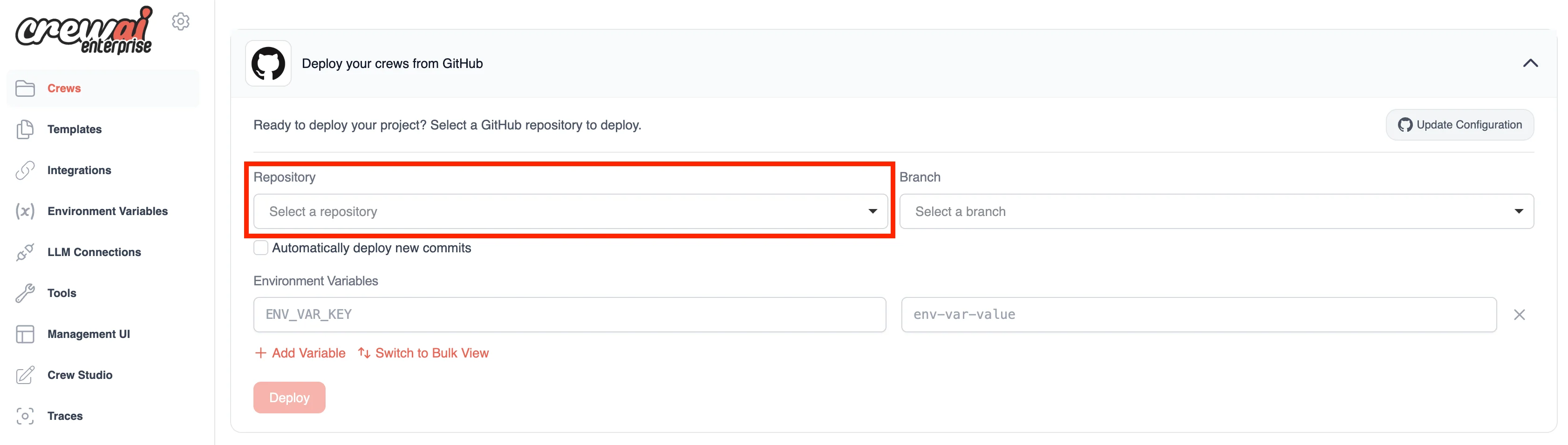
Best viewed on desktop — tap Enlarge to read the numbered controls.
A deployed crew is exposed as an HTTP endpoint with a bearer token. The dashboard lists each crew’s URL and token and provides controls to rotate tokens, redeploy or delete the crew.
Do this first Deploy your crew from GitHub in CrewAI AMP
Identify each crew’s URL and bearer token and control them from a single dashboard
crewai deploy my_first_crewRun this in a terminal with Python 3.10+. When the progress view finishes, note the live URL and Bearer Token shown, then open the management dashboard (e.g., via crewai dashboard) to verify your crew appears with its credentials.
35 outcomes in all — one per recipe below.
Need a code‑only setup for agents and tasks
Learn how to set up agents, tasks, and flows using code instead of a visual canvas
Beginners learn that the platform requires coding rather than visual design
You have to provide your own paid LLM key
Users must supply a paid API key and be aware of cost implications
These capabilities are only available on the hosted platform, not the free framework
Install the CrewAI CLI using uv and scaffold a project
I don’t know my installed version
CrewAI requires Python >3.10 and <3.13. Checking the installed version ensures compatibility before proceeding with any installation steps.
Want quick package handling for CrewAI
UV replaces pip/virtualenv for rapid package handling; installing it correctly lets you later install CrewAI and lock dependencies efficiently.
Want the CrewAI command usable anywhere in your terminal
Using `uv tool install crewai` pulls the latest CrewAI package and registers a command‑line entry point; running the post‑install path update ensures the CLI is on your PATH.
I need a starter folder for my AI crew
The `crewai create crew <name>` command auto‑generates a ready‑to‑edit directory containing agents, tasks, tools and config files in YAML, saving manual setup time.
Need a reproducible workflow with hidden API keys
Locking with `crewai install` creates a reproducible UV lock file; adding OpenAI and SerpAPI keys in `.env` secures credentials; `crewai run` orchestrates agents, tools, and tasks to produce the final report.
Need a short article created by three roles
CrewAI abstracts multi‑agent work into a simple crew definition: you list role classes, set each role’s goal, and the framework automatically schedules agents to fulfill those goals. This reduces boilerplate and makes the codebase highly readable.
Agents need to keep memory across steps
LangGraph builds on LangChain to let you model agents as nodes in a directed graph, where each node can read/write to shared state. This gives explicit control over execution order, error handling, and persistent memory across steps.
Want tasks to run one‑by‑one or all together
The process layer in Crew AI acts as a workflow manager that defines how tasks move between agents. By setting the process to sequential, tasks run one after another; by setting it to parallel, multiple agents operate simultaneously, speeding up execution for independent tasks.
Agents need to pull data from external services
Crew AI allows each agent to be equipped with specific tools or APIs from its toolkit, enabling agents to interact with external data sources or services without building integrations from scratch.
Need an isolated Python setup for a Crew AI project
The tutorial shows how to create a new project folder, set up a virtual environment with UV package manager, and add the crewai-tools package. This ensures an isolated Python environment and fast dependency resolution for Crew AI development.
Want to keep your Gemini API key out of code
The video demonstrates creating a `.env` file, storing the Gemini API key there, and loading it in Python via `python-dotenv`. This keeps secrets out of code and lets Crew AI access the model.
A rough draft email you wrote
Using Crew AI's `Agent`, `Task`, and `Crew` classes, the tutorial creates an agent with role, goal, and backstory prompts, then defines a task that rewrites a rough email. This shows how prompt engineering drives agent behavior.
My AI agent can’t understand company abbreviations
The video builds a subclass of `BaseTool`, implements a `run` method that replaces organization‑specific abbreviations, and registers the tool in an agent. This demonstrates how to give agents domain knowledge they otherwise lack.
Want a short, fact‑based blog post
By defining a researcher agent and a writer agent, then creating two tasks (research facts → write blog), the tutorial shows how Crew AI passes output from one agent as input to the next, enabling complex pipelines.
Your AI stops at its knowledge cutoff
The tutorial imports `SerperTool`, supplies a SerpAPI key, and attaches the tool to the researcher agent. This enables the agent to perform live Google searches, overcoming LLM knowledge cutoffs.
Prompt text hard‑coded in Python
Crew AI can load agent and task definitions from YAML files. The video moves role, goal, backstory, and task descriptions into `agents.yml` and `tasks.yml`, then uses a subclass of `CrewBase` to reference those files, achieving loose coupling.
When you want your AI crew to plan before acting
Setting `reasoning=True` makes Crew AI perform a planning step before acting, improving task decomposition. The tutorial explains the difference between reactive and reasoning modes.
Want agents to remember their output across steps
Crew AI provides `ReadDirectoryTool` and `WriteFileTool`. The tutorial uses them to store generated social‑media drafts in a folder structure, demonstrating persistent storage across agent steps.
CrewAI commands aren’t available on your system
CrewAI is distributed as a UV tool, so you first need the Rust‑based package manager UV installed, then use it to pull the crewai executable. This gives you a ready‑to‑run CLI for creating and running crews.
Need a ready project layout to start coding
The CLI can generate a starter project with the correct folder layout, config files and an executable script. You just name your crew and it creates source, test, and knowledge directories.
Want the latest stock price, change and headlines for a ticker
CrewAI agents can call Python functions annotated as tools. By wrapping a yfinance query in a function and decorating it with `@tool`, the agent can retrieve price, change and recent headlines as plain text.
Need a market data collector that works for any ticker
Agents are described in simple YAML with three fields: role, goal, and backstory. Placeholders like `{ticker}` can be used so the same definition works for any input.
Want an agent to call a specific tool
Tasks link an agent to a concrete action. The description tells the agent which tool to call, and `expected_output` defines the format you want back.
Need to use a locally hosted AI instead of OpenAI
CrewAI reads provider settings from an `.env` file. By replacing the OpenAI key/model with `OLAMA_MODEL`, `OLAMA_API_BASE`, you can run the same crew on any locally hosted model.
Need a daily stock snapshot
With agents, tasks, and tools wired together, invoking `crewai run` executes the workflow: collector fetches data, summarizer condenses it, risk checker flags issues, and brief writer produces the final report.
Want to add an OCR step to your workflow
You can grow the workflow by adding another YAML agent (e.g., OCR extractor) and a matching task, then list it in `crew.py`. The framework will orchestrate the new step automatically.
Need multiple AI agents to collaborate
Crew AI lets you define multiple specialized agents that collaborate to solve a larger problem. By specifying each agent's role, goal, backstory and tools, the framework orchestrates sequential task execution, passing results between agents automatically.
Need an AI with a specific role, goal and backstory
Each Crew AI agent is a self‑contained LLM with a clear purpose. The role is its job title, the goal describes the concrete result it must deliver, and the backstory provides context that guides its behavior. Attaching tool decorators makes external functions (e.g., calculator or search) available to the agent.
Agents need to perform calculations themselves
Custom tools expose Python functions to agents via the @tool decorator. The calculator example shows how to accept an expression string, safely evaluate it, and return the result, enabling agents to perform arithmetic without hard‑coding logic.
Agents need to look up info online
The search tool lets agents query Google via Serper, returning top results with titles, URLs, and snippets. Storing the API key in a .env file keeps credentials safe, and the @tool decorator makes the function callable by any agent.
The same set on /recipes, filtered by tool and role.
The 'one concrete result in 10 minutes' video. A useful multi-agent pattern you can copy for research or writing tasks.
The gentler on-ramp if NeuralNine's code-first pace is too fast. Same tool, more scaffolding.
The clearest code-first CrewAI intro from a respected Python educator. Watch with the repo open and build along.
These are CrewAI's core building blocks. An agent is a role-playing AI worker with a role, a goal, a backstory, and optionally tools and its own LLM, for example a researcher whose goal is to find the latest facts on a topic. A task is a specific unit of work with a description and an expected output, assigned to an agent. A crew is the team of agents plus the list of tasks, run together with a process (such as sequential) that decides the order. In a scaffolded project you describe agents in agents.yaml and tasks in tasks.yaml, then wire them together in Python. Running the crew makes the agents collaborate and produce a final result.
Agents become useful when you attach tools. CrewAI ships a large library of ready-made tools (web search, scraping, file reading and writing, code execution, database and API access, and more), and you can also write custom tools as simple Python functions. You import a tool, instantiate it, and pass it in the agent's tools list, either in code or wired through the YAML-plus-Python scaffold. When the agent runs, it decides when to call a tool to gather information or take an action, rather than relying only on what the LLM already knows. Some tools need their own API keys (for example a search provider), which also go in your .env file.
pip install crewaicrewai create crewcrewai run.envagents.yamltasks.yamlcrew.pyCrewrolegoalbackstoryexpected outputAsk, share, or report — over on the Heidelberg AI community forum.


