Know that Langflow requires local installation, API key setup, and a running machine before use
Track 7 · Advanced
7.2
Langflow
A visual canvas whose blocks stay editable Python underneath
1Overview
Langflow sits between the canvas and the code: you assemble blocks visually, but every block opens into Python you can edit, so you are never stuck behind the abstraction. Build a RAG chatbot over your own documents, bring your own models, keys and vector store, watch the reasoning in the Playground while you debug, then export the finished flow as an API or an MCP server.
Langflow is the middle path: build visually, then open any block and edit the Python behind it. Useful when a canvas gets you 80% there and the last 20% needs real code.
1.1Before you start
1.2After this chapter you can
→Run a Langflow agent from a template and read what it did
→Read a flow on the canvas and open the Python behind any block
→Build a document-grounded chatbot, first from a template and then from a blank canvas
→Swap the model and the vector store without rebuilding the flow
→Export a flow as an API or MCP server and self-host the server behind it
1.3Can I edit Python behind each block?
Yes, every visual block in Langflow opens into editable Python code, letting you fine‑tune logic without leaving the canvas.
1.4How do I turn a flow into an API?
After building and debugging your flow, you can export it directly as an API endpoint or as an MCP server ready for deployment.
2Lessons 8
2.1 Run your first Langflow agent
Langflow provides a visual canvas where blocks map directly to editable Python code and includes ready‑made templates such as Simple Agent.
Launch Langflow, load the Simple Agent template and watch it solve a calculation
Try
I want to add 4 and 4.Open Langflow → New Flow → pick the Simple Agent template → paste an OpenAI API key → click Playground and type the line above.
- Install Langflow using the Desktop app on a machine with Python 3.10–3.14 and at least 2 GB RAM
- Open Langflow, click New Flow, choose the Simple Agent template and paste your OpenAI API key into the model block’s settings
- Click Playground, type “I want to add 4 and 4.” and press Send
- You'll see The agent reasons aloud, selects the Calculator tool and returns 8
- Takeaway A ready‑made template becomes an interactive tool‑using agent in minutes
- Check The Simple Agent answered “4 + 4” by calling a Calculator instead of doing the arithmetic itself. Why is that the point of the lesson?
- Cost Langflow is free and open-source (MIT) — you self-host it at no cost. You pay only your own infrastructure plus the LLM API key you bring (here, a few cents of OpenAI usage).
2.2 Inspect a flow on the canvas and view its code
A flow consists of blocks and wires; each block represents a single operation whose underlying Python can be opened for editing.
Do this first Run your first Langflow agent
Create a simple flow, connect its blocks, and open any block to see the underlying Python
Try
Drag a Chat Input, a Language Model, and a Chat Output onto the canvas, then wire them left-to-right so a typed message flows into the model and the reply flows out.Build it on the same Simple Agent flow or a blank one — Langflow is a visual front end over Python and LangChain, so wiring blocks is the same as composing those steps in code.
- Drag a component from the left‑hand list onto the canvas
- Connect two blocks by dragging a wire from an output port to an input port
- Click a block’s settings icon to open its editable Python view
- You'll see A small flow you assembled — input → model → output — that responds when you open the Playground
- Takeaway Langflow lets you design with visual blocks and wires while keeping the full Python code accessible for customisation
- Check You open a block and change its Python. Where does that change live — in this flow, or in every flow using that block?
- Cost Still free: building and running flows locally costs nothing beyond your own machine and the model key you call.
2.3 Create a chatbot that answers from your PDFs or website
A template is a pre‑built flow you copy; the Document‑grounded starter wires up RAG so uploaded files are split, embedded and stored for retrieval before answering.
Do this first Inspect a flow on the canvas and view its code
Create a chatbot that answers questions using only the content you upload
Try
Open the template gallery, pick a document/RAG starter (e.g. Doc Assistant or Content Search), point it at one of your own PDFs, then ask it a question only that document can answer.Templates give you a working flow to start from instead of a blank canvas — the gallery includes starters like Content Search, Code Debugger, Basic Prompting, Basic Agent and Doc Assistant.
- Open the template gallery and select the “Document‑grounded starter” template
- Drag your PDF or website into the document loader block to load the source material
- Click Playground, type a question that only the uploaded document can answer, and press Send
- You'll see A chatbot that replies with excerpts taken directly from your uploaded document
- Takeaway Templates give you a ready‑made RAG pipeline – load your files and the bot becomes grounded in your own data
- Check Your bot answered a question your PDF never mentions. What went wrong — the template, the file, or the question?
- Cost Free to build and run; you pay only the LLM (and any vector-DB) usage when the bot answers. Templates save you from wiring the flow from scratch.
2.4 Build the same RAG flow from a blank canvas
Building from scratch reveals the five core blocks of a RAG flow: Chat Input → Document Loader → Vector Store → Language Model → Chat Output.
Do this first Create a chatbot that answers from your PDFs or website
Rebuild the document‑grounded chatbot block by block, with no template, and see what each block contributes
Try
What does this document say about <a term only your file contains>?Ask this in the Playground once the five blocks are wired — a term only your file contains proves the answer came from retrieval and not from the model’s own knowledge.
- Click New Flow → Blank Flow to start from an empty canvas
- Drag a Chat Input block, then a Document Loader block and point it at a local file
- Add a Vector Store block and connect the loader’s output port to its input port
- Add a Language Model block, paste your API key in its settings, and wire the vector store’s retrieval output into it
- Add a Chat Output block, connect the model’s response to it, then open Playground and ask your question
- You'll see Five connected blocks on the canvas, and a Playground answer that quotes your own document with retrieved chunks visible when you expand the model block’s run view
- Takeaway A template is five blocks someone already wired — build it once yourself and every Langflow flow becomes readable
- Check Which of the five blocks is the one that makes the answer come from your document rather than the model?
- Cost Langflow is free and open-source (MIT). You pay the embedding call once per document plus one model call per question; the vector store is local unless you point it at a hosted one.
2.5 Swap model and vector store in a Langflow flow
Each block’s provider dropdown lets you swap underlying services without rewiring, so changing the LLM or vector store only requires updating a setting and its API key.
Do this first Build the same RAG flow from a blank canvas
Replace the LLM and vector database used by a flow with alternatives of your choice
Try
Open the Language Model block in your flow and switch its provider — for example from OpenAI to Anthropic — then paste that provider's API key and re-run the Playground.Langflow is model-agnostic: the provider sidebar in the gallery (Anthropic, MistralAI, Langchain, Glean, Cohere, OpenAI, NVIDIA) hints at how many you can wire in.
- Open the Model block’s settings
- Select a different Provider from the dropdown list
- Enter the new provider’s API Key
- Open the Vector Store block’s settings
- Choose an alternative Vector Database from its provider list
- You'll see The same flow answering through a different model provider after a one‑block swap
- Takeaway Model‑agnostic + bring‑your‑own‑keys lets you control cost and provider while Langflow remains free
- Check You swap the vector store on a flow that already answered questions. Why do the old answers stop working until you re‑load the documents?
- Cost Free to run; costs are whatever the model and vector-DB providers you wire in charge for usage. No lock-in to a single vendor.
2.6 Debug an agent in the Playground
The Playground acts as an interactive debugger, expanding each turn to show the agent’s reasoning trace, selected tool and the data exchanged.
Do this first Swap model and vector store in a Langflow flow
Inspect an agent’s step‑by‑step reasoning and tool choices to locate and fix faulty logic
Try
Ask your agent a question that should trigger a tool (e.g. a calculation or a document lookup), then read the Playground's step-by-step trace to confirm it chose the right tool.The Playground is interactive — it shows the agent reasoning and choosing tools in real time, not just the final answer.
- Open the Playground and send a message to start the flow
- Observe the expanded reasoning trace and the highlighted tool selection for each step
- Modify a block’s Role or instruction text, then re‑run the query in the Playground to verify the corrected behaviour
- You'll see A live trace showing each reasoning step and the tool the agent selects
- Takeaway Seeing the internal trace lets you target the exact block that failed
- Check The agent gave a confident wrong answer. Which part of the Playground trace tells you whether the model or the tool was at fault?
- Cost Free; Playground runs use only the model usage of each test message you send.
2.7 Export a flow as an API or MCP server
Exporting turns a finished flow into a callable service: a REST endpoint with code snippets, or an MCP server that other agents can invoke as a tool.
Do this first Debug an agent in the Playground
Turn your finished flow into something others can call by exporting it as a REST API or an MCP server with one click
Try
Open the API dialog for your flow, copy the Python API snippet, and run it from your own machine to call your flow remotely.The export dialog offers Run cURL, Python API, Python Code and JS API tabs — pick whichever fits how you'll call it.
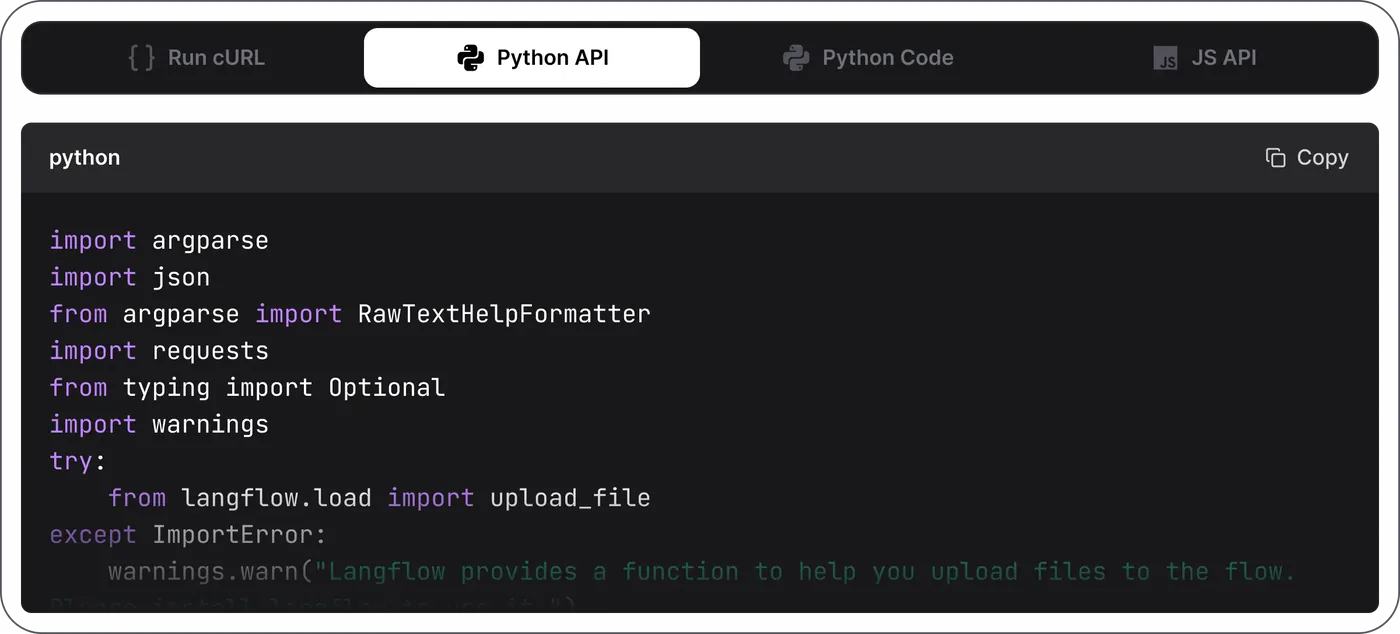
- 1 Python API tab copy snippet for external call
- 2 Python Code tab copy code to run flow locally
Best viewed on desktop — tap Enlarge to read the numbered controls.
- Open the flow’s API dialog from the top‑right menu
- Copy a snippet from the Run cURL, Python API, Python Code or JS API tab and execute it outside Langflow
- Click Export as MCP Server to make the flow available to other agents via the Model Context Protocol
- You'll see Your flow answering a request made from outside Langflow – it's now a callable service, not just a canvas
- Takeaway One click turns a flow into a REST API or MCP server – what you built on the canvas becomes a service others can use
- Check What is the difference between exporting a flow as an API and exporting it as an MCP server?
- Cost Free: exporting and self-hosting the API/MCP server costs only your own infrastructure plus the model usage per call.
2.8 Self-host Langflow so your exported flow has a home
Running Langflow as a server gives your exported endpoints a persistent address; the same application runs headless and serves flows over HTTP.
Do this first Export a flow as an API or MCP server
Run Langflow as a server you control and reach its API at an address other machines can call
macOS
brew install uv, then uv pip install langflowTry
uv pip install langflow && langflow run --host 0.0.0.0 --port 7860Run this in a terminal on the machine that should host it — Python 3.10–3.14 and roughly 2 GB of free RAM. Drop --host 0.0.0.0 if it should only answer on that machine.
- Install uv (or use pip) on the host machine and run
uv pip install langflow - Start the server with
langflow run; add--host 0.0.0.0if remote access is required - Open a browser to
http://localhost:7860to verify the dashboard loads, then import your exported flow if needed - Re‑run the API call from the previous lesson against this address to confirm it answers from the server
- You'll see The terminal prints the listening address, the dashboard loads in a browser, and your exported API call returns the same answer as locally
- Takeaway An exported flow is only as durable as the server behind it — self‑hosting turns a demo endpoint into one you can depend on
- Check Your exported API worked in the editor but 404s from another machine. What is missing?
- Cost The software is free (MIT) — you pay only for the machine it runs on and the LLM keys you put into it. A small VPS is enough; the model calls, not Langflow, are what cost money.
3FAQ, Tips & How-to 4
one problem, one solution, one action
▸How-to Everyone
Need to run Langflow on my machine
Run Langflow with a single Docker command
▸How-to Everyone
Want Langflow available in my code
Add Langflow to a Python environment for programmatic use
Need a quick way to call a flow
Obtain ready-to-use Python, JavaScript, or curl calls for a flow
The same set on /recipes, filtered by tool and role.
4Videos 3

Overview of LangFlow and Build Your First Agent In LangFlow
The follow-along build if you learn by doing. Pair with IBM's explainer above for the why-plus-how.

Building Agentic & RAG Workflows with Langflow and MCP (2026 Guide)
The 'past hello-world' video. Watch when you want agents that call tools and pull from your data, not just chat.

What is Langflow? Build AI Workflows with Python, Gen AI, & MCP Tools
The most credible 'what even is this' intro. Watch first for the mental model before opening the canvas.
5FAQ 6
How does Langflow compare to Flowise?
Both are free, open-source, drag-and-drop builders for AI agents and RAG apps, and both let you self-host and bring your own model keys, so they overlap heavily. The clearest difference is the foundation: Langflow is built around Python and LangChain, and every block opens as editable Python — which suits teams comfortable in the Python ecosystem who may want to drop to code or export flows as an API or MCP server. Flowise is built on Node.js and JavaScript, which can fit JavaScript-first teams better. Both have template galleries and visual canvases, so the practical choice often comes down to which language ecosystem and component set your team already uses. Try the Simple Agent template in each and see which canvas feels clearer.
What is the fastest way to build my first agent?
Use a template instead of a blank canvas. After installing, click New Flow and choose the Simple Agent template — it comes with an Agent component already wired to Chat Input and Output plus Calculator and URL tools. In the Agent component click Setup Provider, pick your model provider, and paste your API key (you bring your own key; Langflow is free). Then click Playground and type a simple request like "I want to add 4 and 4." The agent shows its reasoning, picks the Calculator tool, and answers 8. You have a working, tool-using agent in minutes without writing any code.
How does the canvas work — what are blocks and wires?
A flow is blocks wired together. Each block does one job — a chat input, a language model, a document store, an agent, a web-fetch tool — and the wires between them decide how information moves through your app. You drag blocks from the component list onto the canvas and connect their ports left to right, so a typed message flows into the model and the reply flows back out. Wiring is how you design behaviour; for common cases there is no glue code to write. Open any block and you will see it is real, editable Python underneath, because Langflow is a visual layer over Python and LangChain. Beginners never have to touch that code, but it is there when you want to customise a component.
Can I build a chatbot that answers questions from my own documents?
Yes — this is one of Langflow's most common uses, built with retrieval-augmented generation (RAG). Open the template gallery and pick a document-grounded starter, then point its document block at your own source, such as a PDF or a website. RAG means the bot first retrieves the relevant passages from your files, then asks the model to answer using them, so replies are grounded in your content rather than guessed. Open the Playground and ask a question only that document can answer. This is the same pattern researchers use to chat with their own papers or datasets, and the flow generalises from one PDF to a whole folder or a shared literature-Q&A bot.
Which models and vector databases does Langflow support?
Langflow is model-agnostic: the README states it supports all major LLMs and vector databases, with a growing library of AI tools. You bring your own provider keys — OpenAI, Anthropic, and others — by pasting them into the model block, and you are not locked into any single vendor. Because every component is editable Python over LangChain, you can swap the language model, the embedding model, or the vector store without rebuilding the whole flow. For private or offline setups you can point the model block at a local model instead of a hosted API. This flexibility is a core reason teams pick Langflow over more closed builders.
How do I debug a flow when it does not behave?
Use the Playground, which is built for exactly this. When you chat with your flow there, the agent shows its step-by-step reasoning and which tools it chose, so you can see where a wrong answer came from — a bad retrieval, a missing tool, or an unhelpful prompt. Because each block is a discrete step, you can inspect inputs and outputs at each stage rather than treating the app as a black box. If you need to go deeper, open the underlying Python of any component to understand exactly what it does. Watching the agent think out loud is usually faster than reading raw logs for spotting why a flow misbehaves.
6Glossary 4 terms
Show the 4 terms
Langflow
pip- The standard tool for installing Python packages; running `pip install something` downloads and installs a library so your Python code can use it.
uv- A fast Python package and project manager (made by Astral) that works like pip but runs significantly faster, especially when installing many packages at once.
Playground- Langflow's live testing panel where you message a flow and watch the agent's step-by-step reasoning and tool choices in real time.
canvas- The visual workspace where you drag blocks and draw wires between them to build a flow without writing glue code.
7See also
💬 Discuss this chapter
Ask, share, or report — over on the Heidelberg AI community forum.