Old Docker packages still installed
Removing any previously installed Docker components prevents conflicts with the new installation
Install Docker Engine on Linux — package manager, permissions, and your first container
Docker Engine on Linux — installed natively via the package manager (no VM), so software runs in reproducible, self-contained boxes with the lowest overhead.
Docker on Linux is the most native and performant setup: you install Docker Engine directly via your distribution's package manager, no VM required. This chapter covers Ubuntu/Debian (the most common), shows you how to run Docker without sudo, and gets you running your first container. Covers systemd integration, firewall configuration, and the Docker socket security model.
Install Docker Engine natively on Linux and run your first container. No VM: you install the engine directly through your package manager, so it is the fastest and most lightweight setup.
A fast, native, fully-free container setup on Ubuntu/Debian — ideal for servers and lab machines running n8n, databases, or AI services.
Adding your user to the `docker` group (to skip sudo) grants root-equivalent host access via the Docker socket — only on a machine you trust; command-line only, no bundled GUI.
Fully free and open source — no license tiers. (Docker Desktop's paid plans apply only to the Windows/macOS app, not the Linux engine.)
On Linux, Docker runs natively without a VM, using kernel features like cgroups and namespaces for isolation and performance.
Install Docker Engine from the official repository on Ubuntu/Debian
sudo docker run hello-worldPaste this into the Terminal pane of anythingllm and press Enter; look for the 'Hello from Docker!' message confirming the engine runs correctly.
Do this first Run Docker Engine on Ubuntu
Run Docker commands without sudo by adding your user to the docker group
Do this first Run Docker commands without sudo
Launch a local n8n workflow using Docker Compose
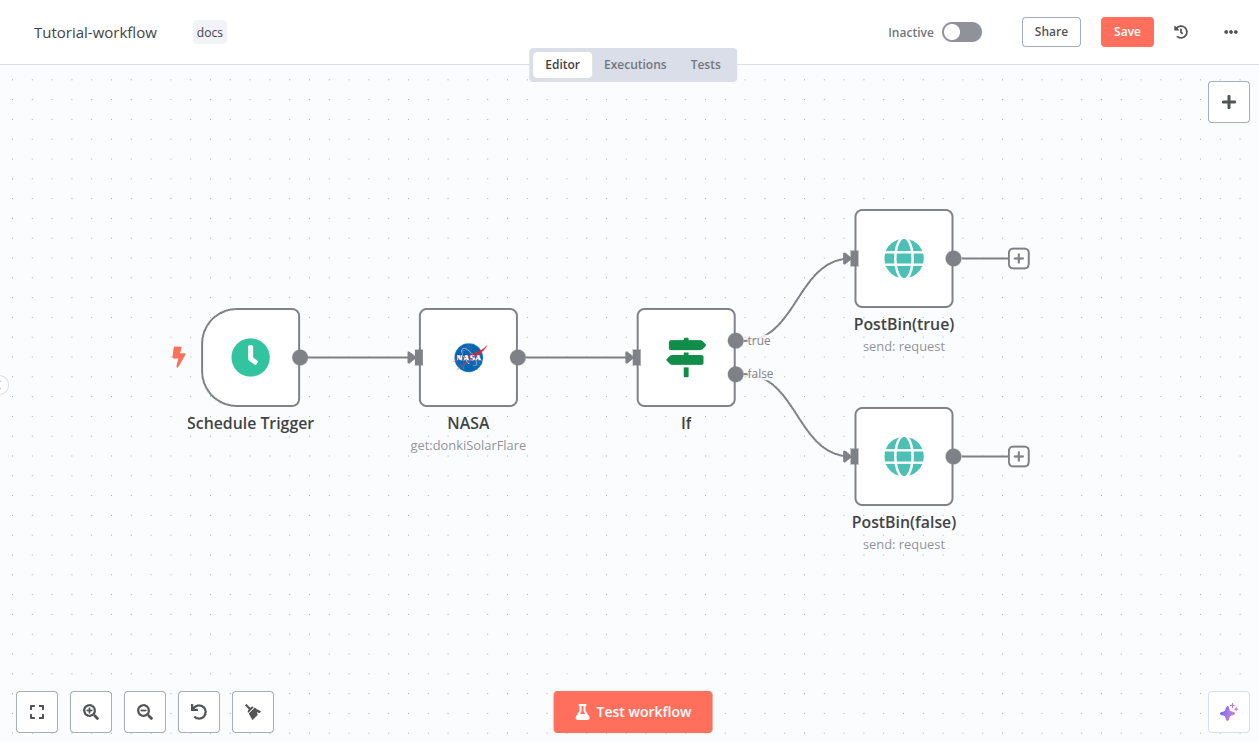
Best viewed on desktop — tap Enlarge to read the numbered controls.
Do this first Start a local n8n workflow with Docker Compose
Enable Docker to start automatically after each reboot using systemd
Do this first Enable Docker auto‑start with systemd
Resolve common Docker issues on a Linux host
73 outcomes in all — one per recipe below.
Old Docker packages still installed
Removing any previously installed Docker components prevents conflicts with the new installation
System lacks required packages for Docker
Installing ca-certificates, curl and gnupg ensures the system can fetch and verify Docker's repository securely
Apt can’t verify Docker packages
Adding Docker's official GPG key lets apt verify packages from Docker's repo
No official Docker package source
Configuring the official Docker apt source enables installation of the latest stable engine
Want Docker on your machine
Installing docker-ce, its CLI, containerd and related plugins gives you a fully functional Docker runtime
Running the official hello-world container confirms that Docker Engine is correctly installed and can pull/run images
Anyone who can access /var/run/docker.sock effectively has full root privileges on the host
Membership in the docker group grants the same power as root because it allows access to the Docker socket
Need to run Docker without typing sudo
Adding your account to the docker group lets you run Docker commands without sudo
Group membership changed but session still shows old rights
You must start a new login session or use newgrp for the group membership to take effect
Running a Docker command without sudo confirms the group membership is active
If Docker still fails, confirming the docker group exists helps diagnose the issue
Need a tidy spot for Docker Compose files
Creating a dedicated folder keeps the Docker Compose configuration and related files tidy and isolated
Opening the browser at the default port shows the running n8n instance
Docker won’t start on its own after a reboot
Enabling the Docker service makes it start automatically whenever the host boots
Docker isn’t running
Starting the service brings Docker up immediately without waiting for a reboot
Seeing the service status confirms Docker is up and ready to manage containers
Containers stop after a host reboot
Adding `restart: unless-stopped` to docker-compose.yml makes containers survive reboots but still obey manual stops
Docker commands require sudo
You can run Docker commands without sudo by granting your user access to the Docker socket
Port already in use error
You can resolve "port already in use" errors by locating the process holding the port and stopping it or remapping the container port
Inspecting the Docker service logs reveals why the daemon fails, enabling targeted fixes such as clearing corrupted data or freeing disk space
An image is a static package containing layers, dependencies and configuration; a container is the running instance of that image with its own filesystem, environment variables and port bindings. Knowing this prevents confusion when managing Docker resources.
`docker pull <repo>/<image>:<tag>` fetches the layered image files from Docker Hub (or another registry) to your local machine, caching layers for future reuse.
`docker run <image>` combines pull (if needed) and starts a new container, allocating resources and executing the image’s default command. Adding `-d` runs it detached so the terminal stays free.
The `-p <host_port>:<container_port>` flag maps a port on your machine to the container’s internal port, allowing external programs to reach the service without conflicts.
`docker stop <container_id>` gracefully stops a running container; `docker start <container_id>` restarts it without recreating, preserving its state and configuration.
The `-a` flag extends `docker ps` to show every container ever created on the host, useful for finding IDs of exited containers for restart or removal.
`docker logs <container_id>` streams the stdout/stderr captured from the container’s process, helping debug issues without attaching to the container.
`docker exec -it <container_id> <command>` opens an interactive shell (or runs any command) inside the container’s namespace, allowing inspection or manual fixes.
Download the stable installer, run it, ensure virtualization is enabled in BIOS/Task Manager, then start Docker Desktop; the whale icon indicates the engine is running.
When native Docker isn’t supported, install Docker Toolbox which bundles Docker CLI, Machine, Compose and VirtualBox; after installation use the QuickStart Terminal to issue Docker commands.
Need a private AI notebook on your computer
The video shows how to pull the Open Notebook Docker image, provide an OpenAI API key, and start the container. This gives you a self‑hosted instance that runs on your machine without needing to compile code.
Multiple AI models behind one URL
LiteLLM can run as a Dockerized proxy that normalizes API calls to different LLM providers. By defining each provider in the config file you expose a single endpoint that forwards requests to the chosen backend, simplifying client code.
Need to try an AI model on your computer without cloud fees
Using Docker containers isolates AI applications on your own machine, giving you the same security and reproducibility as a cloud VM without recurring costs. Containers package code, dependencies, and hardware access, so you can develop and test models offline.
Evaluating the total cost of ownership helps you choose whether to run AI agents locally in Docker or rent a cloud VM. Local execution incurs only electricity and hardware depreciation, while cloud VMs charge per hour for compute and storage.
Running `docker version` in a terminal shows the client and server versions if Docker Desktop is correctly installed. It confirms the CLI can communicate with the Docker daemon.
Need a portable package for my Node server
A Dockerfile defines the build steps for an image. Using a base Node image, copying package files first enables layer caching of dependencies, making rebuilds faster.
Need a ready‑to‑run container image
`docker build -t <name> .` reads the Dockerfile in the current directory, executes each instruction, and produces an immutable image identified by the tag you provide.
Want to view your Node.js app in a browser
`docker run -p hostPort:containerPort <image>` maps a port on your host to the container's exposed port, allowing you to access the service via localhost.
Docker Scout analyzes the layers of an image, lists all installed packages, and flags known security issues, providing remediation suggestions.
Want to run a Node app with its PostgreSQL DB together
`docker-compose.yml` defines multiple services, their build contexts, images, environment variables, ports, and shared volumes, allowing a single command to launch the whole stack.
Container restarts wipe my database rows
A named volume stores files outside the container's writable layer, so data remains even when the container is removed. Declaring it in `docker-compose.yml` or with `-v` on `docker run` mounts it into the container.
Need a private research‑chat notebook like Google’s
Open Notebook is an open‑source, Docker‑first application that provides the same research‑chat experience as Google NotebookLM but runs on your own server. By running it locally you keep all uploaded documents private and can choose any LLM provider.
Want to run containers on Debian
Adds Docker's official GPG key and repository, updates the package index, then installs docker-ce, docker-ce-cli, containerd.io, and the compose plugin. Using Docker's repo ensures you get up‑to‑date packages rather than outdated distro versions.
Running the official hello‑world image pulls a tiny test container that prints a confirmation message, proving the daemon can pull images and run containers correctly.
Having to type sudo for every container command
Adding your user to the `docker` Unix group grants permission to communicate with the Docker daemon, eliminating the need for `sudo` on each command.
Need a self‑hosted uptime monitor that keeps data across restarts
A Docker Compose YAML defines services, ports, volumes, and restart policies. Editing it to create a named volume ensures persistent data across container restarts.
Can't run containers on my PC
The installer provides a GUI that adds the Docker CLI, daemon and optional Kubernetes. It also creates a lightweight Linux VM (or uses WSL/Hyper‑V) to run containers on non‑Linux hosts.
Want to show a custom message in a container
Docker pulls the image layers from Docker Hub, creates an isolated container, and runs the provided command inside it. The '--rm' flag (implicit in this demo) removes the container after exit.
Want a local PostgreSQL server for testing
Using 'docker run' with '-e' sets environment variables (POSTGRES_PASSWORD) required by the official image, while '-p' maps host port 5432 to the container’s port, making it reachable from local tools.
Docker creates a PID namespace so processes inside see their own PID space starting at 1. This prevents containers from seeing host processes, improving security and reproducibility.
Container keeps maxing out the host CPU
Docker maps cgroup settings from command‑line flags. '--cpus=0.5' limits the container to half a CPU core, preventing it from monopolizing host resources.
Docker stores images as a stack of read‑only lower layers plus a writable upper layer. When you pull an image, each layer is downloaded separately; shared base layers are reused across images, saving space and bandwidth.
Need a personal n8n server
Running n8n in Docker gives you full control over updates, ports, and data storage while keeping the setup simple with a single compose file.
Need a local LLM API you can call
Docker provides an isolated environment for LiteLLM, ensuring all dependencies are met and the service runs consistently across machines. Starting the container exposes the API on localhost:4000, ready for configuration.
Virtualization uses a hypervisor to run full guest operating systems on virtual hardware, while containerization shares the host OS kernel and isolates processes using namespaces and cgroups. This makes containers lighter and faster than VMs.
Need to run containers on Arch Linux
Docker can be installed via the system package manager; on Arch Linux the pacman command pulls the Docker daemon and CLI packages, setting up the service automatically.
The `docker run hello-world` command pulls a tiny test image from Docker Hub, creates a container, and prints a confirmation message if the daemon is functional.
Want a custom container built from my code
A Dockerfile lists base image, package installs, file copies, and default command; `docker build` reads this file, executes each step, and produces an immutable image tagged as you specify.
Want to run your script isolated from the host
`docker run` starts a container from an image; the container runs the CMD defined in the Dockerfile unless overridden, providing an isolated environment for the app.
Need separate app versions without overwriting
Docker images are immutable; to change code you edit the Dockerfile and rebuild with a new tag (e.g., `myapp:v2`). Multiple tags can coexist, letting you run different versions side‑by‑side.
I need to run random Python snippets safely
A Docker container can act as a digital prison that runs arbitrary Python code while preventing access to the host filesystem, network, and excessive resources. By pulling a minimal python:3.11-slim image and launching it with restrictive flags, any malicious behavior is confined and the container self‑destructs after execution.
Need to run untrusted Python code
Specific Docker run options (`--network none`, `-m <mem>`, `--cpus <cpu>`) provide a lightweight security boundary that stops most attacks: no outbound connections, limited RAM to prevent OOM, and CPU caps to kill infinite loops quickly.
I need a local OpenAI‑compatible API
The video shows how to clone the LiteLLM repo, set a master key and salt in .env, then launch the proxy with Docker Compose. This creates a local HTTP server (default port 4000) that serves the OpenAI‑compatible API for all configured models.
Need Open NotebookLM but don’t want to install anything
Docker packages all dependencies into an isolated container, so you don’t need to install Python libraries or manage system paths. The video shows pulling the pre‑built image and running it with a single command.
Want a private notebook server on your VPS
Deploying Open Notebook via Docker on a virtual server gives you full control and privacy over your data. By pulling the GitHub repository into a Docker compose setup, the service runs in an isolated container that can be started with a single command.
Need a container engine on Ubuntu
Installing Docker involves updating the package index, adding Docker's repository, installing the docker.io package, and enabling the service to start at boot. This ensures you have the latest stable Docker engine compatible with your Ubuntu version.
Running the official hello‑world image tests that the Docker daemon can pull images and run containers, confirming a successful install.
Need an OS container image locally
The command contacts Docker Hub (a public registry) and retrieves the specified image layers to your host. It caches them locally so future runs are instant.
Need to poke around a running container
`docker exec` runs a new process inside an existing container, letting you interact with its filesystem and services as if you were logged into a separate VM.
Containerized web server not reachable from my PC
The `-p hostPort:containerPort` flag creates a NAT rule so traffic hitting the host’s port is forwarded to the container, enabling web servers or other services to be reachable externally.
Want to free resources by halting a container
`docker stop` sends SIGTERM then SIGKILL after a timeout, gracefully halting the container. `docker start` restarts it without recreating the filesystem, preserving its state.
Docker virtualizes only the application layer and reuses the host kernel, while a VM virtualizes an entire OS with its own kernel. This makes Docker images much smaller, faster to start, but limited to compatible host kernels.
Need to run containers locally
Download the installer from Docker's official site, run the .dmg (mac) or .exe (Windows), and follow system‑requirement prompts. The installation provides the Docker Engine, CLI, and a GUI client.
Want a particular container image saved locally
`docker pull <image>:<tag>` contacts Docker Hub (default registry) and stores the specified image locally, making it ready for container creation.
Need to start a service without tying up the terminal
`docker run -d <image>:<tag>` creates a new container from the image and runs it in the background, returning only the container ID.
Need to reach a service inside a container from my computer
The `-p hostPort:containerPort` flag maps a port on your machine to the container’s internal port, allowing you to reach the service via localhost.
Container IDs are cryptic
Using `--name <myname>` when running a container lets you refer to it by that name instead of the autogenerated ID in subsequent commands.
Need a portable way to run my Node.js app
A Dockerfile defines the steps to assemble an image: choose a base image (`FROM`), copy source files, install dependencies (`RUN npm install`), and set the start command (`CMD`). Building it with `docker build` produces a reusable image.
Container commands need sudo
After installing Docker, the video shows how to configure the system so regular users can execute Docker commands by adding them to the 'docker' group and restarting the session.
Need a private, offline AI notebook for documents
Open NotebookLM is an open‑source web interface that lets you upload documents, create notebooks and query them with LLMs running on your own machine. Because everything runs inside Docker it stays offline, giving full privacy and no usage limits.
Need keyword‑free searching of notes
An embedding model converts text chunks into vector representations that can be compared for similarity, powering fast keyword‑free searches across your knowledge base.
Want to run Open Notebook without any installs
Docker packages all dependencies of Open Notebook into a self‑contained image, letting you run the app on any machine without manual installs. This isolation ensures consistent behavior and easy cleanup.
Need a private AI notebook on your server
`docker compose up -d` reads docker‑compose.yml and the .env variables, builds any needed images, and starts the services in detached mode, making the web UI available on your network.
The same set on /recipes, filtered by tool and role.
Shows how to install Docker on Windows 10, use Docker Toolbox for older systems, and bind ports when running containers
Shows how to build a Docker image, scan it for vulnerabilities, and containerize a basic Node server
Explains the basics of Docker including how to expose container services, differentiate it from virtual machines, and set up Docker Desktop on Windows or macOS.
Shows how to run a container from a custom image, explains image tagging and immutability for version control, and guides Docker installation on Arch Linux.
Docker on Linux uses the host’s kernel directly through features called cgroups and namespaces, so containers share the same kernel instead of emulating hardware. This avoids the overhead of a virtual machine, giving near‑native CPU, I/O and latency performance.
Old Docker components like docker, docker-engine, docker.io, containerd and runc should be uninstalled with apt‑get. Running the provided removal command clears those packages and prevents conflicts with the new install.
Add your user account to the system group named docker, which controls access to the Docker socket (/var/run/docker.sock). After running the usermod command, log out and back in (or use newgrp docker) so the new group membership takes effect.
Run the official test container with sudo docker run hello-world. The command pulls a small image from Docker Hub and prints a success message if the engine is working properly.
Start the Docker daemon manually with systemctl start docker, then check its status using systemctl status docker to confirm it’s active. You can also enable it to launch automatically at boot with systemctl enable docker.
cgroupsnamespacesapt-getusermod/var/run/docker.sockdocker.gpgdocker.listdocker grouphello-world containersystemctl enablerestart: unless-stoppednewgrpAsk, share, or report — over on the Heidelberg AI community forum.
 n8n
n8n